Building an RSS news aggregator with Drupal
An overview of how I created AnimalRights.fyi, a news aggregator.
AnimalRights.fyi is a news aggregator I built to pull together RSS feeds from animal rights and vegan news sources into a single location. The goal is to make this information easily accessible while linking to the people and organisations working to reduce animal suffering.
This blog post write-up is both for my own future reference and for anyone else who might find it helpful.
Contents permalink
Introduction permalink
The core functionality is based on a View and the Aggregator module. The site also uses the Rate and Voting API modules to enable users to ‘react’ to any news item by tapping on one of the emojis. The theme is a subtheme of Olivero, which ships with Drupal core. I quickly set up Drupal using SiteGround’s app installer. (Handily, the install comes with Composer, Drush and git out of the box.)
Adding functionality with custom modules permalink
As well as contributed modules Aggregator and Rate, there are three custom modules:
‘Cookie Voter’ permalink
Cookie Voter alters the Rate module so that it uses cookies instead of IP addresses to track anonymous emoji reactions. Using IP addresses can cause users on shared networks to see others’ reactions appear as their own, which is confusing. BuzzFeed takes a similar approach, storing user reactions in the browser’s localStorage. On the other hand, the Bear blogging platform appears to use IP addresses to record upvotes. In Bear’s case that’s a sensible approach as votes affect a list of trending posts. At AnimalRights.fyi, emoji reactions simply offer users an informal way to engage with news stories.
‘Custom Headline Filter’ permalink
Custom Headline Filter provides a Views filter for removing duplicate (or overly similar) headlines. Such headlines can appear due to malformation of the incoming RSS feed, crossposting between websites, or when multiple news outlets report on the same story. There is a similarity threshold which can be adjusted to taste in the Views UI. The similarity is calculated by PHP’s similar_text function.
‘Custom Twig Extensions’ permalink
I needed to use PHP’s preg_replace function, and wanted to avoid installing the Twig Extensions module; so I created Custom Twig Extensions. (I try to install as few modules as possible to keep the complexity at a minimum and make site maintenance easier.)
Custom modules summary permalink
All three modules were basically written by Claude (3.5 Sonnet), though there was a fair amount of back and forth between it and myself. In the case of Cookie Voter, for example, I asked it to refactor this Drupal 7 code for Drupal 8+, but it took much prompting to achieve the desired result. ‘We’ eventually landed on a solution after I fed the AI some relevant code from the Rate module codebase. This is a useful tip I will bear in mind when problem solving with a chatbot in future: don’t assume it already ‘knows’ a given codebase. (I had a conversation with ChatGPT about why supplying codebase excerpts for more obscure coding problems might be necessary.)
The View permalink
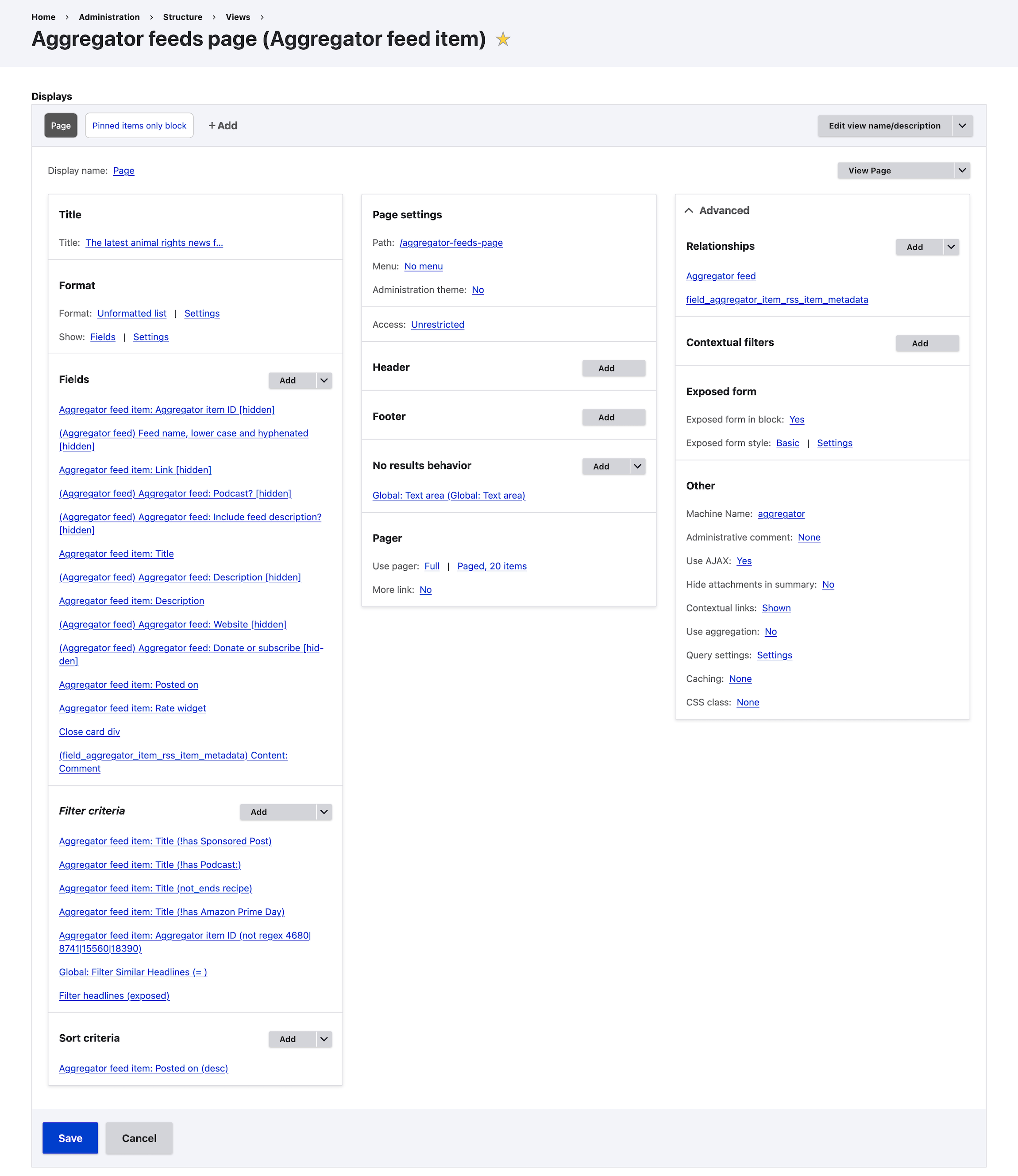
Here’s a screenshot of the View, which is where the user-facing page is built:
Outputting the HTML via the Fields section permalink
The Fields section forms the HTML output of the View, with Twig as the templating language. Here’s the Fields section aggregated into a single template representation:
<div class="news-item {{ title_1 }} fade-in-quick">
<h3 class="headline{% if field_podcast == '1' %} icon-podcast{% endif %}" iid="{{ iid }}"><a href="{{ link }}" target="_blank">{{ title }}</a></h3>
{# Get first paragraph of description and remove HTML tags #}
{% set first_paragraph = description|split('</p>')[0]|trim %}
{% set first_paragraph = first_paragraph starts with '<p>' ? first_paragraph[3:] : first_paragraph %}
{% set first_paragraph = first_paragraph|striptags|trim %}
{# Handle truncation #}
{% set last_char = first_paragraph|last %}
{% set last_three = first_paragraph|slice(-3) %}
{% set last_nine = first_paragraph|slice(-9) %}
{%
if last_char not in ['.', '!', '?', '…', ':'] and
last_three != '[…]' and
first_paragraph|slice(-2) != '."' and
first_paragraph|slice(-6) != ' ' and
last_nine != ' ... more'
%}
{% set first_paragraph = first_paragraph ~ '.' %}
{% elseif last_char == '…' %}
{% set first_paragraph = first_paragraph|custom_replace('/(?<!\s)…$/u', ' […]') %}
{% elseif last_nine == ' ... more' %}
{% set first_paragraph = first_paragraph|custom_replace('/ \.\.\. more$/', ' […]') %}
{% elseif last_three == '...' %}
{% set first_paragraph = first_paragraph|custom_replace('/(?<!\s)\.{3}$/u', ' […]') %}
{% elseif last_char == ':' %}
{% set first_paragraph = first_paragraph|custom_replace('/:$/', '.') %}
{% endif %}
{# Hide descriptions that include these strings #}
{% set excluded_patterns = [
'©',
'Image courtesy of',
'Image supplied by',
'Image credit',
'The post',
'Image:',
'No abstract',
'If you enjoyed this episode',
'Published on'
] %}
{% set is_excluded = excluded_patterns|filter(pattern => pattern in first_paragraph)|length > 0 %}
{% if first_paragraph|length > 5 and not is_excluded %}
<div class="views-field views-field-description">
{{ first_paragraph|custom_replace('/ /', '')|custom_replace('/&/', '&') }}
{% if field_include_feed_description == '1' %}
{{ description_1 }}
{% endif %}
</div>
{% endif %}
<div class="meta">via {{ field_website }}
{% if field_donate %}
<span>
<span class="time">{{ timestamp }}</span><span> {{ field_donate }}</span>
</span>
{% else %}
<span class="time">{{ timestamp }}</span>
{% endif %}
</div>
</div>
<div class="comment fade-in-quick">{{ field_comment }}</div>Most of the logic here is a bunch of heuristics which tidy up the HTML contained within the RSS feeds, eg standardising the ellipsis style for truncated descriptions, and removing descriptions that don’t provide any value to the reader.
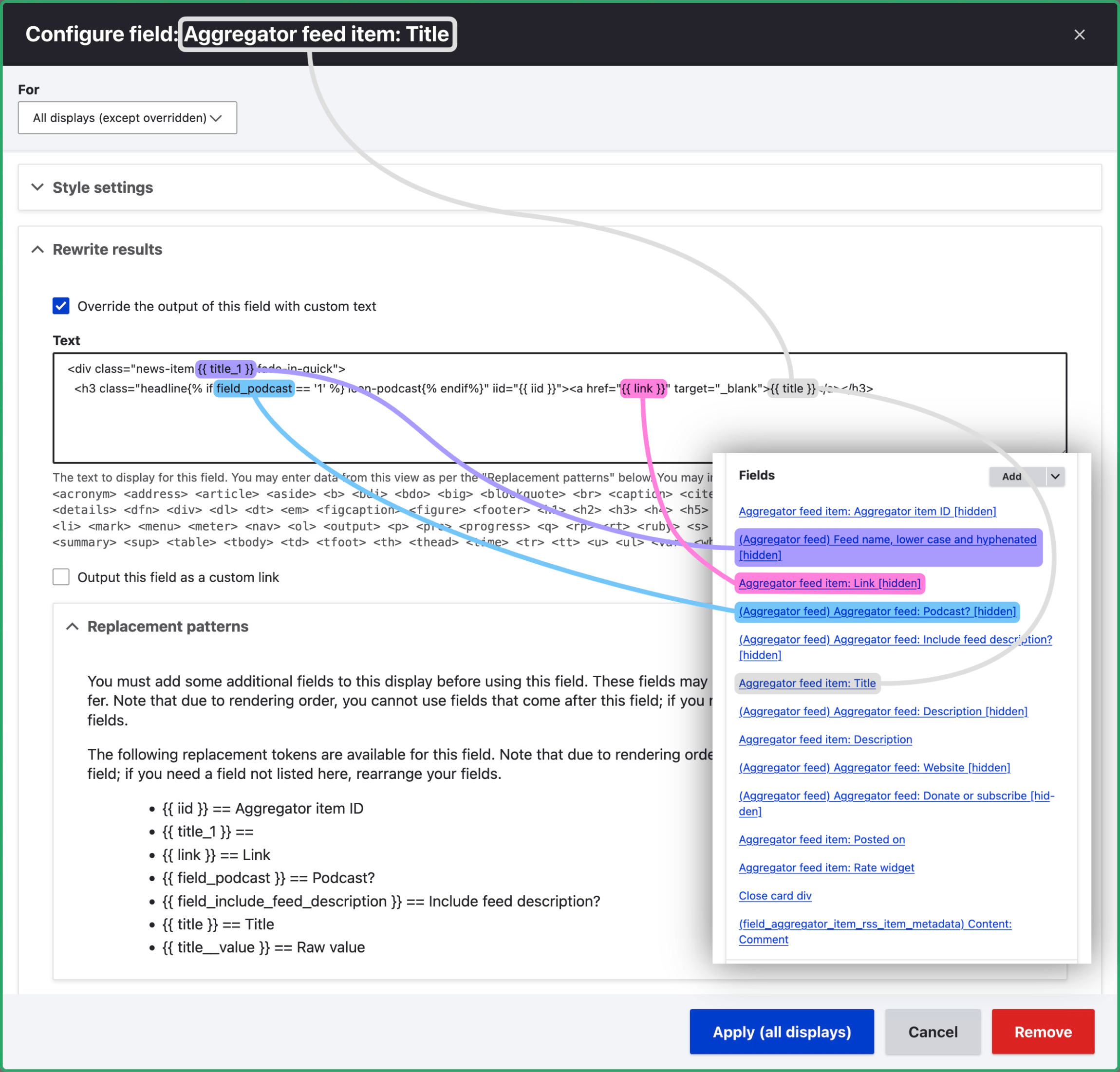
You’ll see in the screenshot that a number of fields are set to ‘hidden’. Hiding a field makes its value available to output in the ‘Rewrite results’ section of subsequent fields. This allows you to combine or perform logic on two or more fields at once. The Field ‘Aggregator feed item: Title’, for instance, uses both the ‘Link’ and ‘Podcast?’ fields. The following markup is from the ‘Title’ field configuration under ‘Rewrite results’:
<div class="news-item {{ title_1 }} fade-in-quick">
  <h3 class="headline{% if field_podcast == '1' %} icon-podcast{% endif%}" iid="{{ iid }}"><a href="{{ link }}" target="_blank">{{ title }}</a></h3>
Here’s a screenshot of the UI for the ‘Title’ field:
Best practice permalink
It’s probably better practice to create a Twig template file override instead of scattering the template across the View’s GUI as I’ve done here. Using the GUI is great for quickly prototyping Views, but you may later want to port it to a Twig template file so you can see the full template at a glance. (I may do this for my View as part of a project refinement exercise.)
Having all the code in a single template file also makes it easy to track changes. That said, it’s still possible to track changes with the GUI approach by exporting the configuration (drush cex) after making changes then committing the output to git.
Filtering the View output permalink
The ‘Filter criteria’ section removes certain items entirely, such as sponsored posts and recipes. ‘Filter headlines (exposed)’ provides a text field by the which the user can search to filter news items by their headline.
Accessing feed custom fields with Relationships permalink
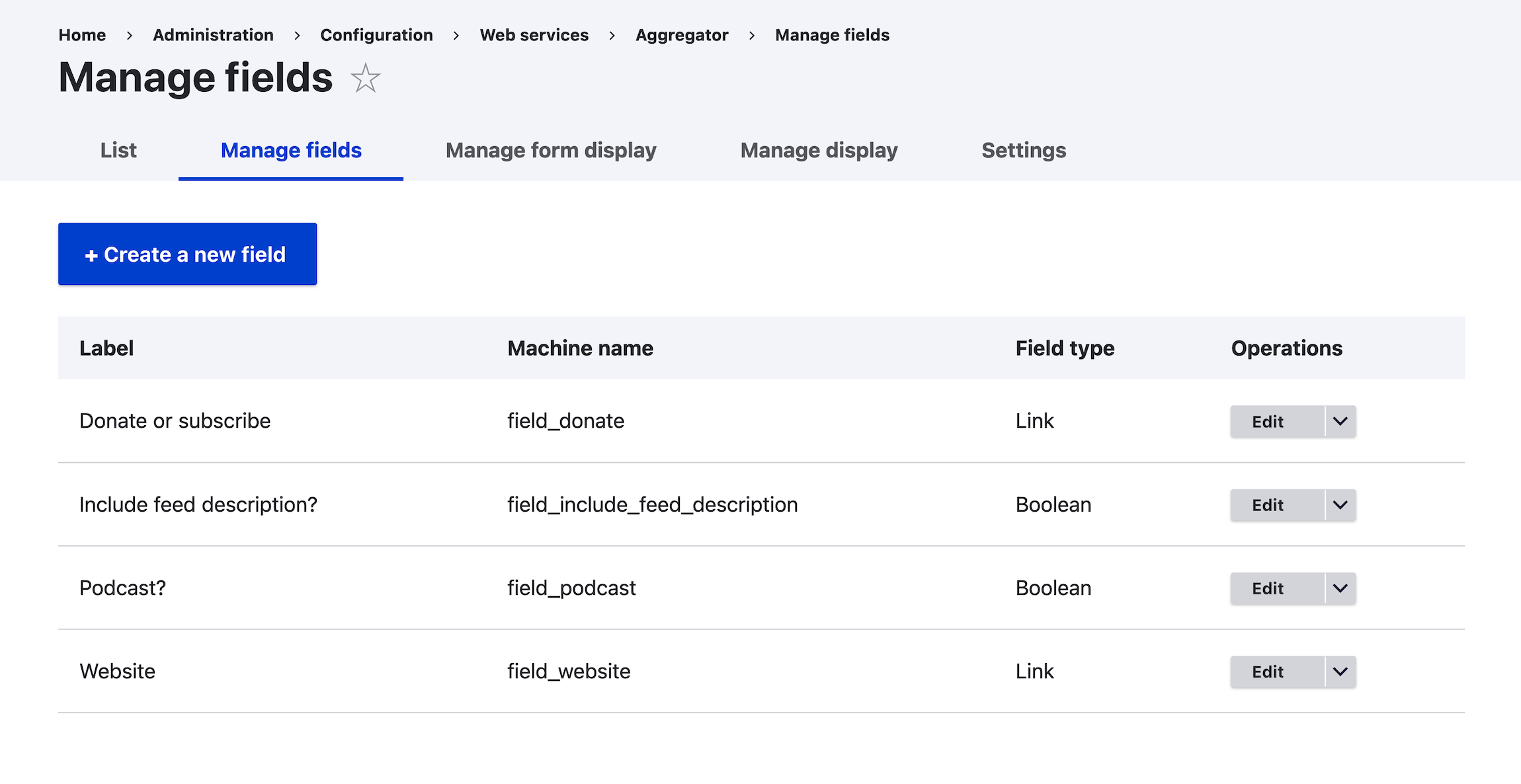
The View is set up to list Aggregator feed items specifically; not the actual feeds. The ‘Aggregator feed’ relationship (under Advanced in the top-right of the Views screenshot) allows us to include custom fields from Aggregator feeds themselves. These include ‘Link’ fields for the feed’s website and a page where the user can donate to or otherwise support the website. Here’s a screenshot of /admin/config/services/aggregator/fields:
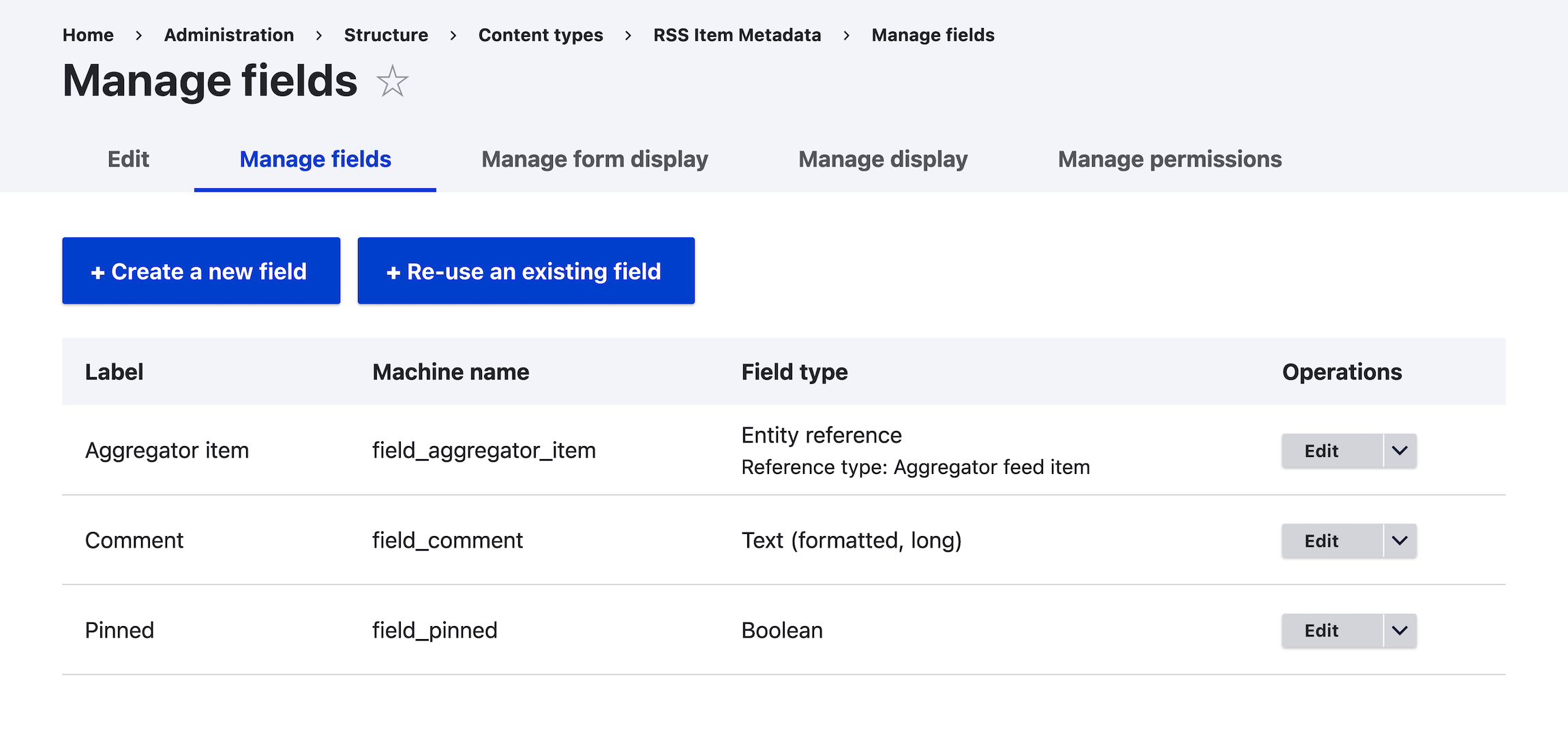
The ‘field_aggregator_item_rss_item_metadata’ Relationship links the View to a custom content type called ‘RSS Item Metadata’, which allows us to attach additional metadata to individual feed items. An ‘Entity reference’ field allows us to search for the news item we want. We can also add a comment beneath a news item or pin it to the right-hand column. Here’s the ‘Manage fields’ UI:
Add some AJAX permalink
Make sure ‘Use AJAX’ (under ‘Other’) is set to ‘Yes’. This allows for pagination and filtering (‘Filter by headline’) without reloading the entire page.
Refreshing the feeds permalink
In order to fetch new items as they’re published, I’ve set a cron job to run every 10 minutes. Drupal’s automated cron system only runs when Drupal processes a request, such as when someone visits the site, so I’ve disabled it by setting the ‘Run cron every’ dropdown at /admin/config/system/cron to ‘Never’, and added a cron directive via my hosting’s cron UI. It looks something like this (__string__ is available at /admin/config/system/cron):
*/10 * * * * curl -s -o /dev/null https://animalrights.fyi/cron/__string__Using an external cron trigger in this way means the cron is guaranteed to run every 10 minutes.
There is an ‘Update interval’ field on each feed (/aggregator/sources/FEED_ID/configure), which I set to ‘15 mins’, ‘1 hour’, ‘1 day’ etc., depending on how frequently the given website tends to post new content. When the cron runs, it checks when each feed was last refreshed, and if the time elapsed since the last refresh exceeds the update interval, the feed will be fetched again, and any new items will be displayed by the View.
Additionally, news items older than a year are deleted, via the directive $config['aggregator.settings']['items']['expire'] = 31536000; in settings.php. (The ‘Discard items older than’ field at /admin/config/services/aggregator/settings is set to ‘Never’, and is overridden by settings.php.)
Conclusion permalink
This post is an overview rather than a step-by-step tutorial. I may explore specific aspects of the website’s functionality in more depth in future posts.
Concerning Drupal as a platform, I wouldn’t necessarily recommend it for side projects like this. Drupal is complex, which is fine because it’s powerful; but managing the system (mainly running regular updates and managing configuration) can be a massive ball-ache. I only chose it for AnimalRights.fyi because I already build Drupal sites professionally. (And LLMs like Claude and ChatGPT make working with Drupal and similarly complex platforms much easier.)