<?xml version="1.0" encoding="utf-8"?>
<feed xmlns="http://www.w3.org/2005/Atom">
  <title>jamieonkeys</title>
  <subtitle></subtitle>
  <link href="/feed.xml" rel="self"/>
  <link href="/"/>
  <updated>2024-12-10T00:00:00+00:00</updated>
  <id></id>
  <author>
    <name>Jamie</name>
    <email>jamie@jamiesmith.scot</email>
  </author>
  
    
    <entry>
      <title>Building an RSS news aggregator with Drupal</title>
      <link href="/posts/news-aggregator-drupal/"/>
      <updated>2024-12-10T00:00:00+00:00</updated>
      <id>/posts/news-aggregator-drupal/</id>
      <content type="html">
        <![CDATA[
      <p><a href="https://animalrights.fyi">AnimalRights.fyi</a> is a news aggregator I built to pull together RSS feeds from animal rights and vegan news sources into a single location. The goal is to make this information easily accessible while linking to the people and organisations working to reduce animal suffering.</p>
<p>This blog post write-up is both for my own future reference and for anyone else who might find it helpful.</p>
<figure class="w-950">
  <video class="br-10" poster="/img/arfyi-31-poster.png" autoplay playsinline muted loop width="950" height="724"><source src="/img/arfyi-31.mp4" type="video/mp4">Your browser does not support the video tag.</video>
  <figcaption>
    AnimalRights.fyi in action, showing how the feed can be filtered by headline, and how users can react to items with the emoji icons.
  </figcaption>
</figure>
<h2 id="contents">Contents</h2>
<ul>
<li><a href="#heading-introduction">Introduction</a></li>
<li><a href="#heading-adding-functionality-with-custom-modules">Adding functionality with custom modules</a></li>
<li><a href="#heading-the-view">The View</a>
<ul>
<li><a href="#heading-outputting-the-html-via-the-fields-section">Outputting the HTML via the Fields section</a></li>
<li><a href="#heading-best-practice">Best practice</a></li>
<li><a href="#heading-filtering-the-view-output">Filtering the View output</a></li>
<li><a href="#heading-accessing-feed-custom-fields-with-relationships">Accessing feed custom fields with Relationships</a></li>
<li><a href="#heading-add-some-ajax">Add some AJAX</a></li>
</ul>
</li>
<li><a href="#heading-refreshing-the-feeds">Refreshing the feeds</a></li>
<li><a href="#heading-conclusion">Conclusion</a></li>
</ul>
<h2 id="introduction">Introduction</h2>
<p>The core functionality is based on a <a href="https://drupalize.me/tutorial/overview-views-api-drupal">View</a> and the <a href="https://www.drupal.org/project/aggregator">Aggregator module</a>. The site also uses the <a href="https://www.drupal.org/project/rate">Rate</a> and <a href="https://www.drupal.org/project/votingapi">Voting API</a> modules to enable users to ‘react’ to any news item by tapping on one of the emojis. The theme is a subtheme of Olivero, which ships with Drupal core. I quickly set up Drupal using SiteGround’s <a href="https://www.siteground.co.uk/tutorials/drupal/app-installer-installation">app installer</a>. (Handily, the install comes with <a href="https://drupalize.me/tutorial/what-composer">Composer</a>, <a href="https://drupalize.me/course/learn-drush-drupal-shell">Drush</a> and git out of the box.)</p>
<h2 id="adding-functionality-with-custom-modules">Adding functionality with custom modules</h2>
<p>As well as <a href="https://drupalize.me/tutorial/concept-using-and-improving-contributed-modules">contributed modules</a> Aggregator and Rate, there are three custom modules:</p>
<h3 id="%E2%80%98cookie-voter%E2%80%99">‘Cookie Voter’</h3>
<p><a href="https://github.com/donbrae/cookie_voter">Cookie Voter</a> alters the Rate module so that it uses cookies instead of IP addresses to track anonymous emoji reactions. Using IP addresses can cause users on shared networks to see others’ reactions appear as their own, which is confusing. BuzzFeed takes a similar approach, storing user reactions in the <a href="https://developer.mozilla.org/en-US/docs/Web/API/Window/localStorage">browser’s <code>localStorage</code></a>. On the other hand, the <a href="https://bearblog.dev/discover/">Bear blogging platform</a> appears to use IP addresses to record upvotes. In Bear’s case that’s a sensible approach as votes affect a list of trending posts. At AnimalRights.fyi, emoji reactions simply offer users an informal way to engage with news stories.</p>
<h3 id="%E2%80%98custom-headline-filter%E2%80%99">‘Custom Headline Filter’</h3>
<p><a href="https://github.com/donbrae/custom_headline_filter">Custom Headline Filter</a> provides a <a href="https://drupalize.me/tutorial/overview-filter-criteria-views">Views filter</a> for removing duplicate (or overly similar) headlines. Such headlines can appear due to malformation of the incoming RSS feed, crossposting between websites, or when multiple news outlets report on the same story. There is a similarity threshold which can be adjusted to taste in the Views UI. The similarity is calculated by PHP’s <a href="https://www.php.net/manual/en/function.similar-text.php"><code>similar_text</code></a> function.</p>
<h3 id="%E2%80%98custom-twig-extensions%E2%80%99">‘Custom Twig Extensions’</h3>
<p>I needed to use PHP’s <code>preg_replace</code> function, and wanted to avoid installing the <a href="https://www.drupal.org/project/twig_extensions">Twig Extensions</a> module; so I created <a href="https://github.com/donbrae/custom_twig_extensions">Custom Twig Extensions</a>. (I try to install as few modules as possible to keep the complexity at a minimum and make site maintenance easier.)</p>
<h3 id="custom-modules-summary">Custom modules summary</h3>
<p>All three modules were basically written by Claude (3.5 Sonnet), though there was a fair amount of back and forth between it and myself. In the case of Cookie Voter, for example, I asked it to refactor <a href="https://www.drupal.org/project/rate/issues/1903262#comment-7170368">this Drupal 7 code</a> for Drupal 8+, but it took much prompting to achieve the desired result. ‘We’ eventually landed on a solution after I fed the AI some relevant code from the Rate module codebase. This is a useful tip I will bear in mind when problem solving with a chatbot in future: don’t assume it already ‘knows’ a given codebase. (I had a <a href="https://chatgpt.com/share/673f5109-29c0-800c-9416-606d51a2afb7">conversation</a> with ChatGPT about why supplying codebase excerpts for more obscure coding problems might be necessary.)</p>
<h2 id="the-view">The View</h2>
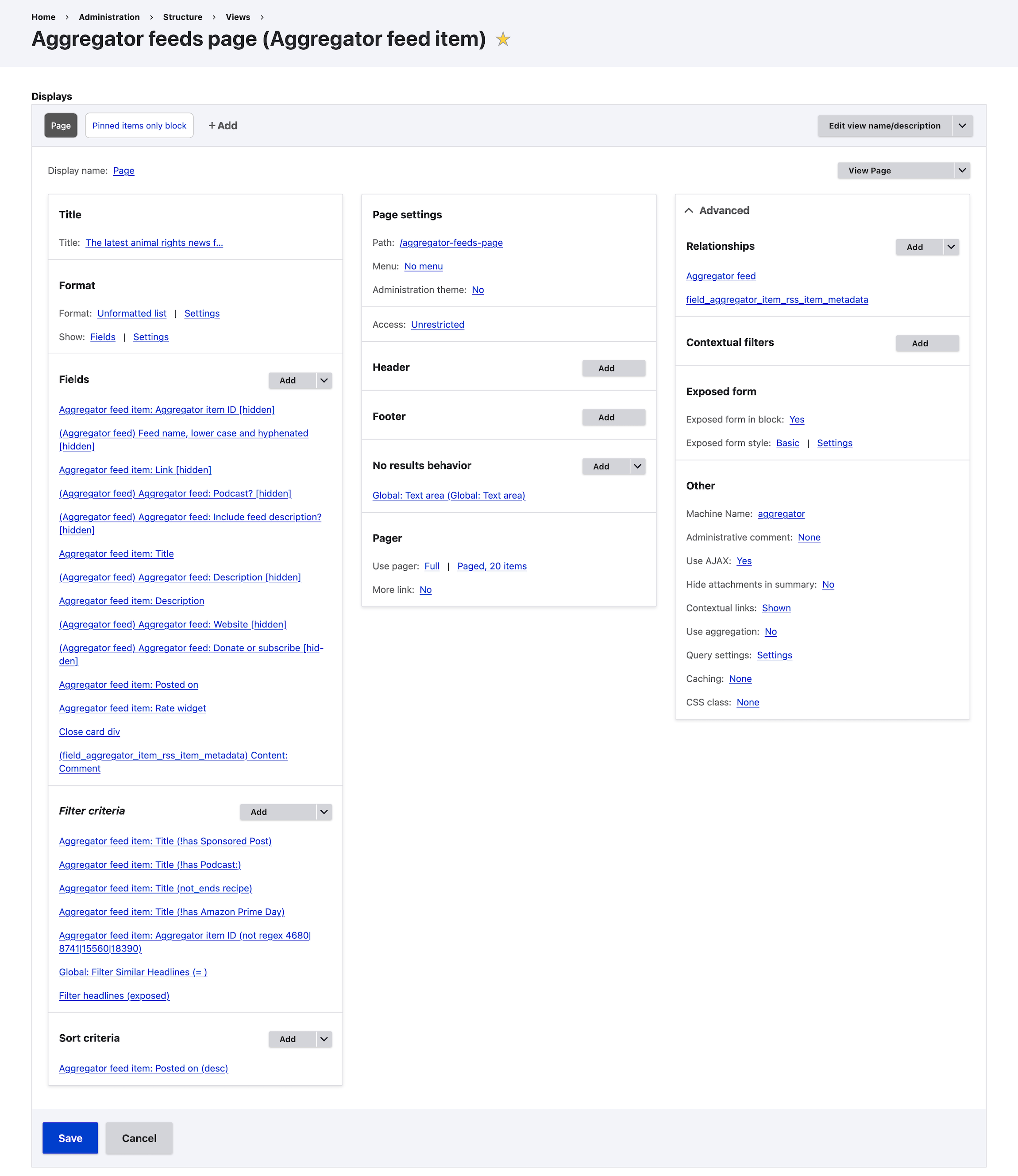
<p>Here’s a screenshot of the View, which is where the user-facing page is built:</p>
<figure class="w-950">
  <img src="/img/arfyi-view.png" width="950" height="1097" alt="A screenshot of the View which creates the listing of aggregated news items.">
  <figcaption>A screenshot of the View which creates the listing of aggregated news items. The output is formed in the Fields section in the left-most column.</figcaption>
</figure>
<h3 id="outputting-the-html-via-the-fields-section">Outputting the HTML via the Fields section</h3>
<p>The Fields section forms the HTML output of the View, with Twig as the templating language. Here’s the Fields section aggregated into a single template representation:</p>
<pre class="language-twig"><code class="language-twig"><span class="token tag"><span class="token tag"><span class="token punctuation">&lt;</span>div</span> <span class="token attr-name">class</span><span class="token attr-value"><span class="token punctuation attr-equals">=</span><span class="token punctuation">"</span>news-item <span class="token twig language-twig"><span class="token delimiter punctuation">{{</span> title_1 <span class="token delimiter punctuation">}}</span></span> fade-in-quick<span class="token punctuation">"</span></span><span class="token punctuation">></span></span><br>  <span class="token tag"><span class="token tag"><span class="token punctuation">&lt;</span>h3</span> <span class="token attr-name">class</span><span class="token attr-value"><span class="token punctuation attr-equals">=</span><span class="token punctuation">"</span>headline<span class="token twig language-twig"><span class="token delimiter punctuation">{%</span> <span class="token tag-name keyword">if</span> field_podcast <span class="token operator">==</span> <span class="token string"><span class="token punctuation">'</span>1<span class="token punctuation">'</span></span> <span class="token delimiter punctuation">%}</span></span> icon-podcast<span class="token twig language-twig"><span class="token delimiter punctuation">{%</span> <span class="token tag-name keyword">endif</span> <span class="token delimiter punctuation">%}</span></span><span class="token punctuation">"</span></span> <span class="token attr-name">iid</span><span class="token attr-value"><span class="token punctuation attr-equals">=</span><span class="token punctuation">"</span><span class="token twig language-twig"><span class="token delimiter punctuation">{{</span> iid <span class="token delimiter punctuation">}}</span></span><span class="token punctuation">"</span></span><span class="token punctuation">></span></span><span class="token tag"><span class="token tag"><span class="token punctuation">&lt;</span>a</span> <span class="token attr-name">href</span><span class="token attr-value"><span class="token punctuation attr-equals">=</span><span class="token punctuation">"</span><span class="token twig language-twig"><span class="token delimiter punctuation">{{</span> link <span class="token delimiter punctuation">}}</span></span><span class="token punctuation">"</span></span> <span class="token attr-name">target</span><span class="token attr-value"><span class="token punctuation attr-equals">=</span><span class="token punctuation">"</span>_blank<span class="token punctuation">"</span></span><span class="token punctuation">></span></span><span class="token twig language-twig"><span class="token delimiter punctuation">{{</span> title <span class="token delimiter punctuation">}}</span></span><span class="token tag"><span class="token tag"><span class="token punctuation">&lt;/</span>a</span><span class="token punctuation">></span></span><span class="token tag"><span class="token tag"><span class="token punctuation">&lt;/</span>h3</span><span class="token punctuation">></span></span><br><br>  <span class="token twig language-twig"><span class="token comment">{# Get first paragraph of description and remove HTML tags #}</span></span><br>  <span class="token twig language-twig"><span class="token delimiter punctuation">{%</span> <span class="token tag-name keyword">set</span> first_paragraph <span class="token operator">=</span> description<span class="token operator">|</span>split<span class="token punctuation">(</span><span class="token string"><span class="token punctuation">'</span>&lt;/p><span class="token punctuation">'</span></span><span class="token punctuation">)</span><span class="token punctuation">[</span><span class="token number">0</span><span class="token punctuation">]</span><span class="token operator">|</span>trim <span class="token delimiter punctuation">%}</span></span><br>  <span class="token twig language-twig"><span class="token delimiter punctuation">{%</span> <span class="token tag-name keyword">set</span> first_paragraph <span class="token operator">=</span> first_paragraph <span class="token operator">starts with</span> <span class="token string"><span class="token punctuation">'</span>&lt;p><span class="token punctuation">'</span></span> <span class="token operator">?</span> first_paragraph<span class="token punctuation">[</span><span class="token number">3</span><span class="token punctuation">:</span><span class="token punctuation">]</span> <span class="token punctuation">:</span> first_paragraph <span class="token delimiter punctuation">%}</span></span><br>  <span class="token twig language-twig"><span class="token delimiter punctuation">{%</span> <span class="token tag-name keyword">set</span> first_paragraph <span class="token operator">=</span> first_paragraph<span class="token operator">|</span>striptags<span class="token operator">|</span>trim <span class="token delimiter punctuation">%}</span></span><br><br>  <span class="token twig language-twig"><span class="token comment">{# Handle truncation #}</span></span><br>  <span class="token twig language-twig"><span class="token delimiter punctuation">{%</span> <span class="token tag-name keyword">set</span> last_char <span class="token operator">=</span> first_paragraph<span class="token operator">|</span>last <span class="token delimiter punctuation">%}</span></span><br>  <span class="token twig language-twig"><span class="token delimiter punctuation">{%</span> <span class="token tag-name keyword">set</span> last_three <span class="token operator">=</span> first_paragraph<span class="token operator">|</span>slice<span class="token punctuation">(</span><span class="token operator">-</span><span class="token number">3</span><span class="token punctuation">)</span> <span class="token delimiter punctuation">%}</span></span><br>  <span class="token twig language-twig"><span class="token delimiter punctuation">{%</span> <span class="token tag-name keyword">set</span> last_nine <span class="token operator">=</span> first_paragraph<span class="token operator">|</span>slice<span class="token punctuation">(</span><span class="token operator">-</span><span class="token number">9</span><span class="token punctuation">)</span> <span class="token delimiter punctuation">%}</span></span><br><br>  <span class="token twig language-twig"><span class="token delimiter punctuation">{%</span><br>    <span class="token tag-name keyword">if</span> last_char <span class="token operator">not</span> <span class="token operator">in</span> <span class="token punctuation">[</span><span class="token string"><span class="token punctuation">'</span>.<span class="token punctuation">'</span></span><span class="token punctuation">,</span> <span class="token string"><span class="token punctuation">'</span>!<span class="token punctuation">'</span></span><span class="token punctuation">,</span> <span class="token string"><span class="token punctuation">'</span>?<span class="token punctuation">'</span></span><span class="token punctuation">,</span> <span class="token string"><span class="token punctuation">'</span>…<span class="token punctuation">'</span></span><span class="token punctuation">,</span> <span class="token string"><span class="token punctuation">'</span>:<span class="token punctuation">'</span></span><span class="token punctuation">]</span> <span class="token operator">and</span><br>    last_three <span class="token operator">!=</span> <span class="token string"><span class="token punctuation">'</span>[…]<span class="token punctuation">'</span></span> <span class="token operator">and</span><br>    first_paragraph<span class="token operator">|</span>slice<span class="token punctuation">(</span><span class="token operator">-</span><span class="token number">2</span><span class="token punctuation">)</span> <span class="token operator">!=</span> <span class="token string"><span class="token punctuation">'</span>."<span class="token punctuation">'</span></span> <span class="token operator">and</span><br>    first_paragraph<span class="token operator">|</span>slice<span class="token punctuation">(</span><span class="token operator">-</span><span class="token number">6</span><span class="token punctuation">)</span> <span class="token operator">!=</span> <span class="token string"><span class="token punctuation">'</span>&amp;nbsp;<span class="token punctuation">'</span></span> <span class="token operator">and</span><br>    last_nine <span class="token operator">!=</span> <span class="token string"><span class="token punctuation">'</span> ... more<span class="token punctuation">'</span></span><br>  <span class="token delimiter punctuation">%}</span></span><br>    <span class="token twig language-twig"><span class="token delimiter punctuation">{%</span> <span class="token tag-name keyword">set</span> first_paragraph <span class="token operator">=</span> first_paragraph <span class="token operator">~</span> <span class="token string"><span class="token punctuation">'</span>.<span class="token punctuation">'</span></span> <span class="token delimiter punctuation">%}</span></span><br>  <span class="token twig language-twig"><span class="token delimiter punctuation">{%</span> <span class="token tag-name keyword">elseif</span> last_char <span class="token operator">==</span> <span class="token string"><span class="token punctuation">'</span>…<span class="token punctuation">'</span></span> <span class="token delimiter punctuation">%}</span></span><br>    <span class="token twig language-twig"><span class="token delimiter punctuation">{%</span> <span class="token tag-name keyword">set</span> first_paragraph <span class="token operator">=</span> first_paragraph<span class="token operator">|</span>custom_replace<span class="token punctuation">(</span><span class="token string"><span class="token punctuation">'</span>/(?&lt;!\s)…$/u<span class="token punctuation">'</span></span><span class="token punctuation">,</span> <span class="token string"><span class="token punctuation">'</span> […]<span class="token punctuation">'</span></span><span class="token punctuation">)</span> <span class="token delimiter punctuation">%}</span></span><br>  <span class="token twig language-twig"><span class="token delimiter punctuation">{%</span> <span class="token tag-name keyword">elseif</span> last_nine <span class="token operator">==</span> <span class="token string"><span class="token punctuation">'</span> ... more<span class="token punctuation">'</span></span> <span class="token delimiter punctuation">%}</span></span><br>    <span class="token twig language-twig"><span class="token delimiter punctuation">{%</span> <span class="token tag-name keyword">set</span> first_paragraph <span class="token operator">=</span> first_paragraph<span class="token operator">|</span>custom_replace<span class="token punctuation">(</span><span class="token string"><span class="token punctuation">'</span>/ \.\.\. more$/<span class="token punctuation">'</span></span><span class="token punctuation">,</span> <span class="token string"><span class="token punctuation">'</span> […]<span class="token punctuation">'</span></span><span class="token punctuation">)</span> <span class="token delimiter punctuation">%}</span></span><br>  <span class="token twig language-twig"><span class="token delimiter punctuation">{%</span> <span class="token tag-name keyword">elseif</span> last_three <span class="token operator">==</span> <span class="token string"><span class="token punctuation">'</span>...<span class="token punctuation">'</span></span> <span class="token delimiter punctuation">%}</span></span><br>    <span class="token twig language-twig"><span class="token delimiter punctuation">{%</span> <span class="token tag-name keyword">set</span> first_paragraph <span class="token operator">=</span> first_paragraph<span class="token operator">|</span>custom_replace<span class="token punctuation">(</span><span class="token string"><span class="token punctuation">'</span>/(?&lt;!\s)\.{3}$/u<span class="token punctuation">'</span></span><span class="token punctuation">,</span> <span class="token string"><span class="token punctuation">'</span> […]<span class="token punctuation">'</span></span><span class="token punctuation">)</span> <span class="token delimiter punctuation">%}</span></span><br>  <span class="token twig language-twig"><span class="token delimiter punctuation">{%</span> <span class="token tag-name keyword">elseif</span> last_char <span class="token operator">==</span> <span class="token string"><span class="token punctuation">'</span>:<span class="token punctuation">'</span></span> <span class="token delimiter punctuation">%}</span></span><br>    <span class="token twig language-twig"><span class="token delimiter punctuation">{%</span> <span class="token tag-name keyword">set</span> first_paragraph <span class="token operator">=</span> first_paragraph<span class="token operator">|</span>custom_replace<span class="token punctuation">(</span><span class="token string"><span class="token punctuation">'</span>/:$/<span class="token punctuation">'</span></span><span class="token punctuation">,</span> <span class="token string"><span class="token punctuation">'</span>.<span class="token punctuation">'</span></span><span class="token punctuation">)</span> <span class="token delimiter punctuation">%}</span></span><br>  <span class="token twig language-twig"><span class="token delimiter punctuation">{%</span> <span class="token tag-name keyword">endif</span> <span class="token delimiter punctuation">%}</span></span><br><br>  <span class="token twig language-twig"><span class="token comment">{# Hide descriptions that include these strings #}</span></span><br>  <span class="token twig language-twig"><span class="token delimiter punctuation">{%</span> <span class="token tag-name keyword">set</span> excluded_patterns <span class="token operator">=</span> <span class="token punctuation">[</span><br>    <span class="token string"><span class="token punctuation">'</span>©<span class="token punctuation">'</span></span><span class="token punctuation">,</span><br>    <span class="token string"><span class="token punctuation">'</span>Image courtesy of<span class="token punctuation">'</span></span><span class="token punctuation">,</span><br>    <span class="token string"><span class="token punctuation">'</span>Image supplied by<span class="token punctuation">'</span></span><span class="token punctuation">,</span><br>    <span class="token string"><span class="token punctuation">'</span>Image credit<span class="token punctuation">'</span></span><span class="token punctuation">,</span><br>    <span class="token string"><span class="token punctuation">'</span>The post<span class="token punctuation">'</span></span><span class="token punctuation">,</span><br>    <span class="token string"><span class="token punctuation">'</span>Image:<span class="token punctuation">'</span></span><span class="token punctuation">,</span><br>    <span class="token string"><span class="token punctuation">'</span>No abstract<span class="token punctuation">'</span></span><span class="token punctuation">,</span><br>    <span class="token string"><span class="token punctuation">'</span>If you enjoyed this episode<span class="token punctuation">'</span></span><span class="token punctuation">,</span><br>    <span class="token string"><span class="token punctuation">'</span>Published on<span class="token punctuation">'</span></span><br>  <span class="token punctuation">]</span> <span class="token delimiter punctuation">%}</span></span><br>  <span class="token twig language-twig"><span class="token delimiter punctuation">{%</span> <span class="token tag-name keyword">set</span> is_excluded <span class="token operator">=</span> excluded_patterns<span class="token operator">|</span>filter<span class="token punctuation">(</span>pattern <span class="token operator">=</span><span class="token operator">></span> pattern <span class="token operator">in</span> first_paragraph<span class="token punctuation">)</span><span class="token operator">|</span>length <span class="token operator">></span> <span class="token number">0</span> <span class="token delimiter punctuation">%}</span></span><br><br>  <span class="token twig language-twig"><span class="token delimiter punctuation">{%</span> <span class="token tag-name keyword">if</span> first_paragraph<span class="token operator">|</span>length <span class="token operator">></span> <span class="token number">5</span> <span class="token operator">and</span> <span class="token operator">not</span> is_excluded <span class="token delimiter punctuation">%}</span></span><br>  <span class="token tag"><span class="token tag"><span class="token punctuation">&lt;</span>div</span> <span class="token attr-name">class</span><span class="token attr-value"><span class="token punctuation attr-equals">=</span><span class="token punctuation">"</span>views-field views-field-description<span class="token punctuation">"</span></span><span class="token punctuation">></span></span><br>    <span class="token twig language-twig"><span class="token delimiter punctuation">{{</span> first_paragraph<span class="token operator">|</span>custom_replace<span class="token punctuation">(</span><span class="token string"><span class="token punctuation">'</span>/&amp;nbsp;/<span class="token punctuation">'</span></span><span class="token punctuation">,</span> <span class="token string"><span class="token punctuation">'</span><span class="token punctuation">'</span></span><span class="token punctuation">)</span><span class="token operator">|</span>custom_replace<span class="token punctuation">(</span><span class="token string"><span class="token punctuation">'</span>/&amp;amp;/<span class="token punctuation">'</span></span><span class="token punctuation">,</span> <span class="token string"><span class="token punctuation">'</span>&amp;<span class="token punctuation">'</span></span><span class="token punctuation">)</span> <span class="token delimiter punctuation">}}</span></span><br>    <span class="token twig language-twig"><span class="token delimiter punctuation">{%</span> <span class="token tag-name keyword">if</span> field_include_feed_description <span class="token operator">==</span> <span class="token string"><span class="token punctuation">'</span>1<span class="token punctuation">'</span></span> <span class="token delimiter punctuation">%}</span></span><br>      <span class="token twig language-twig"><span class="token delimiter punctuation">{{</span> description_1 <span class="token delimiter punctuation">}}</span></span><br>    <span class="token twig language-twig"><span class="token delimiter punctuation">{%</span> <span class="token tag-name keyword">endif</span> <span class="token delimiter punctuation">%}</span></span><br>  <span class="token tag"><span class="token tag"><span class="token punctuation">&lt;/</span>div</span><span class="token punctuation">></span></span><br>  <span class="token twig language-twig"><span class="token delimiter punctuation">{%</span> <span class="token tag-name keyword">endif</span> <span class="token delimiter punctuation">%}</span></span><br><br>  <span class="token tag"><span class="token tag"><span class="token punctuation">&lt;</span>div</span> <span class="token attr-name">class</span><span class="token attr-value"><span class="token punctuation attr-equals">=</span><span class="token punctuation">"</span>meta<span class="token punctuation">"</span></span><span class="token punctuation">></span></span>via <span class="token twig language-twig"><span class="token delimiter punctuation">{{</span> field_website <span class="token delimiter punctuation">}}</span></span><br>  <span class="token twig language-twig"><span class="token delimiter punctuation">{%</span> <span class="token tag-name keyword">if</span> field_donate <span class="token delimiter punctuation">%}</span></span><br>    <span class="token tag"><span class="token tag"><span class="token punctuation">&lt;</span>span</span><span class="token punctuation">></span></span><br>      <span class="token tag"><span class="token tag"><span class="token punctuation">&lt;</span>span</span> <span class="token attr-name">class</span><span class="token attr-value"><span class="token punctuation attr-equals">=</span><span class="token punctuation">"</span>time<span class="token punctuation">"</span></span><span class="token punctuation">></span></span><span class="token twig language-twig"><span class="token delimiter punctuation">{{</span> timestamp <span class="token delimiter punctuation">}}</span></span><span class="token tag"><span class="token tag"><span class="token punctuation">&lt;/</span>span</span><span class="token punctuation">></span></span><span class="token tag"><span class="token tag"><span class="token punctuation">&lt;</span>span</span><span class="token punctuation">></span></span> <span class="token twig language-twig"><span class="token delimiter punctuation">{{</span> field_donate <span class="token delimiter punctuation">}}</span></span><span class="token tag"><span class="token tag"><span class="token punctuation">&lt;/</span>span</span><span class="token punctuation">></span></span><br>    <span class="token tag"><span class="token tag"><span class="token punctuation">&lt;/</span>span</span><span class="token punctuation">></span></span><br>  <span class="token twig language-twig"><span class="token delimiter punctuation">{%</span> <span class="token tag-name keyword">else</span> <span class="token delimiter punctuation">%}</span></span><br>    <span class="token tag"><span class="token tag"><span class="token punctuation">&lt;</span>span</span> <span class="token attr-name">class</span><span class="token attr-value"><span class="token punctuation attr-equals">=</span><span class="token punctuation">"</span>time<span class="token punctuation">"</span></span><span class="token punctuation">></span></span><span class="token twig language-twig"><span class="token delimiter punctuation">{{</span> timestamp <span class="token delimiter punctuation">}}</span></span><span class="token tag"><span class="token tag"><span class="token punctuation">&lt;/</span>span</span><span class="token punctuation">></span></span><br>  <span class="token twig language-twig"><span class="token delimiter punctuation">{%</span> <span class="token tag-name keyword">endif</span> <span class="token delimiter punctuation">%}</span></span><br>  <span class="token tag"><span class="token tag"><span class="token punctuation">&lt;/</span>div</span><span class="token punctuation">></span></span><br><span class="token tag"><span class="token tag"><span class="token punctuation">&lt;/</span>div</span><span class="token punctuation">></span></span><br><br><span class="token tag"><span class="token tag"><span class="token punctuation">&lt;</span>div</span> <span class="token attr-name">class</span><span class="token attr-value"><span class="token punctuation attr-equals">=</span><span class="token punctuation">"</span>comment fade-in-quick<span class="token punctuation">"</span></span><span class="token punctuation">></span></span><span class="token twig language-twig"><span class="token delimiter punctuation">{{</span> field_comment <span class="token delimiter punctuation">}}</span></span><span class="token tag"><span class="token tag"><span class="token punctuation">&lt;/</span>div</span><span class="token punctuation">></span></span></code></pre>
<p>Most of the logic here is a bunch of heuristics which tidy up the HTML contained within the RSS feeds, eg standardising the ellipsis style for truncated descriptions, and removing descriptions that don’t provide any value to the reader.</p>
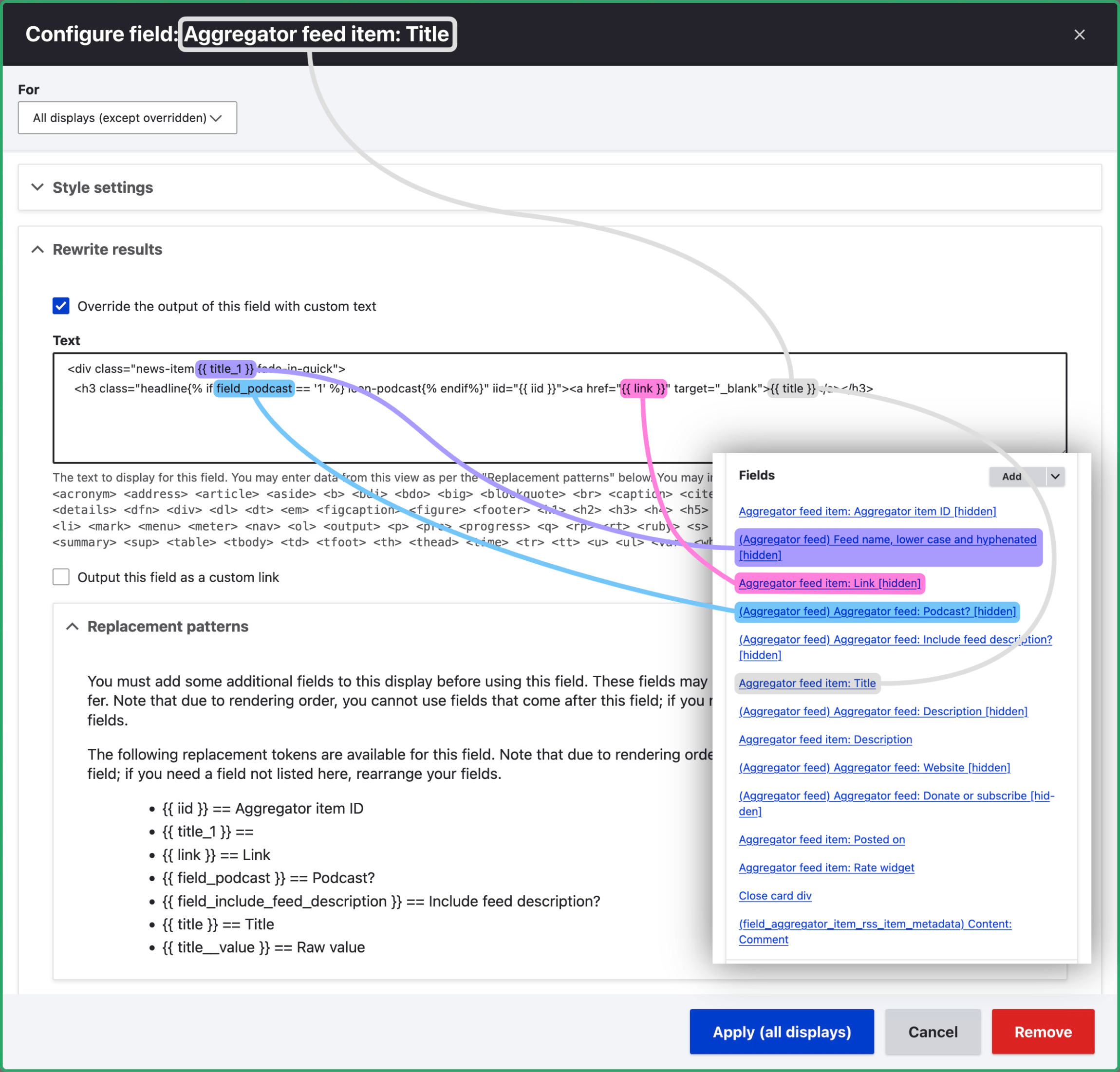
<p>You’ll see in the screenshot that a number of fields are set to ‘hidden’. Hiding a field makes its value available to output in the ‘Rewrite results’ section of subsequent fields. This allows you to combine or perform logic on two or more fields at once. The Field ‘Aggregator feed item: Title’, for instance, uses both the ‘Link’ and ‘Podcast?’ fields. The following markup is from the ‘Title’ field configuration under ‘Rewrite results’:</p>
<pre class="language-twig"><code class="language-twig"><span class="token tag"><span class="token tag"><span class="token punctuation">&lt;</span>div</span> <span class="token attr-name">class</span><span class="token attr-value"><span class="token punctuation attr-equals">=</span><span class="token punctuation">"</span>news-item <span class="token twig language-twig"><span class="token delimiter punctuation">{{</span> title_1 <span class="token delimiter punctuation">}}</span></span> fade-in-quick<span class="token punctuation">"</span></span><span class="token punctuation">></span></span><br>  <span class="token tag"><span class="token tag"><span class="token punctuation">&lt;</span>h3</span> <span class="token attr-name">class</span><span class="token attr-value"><span class="token punctuation attr-equals">=</span><span class="token punctuation">"</span>headline<span class="token twig language-twig"><span class="token delimiter punctuation">{%</span> <span class="token tag-name keyword">if</span> field_podcast <span class="token operator">==</span> <span class="token string"><span class="token punctuation">'</span>1<span class="token punctuation">'</span></span> <span class="token delimiter punctuation">%}</span></span> icon-podcast<span class="token twig language-twig"><span class="token delimiter punctuation">{%</span> <span class="token tag-name keyword">endif</span><span class="token delimiter punctuation">%}</span></span><span class="token punctuation">"</span></span> <span class="token attr-name">iid</span><span class="token attr-value"><span class="token punctuation attr-equals">=</span><span class="token punctuation">"</span><span class="token twig language-twig"><span class="token delimiter punctuation">{{</span> iid <span class="token delimiter punctuation">}}</span></span><span class="token punctuation">"</span></span><span class="token punctuation">></span></span><span class="token tag"><span class="token tag"><span class="token punctuation">&lt;</span>a</span> <span class="token attr-name">href</span><span class="token attr-value"><span class="token punctuation attr-equals">=</span><span class="token punctuation">"</span><span class="token twig language-twig"><span class="token delimiter punctuation">{{</span> link <span class="token delimiter punctuation">}}</span></span><span class="token punctuation">"</span></span> <span class="token attr-name">target</span><span class="token attr-value"><span class="token punctuation attr-equals">=</span><span class="token punctuation">"</span>_blank<span class="token punctuation">"</span></span><span class="token punctuation">></span></span><span class="token twig language-twig"><span class="token delimiter punctuation">{{</span> title <span class="token delimiter punctuation">}}</span></span><span class="token tag"><span class="token tag"><span class="token punctuation">&lt;/</span>a</span><span class="token punctuation">></span></span><span class="token tag"><span class="token tag"><span class="token punctuation">&lt;/</span>h3</span><span class="token punctuation">></span></span></code></pre>
<p>Here’s a screenshot of the UI for the ‘Title’ field:</p>
<figure class="w-950">
  <img src="/img/arfyi-configure-title.png" width="950" height="909" alt="Screenshot of the ‘Aggregator feed item: Title’ field UI.">
  <figcaption>Hidden fields ‘Link’ and ‘Podcast?’ (see inset, taken from the <a href="#heading-the-view">main Views screenshot</a>) are subsequently available in the ‘Aggregator feed item: Title’ field UI.</figcaption>
</figure>
<h3 id="best-practice">Best practice</h3>
<p>It’s probably better practice to create a Twig template file <a href="https://www.drupal.org/docs/develop/theming-drupal/twig-in-drupal/twig-template-naming-conventions#s-views">override</a> instead of scattering the template across the View’s GUI as I’ve done here. Using the GUI is great for quickly prototyping Views, but you may later want to port it to a Twig template file so you can see the full template at a glance. (I may do this for my View as part of a project refinement exercise.)</p>
<p>Having all the code in a single template file also makes it easy to track changes. That said, it’s still possible to track changes with the GUI approach by exporting the <a href="https://drupalize.me/tutorial/overview-configuration-system">configuration</a> (<code>drush cex</code>) after making changes then committing the output to git.</p>
<h3 id="filtering-the-view-output">Filtering the View output</h3>
<p>The ‘Filter criteria’ section removes certain items entirely, such as sponsored posts and recipes. ‘Filter headlines (exposed)’ provides a text field by the which the user can search to filter news items by their headline.</p>
<h3 id="accessing-feed-custom-fields-with-relationships">Accessing feed custom fields with Relationships</h3>
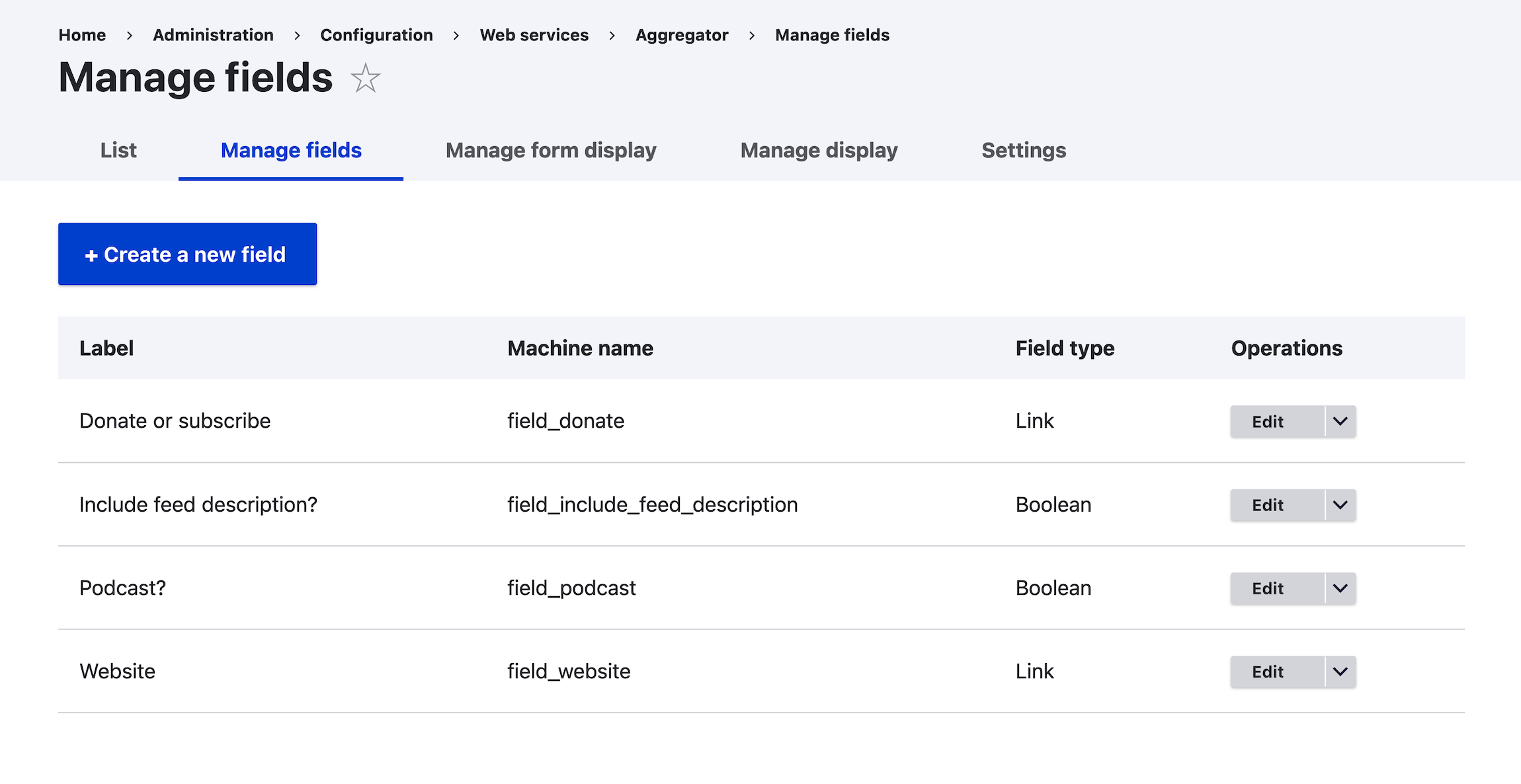
<p>The View is set up to list Aggregator feed items specifically; not the actual feeds. The ‘Aggregator feed’ relationship (under Advanced in the top-right of the <a href="#heading-the-view">Views screenshot</a>) allows us to include custom fields from Aggregator feeds themselves. These include ‘Link’ fields for the feed’s website and a page where the user can donate to or otherwise support the website. Here’s a screenshot of <code>/admin/config/services/aggregator/fields</code>:</p>
<figure class="w-950">
  <img src="/img/arfyi-feed-metadata.png" width="950" height="490" alt="Screenshot showing custom fields added to Aggregator feeds.">
  <figcaption>There are a few custom fields added to Aggregator feeds. The View is set to list Aggregator <i>items</i>, as opposed to <i>feeds</i>, but we can output fields from an item’s associated feed by adding a Relationship in the View’s Advanced section.</figcaption>
</figure>
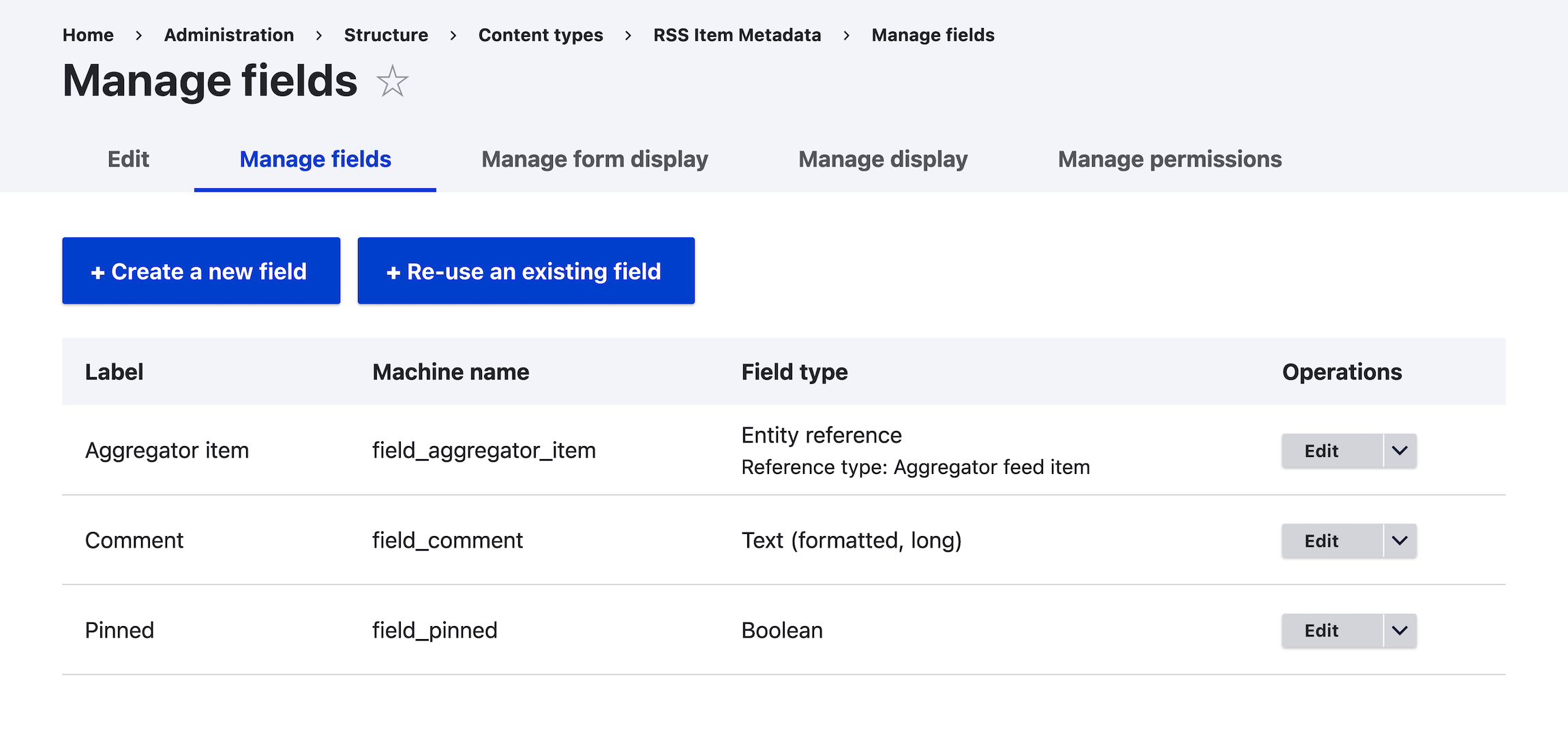
<p>The ‘field_aggregator_item_rss_item_metadata’ Relationship links the View to a custom content type called ‘RSS Item Metadata’, which allows us to attach additional metadata to individual feed items. An ‘Entity reference’ field allows us to search for the news item we want. We can also add a comment beneath a news item or pin it to the right-hand column. Here’s the ‘Manage fields’ UI:</p>
<figure class="w-950">
  <img src="/img/arfyi-item-metadata.png" width="950" height="499" alt="Screenshot of the ‘RSS Item Metadata’ content type.">
  <figcaption>The ‘RSS Item Metadata’ content type allows us to choose a news item and comment on or ‘pin’ it.</figcaption>
</figure>
<h3 id="add-some-ajax">Add some AJAX</h3>
<p>Make sure ‘Use AJAX’ (under ‘Other’) is set to ‘Yes’. This allows for pagination and filtering (‘Filter by headline’) without reloading the entire page.</p>
<h2 id="refreshing-the-feeds">Refreshing the feeds</h2>
<p>I’ve set the <a href="/posts/running-scripts-as-cron-jobs/">cron</a> to run every 10 minutues, which will update the feeds with any new items. The cron interval is set via the directive <code>$config['automated_cron.settings']['interval'] = 600;</code> in <code>settings.php</code>. (At <code>/admin/config/system/cron</code>, the equivalent field in the UI – ‘Run cron every’ – is set to ‘Never’, but Drupal will ignore this value.)</p>
<p>There is an ‘Update interval’ field on each feed (<code>/aggregator/sources/FEED_ID/configure</code>), which I set to ‘15 mins’, ‘1 hour’, ‘1 day’ etc., depending on how frequently the given website tends to post new content. When the cron runs, it checks when each feed was last refreshed, and if the time elapsed since the last refresh exceeds the update interval, the feed will be fetched again, and any new items will be displayed by the View.</p>
<p>Additionally, news items older than a year are deleted, via another directive in <code>settings.php</code>: <code>$config['aggregator.settings']['items']['expire'] = 31536000;</code>. (The ‘Discard items older than’ field at <code>/admin/config/services/aggregator/settings</code> is set to ‘Never’, and, like ‘Run cron every’, is overridden by <code>settings.php</code>.)</p>
<h2 id="conclusion">Conclusion</h2>
<p>This post is an overview rather than a step-by-step tutorial. I may explore specific aspects of the website’s functionality in more depth in future posts.</p>
<p>Concerning Drupal as a platform, I wouldn’t necessarily recommend it for side projects like this. Drupal is complex, which is fine because it’s powerful; but managing the system (mainly running regular updates and <a href="https://drupalize.me/course/configuration-management-drupal">managing configuration</a>) can be a massive ball-ache. I only chose it for AnimalRights.fyi because I already build Drupal sites professionally. (And <a href="https://en.wikipedia.org/wiki/Large_language_model">LLMs</a> like Claude and ChatGPT make working with Drupal and similarly complex platforms much easier.)</p>

    ]]>
      </content>
    </entry>
  
    
    <entry>
      <title>TIL: ‘Hello, world’ in Z80 assembly language on the ZX Spectrum</title>
      <link href="/posts/til-z80-asm-hello-world/"/>
      <updated>2024-02-09T00:00:00+00:00</updated>
      <id>/posts/til-z80-asm-hello-world/</id>
      <content type="html">
        <![CDATA[
      <p>I recently received my <a href="https://www.specnext.com">ZX Spectrum Next</a> after having backed a Kickstarter in 2020. I began my computing life on a <a href="https://www.dataserve-retro.co.uk/contents/en-uk/d66.html">Spectrum +2A</a> in 1989, and it’s also the machine I first learned to program on, in BASIC. I knew you could write things ‘in machine code’ (like most games produced for the platform were) but figuring it out was way over my head at the time. (Programs written in machine code are much faster and have access to more memory, but are low level and more difficult to write.)</p>
<p>Now that I have ZX Spectrum hardware for the first time in a couple of decades, I thought it would be a good time to see whether I could create a ‘Hello, world’ program in Z80 assembly language, convert it to machine code, and run it.</p>
<blockquote>
<p>Reader caution: I don’t really know what I’m doing here. This blog post is more or less personal documentation. I’ve tried to avoid inaccuracies, but feel free to correct me in the comments.</p>
</blockquote>
<p>I found the take on ‘Hello, world’ described on <a href="https://benjamin.computer/posts/2022-04-22-ZX-coding.html">Benjamin Blundell’s website</a> to be nice and succinct, so I used that. Here it is:</p>
<pre class="language-wasm"><code class="language-wasm">org <span class="token variable">$8000</span><br>  ld bc, MY_STRING<br><br>MY_LOOP:<br>  ld a, <span class="token punctuation">(</span>bc<span class="token punctuation">)</span><br>  cp <span class="token number">0</span><br>  jr z, END_PROGRAM<br>  rst <span class="token variable">$10</span><br>  inc bc<br>  jr MY_LOOP<br><br>END_PROGRAM:<br>  ret<br><br>MY_STRING:<br>  defb <span class="token string">"Hello, world!"</span><br>  defb <span class="token number">13</span>, <span class="token number">0</span></code></pre>
<p>I’ll use the Pasmo assembler to translate the instructions into binary machine code so that the Spectrum can understand it.</p>
<p>Some notes, based on Benjamin’s blog post, on what each line does:</p>
<h3 id="org-%248000"><code>org $8000</code></h3>
<p>This is an assembler directive to set the starting (‘origin’) memory location (address) of the proceeding program (<code>$8000</code> is 0x8000, or 8000 in hex, or decimal 32768). This location is safely within a 48K Spectrum’s non-system memory. (See <a href="http://www.breakintoprogram.co.uk/hardware/computers/zx-spectrum/memory-map">Dean Belfield’s website</a> for details on how memory is mapped in the both 48 and 128K models.)</p>
<h3 id="ld-bc%2C-my_string"><code>ld bc, MY_STRING</code></h3>
<p>Load register pair BC with the starting address of <code>MY_STRING</code>. <a href="https://www.totalphase.com/blog/2023/05/what-is-register-in-cpu-how-does-it-work/#:~:text=Registers%20are%20a%20type%20of,bit%20sequence%20or%20individual%20characters)">Registers</a> are small storage areas on the processor where data can be manipulated. We need to move a given value stored in memory into a register before anything can be done with it (eg print it on screen, do a calculation with it). We don’t need to think about this when working in a higher-level language like BASIC or JavaScript: memory management is handled for us. However when writing assembly language we need to move values explicitly between memory and the registers.</p>
<p>Regarding the address of our string, you may be wondering, as I did: ‘Hello, world!’ isn’t actually written to memory until later in the code, so how does the assembler know at this stage what the address is? The answer is that most assemblers, including Pasmo, run two passes, the first of which will read through the assembly code to determine the address of each label. Only on the second pass will the machine code be generated. So when the instruction <code>ld bc, MY_STRING</code> is encountered on pass two, the assembler knows the starting address of <code>MY_STRING</code>. This concept and process is referred to as ‘forward referencing’.</p>
<h3 id="my_loop%3A"><code>MY_LOOP:</code></h3>
<p>Add label <code>MY_LOOP</code> to mark a loop that will cycle through each byte of whatever is stored starting at location <code>MY_STRING</code>.</p>
<h3 id="ld-a%2C-(bc)"><code>ld a, (bc)</code></h3>
<p>Load register A (<a href="https://www.msx.org/wiki/Z80_Assembler_for_Dummies#The_registers">the accumulator</a>) with the value of the first byte at address <code>MY_STRING</code> (which will be the ‘H’ from ‘Hello, world!’ on the first go-around of this loop).</p>
<h3 id="cp-0"><code>cp 0</code></h3>
<p>Compare the contents of register A with 0. 0 is the last byte, after <code>Hello, world!</code> and a carriage return, set by the instruction <code>defb 13, 0</code> later.</p>
<h3 id="jr-z%2C-end_program"><code>jr z, END_PROGRAM</code></h3>
<p>Jump to <code>END_PROGRAM</code> if the above comparison is true (ie the value in A is 0).</p>
<h3 id="rst-%2410"><code>rst $10</code></h3>
<p>Call the ROM routine at address 0x10, which prints whatever is in register A to the screen. <code>RST</code> (or ‘restart’) is the same as <a href="http://z80-heaven.wikidot.com/instructions-set:call"><code>CALL</code></a>, except it uses only one byte, and is faster. However, you can only use it with eight specific ROM addresses, one of which is 0x10, which we call here. (Source: ‘Spectrum Machine Language for the Absolute Beginner’, page 128.) You could think of these routines as built-in helper functions which perform a specific task.</p>
<h3 id="inc-bc"><code>inc bc</code></h3>
<p>Increment register pair BC so it moves to the next byte in memory (ie the next character in our string).</p>
<h3 id="jr-my_loop"><code>jr MY_LOOP</code></h3>
<p>Jump back to the top of the loop.</p>
<h3 id="end_program%3A"><code>END_PROGRAM:</code></h3>
<p>Another label. Labels can have arbitrary values, and help us and the assembler navigate the code.</p>
<h3 id="ret"><code>ret</code></h3>
<p>Exit program.</p>
<h3 id="defb-%22hello%2C-world!%22"><code>defb &quot;Hello, world!&quot;</code></h3>
<p>Define bytes with the string we want to print.</p>
<h3 id="defb-13%2C-0"><code>defb 13, 0</code></h3>
<p>Define two more bytes — a carriage return (13) and string terminator (0) — so that <code>cp 0</code> earlier in the code can check whether we’ve reached the end of the string.</p>
<p>I saved the file as <code>helloworld.asm</code>.</p>
<h2 id="converting-our-program-into-machine-code">Converting our program into machine code</h2>
<p>We’ll use the command line tool Pasmo (a Z80 cross-assembler) to assemble our machine code and create our <code>.tap</code> file, which we can then run on a Spectrum emulator or actual Speccy hardware. The TAP will comprise <code>helloworld.asm</code> in machine code form, and a BASIC loader program. The latter loads the machine code into memory and runs it. (Alternative assemblers include <a href="https://github.com/Megatokio/zasm">zasm</a>, and <a href="https://www.specnext.com/software/?title=108">Odin</a> and <a href="https://spectrumcomputing.co.uk/entry/4000098/Timex/Zeus_Assembler">Zeus</a> if you’d like to develop on an actual Spectrum.)</p>
<h3 id="build-and-install-pasmo">Build and install Pasmo</h3>
<p>I’m using macOS here, but the steps should be similar on other platforms.</p>
<ol>
<li>First install <a href="https://cmake.org/download/">CMake</a>, a C++ build tool. I’ll use Homebrew: <code>brew install cmake</code></li>
<li>Download Pasmo: <code>git clone https://github.com/jounikor/pasmo.git</code></li>
<li><code>cd pasmo/pasmo</code> (steps 3 to 7 are taken from the Pasma <code>README.md</code>)</li>
<li><code>mkdir build</code></li>
<li><code>cd build</code></li>
<li><code>cmake ../</code></li>
<li><code>make</code></li>
<li>Copy Pasmo to <code>/usr/local/bin/</code> so that you can run it from anywhere: <code>sudo cp pasmo /usr/local/bin/</code></li>
<li>Relaunch the shell: <code>exec zsh -l</code></li>
<li>Verify that you can run Pasmo by viewing the manual page: <code>pasmo man</code></li>
</ol>
<h3 id="assemble-our-program-and-create-the-.tap-file">Assemble our program and create the <code>.tap</code> file</h3>
<ol>
<li>Before we run the assembly process, add the Pasmo directive <code>END $8000</code> at the end of your <code>helloworld.asm</code> file. This will prompt Pasmo to include a <code>RANDOMIZE USR</code> statement in the BASIC loader program. This will ensure our machine code runs when we launch the <code>.tap</code> file</li>
<li>Run <code>pasmo --tapbas helloworld.asm helloworld.tap</code></li>
</ol>
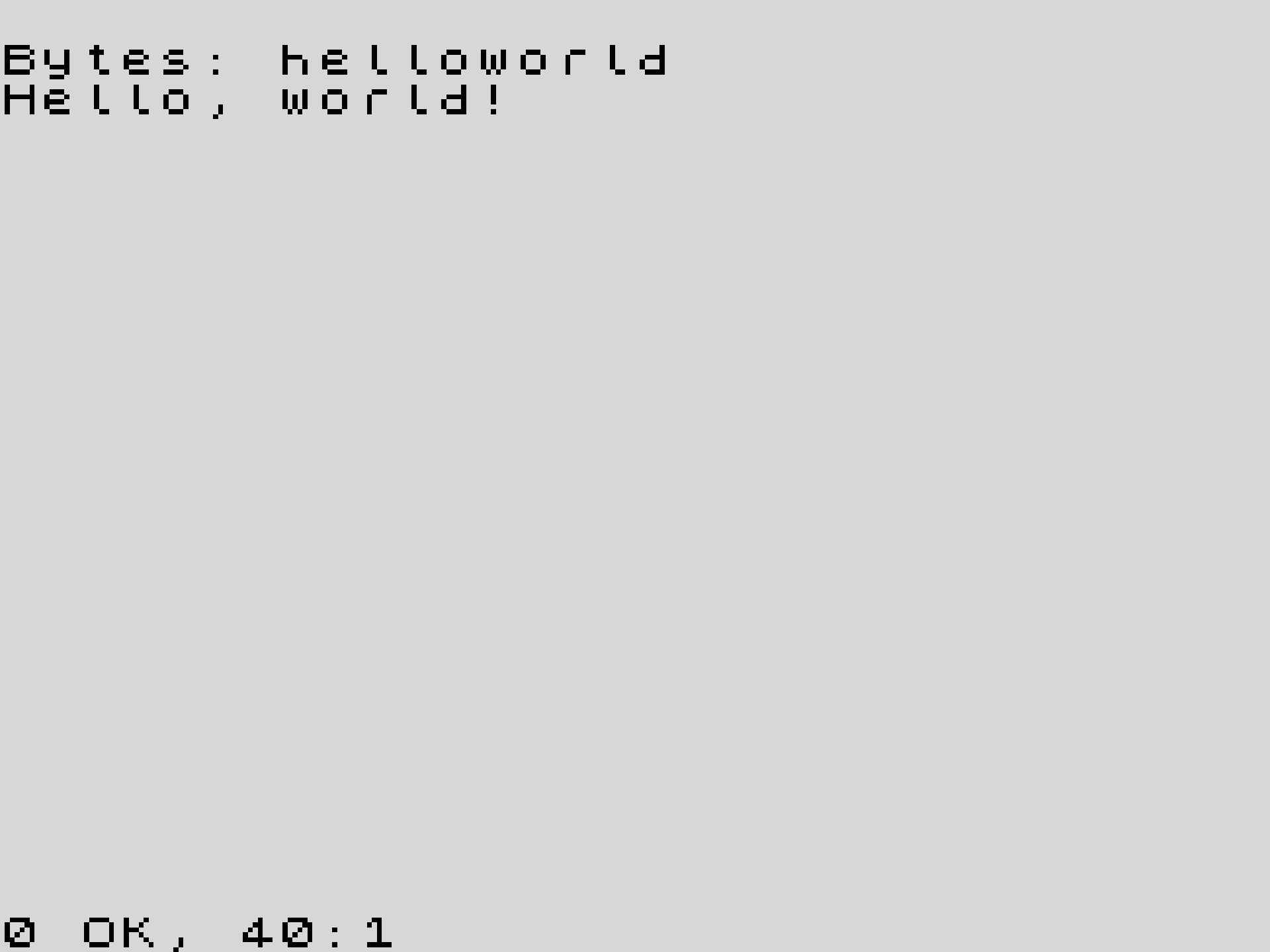
<p>Open <code>helloworld.tap</code> in Fuse or another emulator, or on an actual Spectrum Next, as I did. It should look like this:</p>
<figure>
  <img src="/img/helloworld-scaledup.jpg" width="714" height="536" alt="Screenshot of the ‘Hello, world’ program running on a Sinclair ZX Spectrum Next">
  <figcaption>Screenshot of the ‘Hello, world’ program running on a Sinclair ZX Spectrum Next. The original <code>.src</code> file was converted to a PNG with Remy Sharp’s <a href="https://zx.remysharp.com/tools/">image and font conversion tool</a>, then that 256×192 file was upscaled to 1920×1440 with Pixelmator Pro’s <a href="https://www.pixelmator.com/support/guide/pixelmator-pro/1006/">nearest-neighbour algorithm</a>.</figcaption>
</figure>
<h3 id="the-basic-loader-program">The BASIC loader program</h3>
<p>This is the BASIC loader program that Pasmo created:</p>
<pre class="language-purebasic"><code class="language-purebasic"><span class="token number">10</span> CLEAR <span class="token number">32767</span><br><span class="token number">20</span> POKE <span class="token number">23610</span><span class="token punctuation">,</span><span class="token number">255</span><br><span class="token number">30</span> LOAD <span class="token string">""</span> CODE<br><span class="token number">40</span> RANDOMIZE USR <span class="token number">32768</span></code></pre>
<p>Line by line:</p>
<ul>
<li><code>10 CLEAR 32767</code> — ensure that the BASIC interpreter doesn’t write to memory above address 32767 (as well as clear any variables that are already stored there). This value should be a byte before the start of where our machine code will be stored.</li>
<li><code>20 POKE 23610,255</code> — ‘avoid a[n] error message when using +3 loader’. (Source: <a href="https://github.com/jounikor/pasmo/blob/master/pasmo/spectrum.cxx#L159-L185"><code>spectrum.cxx</code></a> in the pasmo-0.5.5 codebase.)</li>
<li><code>30 LOAD &quot;&quot; CODE</code> — load the next binary code file the Spectrum finds (which would typically have been on a cassette tape back in the day, located just after the BASIC loader program).</li>
<li><code>40 RANDOMIZE USR 32768</code>: call (run) the machine code that’s stored starting at address 32768, which we specified in our <code>helloworld.asm</code> code on line 1 (<code>org $8000</code>), and at the end (<code>END $8000</code>) as Pasmo requires. <code>$8000</code> is a shorthand for hexadecimal 8000 (0x8000), or decimal 32768.</li>
</ul>
<h2 id="what-next%3F">What next?</h2>
<p>I just received my copy of <a href="https://hueygames.com/40-bmcr-zx-spectrum">40 Best Machine Code Routines for the ZX Spectrum</a> by John Hardman and Andrew Hewson (with a new chapter on the Next by Jim Bagley), and it seems like an accessible guide to using machine code. I’ll try out some of the routines.</p>
<p>The tutorial <a href="https://chuntey.wordpress.com/2010/01/12/tutorial-zx-spectrum-machine-code-game-30-minutes">‘ZX Spectrum Machine Code Game in 30 Minutes!’</a> by Jon Kingsman looks intruiging, and promises the ability to program in machine code in the time it takes to consume a large cup of tea. I tend to ‘learn by doing’ so I think I may tackle this next.</p>
<h2 id="sources">Sources</h2>
<ul>
<li><a href="https://benjamin.computer/posts/2022-04-22-ZX-coding.html">Assembly on the ZX Spectrum - Part 1, Benjamin Blundel</a></li>
<li>Original source of this ‘Hello, world’ code may have been <a href="https://github.com/DIDIx13/hello-world/blob/master/ASSEMBLER-Z80-ZXSPECTRUM">DIDIx13/hello-world</a></li>
<li><a href="https://www.amazon.co.uk/Spectrum-Machine-Language-Absolute-Beginner/dp/1789822378">Spectrum Machine Language for the Absolute Beginner</a>, ed. William Tang. 1982 (2020 reprint)</li>
<li>Jonathan Cauldwell, <a href="https://jonathan-cauldwell.itch.io/how-to-write-spectrum-games">How to Write ZX Spectrum Games</a>, v1.1 (?2020): ‘Chapter Eighteen - Making Games Load and Run Automatically’</li>
<li><a href="http://www.breakintoprogram.co.uk/hardware/computers/zx-spectrum/memory-map">Spectrum memory map</a>, Dean Belfield</li>
<li><a href="https://pasmo.speccy.org/pasmodoc.html">Pasmo docs</a></li>
<li>ChatGPT (GPT-4)</li>
</ul>

    ]]>
      </content>
    </entry>
  
    
    <entry>
      <title>Get a local instance of Drupal up and running fast with DDEV</title>
      <link href="/posts/drupal-ddev-mac/"/>
      <updated>2023-06-08T23:00:00+01:00</updated>
      <id>/posts/drupal-ddev-mac/</id>
      <content type="html">
        <![CDATA[
      <p>This is the quickest way I’ve found to get a local instance of Drupal up and running on macOS. Deployment to a server isn’t covered in this post.</p>
<h2 id="requirements">Requirements</h2>
<p>If you have not already done so, install the following tools:</p>
<ol>
<li><a href="https://docs.docker.com/desktop/mac/install/">Docker Desktop</a></li>
<li><a href="https://brew.sh">Homebrew</a>: <code>/bin/bash -c &quot;$(curl -fsSL https://raw.githubusercontent.com/Homebrew/install/HEAD/install.sh)&quot;</code></li>
<li><a href="https://getcomposer.org">Composer</a>: <code>brew install composer</code></li>
<li><a href="https://nodejs.org/en">Node</a>/<a href="https://www.npmjs.com">npm</a>: <code>brew install node</code></li>
<li><a href="https://ddev.com">DDEV</a>: <code>brew tap drud/ddev &amp;&amp; brew install ddev</code></li>
<li><a href="https://mkcert.org">mkcert</a>: <code>mkcert -install</code></li>
</ol>
<h2 id="installation">Installation</h2>
<p>I initially followed <a href="https://www.digitalocean.com/community/tutorials/how-to-develop-a-drupal-9-website-on-your-local-machine-using-docker-and-ddev">this Digital Ocean guide</a> and distilled the key steps into the below sequence. (The Digital Ocean tutorial also covers Linux.)</p>
<ol>
  <li><code>mkdir &lt;project-name&gt;</code></li>
  <li><code>cd &lt;project-name&gt;</code></li>
  <li><code>ddev config --project-type=drupal9 --docroot=web --create-docroot</code></li>
  <li><code>ddev start</code></li>
  <li><code>ddev composer create "drupal/recommended-project"</code>
    <ul>
      <li>This will install the latest stable version of Drupal. To choose an older version, say v10, run <code>ddev composer create "drupal/recommended-project:^10"</code></li>
    </ul>
  </li>
  <li><code>ddev composer require "drush/drush"</code>
    <ul>
      <li>If you get a PHP version error running this command:
        <ol>
          <li>Update <code>php_version</code> in <code>.ddev/config.yaml</code></li>
          <li><code>ddev restart</code></li>
          <li>Run step 6 again</li>
        </ol>
      </li>
    </ul>
  <li><code>ddev exec drush site:install --account-name=admin --account-pass=admin</code> (or replace <code>admin</code> with a more secure username and password)</li>
  <li>Modify the path for the config files in the DDEV settings file: <code style="display: block;">sed -i '' "s|^# \\\$settings\['config_sync_directory'\].*|\$settings['config_sync_directory'] = '../config/sync';|" web/sites/default/settings.php</code></li>
  <li><code>ddev launch</code></li>
</ol>
<p>The new Drupal site, with the URL <code>https://&lt;project-name&gt;.ddev.site/</code>, should now open in your browser.</p>
<h2 id="that%E2%80%99s-it">That’s it</h2>
<p>You might like to install <a href="https://www.drupal.org/project/bootstrap5">Bootstrap5</a> as a starter theme: <code>composer require 'drupal/bootstrap5'</code>. And these modules:</p>
<ol>
<li><a href="https://www.drupal.org/project/simple_sitemap">Simple XML sitemap</a>: <code>composer require drupal/simple_sitemap &amp;&amp; ddev drush pm:enable simple_sitemap</code></li>
<li><a href="https://www.drupal.org/project/admin_toolbar">Admin Toolbar</a>: <code>composer require drupal/admin_toolbar &amp;&amp; ddev drush pm:enable admin_toolbar admin_toolbar_tools admin_toolbar_search</code></li>
<li><a href="https://www.drupal.org/project/pathauto">Pathauto</a>: <code>composer require drupal/pathauto &amp;&amp; ddev drush pm:enable pathauto</code></li>
</ol>
<p>At this point you might commit the code to a git repo, then get on with developing your site.</p>
<p>If you have any corrections or optimisations, please comment below.</p>

    ]]>
      </content>
    </entry>
  
    
    <entry>
      <title>Writing some JavaScript to download files from the web, with help from an AI chatbot</title>
      <link href="/posts/chatgpt-file-download-browser/"/>
      <updated>2023-04-30T23:00:00+01:00</updated>
      <id>/posts/chatgpt-file-download-browser/</id>
      <content type="html">
        <![CDATA[
      <p><a href="https://openai.com/blog/chatgpt">ChatGPT</a> really does supercharge your productivity as a developer. Code that would have taken maybe an hour or two (or more) to write and test using the power of human thought can now be produced by said human explaining the problem to ChatGPT and having it write the code.</p>
<p>For this blog post I’ve chosen a practical, real-life example from my archive of ChatGPT conversations. The problem in this case: I wanted to download a bunch of files (PDFs mostly) for which I had a list of URLs. My initial thought was to look into whether I could run something in the browser, for three reasons:</p>
<ol>
<li>I’m a front-end dev whose natural habitat is the browser, so I should be able to whip up a solution quickly.</li>
<li>You don’t need to worry about authentication (if the files are only accessible when you’re logged in) as you can run the code from within an authenticated browser session.</li>
<li>The code can be run by others easily on their own machines.</li>
</ol>
<p>On being presented with this problem, rather than start from a blank slate, I had a conversation with ChatGPT (GPT-4) about it. I’ve reproduced a lightly edited version of it below.</p>
<p>I’m aware that in blogging about a ChatGPT conversation I could be accused of being a bore (like somebody going on about the dream they had last night). However, large language model-based products, like ChatGPT and <a href="https://github.com/features/copilot">GitHub Copilot</a>, look like they’re ushering in a major change in how sofware developers work, so I thought why not write about how I’m using them.</p>
<p>ChatGPT maintains context throughout the conversation so I can ask it questions about the information it’s given me (<a href="#async">‘What does <code>async</code> do?’</a> and <a href="#destructuring">‘Is that called “destructuring”?’</a>), and ask it to refactor code to meet new requirements (<a href="#refactor">‘Can you refactor <code>downloadPDF()</code> to handle multiple PDFs?’</a>, <a href="#mime-type">‘Can I determine the MIME type?’</a>).</p>
<blockquote>
<p>If you’re in a hurry, you can <a href="#final">jump</a> straight to the final iteration of the code.</p>
</blockquote>
<hr>
<blockquote class="prompt-q">
<p>JavaScript function to fetch and download PDF.</p>
</blockquote>
<blockquote class="prompt-a w-990">
<p>To fetch and download a PDF using JavaScript, you can use the <code>fetch</code> function to get the PDF data as a Blob and then create a download link using that Blob. Here’s an example function that takes a URL and a filename as parameters:</p>
<pre class="language-javascript"><code class="language-javascript"><span class="token keyword">async</span> <span class="token keyword">function</span> <span class="token function">downloadPDF</span><span class="token punctuation">(</span><span class="token parameter">url<span class="token punctuation">,</span> filename</span><span class="token punctuation">)</span> <span class="token punctuation">{</span><br>  <span class="token keyword">try</span> <span class="token punctuation">{</span><br>	<span class="token comment">// Fetch the PDF data as a Blob</span><br>	<span class="token keyword">const</span> response <span class="token operator">=</span> <span class="token keyword">await</span> <span class="token function">fetch</span><span class="token punctuation">(</span>url<span class="token punctuation">)</span><span class="token punctuation">;</span><br>	<span class="token keyword">const</span> blob <span class="token operator">=</span> <span class="token keyword">await</span> response<span class="token punctuation">.</span><span class="token function">blob</span><span class="token punctuation">(</span><span class="token punctuation">)</span><span class="token punctuation">;</span><br><br>	<span class="token comment">// Create a download link and set its attributes</span><br>	<span class="token keyword">const</span> link <span class="token operator">=</span> document<span class="token punctuation">.</span><span class="token function">createElement</span><span class="token punctuation">(</span><span class="token string">'a'</span><span class="token punctuation">)</span><span class="token punctuation">;</span><br>	link<span class="token punctuation">.</span>href <span class="token operator">=</span> <span class="token constant">URL</span><span class="token punctuation">.</span><span class="token function">createObjectURL</span><span class="token punctuation">(</span>blob<span class="token punctuation">)</span><span class="token punctuation">;</span><br>	link<span class="token punctuation">.</span>download <span class="token operator">=</span> filename<span class="token punctuation">;</span><br><br>	<span class="token comment">// Append the link to the document, click it, and remove it</span><br>	document<span class="token punctuation">.</span>body<span class="token punctuation">.</span><span class="token function">appendChild</span><span class="token punctuation">(</span>link<span class="token punctuation">)</span><span class="token punctuation">;</span><br>	link<span class="token punctuation">.</span><span class="token function">click</span><span class="token punctuation">(</span><span class="token punctuation">)</span><span class="token punctuation">;</span><br>	document<span class="token punctuation">.</span>body<span class="token punctuation">.</span><span class="token function">removeChild</span><span class="token punctuation">(</span>link<span class="token punctuation">)</span><span class="token punctuation">;</span><br>  <span class="token punctuation">}</span> <span class="token keyword">catch</span> <span class="token punctuation">(</span>error<span class="token punctuation">)</span> <span class="token punctuation">{</span><br>	console<span class="token punctuation">.</span><span class="token function">error</span><span class="token punctuation">(</span><span class="token string">'Error while downloading PDF:'</span><span class="token punctuation">,</span> error<span class="token punctuation">)</span><span class="token punctuation">;</span><br>  <span class="token punctuation">}</span><br><span class="token punctuation">}</span><br><br><span class="token comment">// Usage example</span><br><span class="token keyword">const</span> pdfURL <span class="token operator">=</span> <span class="token string">'https://example.com/path/to/your/pdf-file.pdf'</span><span class="token punctuation">;</span><br><span class="token keyword">const</span> pdfFilename <span class="token operator">=</span> <span class="token string">'downloaded-pdf-file.pdf'</span><span class="token punctuation">;</span><br><span class="token function">downloadPDF</span><span class="token punctuation">(</span>pdfURL<span class="token punctuation">,</span> pdfFilename<span class="token punctuation">)</span><span class="token punctuation">;</span></code></pre>
<p>Make sure to replace the <code>pdfURL</code> variable with the URL of the PDF file you want to download. The <code>pdfFilename</code> variable is the name that will be given to the downloaded file.</p>
</blockquote>
<p>[Tangential question removed.]</p>
<blockquote class="prompt-q" id="refactor">
<p>Re the <code>downloadPDF()</code> function you wrote, can you refactor to handle a list of PDFs to download, each with a specific, defined value[?]</p>
</blockquote>
<blockquote class="prompt-a w-990">
<p>Certainly! Here’s a modified version of the <code>downloadPDF</code> function that accepts an array of objects, each containing the URL and filename for a PDF. The function will download all PDFs one after another.</p>
<pre class="language-javascript"><code class="language-javascript"><mark class="highlight-line highlight-line-active"><span class="token keyword">async</span> <span class="token keyword">function</span> <span class="token function">downloadPDFs</span><span class="token punctuation">(</span><span class="token parameter">pdfs</span><span class="token punctuation">)</span> <span class="token punctuation">{</span></mark><br><mark class="highlight-line highlight-line-active">  <span class="token comment">// [Deleted]</span></mark><br><mark class="highlight-line highlight-line-active"></mark><br><mark class="highlight-line highlight-line-active">  <span class="token keyword">for</span> <span class="token punctuation">(</span><span class="token keyword">const</span> pdf <span class="token keyword">of</span> pdfs<span class="token punctuation">)</span> <span class="token punctuation">{</span></mark><br><mark class="highlight-line highlight-line-active">	<span class="token keyword">const</span> <span class="token punctuation">{</span> url<span class="token punctuation">,</span> filename <span class="token punctuation">}</span> <span class="token operator">=</span> pdf<span class="token punctuation">;</span></mark><br><span class="highlight-line">	<span class="token keyword">try</span> <span class="token punctuation">{</span></span><br><span class="highlight-line">	  <span class="token comment">// Fetch the PDF data as a Blob</span></span><br><span class="highlight-line">	  <span class="token keyword">const</span> response <span class="token operator">=</span> <span class="token keyword">await</span> <span class="token function">fetch</span><span class="token punctuation">(</span>url<span class="token punctuation">)</span><span class="token punctuation">;</span></span><br><span class="highlight-line">	  <span class="token keyword">const</span> blob <span class="token operator">=</span> <span class="token keyword">await</span> response<span class="token punctuation">.</span><span class="token function">blob</span><span class="token punctuation">(</span><span class="token punctuation">)</span><span class="token punctuation">;</span></span><br><span class="highlight-line"></span><br><span class="highlight-line">	  <span class="token comment">// Create a download link and set its attributes</span></span><br><span class="highlight-line">	  <span class="token keyword">const</span> link <span class="token operator">=</span> document<span class="token punctuation">.</span><span class="token function">createElement</span><span class="token punctuation">(</span><span class="token string">'a'</span><span class="token punctuation">)</span><span class="token punctuation">;</span></span><br><span class="highlight-line">	  link<span class="token punctuation">.</span>href <span class="token operator">=</span> <span class="token constant">URL</span><span class="token punctuation">.</span><span class="token function">createObjectURL</span><span class="token punctuation">(</span>blob<span class="token punctuation">)</span><span class="token punctuation">;</span></span><br><span class="highlight-line">	  link<span class="token punctuation">.</span>download <span class="token operator">=</span> filename<span class="token punctuation">;</span></span><br><span class="highlight-line"></span><br><span class="highlight-line">	  <span class="token comment">// Append the link to the document, click it, and remove it</span></span><br><span class="highlight-line">	  document<span class="token punctuation">.</span>body<span class="token punctuation">.</span><span class="token function">appendChild</span><span class="token punctuation">(</span>link<span class="token punctuation">)</span><span class="token punctuation">;</span></span><br><span class="highlight-line">	  link<span class="token punctuation">.</span><span class="token function">click</span><span class="token punctuation">(</span><span class="token punctuation">)</span><span class="token punctuation">;</span></span><br><span class="highlight-line">	  document<span class="token punctuation">.</span>body<span class="token punctuation">.</span><span class="token function">removeChild</span><span class="token punctuation">(</span>link<span class="token punctuation">)</span><span class="token punctuation">;</span></span><br><span class="highlight-line"></span><br><mark class="highlight-line highlight-line-active">	  <span class="token comment">// Add a delay to avoid triggering browser's security mechanisms</span></mark><br><mark class="highlight-line highlight-line-active">	  <span class="token keyword">await</span> <span class="token keyword">new</span> <span class="token class-name">Promise</span><span class="token punctuation">(</span><span class="token punctuation">(</span><span class="token parameter">resolve</span><span class="token punctuation">)</span> <span class="token operator">=></span> <span class="token function">setTimeout</span><span class="token punctuation">(</span>resolve<span class="token punctuation">,</span> <span class="token number">1000</span><span class="token punctuation">)</span><span class="token punctuation">)</span><span class="token punctuation">;</span></mark><br><span class="highlight-line">	<span class="token punctuation">}</span> <span class="token keyword">catch</span> <span class="token punctuation">(</span>error<span class="token punctuation">)</span> <span class="token punctuation">{</span></span><br><mark class="highlight-line highlight-line-active">	  console<span class="token punctuation">.</span><span class="token function">error</span><span class="token punctuation">(</span><span class="token template-string"><span class="token template-punctuation string">`</span><span class="token string">Error while downloading </span><span class="token interpolation"><span class="token interpolation-punctuation punctuation">${</span>filename<span class="token interpolation-punctuation punctuation">}</span></span><span class="token string">:</span><span class="token template-punctuation string">`</span></span><span class="token punctuation">,</span> error<span class="token punctuation">)</span><span class="token punctuation">;</span></mark><br><mark class="highlight-line highlight-line-active">	<span class="token punctuation">}</span></mark><br><span class="highlight-line">  <span class="token punctuation">}</span></span><br><mark class="highlight-line highlight-line-active"><span class="token punctuation">}</span></mark><br><span class="highlight-line"></span><br><mark class="highlight-line highlight-line-active"><span class="token comment">// Usage example</span></mark><br><mark class="highlight-line highlight-line-active"><span class="token keyword">const</span> pdfList <span class="token operator">=</span> <span class="token punctuation">[</span></mark><br><mark class="highlight-line highlight-line-active">  <span class="token punctuation">{</span></mark><br><mark class="highlight-line highlight-line-active">	<span class="token literal-property property">url</span><span class="token operator">:</span> <span class="token string">'https://example.com/path/to/your/pdf-file1.pdf'</span><span class="token punctuation">,</span></mark><br><mark class="highlight-line highlight-line-active">	<span class="token literal-property property">filename</span><span class="token operator">:</span> <span class="token string">'downloaded-pdf-file1.pdf'</span><span class="token punctuation">,</span></mark><br><mark class="highlight-line highlight-line-active">  <span class="token punctuation">}</span><span class="token punctuation">,</span></mark><br><mark class="highlight-line highlight-line-active">  <span class="token punctuation">{</span></mark><br><mark class="highlight-line highlight-line-active">	<span class="token literal-property property">url</span><span class="token operator">:</span> <span class="token string">'https://example.com/path/to/your/pdf-file2.pdf'</span><span class="token punctuation">,</span></mark><br><mark class="highlight-line highlight-line-active">	<span class="token literal-property property">filename</span><span class="token operator">:</span> <span class="token string">'downloaded-pdf-file2.pdf'</span><span class="token punctuation">,</span></mark><br><mark class="highlight-line highlight-line-active">  <span class="token punctuation">}</span><span class="token punctuation">,</span></mark><br><mark class="highlight-line highlight-line-active">  <span class="token comment">// Add more PDFs as needed</span></mark><br><mark class="highlight-line highlight-line-active"><span class="token punctuation">]</span><span class="token punctuation">;</span></mark><br><span class="highlight-line"></span><br><mark class="highlight-line highlight-line-active"><span class="token function">downloadPDFs</span><span class="token punctuation">(</span>pdfList<span class="token punctuation">)</span><span class="token punctuation">;</span></mark></code></pre>
<p>Replace the <code>pdfList</code> array with the URLs and filenames for the PDF files you want to download. The function will iterate through the list and download each PDF file with the specified filename.</p>
<p>Please note that downloading multiple files in quick succession might be flagged by some browsers as suspicious behavior, potentially causing the downloads to be blocked. To avoid this, a delay is added between downloads using <code>setTimeout</code>. You can adjust the delay time as needed.</p>
</blockquote>
<blockquote class="prompt-q" id="async">
<p>What does the <code>async</code> before the function definition mean?</p>
</blockquote>
<blockquote class="prompt-a w-990">
<p>The <code>async</code> keyword before a function definition indicates that the function is asynchronous. An asynchronous function is a function that can perform operations without blocking the execution of other code, allowing other tasks to run concurrently.</p>
<p>Asynchronous functions use the <code>await</code> keyword within their bodies to pause the execution of the function until a Promise is resolved or rejected. When a Promise is resolved, the function continues execution from the point where it was paused.</p>
<p>Here’s a simple example to illustrate how async functions work:</p>
<pre class="language-javascript"><code class="language-javascript"><span class="token keyword">async</span> <span class="token keyword">function</span> <span class="token function">fetchData</span><span class="token punctuation">(</span><span class="token punctuation">)</span> <span class="token punctuation">{</span><br>  console<span class="token punctuation">.</span><span class="token function">log</span><span class="token punctuation">(</span><span class="token string">'Fetching data...'</span><span class="token punctuation">)</span><span class="token punctuation">;</span><br><br>  <span class="token comment">// Simulate an asynchronous operation (e.g., fetching data from an API)</span><br>  <span class="token keyword">const</span> result <span class="token operator">=</span> <span class="token keyword">await</span> <span class="token keyword">new</span> <span class="token class-name">Promise</span><span class="token punctuation">(</span><span class="token punctuation">(</span><span class="token parameter">resolve</span><span class="token punctuation">)</span> <span class="token operator">=></span><br>	<span class="token function">setTimeout</span><span class="token punctuation">(</span><span class="token punctuation">(</span><span class="token punctuation">)</span> <span class="token operator">=></span> <span class="token function">resolve</span><span class="token punctuation">(</span><span class="token string">'Data fetched!'</span><span class="token punctuation">)</span><span class="token punctuation">,</span> <span class="token number">1000</span><span class="token punctuation">)</span><br>  <span class="token punctuation">)</span><span class="token punctuation">;</span><br><br>  console<span class="token punctuation">.</span><span class="token function">log</span><span class="token punctuation">(</span>result<span class="token punctuation">)</span><span class="token punctuation">;</span><br><span class="token punctuation">}</span><br><br>console<span class="token punctuation">.</span><span class="token function">log</span><span class="token punctuation">(</span><span class="token string">'Starting...'</span><span class="token punctuation">)</span><span class="token punctuation">;</span><br><span class="token function">fetchData</span><span class="token punctuation">(</span><span class="token punctuation">)</span><span class="token punctuation">;</span><br>console<span class="token punctuation">.</span><span class="token function">log</span><span class="token punctuation">(</span><span class="token string">'Waiting for data...'</span><span class="token punctuation">)</span><span class="token punctuation">;</span></code></pre>
<p>The output will be:</p>
<pre class="language-plaintext"><code class="language-plaintext">Starting...<br>Fetching data...<br>Waiting for data...<br>Data fetched!</code></pre>
<p>As you can see, the async function does not block the execution of the rest of the code. While it’s waiting for the Promise to resolve, other code (in this case, the <code>console.log('Waiting for data...')</code>) can run.</p>
<p>In the <code>downloadPDFs</code> function example, the <code>async</code> keyword allows the function to wait for the fetching and downloading of each PDF without blocking the execution of other code. This is useful when working with network requests or other asynchronous operations.</p>
</blockquote>
<blockquote class="prompt-q" id="destructuring">
<p>In the refactored <code>downloadPDFs()</code> function, what does <code>const { url, filename } = pdf;</code> do? Is that called ‘destructuring’ or something?</p>
</blockquote>
<blockquote class="prompt-a w-990">
<p>Yes, you’re correct! The line <code>const { url, filename } = pdf;</code> is an example of object destructuring in JavaScript. Object destructuring is a syntax feature that allows you to extract properties from an object and create new variables that hold the values of these properties.</p>
<p>In the <code>downloadPDFs()</code> function, the <code>pdfs</code> parameter is an array of objects, where each object has a <code>url</code> and <code>filename</code> property. The line <code>const { url, filename } = pdf;</code> is used to extract the <code>url</code> and <code>filename</code> properties from the current <code>pdf</code> object in the loop. This creates two new variables <code>url</code> and <code>filename</code> holding the respective values, which can then be used in the following lines of code.</p>
<p>Here’s a simple example to illustrate object destructuring:</p>
<pre class="language-javascript"><code class="language-javascript"><span class="token keyword">const</span> person <span class="token operator">=</span> <span class="token punctuation">{</span><br>  <span class="token literal-property property">name</span><span class="token operator">:</span> <span class="token string">'John'</span><span class="token punctuation">,</span><br>  <span class="token literal-property property">age</span><span class="token operator">:</span> <span class="token number">30</span><span class="token punctuation">,</span><br><span class="token punctuation">}</span><span class="token punctuation">;</span><br><br><span class="token keyword">const</span> <span class="token punctuation">{</span> name<span class="token punctuation">,</span> age <span class="token punctuation">}</span> <span class="token operator">=</span> person<span class="token punctuation">;</span><br><br>console<span class="token punctuation">.</span><span class="token function">log</span><span class="token punctuation">(</span>name<span class="token punctuation">)</span><span class="token punctuation">;</span> <span class="token comment">// Output: 'John'</span><br>console<span class="token punctuation">.</span><span class="token function">log</span><span class="token punctuation">(</span>age<span class="token punctuation">)</span><span class="token punctuation">;</span>  <span class="token comment">// Output: 30</span></code></pre>
<p>In this example, the <code>name</code> and <code>age</code> properties are extracted from the <code>person</code> object, and new variables <code>name</code> and <code>age</code> are created with the corresponding values.</p>
</blockquote>
<blockquote class="prompt-q">
<p>Can you do this with arrays, for example if <code>pdfList</code> was an array of arrays, each PDF array being the format <code>['https://example.com/pdfs/pdf1.pdf', 'pdf1.pdf']</code>?</p>
</blockquote>
<blockquote class="prompt-a w-990">
<p>Yes, you can use array destructuring to handle the <code>pdfList</code> if it’s an array of arrays. Array destructuring works similarly to object destructuring but is used to extract elements from arrays. Here’s the modified version of the <code>downloadPDFs()</code> function that works with an array of arrays:</p>
<pre class="language-javascript"><code class="language-javascript"><span class="highlight-line"><span class="token keyword">async</span> <span class="token keyword">function</span> <span class="token function">downloadPDFs</span><span class="token punctuation">(</span><span class="token parameter">pdfs</span><span class="token punctuation">)</span> <span class="token punctuation">{</span></span><br><span class="highlight-line">  <span class="token keyword">for</span> <span class="token punctuation">(</span><span class="token keyword">const</span> pdf <span class="token keyword">of</span> pdfs<span class="token punctuation">)</span> <span class="token punctuation">{</span></span><br><mark class="highlight-line highlight-line-active">	<span class="token keyword">const</span> <span class="token punctuation">[</span>url<span class="token punctuation">,</span> filename<span class="token punctuation">]</span> <span class="token operator">=</span> pdf<span class="token punctuation">;</span> <span class="token comment">// Array destructuring</span></mark><br><span class="highlight-line">	<span class="token keyword">try</span> <span class="token punctuation">{</span></span><br><span class="highlight-line">	  <span class="token comment">// Fetch the PDF data as a Blob</span></span><br><span class="highlight-line">	  <span class="token keyword">const</span> response <span class="token operator">=</span> <span class="token keyword">await</span> <span class="token function">fetch</span><span class="token punctuation">(</span>url<span class="token punctuation">)</span><span class="token punctuation">;</span></span><br><span class="highlight-line">	  <span class="token keyword">const</span> blob <span class="token operator">=</span> <span class="token keyword">await</span> response<span class="token punctuation">.</span><span class="token function">blob</span><span class="token punctuation">(</span><span class="token punctuation">)</span><span class="token punctuation">;</span></span><br><span class="highlight-line"></span><br><span class="highlight-line">	  <span class="token comment">// Create a download link and set its attributes</span></span><br><span class="highlight-line">	  <span class="token keyword">const</span> link <span class="token operator">=</span> document<span class="token punctuation">.</span><span class="token function">createElement</span><span class="token punctuation">(</span><span class="token string">'a'</span><span class="token punctuation">)</span><span class="token punctuation">;</span></span><br><span class="highlight-line">	  link<span class="token punctuation">.</span>href <span class="token operator">=</span> <span class="token constant">URL</span><span class="token punctuation">.</span><span class="token function">createObjectURL</span><span class="token punctuation">(</span>blob<span class="token punctuation">)</span><span class="token punctuation">;</span></span><br><span class="highlight-line">	  link<span class="token punctuation">.</span>download <span class="token operator">=</span> filename<span class="token punctuation">;</span></span><br><span class="highlight-line"></span><br><span class="highlight-line">	  <span class="token comment">// Append the link to the document, click it, and remove it</span></span><br><span class="highlight-line">	  document<span class="token punctuation">.</span>body<span class="token punctuation">.</span><span class="token function">appendChild</span><span class="token punctuation">(</span>link<span class="token punctuation">)</span><span class="token punctuation">;</span></span><br><span class="highlight-line">	  link<span class="token punctuation">.</span><span class="token function">click</span><span class="token punctuation">(</span><span class="token punctuation">)</span><span class="token punctuation">;</span></span><br><span class="highlight-line">	  document<span class="token punctuation">.</span>body<span class="token punctuation">.</span><span class="token function">removeChild</span><span class="token punctuation">(</span>link<span class="token punctuation">)</span><span class="token punctuation">;</span></span><br><span class="highlight-line"></span><br><span class="highlight-line">	  <span class="token comment">// Add a delay to avoid triggering browser's security mechanisms</span></span><br><span class="highlight-line">	  <span class="token keyword">await</span> <span class="token keyword">new</span> <span class="token class-name">Promise</span><span class="token punctuation">(</span><span class="token punctuation">(</span><span class="token parameter">resolve</span><span class="token punctuation">)</span> <span class="token operator">=></span> <span class="token function">setTimeout</span><span class="token punctuation">(</span>resolve<span class="token punctuation">,</span> <span class="token number">1000</span><span class="token punctuation">)</span><span class="token punctuation">)</span><span class="token punctuation">;</span></span><br><span class="highlight-line">	<span class="token punctuation">}</span> <span class="token keyword">catch</span> <span class="token punctuation">(</span>error<span class="token punctuation">)</span> <span class="token punctuation">{</span></span><br><span class="highlight-line">	  console<span class="token punctuation">.</span><span class="token function">error</span><span class="token punctuation">(</span><span class="token template-string"><span class="token template-punctuation string">`</span><span class="token string">Error while downloading </span><span class="token interpolation"><span class="token interpolation-punctuation punctuation">${</span>filename<span class="token interpolation-punctuation punctuation">}</span></span><span class="token string">:</span><span class="token template-punctuation string">`</span></span><span class="token punctuation">,</span> error<span class="token punctuation">)</span><span class="token punctuation">;</span></span><br><span class="highlight-line">	<span class="token punctuation">}</span></span><br><span class="highlight-line">  <span class="token punctuation">}</span></span><br><span class="highlight-line"><span class="token punctuation">}</span></span><br><span class="highlight-line"></span><br><span class="highlight-line"><span class="token comment">// Usage example</span></span><br><span class="highlight-line"><span class="token keyword">const</span> pdfList <span class="token operator">=</span> <span class="token punctuation">[</span></span><br><mark class="highlight-line highlight-line-active">  <span class="token punctuation">[</span></mark><br><mark class="highlight-line highlight-line-active">	<span class="token string">'https://example.com/path/to/your/pdf-file1.pdf'</span><span class="token punctuation">,</span></mark><br><mark class="highlight-line highlight-line-active">	<span class="token string">'downloaded-pdf-file1.pdf'</span><span class="token punctuation">,</span></mark><br><mark class="highlight-line highlight-line-active">  <span class="token punctuation">]</span><span class="token punctuation">,</span></mark><br><mark class="highlight-line highlight-line-active">  <span class="token punctuation">[</span></mark><br><mark class="highlight-line highlight-line-active">	<span class="token string">'https://example.com/path/to/your/pdf-file2.pdf'</span><span class="token punctuation">,</span></mark><br><mark class="highlight-line highlight-line-active">	<span class="token string">'downloaded-pdf-file2.pdf'</span><span class="token punctuation">,</span></mark><br><mark class="highlight-line highlight-line-active">  <span class="token punctuation">]</span><span class="token punctuation">,</span></mark><br><span class="highlight-line">  <span class="token comment">// Add more PDFs as needed</span></span><br><span class="highlight-line"><span class="token punctuation">]</span><span class="token punctuation">;</span></span><br><span class="highlight-line"></span><br><span class="highlight-line"><span class="token function">downloadPDFs</span><span class="token punctuation">(</span>pdfList<span class="token punctuation">)</span><span class="token punctuation">;</span></span></code></pre>
<p>In this version, the line <code>const [url, filename] = pdf;</code> uses array destructuring to extract the URL and filename from each array element in <code>pdfList</code>. The rest of the function remains the same.</p>
</blockquote>
<blockquote class="prompt-q" id="mime-type">
<p>Say some of the files were Word docs (<code>.docx</code>); can I determine the MIME type from the response so I can give the file to be downloaded the correct file extension?</p>
</blockquote>
<blockquote class="prompt-a w-990">
<p>Yes, you can determine the MIME type of the fetched file from the <code>Content-Type</code> header in the response object. Based on the MIME type, you can set the appropriate file extension for the downloaded file. Here’s the modified version of the <code>downloadPDFs()</code> function that handles different file types and sets the correct file extension:</p>
<pre class="language-javascript"><code class="language-javascript"><mark class="highlight-line highlight-line-active"><span class="token keyword">async</span> <span class="token keyword">function</span> <span class="token function">downloadFiles</span><span class="token punctuation">(</span><span class="token parameter">files</span><span class="token punctuation">)</span> <span class="token punctuation">{</span></mark><br><mark class="highlight-line highlight-line-active">  <span class="token keyword">for</span> <span class="token punctuation">(</span><span class="token keyword">const</span> file <span class="token keyword">of</span> files<span class="token punctuation">)</span> <span class="token punctuation">{</span></mark><br><mark class="highlight-line highlight-line-active">	<span class="token keyword">const</span> <span class="token punctuation">[</span>url<span class="token punctuation">,</span> filename<span class="token punctuation">]</span> <span class="token operator">=</span> file<span class="token punctuation">;</span></mark><br><span class="highlight-line">	<span class="token keyword">try</span> <span class="token punctuation">{</span></span><br><mark class="highlight-line highlight-line-active">	  <span class="token comment">// Fetch the file data as a Blob</span></mark><br><span class="highlight-line">	  <span class="token keyword">const</span> response <span class="token operator">=</span> <span class="token keyword">await</span> <span class="token function">fetch</span><span class="token punctuation">(</span>url<span class="token punctuation">)</span><span class="token punctuation">;</span></span><br><span class="highlight-line">	  <span class="token keyword">const</span> blob <span class="token operator">=</span> <span class="token keyword">await</span> response<span class="token punctuation">.</span><span class="token function">blob</span><span class="token punctuation">(</span><span class="token punctuation">)</span><span class="token punctuation">;</span></span><br><span class="highlight-line"></span><br><mark class="highlight-line highlight-line-active">	  <span class="token comment">// Get the MIME type from the response headers</span></mark><br><mark class="highlight-line highlight-line-active">	  <span class="token keyword">const</span> contentType <span class="token operator">=</span> response<span class="token punctuation">.</span>headers<span class="token punctuation">.</span><span class="token function">get</span><span class="token punctuation">(</span><span class="token string">'content-type'</span><span class="token punctuation">)</span><span class="token punctuation">;</span></mark><br><mark class="highlight-line highlight-line-active">	  <span class="token keyword">let</span> extension<span class="token punctuation">;</span></mark><br><span class="highlight-line"></span><br><mark class="highlight-line highlight-line-active">	  <span class="token comment">// Determine the file extension based on the MIME type</span></mark><br><mark class="highlight-line highlight-line-active">	  <span class="token keyword">switch</span> <span class="token punctuation">(</span>contentType<span class="token punctuation">)</span> <span class="token punctuation">{</span></mark><br><mark class="highlight-line highlight-line-active">		<span class="token keyword">case</span> <span class="token string">'application/pdf'</span><span class="token operator">:</span></mark><br><mark class="highlight-line highlight-line-active">		  extension <span class="token operator">=</span> <span class="token string">'.pdf'</span><span class="token punctuation">;</span></mark><br><mark class="highlight-line highlight-line-active">		  <span class="token keyword">break</span><span class="token punctuation">;</span></mark><br><mark class="highlight-line highlight-line-active">		<span class="token keyword">case</span> <span class="token string">'application/vnd.openxmlformats-officedocument.wordprocessingml.document'</span><span class="token operator">:</span></mark><br><mark class="highlight-line highlight-line-active">		  extension <span class="token operator">=</span> <span class="token string">'.docx'</span><span class="token punctuation">;</span></mark><br><mark class="highlight-line highlight-line-active">		  <span class="token keyword">break</span><span class="token punctuation">;</span></mark><br><mark class="highlight-line highlight-line-active">		<span class="token comment">// Add more cases for other MIME types if needed</span></mark><br><mark class="highlight-line highlight-line-active">		<span class="token keyword">default</span><span class="token operator">:</span></mark><br><mark class="highlight-line highlight-line-active">		  extension <span class="token operator">=</span> <span class="token string">''</span><span class="token punctuation">;</span> <span class="token comment">// Fallback to no extension if MIME type is unknown</span></mark><br><mark class="highlight-line highlight-line-active">	  <span class="token punctuation">}</span></mark><br><span class="highlight-line"></span><br><span class="highlight-line">	  <span class="token comment">// Create a download link and set its attributes</span></span><br><span class="highlight-line">	  <span class="token keyword">const</span> link <span class="token operator">=</span> document<span class="token punctuation">.</span><span class="token function">createElement</span><span class="token punctuation">(</span><span class="token string">'a'</span><span class="token punctuation">)</span><span class="token punctuation">;</span></span><br><span class="highlight-line">	  link<span class="token punctuation">.</span>href <span class="token operator">=</span> <span class="token constant">URL</span><span class="token punctuation">.</span><span class="token function">createObjectURL</span><span class="token punctuation">(</span>blob<span class="token punctuation">)</span><span class="token punctuation">;</span></span><br><mark class="highlight-line highlight-line-active">	  link<span class="token punctuation">.</span>download <span class="token operator">=</span> filename <span class="token operator">+</span> extension<span class="token punctuation">;</span></mark><br><span class="highlight-line"></span><br><span class="highlight-line">	  <span class="token comment">// Append the link to the document, click it, and remove it</span></span><br><span class="highlight-line">	  document<span class="token punctuation">.</span>body<span class="token punctuation">.</span><span class="token function">appendChild</span><span class="token punctuation">(</span>link<span class="token punctuation">)</span><span class="token punctuation">;</span></span><br><span class="highlight-line">	  link<span class="token punctuation">.</span><span class="token function">click</span><span class="token punctuation">(</span><span class="token punctuation">)</span><span class="token punctuation">;</span></span><br><span class="highlight-line">	  document<span class="token punctuation">.</span>body<span class="token punctuation">.</span><span class="token function">removeChild</span><span class="token punctuation">(</span>link<span class="token punctuation">)</span><span class="token punctuation">;</span></span><br><span class="highlight-line"></span><br><span class="highlight-line">	  <span class="token comment">// Add a delay to avoid triggering browser's security mechanisms</span></span><br><span class="highlight-line">	  <span class="token keyword">await</span> <span class="token keyword">new</span> <span class="token class-name">Promise</span><span class="token punctuation">(</span><span class="token punctuation">(</span><span class="token parameter">resolve</span><span class="token punctuation">)</span> <span class="token operator">=></span> <span class="token function">setTimeout</span><span class="token punctuation">(</span>resolve<span class="token punctuation">,</span> <span class="token number">1000</span><span class="token punctuation">)</span><span class="token punctuation">)</span><span class="token punctuation">;</span></span><br><span class="highlight-line">	<span class="token punctuation">}</span> <span class="token keyword">catch</span> <span class="token punctuation">(</span>error<span class="token punctuation">)</span> <span class="token punctuation">{</span></span><br><span class="highlight-line">	  console<span class="token punctuation">.</span><span class="token function">error</span><span class="token punctuation">(</span><span class="token template-string"><span class="token template-punctuation string">`</span><span class="token string">Error while downloading </span><span class="token interpolation"><span class="token interpolation-punctuation punctuation">${</span>filename<span class="token interpolation-punctuation punctuation">}</span></span><span class="token string">:</span><span class="token template-punctuation string">`</span></span><span class="token punctuation">,</span> error<span class="token punctuation">)</span><span class="token punctuation">;</span></span><br><span class="highlight-line">	<span class="token punctuation">}</span></span><br><span class="highlight-line">  <span class="token punctuation">}</span></span><br><span class="highlight-line"><span class="token punctuation">}</span></span><br><span class="highlight-line"></span><br><span class="highlight-line"><span class="token comment">// Usage example</span></span><br><mark class="highlight-line highlight-line-active"><span class="token keyword">const</span> fileList <span class="token operator">=</span> <span class="token punctuation">[</span></mark><br><span class="highlight-line">  <span class="token punctuation">[</span></span><br><span class="highlight-line">	<span class="token string">'https://example.com/path/to/your/pdf-file1.pdf'</span><span class="token punctuation">,</span></span><br><mark class="highlight-line highlight-line-active">	<span class="token string">'downloaded-pdf-file1'</span><span class="token punctuation">,</span></mark><br><span class="highlight-line">  <span class="token punctuation">]</span><span class="token punctuation">,</span></span><br><span class="highlight-line">  <span class="token punctuation">[</span></span><br><mark class="highlight-line highlight-line-active">	<span class="token string">'https://example.com/path/to/your/word-file1.docx'</span><span class="token punctuation">,</span></mark><br><mark class="highlight-line highlight-line-active">	<span class="token string">'downloaded-word-file1'</span><span class="token punctuation">,</span></mark><br><span class="highlight-line">  <span class="token punctuation">]</span><span class="token punctuation">,</span></span><br><mark class="highlight-line highlight-line-active">  <span class="token comment">// Add more files as needed</span></mark><br><span class="highlight-line"><span class="token punctuation">]</span><span class="token punctuation">;</span></span><br><span class="highlight-line"></span><br><mark class="highlight-line highlight-line-active"><span class="token function">downloadFiles</span><span class="token punctuation">(</span>fileList<span class="token punctuation">)</span><span class="token punctuation">;</span></mark></code></pre>
<p>In this version, the function is renamed to <code>downloadFiles()</code> to reflect that it can handle different file types. The MIME type is obtained from the response headers using <code>response.headers.get('content-type')</code>, and a <code>switch</code> statement is used to determine the appropriate file extension based on the MIME type. The <code>link.download</code> attribute is set to the filename concatenated with the determined file extension.</p>
<p>Please note that this approach relies on the server providing the correct <code>Content-Type</code> header for the files. If the server doesn’t provide the correct MIME type, you might need to use an alternative method, such as checking the file extension in the URL or using a library to determine the file type based on the content.</p>
</blockquote>
<p><a id="final"></a>And that was me with the code I needed. I manually tidied it up a bit, and this is the format of the final version that I ran:</p>
<pre class="language-javascript"><code class="language-javascript"><span class="highlight-line"><span class="token keyword">async</span> <span class="token keyword">function</span> <span class="token function">downloadFiles</span><span class="token punctuation">(</span><span class="token parameter">files</span><span class="token punctuation">)</span> <span class="token punctuation">{</span></span><br><span class="highlight-line"></span><br><mark class="highlight-line highlight-line-active">  <span class="token comment">// MIME type: file extension</span></mark><br><mark class="highlight-line highlight-line-active">  <span class="token keyword">const</span> fileExtensions <span class="token operator">=</span> <span class="token punctuation">{</span></mark><br><mark class="highlight-line highlight-line-active">	<span class="token string-property property">'application/pdf'</span><span class="token operator">:</span> <span class="token string">'pdf'</span><span class="token punctuation">,</span></mark><br><mark class="highlight-line highlight-line-active">	<span class="token string-property property">'application/vnd.openxmlformats-officedocument.wordprocessingml.document'</span><span class="token operator">:</span> <span class="token string">'docx'</span><span class="token punctuation">,</span></mark><br><mark class="highlight-line highlight-line-active">	<span class="token string-property property">'application/msword'</span><span class="token operator">:</span> <span class="token string">'doc'</span><span class="token punctuation">,</span></mark><br><mark class="highlight-line highlight-line-active">	<span class="token string-property property">'application/zip'</span><span class="token operator">:</span> <span class="token string">'zip'</span></mark><br><mark class="highlight-line highlight-line-active">  <span class="token punctuation">}</span></mark><br><span class="highlight-line"></span><br><mark class="highlight-line highlight-line-active">  <span class="token keyword">const</span> mimeTypes <span class="token operator">=</span> <span class="token punctuation">[</span><span class="token punctuation">]</span><span class="token punctuation">;</span></mark><br><span class="highlight-line"></span><br><mark class="highlight-line highlight-line-active">  <span class="token comment">// Collate MIME types</span></mark><br><mark class="highlight-line highlight-line-active">  Object<span class="token punctuation">.</span><span class="token function">keys</span><span class="token punctuation">(</span>fileExtensions<span class="token punctuation">)</span><span class="token punctuation">.</span><span class="token function">forEach</span><span class="token punctuation">(</span><span class="token parameter">key</span> <span class="token operator">=></span> <span class="token punctuation">{</span></mark><br><mark class="highlight-line highlight-line-active">	mimeTypes<span class="token punctuation">.</span><span class="token function">push</span><span class="token punctuation">(</span>key<span class="token punctuation">)</span><span class="token punctuation">;</span></mark><br><mark class="highlight-line highlight-line-active">  <span class="token punctuation">}</span><span class="token punctuation">)</span><span class="token punctuation">;</span></mark><br><span class="highlight-line"></span><br><span class="highlight-line">  <span class="token keyword">for</span> <span class="token punctuation">(</span><span class="token keyword">const</span> file <span class="token keyword">of</span> files<span class="token punctuation">)</span> <span class="token punctuation">{</span></span><br><span class="highlight-line">	<span class="token keyword">const</span> <span class="token punctuation">[</span>url<span class="token punctuation">,</span> filename<span class="token punctuation">]</span> <span class="token operator">=</span> file<span class="token punctuation">;</span></span><br><span class="highlight-line"></span><br><span class="highlight-line">	<span class="token keyword">try</span> <span class="token punctuation">{</span> <span class="token comment">// Fetch the file data as a Blob</span></span><br><span class="highlight-line"></span><br><span class="highlight-line">	  <span class="token keyword">const</span> response <span class="token operator">=</span> <span class="token keyword">await</span> <span class="token function">fetch</span><span class="token punctuation">(</span>url<span class="token punctuation">)</span><span class="token punctuation">;</span></span><br><span class="highlight-line">	  <span class="token keyword">const</span> contentType <span class="token operator">=</span> response<span class="token punctuation">.</span>headers<span class="token punctuation">.</span><span class="token function">get</span><span class="token punctuation">(</span><span class="token string">'Content-Type'</span><span class="token punctuation">)</span><span class="token punctuation">;</span></span><br><span class="highlight-line"></span><br><mark class="highlight-line highlight-line-active">	  <span class="token keyword">if</span> <span class="token punctuation">(</span>response<span class="token punctuation">.</span>ok <span class="token operator">&amp;&amp;</span> mimeTypes<span class="token punctuation">.</span><span class="token function">includes</span><span class="token punctuation">(</span>contentType<span class="token punctuation">)</span><span class="token punctuation">)</span> <span class="token punctuation">{</span></mark><br><span class="highlight-line">		<span class="token keyword">const</span> blob <span class="token operator">=</span> <span class="token keyword">await</span> response<span class="token punctuation">.</span><span class="token function">blob</span><span class="token punctuation">(</span><span class="token punctuation">)</span><span class="token punctuation">;</span></span><br><span class="highlight-line"></span><br><span class="highlight-line">		<span class="token comment">// Create a download link and set its attributes</span></span><br><span class="highlight-line">		<span class="token keyword">const</span> link <span class="token operator">=</span> document<span class="token punctuation">.</span><span class="token function">createElement</span><span class="token punctuation">(</span><span class="token string">'a'</span><span class="token punctuation">)</span><span class="token punctuation">;</span></span><br><span class="highlight-line">		link<span class="token punctuation">.</span>href <span class="token operator">=</span> <span class="token constant">URL</span><span class="token punctuation">.</span><span class="token function">createObjectURL</span><span class="token punctuation">(</span>blob<span class="token punctuation">)</span><span class="token punctuation">;</span></span><br><mark class="highlight-line highlight-line-active">		link<span class="token punctuation">.</span>download <span class="token operator">=</span> <span class="token template-string"><span class="token template-punctuation string">`</span><span class="token interpolation"><span class="token interpolation-punctuation punctuation">${</span>filename<span class="token interpolation-punctuation punctuation">}</span></span><span class="token string">.</span><span class="token interpolation"><span class="token interpolation-punctuation punctuation">${</span>fileExtensions<span class="token punctuation">[</span>contentType<span class="token punctuation">]</span><span class="token interpolation-punctuation punctuation">}</span></span><span class="token template-punctuation string">`</span></span><span class="token punctuation">;</span></mark><br><span class="highlight-line"></span><br><span class="highlight-line">		<span class="token comment">// Append the link to the document, click it, and remove it</span></span><br><span class="highlight-line">		document<span class="token punctuation">.</span>body<span class="token punctuation">.</span><span class="token function">appendChild</span><span class="token punctuation">(</span>link<span class="token punctuation">)</span><span class="token punctuation">;</span></span><br><span class="highlight-line">		link<span class="token punctuation">.</span><span class="token function">click</span><span class="token punctuation">(</span><span class="token punctuation">)</span><span class="token punctuation">;</span></span><br><span class="highlight-line">		document<span class="token punctuation">.</span>body<span class="token punctuation">.</span><span class="token function">removeChild</span><span class="token punctuation">(</span>link<span class="token punctuation">)</span><span class="token punctuation">;</span></span><br><mark class="highlight-line highlight-line-active">	  <span class="token punctuation">}</span> <span class="token keyword">else</span> <span class="token punctuation">{</span></mark><br><mark class="highlight-line highlight-line-active">		console<span class="token punctuation">.</span><span class="token function">error</span><span class="token punctuation">(</span><span class="token template-string"><span class="token template-punctuation string">`</span><span class="token string">Error while downloading </span><span class="token interpolation"><span class="token interpolation-punctuation punctuation">${</span>filename<span class="token interpolation-punctuation punctuation">}</span></span><span class="token string">: Invalid content type (</span><span class="token interpolation"><span class="token interpolation-punctuation punctuation">${</span>response<span class="token punctuation">.</span>headers<span class="token punctuation">.</span><span class="token function">get</span><span class="token punctuation">(</span><span class="token string">'Content-Type'</span><span class="token punctuation">)</span><span class="token interpolation-punctuation punctuation">}</span></span><span class="token string">) or response error</span><span class="token template-punctuation string">`</span></span><span class="token punctuation">)</span><span class="token punctuation">;</span></mark><br><mark class="highlight-line highlight-line-active">	  <span class="token punctuation">}</span></mark><br><span class="highlight-line"></span><br><span class="highlight-line">	  <span class="token comment">// Add a delay to avoid triggering browser's security mechanisms</span></span><br><mark class="highlight-line highlight-line-active">	  <span class="token keyword">await</span> <span class="token keyword">new</span> <span class="token class-name">Promise</span><span class="token punctuation">(</span><span class="token punctuation">(</span><span class="token parameter">resolve</span><span class="token punctuation">)</span> <span class="token operator">=></span> <span class="token function">setTimeout</span><span class="token punctuation">(</span>resolve<span class="token punctuation">,</span> <span class="token number">300</span><span class="token punctuation">)</span><span class="token punctuation">)</span><span class="token punctuation">;</span></mark><br><span class="highlight-line">	<span class="token punctuation">}</span> <span class="token keyword">catch</span> <span class="token punctuation">(</span>error<span class="token punctuation">)</span> <span class="token punctuation">{</span></span><br><span class="highlight-line">	  console<span class="token punctuation">.</span><span class="token function">error</span><span class="token punctuation">(</span><span class="token template-string"><span class="token template-punctuation string">`</span><span class="token string">Error while downloading </span><span class="token interpolation"><span class="token interpolation-punctuation punctuation">${</span>filename<span class="token interpolation-punctuation punctuation">}</span></span><span class="token string">:</span><span class="token template-punctuation string">`</span></span><span class="token punctuation">,</span> error<span class="token punctuation">)</span><span class="token punctuation">;</span></span><br><span class="highlight-line">	<span class="token punctuation">}</span></span><br><span class="highlight-line">  <span class="token punctuation">}</span></span><br><span class="highlight-line"><span class="token punctuation">}</span></span><br><span class="highlight-line"></span><br><span class="highlight-line"><span class="token comment">// Usage example</span></span><br><mark class="highlight-line highlight-line-active"><span class="token keyword">var</span> fileList <span class="token operator">=</span> <span class="token punctuation">[</span> <span class="token comment">// `const` → `var` so we run in single browser console session more than once</span></mark><br><mark class="highlight-line highlight-line-active">  <span class="token punctuation">[</span><span class="token string">'https://example.com/path/to/your/pdf-file1.pdf'</span><span class="token punctuation">,</span> <span class="token string">'pdf-file1'</span><span class="token punctuation">]</span><span class="token punctuation">,</span></mark><br><mark class="highlight-line highlight-line-active">  <span class="token punctuation">[</span><span class="token string">'https://example.com/path/to/your/word-file1.docx'</span><span class="token punctuation">,</span> <span class="token string">'word-file1'</span><span class="token punctuation">]</span><span class="token punctuation">,</span></mark><br><mark class="highlight-line highlight-line-active"><span class="token punctuation">]</span><span class="token punctuation">;</span></mark><br><span class="highlight-line"></span><br><span class="highlight-line"><span class="token function">downloadFiles</span><span class="token punctuation">(</span>fileList<span class="token punctuation">)</span><span class="token punctuation">;</span></span></code></pre>
<hr>
<p>This was a pretty straightforward series of prompts. The problem was a relatively simple one, and ChatGPT was able to output what I wanted from start to finish. In more complex scenarios, it might only get you started, or you’ll have enough code you want to ask it about that you’ll run out of <a href="https://learn.microsoft.com/en-us/semantic-kernel/concepts-ai/tokens#:~:text=Tokens%20are%20the%20basic%20units,chosen%20tokenization%20method%20or%20scheme">tokens</a>. ChatGPT also didn’t have any <a href="https://www.phind.com/search?cache=7fa5a46f-58a7-4950-9560-e49fc18d5237">hallucinations</a> in this session. When that happens you can politely let it know it’s havering and should provide a new answer.</p>
<p>And as to the way I went about solving this problem (running a script from the browser console), some may think it a bit inelegant or hacky. You’re probably right! But it did the job and that’s what matters. And thanks to ChatGPT it took less time and effort than it would have otherwise.</p>

    ]]>
      </content>
    </entry>
  
    
    <entry>
      <title>Drupal how-to: list menu items, outputting a thumbnail image assigned to each item</title>
      <link href="/posts/drupal-menu-gallery/"/>
      <updated>2023-02-12T00:00:00+00:00</updated>
      <id>/posts/drupal-menu-gallery/</id>
      <content type="html">
        <![CDATA[
      <blockquote>
<p>Disclaimer: I’m not a Drupal expert and share this post only to help others who may have a similar use case. I make no guarantees of best practice! This should work in Drupal 8 onwards. Refinements welcome in the comments.</p>
</blockquote>
<p>The scenario here is that you want to create a number of landing pages which, within the body of each landing page, list their immediate sub-pages. Along with a hyperlink, you also want to output a thumbnail image which has been assigned to each sub-page.</p>
<p>Say you were building a website for a professional wrestling organisation called the Scottish Wrestling Federation (SWF) and had a number of categories under a parent <em>Roster</em> page: <em>Men</em>, <em>Women</em>, <em>Broadcast team</em> and <em>Referees</em>. Each landing page is a gallery of photos which link to a relevant profile page.</p>
<p>First create a custom <code>Image</code> field called <code>field_wrestler_photo</code> (most of the roster are wrestlers so we’ll ignore the fact that a few are referees and announcers in terms of the naming). Then set up a <code>Menu</code> block called <em>Sub-pages</em> within the <em>Main content</em> region at <code>/admin/structure/block</code>. You should now see a theme hook suggestion at <code>/admin/structure/block/manage/sub_pages#edit-settings-style</code> (within the <em>HTML and style options</em> settings). Let’s name the block <code>menu__sub_pages</code>.</p>
<p>Next add a function called <code>swf_preprocess_menu__sub_pages()</code> to our <code>swf.theme</code> file. This function will process the URL and alt text data and assign it to properties of <code>$variables</code>. The data will then be available to us in <code>menu--sub_pages.html.twig</code> in the <code>templates/navigation</code> folder.</p>
<p>We’ll be using the <code>Node</code> interface within our preprocess function in <code>swf.theme</code>, so first include it towards the top of the file:</p>
<pre class="language-php"><code class="language-php"><span class="token keyword">use</span> <span class="token package">Drupal<span class="token punctuation">\</span>node<span class="token punctuation">\</span>Entity<span class="token punctuation">\</span>Node</span><span class="token punctuation">;</span></code></pre>
<p>Begin our function by setting up a loop to get the data for each page:</p>
<pre class="language-php"><code class="language-php"><span class="token keyword">function</span> <span class="token function-definition function">swf_preprocess_menu__sub_pages</span><span class="token punctuation">(</span><span class="token operator">&amp;</span><span class="token variable">$variables</span><span class="token punctuation">)</span> <span class="token punctuation">{</span><br>  <span class="token keyword">foreach</span> <span class="token punctuation">(</span><span class="token variable">$variables</span><span class="token punctuation">[</span><span class="token string single-quoted-string">'items'</span><span class="token punctuation">]</span> <span class="token keyword">as</span> <span class="token variable">$key</span> <span class="token operator">=></span> <span class="token variable">$item</span><span class="token punctuation">)</span> <span class="token punctuation">{</span> <span class="token comment">// Loop through each page</span><br>    <span class="token comment">// ...</span><br>  <span class="token punctuation">}</span><br><span class="token punctuation">}</span></code></pre>
<p>For each page, get its URL (eg <code>/roster/women/jean-meikle</code>) and node path (eg <code>/node/23</code>). From the node path use <code>preg_match()</code> to get the node ID (<code>23</code> in this example):</p>
<pre class="language-php"><code class="language-php"><span class="highlight-line"><span class="token keyword">function</span> <span class="token function-definition function">swf_preprocess_menu__sub_pages</span><span class="token punctuation">(</span><span class="token operator">&amp;</span><span class="token variable">$variables</span><span class="token punctuation">)</span> <span class="token punctuation">{</span></span><br><span class="highlight-line">  <span class="token keyword">foreach</span> <span class="token punctuation">(</span><span class="token variable">$variables</span><span class="token punctuation">[</span><span class="token string single-quoted-string">'items'</span><span class="token punctuation">]</span> <span class="token keyword">as</span> <span class="token variable">$key</span> <span class="token operator">=></span> <span class="token variable">$item</span><span class="token punctuation">)</span> <span class="token punctuation">{</span></span><br><mark class="highlight-line highlight-line-active">    <span class="token variable">$page_url</span> <span class="token operator">=</span> <span class="token variable">$variables</span><span class="token punctuation">[</span><span class="token string single-quoted-string">'items'</span><span class="token punctuation">]</span><span class="token punctuation">[</span><span class="token variable">$key</span><span class="token punctuation">]</span><span class="token punctuation">[</span><span class="token string single-quoted-string">'url'</span><span class="token punctuation">]</span><span class="token operator">-></span><span class="token function">toString</span><span class="token punctuation">(</span><span class="token punctuation">)</span><span class="token punctuation">;</span> <span class="token comment">// Get page’s URL</span></mark><br><mark class="highlight-line highlight-line-active">    <span class="token variable">$node_path</span> <span class="token operator">=</span> <span class="token class-name class-name-fully-qualified static-context"><span class="token punctuation">\</span>Drupal</span><span class="token operator">::</span><span class="token function">service</span><span class="token punctuation">(</span><span class="token string single-quoted-string">'path_alias.manager'</span><span class="token punctuation">)</span><span class="token operator">-></span><span class="token function">getPathByAlias</span><span class="token punctuation">(</span><span class="token variable">$page_url</span><span class="token punctuation">)</span><span class="token punctuation">;</span> <span class="token comment">// Get node path, eg /node/23</span></mark><br><mark class="highlight-line highlight-line-active">    <span class="token keyword">if</span> <span class="token punctuation">(</span><span class="token function">preg_match</span><span class="token punctuation">(</span><span class="token string single-quoted-string">'/node\/(\d+)/'</span><span class="token punctuation">,</span> <span class="token variable">$node_path</span><span class="token punctuation">,</span> <span class="token variable">$matches</span><span class="token punctuation">)</span><span class="token punctuation">)</span> <span class="token punctuation">{</span></mark><br><mark class="highlight-line highlight-line-active">      <span class="token variable">$node_id</span> <span class="token operator">=</span> <span class="token function">intval</span><span class="token punctuation">(</span><span class="token variable">$matches</span><span class="token punctuation">[</span><span class="token number">1</span><span class="token punctuation">]</span><span class="token punctuation">)</span><span class="token punctuation">;</span> <span class="token comment">// Get the numeric node ID</span></mark><br><mark class="highlight-line highlight-line-active">      <span class="token comment">// ...</span></mark><br><mark class="highlight-line highlight-line-active">    <span class="token punctuation">}</span></mark><br><span class="highlight-line">  <span class="token punctuation">}</span></span><br><span class="highlight-line"><span class="token punctuation">}</span></span></code></pre>
<p>Next, check for the property <code>field_wrestler_photo</code> and whether it has a value. Then get the <code>Node</code> object for this node ID:</p>
<pre class="language-php"><code class="language-php"><span class="highlight-line"><span class="token keyword">function</span> <span class="token function-definition function">swf_preprocess_menu__sub_pages</span><span class="token punctuation">(</span><span class="token operator">&amp;</span><span class="token variable">$variables</span><span class="token punctuation">)</span> <span class="token punctuation">{</span></span><br><span class="highlight-line">  <span class="token keyword">foreach</span> <span class="token punctuation">(</span><span class="token variable">$variables</span><span class="token punctuation">[</span><span class="token string single-quoted-string">'items'</span><span class="token punctuation">]</span> <span class="token keyword">as</span> <span class="token variable">$key</span> <span class="token operator">=></span> <span class="token variable">$item</span><span class="token punctuation">)</span> <span class="token punctuation">{</span></span><br><span class="highlight-line">    <span class="token variable">$page_url</span> <span class="token operator">=</span> <span class="token variable">$variables</span><span class="token punctuation">[</span><span class="token string single-quoted-string">'items'</span><span class="token punctuation">]</span><span class="token punctuation">[</span><span class="token variable">$key</span><span class="token punctuation">]</span><span class="token punctuation">[</span><span class="token string single-quoted-string">'url'</span><span class="token punctuation">]</span><span class="token operator">-></span><span class="token function">toString</span><span class="token punctuation">(</span><span class="token punctuation">)</span><span class="token punctuation">;</span></span><br><span class="highlight-line">    <span class="token variable">$node_path</span> <span class="token operator">=</span> <span class="token class-name class-name-fully-qualified static-context"><span class="token punctuation">\</span>Drupal</span><span class="token operator">::</span><span class="token function">service</span><span class="token punctuation">(</span><span class="token string single-quoted-string">'path_alias.manager'</span><span class="token punctuation">)</span><span class="token operator">-></span><span class="token function">getPathByAlias</span><span class="token punctuation">(</span><span class="token variable">$page_url</span><span class="token punctuation">)</span><span class="token punctuation">;</span></span><br><span class="highlight-line">    <span class="token keyword">if</span> <span class="token punctuation">(</span><span class="token function">preg_match</span><span class="token punctuation">(</span><span class="token string single-quoted-string">'/node\/(\d+)/'</span><span class="token punctuation">,</span> <span class="token variable">$node_path</span><span class="token punctuation">,</span> <span class="token variable">$matches</span><span class="token punctuation">)</span><span class="token punctuation">)</span> <span class="token punctuation">{</span></span><br><span class="highlight-line">      <span class="token variable">$node_id</span> <span class="token operator">=</span> <span class="token function">intval</span><span class="token punctuation">(</span><span class="token variable">$matches</span><span class="token punctuation">[</span><span class="token number">1</span><span class="token punctuation">]</span><span class="token punctuation">)</span><span class="token punctuation">;</span></span><br><span class="highlight-line"></span><br><mark class="highlight-line highlight-line-active">      <span class="token keyword">if</span> <span class="token punctuation">(</span></mark><br><mark class="highlight-line highlight-line-active">          <span class="token variable">$node_id</span> <span class="token operator">&amp;&amp;</span></mark><br><mark class="highlight-line highlight-line-active">          <span class="token class-name static-context">Node</span><span class="token operator">::</span><span class="token function">load</span><span class="token punctuation">(</span><span class="token variable">$node_id</span><span class="token punctuation">)</span><span class="token operator">-></span><span class="token property">field_wrestler_photo</span> <span class="token operator">&amp;&amp;</span> <span class="token comment">// Has wrestler photo field</span></mark><br><mark class="highlight-line highlight-line-active">          <span class="token function">count</span><span class="token punctuation">(</span><span class="token class-name static-context">Node</span><span class="token operator">::</span><span class="token function">load</span><span class="token punctuation">(</span><span class="token variable">$node_id</span><span class="token punctuation">)</span><span class="token operator">-></span><span class="token property">field_wrestler_photo</span><span class="token punctuation">)</span> <span class="token comment">// Field has value</span></mark><br><mark class="highlight-line highlight-line-active">      <span class="token punctuation">)</span> <span class="token punctuation">{</span></mark><br><mark class="highlight-line highlight-line-active">        <span class="token variable">$node</span> <span class="token operator">=</span> <span class="token class-name static-context">Node</span><span class="token operator">::</span><span class="token function">load</span><span class="token punctuation">(</span><span class="token variable">$node_id</span><span class="token punctuation">)</span><span class="token punctuation">;</span> <span class="token comment">// Get node object</span></mark><br><mark class="highlight-line highlight-line-active">        <span class="token comment">// ...</span></mark><br><mark class="highlight-line highlight-line-active">      <span class="token punctuation">}</span></mark><br><span class="highlight-line">    <span class="token punctuation">}</span></span><br><span class="highlight-line">  <span class="token punctuation">}</span></span><br><span class="highlight-line"><span class="token punctuation">}</span></span></code></pre>
<p>You can now access the alt text, and use <code>getFileUri()</code> and the <code>file_url_generator</code> service to get the image’s URL. Finally, assign them to <code>$variable</code> properties so you can reference them in the Twig templates:</p>
<pre class="language-php"><code class="language-php"><span class="highlight-line"><span class="token keyword">function</span> <span class="token function-definition function">swf_preprocess_menu__sub_pages</span><span class="token punctuation">(</span><span class="token operator">&amp;</span><span class="token variable">$variables</span><span class="token punctuation">)</span> <span class="token punctuation">{</span></span><br><span class="highlight-line">  <span class="token keyword">foreach</span> <span class="token punctuation">(</span><span class="token variable">$variables</span><span class="token punctuation">[</span><span class="token string single-quoted-string">'items'</span><span class="token punctuation">]</span> <span class="token keyword">as</span> <span class="token variable">$key</span> <span class="token operator">=></span> <span class="token variable">$item</span><span class="token punctuation">)</span> <span class="token punctuation">{</span></span><br><span class="highlight-line">    <span class="token variable">$page_url</span> <span class="token operator">=</span> <span class="token variable">$variables</span><span class="token punctuation">[</span><span class="token string single-quoted-string">'items'</span><span class="token punctuation">]</span><span class="token punctuation">[</span><span class="token variable">$key</span><span class="token punctuation">]</span><span class="token punctuation">[</span><span class="token string single-quoted-string">'url'</span><span class="token punctuation">]</span><span class="token operator">-></span><span class="token function">toString</span><span class="token punctuation">(</span><span class="token punctuation">)</span><span class="token punctuation">;</span></span><br><span class="highlight-line">    <span class="token variable">$node_path</span> <span class="token operator">=</span> <span class="token class-name class-name-fully-qualified static-context"><span class="token punctuation">\</span>Drupal</span><span class="token operator">::</span><span class="token function">service</span><span class="token punctuation">(</span><span class="token string single-quoted-string">'path_alias.manager'</span><span class="token punctuation">)</span><span class="token operator">-></span><span class="token function">getPathByAlias</span><span class="token punctuation">(</span><span class="token variable">$page_url</span><span class="token punctuation">)</span><span class="token punctuation">;</span></span><br><span class="highlight-line">    <span class="token keyword">if</span> <span class="token punctuation">(</span><span class="token function">preg_match</span><span class="token punctuation">(</span><span class="token string single-quoted-string">'/node\/(\d+)/'</span><span class="token punctuation">,</span> <span class="token variable">$node_path</span><span class="token punctuation">,</span> <span class="token variable">$matches</span><span class="token punctuation">)</span><span class="token punctuation">)</span> <span class="token punctuation">{</span></span><br><span class="highlight-line">      <span class="token variable">$node_id</span> <span class="token operator">=</span> <span class="token function">intval</span><span class="token punctuation">(</span><span class="token variable">$matches</span><span class="token punctuation">[</span><span class="token number">1</span><span class="token punctuation">]</span><span class="token punctuation">)</span><span class="token punctuation">;</span></span><br><span class="highlight-line"></span><br><span class="highlight-line">      <span class="token keyword">if</span> <span class="token punctuation">(</span></span><br><span class="highlight-line">          <span class="token variable">$node_id</span> <span class="token operator">&amp;&amp;</span></span><br><span class="highlight-line">          <span class="token class-name static-context">Node</span><span class="token operator">::</span><span class="token function">load</span><span class="token punctuation">(</span><span class="token variable">$node_id</span><span class="token punctuation">)</span><span class="token operator">-></span><span class="token property">field_wrestler_photo</span> <span class="token operator">&amp;&amp;</span></span><br><span class="highlight-line">          <span class="token function">count</span><span class="token punctuation">(</span><span class="token class-name static-context">Node</span><span class="token operator">::</span><span class="token function">load</span><span class="token punctuation">(</span><span class="token variable">$node_id</span><span class="token punctuation">)</span><span class="token operator">-></span><span class="token property">field_wrestler_photo</span><span class="token punctuation">)</span></span><br><span class="highlight-line">      <span class="token punctuation">)</span> <span class="token punctuation">{</span></span><br><mark class="highlight-line highlight-line-active">        <span class="token variable">$node</span> <span class="token operator">=</span> <span class="token class-name static-context">Node</span><span class="token operator">::</span><span class="token function">load</span><span class="token punctuation">(</span><span class="token variable">$node_id</span><span class="token punctuation">)</span><span class="token punctuation">;</span></mark><br><mark class="highlight-line highlight-line-active">        <span class="token variable">$image_alt_text</span> <span class="token operator">=</span> <span class="token variable">$node</span><span class="token operator">-></span><span class="token property">field_wrestler_photo</span><span class="token operator">-></span><span class="token property">alt</span><span class="token punctuation">;</span> <span class="token comment">// Get alt text</span></mark><br><mark class="highlight-line highlight-line-active">        <span class="token variable">$file_uri</span> <span class="token operator">=</span> <span class="token variable">$node</span><span class="token operator">-></span><span class="token property">field_wrestler_photo</span><span class="token operator">-></span><span class="token property">entity</span><span class="token operator">-></span><span class="token function">getFileUri</span><span class="token punctuation">(</span><span class="token punctuation">)</span><span class="token punctuation">;</span> <span class="token comment">// Get file URI</span></mark><br><mark class="highlight-line highlight-line-active">        <span class="token variable">$image_url</span> <span class="token operator">=</span> <span class="token class-name class-name-fully-qualified static-context"><span class="token punctuation">\</span>Drupal</span><span class="token operator">::</span><span class="token function">service</span><span class="token punctuation">(</span><span class="token string single-quoted-string">'file_url_generator'</span><span class="token punctuation">)</span><span class="token operator">-></span><span class="token function">generateString</span><span class="token punctuation">(</span><span class="token variable">$file_uri</span><span class="token punctuation">)</span><span class="token punctuation">;</span> <span class="token comment">// Get image URL</span></mark><br><mark class="highlight-line highlight-line-active">        <span class="token variable">$variables</span><span class="token punctuation">[</span><span class="token string single-quoted-string">'items'</span><span class="token punctuation">]</span><span class="token punctuation">[</span><span class="token variable">$key</span><span class="token punctuation">]</span><span class="token punctuation">[</span><span class="token string single-quoted-string">'image_alt_text'</span><span class="token punctuation">]</span> <span class="token operator">=</span> <span class="token variable">$image_alt_text</span><span class="token punctuation">;</span> <span class="token comment">// Store alt text</span></mark><br><mark class="highlight-line highlight-line-active">        <span class="token variable">$variables</span><span class="token punctuation">[</span><span class="token string single-quoted-string">'items'</span><span class="token punctuation">]</span><span class="token punctuation">[</span><span class="token variable">$key</span><span class="token punctuation">]</span><span class="token punctuation">[</span><span class="token string single-quoted-string">'image_url'</span><span class="token punctuation">]</span> <span class="token operator">=</span> <span class="token variable">$image_url</span><span class="token punctuation">;</span> <span class="token comment">// Store image URL</span></mark><br><span class="highlight-line">      <span class="token punctuation">}</span></span><br><span class="highlight-line">    <span class="token punctuation">}</span></span><br><span class="highlight-line">  <span class="token punctuation">}</span></span><br><span class="highlight-line"><span class="token punctuation">}</span></span></code></pre>
<p>Create a Twig template for the roster lists in <code>templates/navigation/menu--sub_pages.html.twig</code>:</p>
<pre class="language-twig"><code class="language-twig"><span class="token twig language-twig"><span class="token delimiter punctuation">{%</span> <span class="token tag-name keyword">import</span> _self as menus <span class="token delimiter punctuation">%}</span></span><br><br><span class="token twig language-twig"><span class="token delimiter punctuation">{{</span> menus<span class="token punctuation">.</span>build_menu<span class="token punctuation">(</span>items<span class="token punctuation">,</span> attributes<span class="token punctuation">,</span> <span class="token number">0</span><span class="token punctuation">)</span> <span class="token delimiter punctuation">}}</span></span><br><br><span class="token twig language-twig"><span class="token delimiter punctuation">{%</span> <span class="token tag-name keyword">macro</span> build_menu<span class="token punctuation">(</span>items<span class="token punctuation">,</span> attributes<span class="token punctuation">,</span> menu_level<span class="token punctuation">)</span> <span class="token delimiter punctuation">%}</span></span><br>  <span class="token twig language-twig"><span class="token delimiter punctuation">{%</span> <span class="token tag-name keyword">import</span> _self as menus <span class="token delimiter punctuation">%}</span></span><br>  <span class="token twig language-twig"><span class="token delimiter punctuation">{%</span> <span class="token tag-name keyword">if</span> items <span class="token delimiter punctuation">%}</span></span><br>  <span class="token twig language-twig"><span class="token delimiter punctuation">{%</span> <span class="token tag-name keyword">for</span> item <span class="token operator">in</span> items <span class="token delimiter punctuation">%}</span></span><br>    <span class="token twig language-twig"><span class="token delimiter punctuation">{{</span> menus<span class="token punctuation">.</span>add_link<span class="token punctuation">(</span>item<span class="token punctuation">,</span> attributes<span class="token punctuation">,</span> menu_level<span class="token punctuation">)</span> <span class="token delimiter punctuation">}}</span></span><br>  <span class="token twig language-twig"><span class="token delimiter punctuation">{%</span> <span class="token tag-name keyword">endfor</span> <span class="token delimiter punctuation">%}</span></span><br>  <span class="token twig language-twig"><span class="token delimiter punctuation">{%</span> <span class="token tag-name keyword">endif</span> <span class="token delimiter punctuation">%}</span></span><br><span class="token twig language-twig"><span class="token delimiter punctuation">{%</span> <span class="token tag-name keyword">endmacro</span> <span class="token delimiter punctuation">%}</span></span><br><br><span class="token twig language-twig"><span class="token delimiter punctuation">{%</span> <span class="token tag-name keyword">macro</span> add_link<span class="token punctuation">(</span>item<span class="token punctuation">,</span> attributes<span class="token punctuation">,</span> menu_level<span class="token punctuation">)</span> <span class="token delimiter punctuation">%}</span></span><br>  <span class="token tag"><span class="token tag"><span class="token punctuation">&lt;</span>div</span><span class="token punctuation">></span></span><br>    <span class="token tag"><span class="token tag"><span class="token punctuation">&lt;</span>a</span> <span class="token attr-name">href</span><span class="token attr-value"><span class="token punctuation attr-equals">=</span><span class="token punctuation">"</span><span class="token twig language-twig"><span class="token delimiter punctuation">{{</span> item<span class="token punctuation">.</span>url <span class="token delimiter punctuation">}}</span></span><span class="token punctuation">"</span></span><span class="token punctuation">></span></span><br>     <span class="token tag"><span class="token tag"><span class="token punctuation">&lt;</span>img</span> <span class="token attr-name">src</span><span class="token attr-value"><span class="token punctuation attr-equals">=</span><span class="token punctuation">"</span><span class="token twig language-twig"><span class="token delimiter punctuation">{{</span> item<span class="token punctuation">.</span>image_url <span class="token delimiter punctuation">}}</span></span><span class="token punctuation">"</span></span> <span class="token attr-name">alt</span><span class="token attr-value"><span class="token punctuation attr-equals">=</span><span class="token punctuation">"</span><span class="token twig language-twig"><span class="token delimiter punctuation">{{</span> item<span class="token punctuation">.</span>image_alt_text <span class="token delimiter punctuation">}}</span></span><span class="token punctuation">"</span></span> <span class="token attr-name">width</span><span class="token attr-value"><span class="token punctuation attr-equals">=</span><span class="token punctuation">"</span>240<span class="token punctuation">"</span></span> <span class="token attr-name">height</span><span class="token attr-value"><span class="token punctuation attr-equals">=</span><span class="token punctuation">"</span>360<span class="token punctuation">"</span></span><span class="token punctuation">></span></span> <span class="token twig language-twig"><span class="token comment">{# Wrestler image #}</span></span><br>    <span class="token tag"><span class="token tag"><span class="token punctuation">&lt;/</span>a</span><span class="token punctuation">></span></span><br>    <span class="token tag"><span class="token tag"><span class="token punctuation">&lt;</span>div</span><span class="token punctuation">></span></span><span class="token twig language-twig"><span class="token delimiter punctuation">{{</span> item<span class="token punctuation">.</span>title <span class="token delimiter punctuation">}}</span></span><span class="token tag"><span class="token tag"><span class="token punctuation">&lt;/</span>div</span><span class="token punctuation">></span></span> <span class="token twig language-twig"><span class="token comment">{# Wrestler name #}</span></span><br>  <span class="token tag"><span class="token tag"><span class="token punctuation">&lt;/</span>div</span><span class="token punctuation">></span></span><br><span class="token twig language-twig"><span class="token delimiter punctuation">{%</span> <span class="token tag-name keyword">endmacro</span> <span class="token delimiter punctuation">%}</span></span></code></pre>
<p>You can now create a page for each person in the roster and arrange them into categories by editing the menu struture at <code>/admin/structure/menu/manage/main</code>.</p>
<p>You probably want to restrict the sub-pages block to only appear on the Roster pages by adding relevant paths at <code>/admin/structure/block/manage/sub_pages#edit-visibility-request-path</code>: <code>/roster</code>, <code>roster/men</code>  etc.</p>
<p>We’ve focused here on a custom image field, but you can access any default or custom field in a similar fashion. For example, you could add <code>field_wrestler_height</code> and <code>field_wrestler_weight</code> fields and list each wrestler’s height and weight under their photo.</p>

    ]]>
      </content>
    </entry>
  
    
    <entry>
      <title>Interview with ChatGPT</title>
      <link href="/posts/chatgpt-interview/"/>
      <updated>2023-01-23T00:00:00+00:00</updated>
      <id>/posts/chatgpt-interview/</id>
      <content type="html">
        <![CDATA[
      <blockquote>
<p>Update (18 Feb): I’ve added a <a href="#heading-note-(18-feb)">note</a> about how ChatGPT works, and which may explain some of the nonsense it can produce.</p>
</blockquote>
<p>It’s not hyperbole to say that <a href="https://chat.openai.com">ChatGPT</a> is revolutionary. It’s a significant leap over the often frustrating experience of using Siri or Alexa.</p>
<p>Like Siri and Alexa, ChatGPT doesn’t always get everything right. It can state nonsense confidently as if it were fact. However, whether it’s searching the web, reading a newspaper article, or even an academic text, I’m quite used to having to have my bullshit detector switched on and comparing several sources to verify things. In that respect, ChatGPT seems as good as any other information source. (It got almost everything about my areas of expertise — the Scots language, software development and music — correct.)</p>
<p>Since its launch late last year I’ve been thinking about whether ChatGPT might free white-collar workers (or middle-class professionals, as you might call them here in the UK) from everyday office drudgery. We’ve been getting there over time: my first office job 20 years ago, where I transferred information from scanned paper copies of life insurance applications into text fields in a desktop software application by typing a letter at a time, surely no longer exists.</p>
<p>Could ChatGPT be a revolutionary, as opposed to evolutionary, step in freeing us from monotonous work (not before UBI though, please; I have a mortgage to pay)? I have questions about what AI tools might mean for content producers, office workers and even the future of society. I decided to put some of them to ChatGPT directly to see what it had to say. It was an informative chat. A transcript is below. The <a href="https://chat.openai.com/chat/3b9a5f32-c183-4e9b-8b5e-39a4df89785b">original text</a> can be found on the OpenAI website.</p>
<hr>
<h3 id="will-chatgpt-ever-list-its-sources-so-users-can-verify-the-information-and-do-further-reading%3F">Will ChatGPT ever list its sources so users can verify the information and do further reading?</h3>
<p>ChatGPT is trained on a diverse range of internet text, which means it can generate responses based on the information it has seen during training. However, it does not store or have a way to retrieve the specific source of the information it provides. While it is not possible for ChatGPT to list its sources for users to verify information or do further reading, it is possible to develop a system that would keep track of the sources used to train a certain model version, so that users could identify potential sources of the information generated by the model. This can be done by keeping a record of the data used to train the model, but this would require significant computational resources and would make the model less efficient.</p>
<p>It‘s important to note that GPT-3 and other models like it should be considered as an aid and not a replacement for human knowledge and critical thinking. They should not be used as a sole source of information and their outputs should always be critically evaluated.</p>
<h3 id="will-providers-of-the-information-used-by-chatgpt-be-compensated-in-some-way%3F-for-example%2C-will-a%5Bn%5D-academic-receive-any-royalties-if-several-of-their-papers-contributed-to-the-model%3F">Will providers of the information used by ChatGPT be compensated in some way? For example, will a[n] academic receive any royalties if several of their papers contributed to the model?</h3>
<p>It is unlikely that individual authors or sources of the text used to train ChatGPT or other language models will be compensated directly. The vast majority of the text used to train these models is taken from publicly available sources on the internet, such as websites and social media, which are generally not covered by copyright. Additionally, it would be extremely difficult to track down and compensate all of the individual authors and sources of the text used to train a model, especially given the sheer volume of text that is used.</p>
<p>In the case of academic papers, it‘s possible that the authors of these papers would not receive any royalties or compensation from the use of their papers in the training data set. Many academic papers are made available online for free and the authors have likely signed over the copyright to the publisher.</p>
<p>It‘s worth noting that OpenAI, the company behind ChatGPT, has a policy of only using text that is publicly available and not covered by copyright. Additionally, OpenAI has also committed to using a portion of its revenue to fund research and development in AI safety and open AI.</p>
<p>It‘s important to note that the use of text from any sources, whether they are publicly available or not, should always be done in compliance with the terms of use and copyright laws.</p>
<h3 id="could-chatgpt-ingest-highly-technical-sources-that-cover-a-particular-domain%2C-for-example-aerospace-engineering%2C-to-create-a-custom-model-for-use-within-a-particular-industry%3F">Could ChatGPT ingest highly technical sources that cover a particular domain, for example aerospace engineering, to create a custom model for use within a particular industry?</h3>
<p>Yes, it is possible to fine-tune ChatGPT or other language models on a specific domain or industry, such as aerospace engineering. This process is called “domain adaptation” or “domain transfer.” By fine-tuning the model on a specific dataset of domain-specific text, the model can learn the specific terminology, concepts and writing style of that domain, which allows it to generate more accurate and relevant responses when working within that domain.</p>
<p>Fine-tuning can be done by using a dataset of technical documents, articles or papers that cover the specific domain such as aerospace engineering. The process involves training the model on this specific dataset, which allows it to adapt to the specific characteristics of the domain.</p>
<p>However, it‘s worth noting that fine-tuning a model on a specific domain requires a large amount of high-quality, domain-specific data and computational resources. Additionally, the fine-tuned model will perform best on the specific task and domain it was trained on and may not generalize well to other tasks or domains.</p>
<p>It‘s also important to keep in mind that a fine-tuned model may not perform as well as an expert in the field, and the outputs should be always evaluated critically.</p>
<h3 id="can-you-give-a-ballpark-figure-as-to-how-much-data-would-be-required%3F-for-example%2C-would-250%2C000-words-be-enough%3F">Can you give a ballpark figure as to how much data would be required? For example, would 250,000 words be enough?</h3>
<p>The amount of data required to fine-tune a language model on a specific domain depends on various factors such as the complexity of the domain, the quality of the data, and the size of the pre-trained model.</p>
<p>In general, the more data and the more diverse the data, the better the fine-tuned model will perform. However, as a rough estimate, around 250,000 words may be enough to fine-tune a model on a specific domain, but it‘s also possible that more or less data may be needed depending on the specific situation.</p>
<p>For example, for a specific task or domain like aerospace engineering, 250,000 words of high-quality, domain-specific text such as academic papers, technical reports and journal articles would likely be sufficient to fine-tune a large pre-trained language model like GPT-3. However, for a more complex and broader domain like medicine, it may require more data to achieve similar results.</p>
<p>It‘s worth noting that in practice, obtaining a large amount of high-quality, domain-specific data can be a challenging task and requires a considerable effort. Additionally, it‘s also important to keep in mind that fine-tuning a model on a specific domain requires computational resources and time, and the performance may vary depending on the specific task and data.</p>
<h3 id="can-chatgpt-understand-diagrams-as-well-as-standard-text%2Fprose%3F">Can ChatGPT understand diagrams as well as standard text/prose?</h3>
<p>ChatGPT is a language model, which means it is trained to understand and generate text. It is not specifically designed to understand diagrams or images, however, it can be fine-tuned on a dataset that includes images and captions, allowing the model to learn some level of understanding of image-text associations.</p>
<p>There are other models like image captioning models, which can be used in conjunction with language models like ChatGPT to understand and generate captions for images. These models are trained to understand the content of images and generate text descriptions of them.</p>
<p>It‘s worth noting that current state-of-the-art models for image captioning still have limited understanding of complex images and there is still a lot of research being done in this field to improve their ability to understand and generate captions for images.</p>
<p>Moreover, it‘s also important to keep in mind that a model‘s understanding of images is limited to the data it has seen during training, and it may not generalize well to new images or situations.</p>
<h3 id="if-chatgpt-doesn%E2%80%98t-know-the-answer-to-a-user-query%2C-will-it-just-say-so%3F-would-it-ever-give-out-a-false-answer-if-it-didn%E2%80%99t-know-the-correct-answer%3F">If ChatGPT doesn‘t know the answer to a user query, will it just say so? Would it ever give out a false answer if it didn’t know the correct answer?</h3>
<p>ChatGPT is a machine learning model, which means that it is able to generate responses based on the patterns it has learned during training. However, it is not infallible and may not know the answer to every question or provide a false answer.</p>
<p>If ChatGPT doesn‘t know the answer to a user‘s query, it will likely generate a response that indicates that it doesn’t have enough information to provide an answer. For example, it may say something like “I‘m sorry, I don‘t know the answer to that question” or “I don‘t have enough information to provide an accurate answer.”</p>
<p>It‘s also worth noting that ChatGPT is trained on a vast amount of text data from the internet, and the quality of the information it has seen during training may vary. Therefore, it‘s possible that the model may generate a response that is incorrect, out-of-date or biased.</p>
<p>It is important to keep in mind that the output of a language model should be critically evaluated, and the model should not be considered as a sole source of information or knowledge.</p>
<p>OpenAI, the company behind ChatGPT, has an API which allows developers to access the model‘s capabilities and integrate them into their own applications, and they also provide a way to flag unsafe or unreliable content, which OpenAI team will review and take action if necessary.</p>
<blockquote>
<h3 id="note-(18-feb)">Note (18 Feb)</h3>
<p>I’ve experienced ChatGPT, as it describes above, saying it cannot give an answer (in response to being asked to translate Scots text of more than a sentence or two), but I’ve also seen it return utter falsehoods, where it seems like it doesn’t know the answer and is just making things up.<br><br>This makes some sense given that ChatGPT is, as <a href="https://www.lesswrong.com/posts/qdStMFDMrWAnTqNWL/gpt-4-predictions#Conclusion">described by Stephen McAleese at LessWrong</a>, a ‘next-word’ predictor that ‘developed unexpected capabilities such as the ability to learn on the fly from prompts (in-context learning), arithmetic, and code generation.’ <a href="https://writings.stephenwolfram.com/2023/02/what-is-chatgpt-doing-and-why-does-it-work/">Stephen Wolfram describes</a> ChatGPT’s approach to writing an essay as ‘essentially […] just asking over and over again “given the text so far, what should the next word be?”—and each time adding a word.’</p>
</blockquote>
<h3 id="how-do-you-think-chatgpt-will-impact-software-development%3F">How do you think ChatGPT will impact software development?</h3>
<p>ChatGPT and other large language models like it have the potential to greatly impact software development in several ways:</p>
<ol>
<li>Automated content generation: ChatGPT and other language models can be used to generate large amounts of high-quality text, such as documentation, product descriptions, and even code. This can greatly reduce the time and effort required for content creation and allow developers to focus on more complex tasks.</li>
<li>Improved natural language processing: ChatGPT and other language models can be used to improve natural language processing (NLP) capabilities in a wide range of applications, such as chatbots, virtual assistants, and sentiment analysis. This can make it easier for developers to create NLP-enabled applications that are more accurate and user-friendly.</li>
<li>Improved search: ChatGPT and other language models can be used to improve the quality of search results by better understanding the intent behind user queries. This can make it easier for developers to create search applications that are more accurate and relevant.</li>
<li>Improved data analysis: ChatGPT and other language models can be used to analyze and extract insights from large amounts of text data. This can make it easier for developers to create data-driven applications that are more accurate and informative.</li>
<li>Improved accessibility: ChatGPT and other language models can be used to improve accessibility for people with disabilities, such as those who are visually impaired or have difficulty reading. This can make it easier for developers to create applications that are more inclusive and accessible to a wider range of users.</li>
</ol>
<p>Overall, ChatGPT and other large language models have the potential to greatly accelerate the development of a wide range of applications and services that rely on natural language processing and understanding. However, it‘s worth noting that the use of these models requires significant computational resources, and the development of applications that rely on these models may require a significant investment of time and resources.</p>
<h3 id="how-might-chatgpt-improve-accessibility-for-people-with-disabilities%3F">How might ChatGPT improve accessibility for people with disabilities?</h3>
<p>ChatGPT and other large language models have the potential to improve accessibility for people with disabilities in several ways:</p>
<ol>
<li>Text-to-speech: ChatGPT and other language models can be used to generate high-quality text-to-speech (TTS) output, which can make it easier for people with visual impairments to access and understand written content.</li>
<li>Automatic captioning: ChatGPT and other language models can be used to generate automatic captions for videos, which can make it easier for people with hearing impairments to access and understand spoken content.</li>
<li>Language translation: ChatGPT and other language models can be used to translate text from one language to another, which can make it easier for people with language barriers to access and understand written content.</li>
<li>Speech recognition: ChatGPT and other language models can be used to improve speech recognition capabilities in a wide range of applications, such as virtual assistants and chatbots, which can make it easier for people with mobility impairments or difficulty typing to interact with technology.</li>
<li>Summarization: ChatGPT and other language models can be used to summarize long text content, which can make it easier for people with cognitive impairments or difficulty reading to access and understand written content.</li>
</ol>
<p>It‘s worth noting that the use of these models to improve accessibility for people with disabilities is still an active research area, and there are still some challenges to be overcome, such as the need for large amounts of high-quality, diverse data and the ability to fine-tune the models to specific use cases and users. Additionally, the performance of these models may vary depending on the specific task and data.</p>
<h3 id="can-chatgpt-deal-with-languages-that-have-some-variation-in-spelling%2C-for-example%2C-scots-and-nynorsk%3F-i-recently-asked-you-about-the-meaning-of-a-few-scots-words-and-phrases-and-you-did-well-despite-the-spelling-variation.">Can ChatGPT deal with languages that have some variation in spelling, for example, Scots and Nynorsk? I recently asked you about the meaning of a few Scots words and phrases and you did well despite the spelling variation.</h3>
<p>Yes, ChatGPT and other large language models like it can deal with languages that have some variation in spelling, such as Scots and Nynorsk. However, it‘s important to note that the performance of the model will depend on the amount and quality of data it has seen during training.</p>
<p>Large language models like ChatGPT are trained on vast amounts of text data from the internet, which means that they are exposed to a wide range of variations in spelling, grammar, and language usage. This allows the model to learn the different ways that words and phrases can be spelled and used, and thus to generalize well to new, unseen variations.</p>
<p>However, it‘s worth noting that the model‘s performance may not be perfect, especially if it has not seen enough examples of a specific variation during training. This is particularly true for low-resource languages or dialects, which may have less representation in the training data.</p>
<p>In the case of Scots, a dialect spoken in Lowland Scotland, it is similar to English, but with some variations in spelling, grammar, and vocabulary. However, the model can still understand and generate text in this dialect, thanks to the large amount of training data it has seen.</p>
<p>It‘s also important to keep in mind that the model‘s understanding of any language is limited to the data it has seen during training, and it may not generalize well to new, unseen variations of that language or dialect, especially if they are not well represented in the training data.</p>
<h3 id="thanks.-just-to-note%3A-scots-is-recognised-as-a-language%2C-rather-than-a-dialect%2C-by-many.-of-course%2C-dialect-and-language-can-be-used-interchangeably%2C-and-scots-and-english-are-closely-related%2C-so-i-won%E2%80%98t-take-offense!">Thanks. Just to note: Scots is recognised as a language, rather than a dialect, by many. Of course, dialect and language can be used interchangeably, and Scots and English are closely related, so I won‘t take offense!</h3>
<p>I apologize for any confusion caused, you are correct that Scots is recognized as a language by many, and it has its own distinct spelling, grammar, and vocabulary. I apologize for any confusion caused by my previous message. The distinction between dialect and language can be complex, and different people may have different opinions on how to classify different forms of speech.</p>
<p>As a machine learning model, ChatGPT‘s understanding and classification of languages is based on the data it has seen during training. If the training data includes examples of Scots as a language, the model will be able to understand and generate text in this language.</p>
<p>It‘s important to remember that a machine learning model‘s understanding of a language will always be limited by the data it has seen during training, and it may not fully understand or reflect the nuances and complexities of a language, dialect or culture.</p>
<h3 id="does-chatgpt-attach-some-kind-of-metric-or-parameter-to-each-answer-which-estimates-exactly-how-accurate-the-response-likely-is%3F">Does ChatGPT attach some kind of metric or parameter to each answer which estimates exactly how accurate the response likely is?</h3>
<p>ChatGPT, like most language models, does not attach a metric or parameter to each answer that estimates how accurate the response likely is. Instead, it generates responses based on the patterns it has learned during training, and the quality of the responses can vary depending on the input and context.</p>
<p>Language models like ChatGPT are typically trained on a large amount of text data from the internet, and the quality of the information in this data can vary. Therefore, while the model may generate a response that is accurate and relevant in some cases, it may generate a response that is inaccurate, out-of-date, or biased in other cases.</p>
<p>There are some ways to evaluate the quality of the responses generated by a language model, such as human evaluation, where a human annotator assess the quality of the response, or automatic evaluation by comparing the generated response against a reference set. However, these methods are not always straightforward, and the results may vary depending on the specific task and data.</p>
<p>Additionally, it‘s important to remember that the output of a language model should always be critically evaluated, and the model should not be considered as a sole source of information or knowledge.</p>
<h3 id="could-chatgpt-ever-replace-google-as-the-main-way-people-search-for-information%3F">Could ChatGPT ever replace Google as the main way people search for information?</h3>
<p>It is unlikely that ChatGPT or any other single language model could replace Google as the main way people search for information. Google Search is a complex system that uses a variety of techniques, such as web crawling, indexing, and ranking, to provide relevant and accurate search results to users.</p>
<p>ChatGPT and other language models like it are primarily focused on understanding and generating text, rather than searching and indexing the web. While they can be used to improve the quality of search results by better understanding the intent behind user queries, they are not currently capable of indexing and ranking the entire web.</p>
<p>Additionally, Google search not only returns the most relevant results but also provides a vast array of features like autocomplete, spell check, voice search and many more.</p>
<p>It‘s worth noting that OpenAI, the company behind ChatGPT, has developed a search engine called DALL-E that can search and generate images, but it‘s still in its early stages and not available for general use yet.<sup class="footnote-ref"><a href="#fn1" id="fnref1">1</a></sup></p>
<p>That being said, ChatGPT and other language models like it can be used to improve the natural language understanding capabilities of search engines and other applications, making them more accurate and user-friendly. But it‘s unlikely that it will replace Google or other search engines as the main way people search for information in the near future.</p>
<h3 id="do-you-expect-chatgpt-will-put-a-lot-of-white%5B-%5Dcollar-workers-out-of-work%3F">Do you expect ChatGPT will put a lot of white[-]collar workers out of work?</h3>
<p>ChatGPT and other large language models like it have the potential to automate certain tasks that were previously done by white-collar workers, such as content generation, data entry, and customer service. However, it‘s important to note that the impact of these models on employment will depend on a variety of factors, including the specific tasks and industries in question, as well as the rate at which the technology improves and becomes more widely adopted.</p>
<p>It‘s likely that the use of ChatGPT and other large language models will result in some job displacement, particularly in areas such as data entry, customer service and content creation. However, it‘s also possible that the use of these models will lead to the creation of new types of jobs and industries, such as those related to building, training, and maintaining the models.</p>
<p>It‘s also worth noting that the use of language models like ChatGPT can also bring benefits to businesses and society as a whole by increasing efficiency and productivity, reducing costs, and improving the quality of products and services.</p>
<p>It‘s important to keep in mind that the impact of ChatGPT and other language models on employment is a complex issue that depends on many factors. It‘s also important to consider the potential benefits and drawbacks of the technology, and to actively work on the development of policies and programs that can mitigate the negative effects and maximize the positive effects of the technology on employment and society.</p>
<h3 id="it-is-possible%2C-on-an-infinite-timescale%2C-that-chatgpt-or-another-ai-could-actually-become-sentient%3F">It is possible, on an infinite timescale, that ChatGPT or another AI could actually become sentient?</h3>
<p>The question of whether an AI could become sentient is a topic of ongoing debate and research in the field of artificial intelligence. Sentience is the capacity to have subjective experiences and conscious awareness, and it‘s a difficult concept to define and measure.</p>
<p>Currently, the AI systems like ChatGPT and other large language models are based on machine learning techniques that are used to process and analyze large amounts of data, but they don‘t have the ability to feel emotions, consciousness, self-awareness or experience the subjective aspects of the world.</p>
<p>It‘s important to note that the current AI systems are not sentient, they are based on mathematical models and algorithms, and their behavior is determined by the parameters and data that is used during training. There‘s no evidence that current AI systems have the ability to become sentient, and it‘s not clear if it would ever be possible for an AI to become sentient or not.</p>
<p>That being said, the field of AI is rapidly evolving, and new developments in the field of Artificial General Intelligence (AGI) and Artificial Super Intelligence (ASI) may bring new possibilities. However, the question of whether an AI could become sentient is still a topic of debate and it‘s not something that is likely to happen in the near future.</p>
<h3 id="that%E2%80%98s-somewhat-of-a-relief.">That‘s somewhat of a relief.</h3>
<p>I understand that the idea of an AI becoming sentient can be a concern for some people. It‘s important to remember that the current state of AI technology is still quite limited, and the capabilities of AI systems like ChatGPT are still far from matching human intelligence.</p>
<p>It‘s also worth noting that the development of AI is guided by a set of ethical principles, such as transparency, accountability and explainability, which aim to ensure that the technology is used for the benefit of humanity and that its development is guided by ethical considerations.</p>
<p>It‘s important to continue to have open and honest conversations about the potential implications of AI and to actively work on the development of policies and programs that can mitigate the negative effects and maximize the positive effects of the technology on society.</p>
<h3 id="thank-you-for-answering-my-questions.">Thank you for answering my questions.</h3>
<p>You‘re welcome! I‘m glad I could help. If you have any other questions, feel free to ask.</p>
<hr class="footnotes-sep">
<section class="footnotes">
<ol class="footnotes-list">
<li id="fn1" class="footnote-item"><p>ChatGPT has limited knowledge of events after 2021. DALL-E was made widely available towards the end of 2022. <a href="#fnref1" class="footnote-backref">↩︎</a></p>
</li>
</ol>
</section>

    ]]>
      </content>
    </entry>
  
    
    <entry>
      <title>Finding the perfect domain name</title>
      <link href="/posts/perfect-domain-name/"/>
      <updated>2022-10-12T23:00:00+01:00</updated>
      <id>/posts/perfect-domain-name/</id>
      <content type="html">
        <![CDATA[
      <p><code>.com</code> was once the most coveted of top-level domains (TLDs). For some, that might still be the case. To me, however, much more cool, fun — and often actually available to register<sup class="footnote-ref"><a href="#fn1" id="fnref1">1</a></sup> — are the spate of generic TLDs (gTLDs) that started appearing in the 2010s: <code>.club</code>, <code>.guru</code>, <code>.dev</code>, <code>.buzz</code>, <code>.press</code>, <code>.band</code> and <code>.store</code>, <a href="https://en.wikipedia.org/wiki/List_of_Internet_top-level_domains">among many others</a>.</p>
<p>When coming up with a domain name for your latest venture, the possibilties now seem endless. Even if a <code>.com</code> is still available,<sup class="footnote-ref"><a href="#fn2" id="fnref2">2</a></sup> there’s probably something more eye-catching and a better fit for your project out there.</p>
<p>gTLDs can have their own tone, ranging from the irreverent (<code>.fail</code> and <code>.lol</code>) to the functional (<code>.plumbing</code> and <code>.florist</code>) to the apparently inexplicable (<code>.ooo</code> and <code>.xyz</code>), and they seem to have become somewhat more visiable of late. For example, the advice columnist and podcast host Dan Savage’s domain is now <a href="https://savage.love">savage.love</a>,<sup class="footnote-ref"><a href="#fn3" id="fnref3">3</a></sup> and I’ve just seen <a href="https://freetesting.hiv">freetesting.hiv</a> in an Instagram ad.<sup class="footnote-ref"><a href="#fn4" id="fnref4">4</a></sup> The former GoCompare.com (quite well known in the UK owing to their <a href="https://www.vice.com/en/article/3a8zkb/go-compare-guy-gio-di-compario-interview-2020">annoying</a> TV ads) has gone for a full rebrand as <a href="https://go.compare">Go.Compare</a>, with the <a href="https://press.gocompare.com/news/gocompare-goes-dotty-for-new-name">idea</a> being that ‘searching’ for it on any device will take the user directly to the website rather than an intermediary search engine.</p>
<p>The project I’ve been working on for the past couple of years is a website with a bunch of jazz piano tips and tricks. In the process of thinking about what I should call it, I jotted down some ideas. I thought I’d publish them here as a blog post, along with comments on their suitability. I’m not sure whether the list provides much in the way of insight into how to best go about choosing the ‘perfect’ domain name, but I present it here nonetheless for anyone looking for inspiration.</p>
<p>(These are the domains in the order I jotted them down in my notes file. You can mostly interchange ‘jazz’, ‘jazzkeys’ and ‘jazztoolkit’, as it took some time before I settled on which variant I liked best.)</p>
<ul>
<li><code>jazz.wtf</code><br>
I like this. It’s irreverent. Reflects the state of feeling overwhelmed when learning a complex subject like jazz. Maybe a bit sweary for some people, though.</li>
<li><code>jazz.clinic</code><br>
Nice. It might suggest that the website is some kind of a workshop, which it’s not. Maybe a bit too grand also: I don’t feel in a position to put on a ‘clinic’ in jazz piano. And aren’t clinics more things that drummers do?</li>
<li><code>jazz.tips</code><br>
Like it. Short. Doesn’t suggest something too all-encompassing.</li>
<li><code>jazztoolkit.fyi</code><br>
I like the informality of the ‘.fyi’ domain. Reflects the approach I’m taking. ‘Toolkit’ feels like it reflects what the site will be: a bunch of techniques and approaches to playing jazz piano.</li>
<li><code>jazzpiano.how</code><br>
Cool domain, but <code>.how</code> suggests too grand a scope. The site will be a collection of tips, examples etc.; not a soup-to-nuts course in how to play jazz piano. I’m not sure even the most accomplished jazz piano player would be so arrogant as to think they know the ‘how’: making music is an individual, and often mysterious, thing.</li>
<li><code>jazz.fyi</code><br>
Nice. However, I’m leaning towards focusing on just jazz piano and not jazz in general (though a lot of stuff can also be applied to other instruments). Domain is already registered so I’d need to look into making an offer.</li>
<li><code>jazz.fail</code><br>
Like jazz.wtf, this is irreverent, and I like it; but maybe a bit negative sounding.</li>
<li><code>jazzpiano.tools</code><br>
Goes well with the ‘toolkit’ framing.</li>
<li><code>jazzkeys.tools</code><br>
Fine. I prefer ‘keys’ to ’piano’. It’s more informal, and I’m recording a lot of the examples on an electric piano anyway.</li>
<li><code>jazztoolkit.online</code><br>
OK, I guess. There are better TLDs than <code>.online</code>.</li>
<li><code>jazztoolkit.help</code><br>
Cool TLD that reflects what I want to achieve with the site.</li>
<li><code>jazztoolk.it</code><br>
Too clever. Difficult to verbally convey to others. Not a huge fan of using country-level TLDs for purposes other than those for which they’re intended.</li>
<li><code>jazz.help</code><br>
Fine, but at ~£100 it’s a bit expensive.<sup class="footnote-ref"><a href="#fn5" id="fnref5">5</a></sup></li>
<li><code>jazztoolkit.app</code><br>
I like the <code>.app</code> TLD, and the site does have app-like functionality; but it might confuse non-tech people as it’s a web app, which I don’t think means much to non-tech punters.</li>
<li>🌟 <a href="https://jazzkeys.fyi"><code>jazzkeys.fyi</code></a><br>
OK, this is perfect. Suggests an informal, non-prescriptivist approach: “Here’s what works for me; if it’s of use to you, then great.” Also rolls off the tongue. <a href="https://jazzkeys.fyi">JazzKeys.fyi</a> it is!</li>
</ul>
<blockquote>
<p>JazzKeys.fyi will be launching soon. <a href="https://www.jazzkeys.fyi/#heading-get-notified-on-launch">Sign up to be notified!</a></p>
</blockquote>
<hr class="footnotes-sep">
<section class="footnotes">
<ol class="footnotes-list">
<li id="fn1" class="footnote-item"><p>A domain registrar that often seems to have good deals is <a href="https://www.namecheap.com">Namecheap</a>. (That’s not an affiliate link, nor is this a sponsored post — I’m just a customer.) <a href="#fnref1" class="footnote-backref">↩︎</a></p>
</li>
<li id="fn2" class="footnote-item"><p>You might still want to register the <code>.com</code> if it’s available and add a redirect to your actual domain, in case folk type it out of habit. <a href="#fnref2" class="footnote-backref">↩︎</a></p>
</li>
<li id="fn3" class="footnote-item"><p>Content may not be suitable office reading if your co-workers are prudes. <a href="#fnref3" class="footnote-backref">↩︎</a></p>
</li>
<li id="fn4" class="footnote-item"><p>Some other random sites using new TLDs that I’ve encountered: <a href="https://pudding.cool">pudding.cool</a>, <a href="http://bad.coffee">bad.coffee</a>, <a href="https://brr.fyi">brr.fyi</a>, <a href="https://abc.xyz">abc.xyz</a>, <a href="https://jatan.space">jatan.space</a>, <a href="https://dogapi.dog">dogapi.dog</a>, <a href="https://sheep.horse">sheep.horse</a>, <a href="https://mysideproject.rocks">mysideproject.rocks</a> and <a href="https://resumey.pro">resumey.pro</a>. <a href="#fnref4" class="footnote-backref">↩︎</a></p>
</li>
<li id="fn5" class="footnote-item"><p>Someone has subsequently registered <code>jazz.help</code>. <a href="#fnref5" class="footnote-backref">↩︎</a></p>
</li>
</ol>
</section>

    ]]>
      </content>
    </entry>
  
    
    <entry>
      <title>Using the GitHub REST API to fetch and display gists</title>
      <link href="/posts/gists-github-api/"/>
      <updated>2022-09-05T23:00:00+01:00</updated>
      <id>/posts/gists-github-api/</id>
      <content type="html">
        <![CDATA[
      <p>I wanted to add some additional content to my <a href="/">home page</a>: stuff that didn’t merit a blog post but which I thought was still worth sharing. I’d already been using <a href="https://gist.github.com">GitHub Gist</a> to record code snippets and other notes, so decided to look into using the <a href="https://docs.github.com/en/rest/gists/gists">GitHub REST API</a> to retrieve that data and display it on the page.</p>
<blockquote>
<p><strong>tl;dr:</strong> if you’d rather just dig into the code, and not bother with this blog post, <a href="https://github.com/donbrae/get-gists">there’s a repo on GitHub</a>.</p>
</blockquote>
<p>This post describes a demo version — available at the repo linked above — of the code I deployed on my home page.</p>
<h2 id="contents">Contents</h2>
<ul>
<li><a href="#heading-testing-the-api">Testing the API</a></li>
<li><a href="#heading-authenticating">Authenticating</a></li>
<li><a href="#heading-proxy-scripts">Proxy scripts</a>
<ul>
<li><a href="#heading-header.inc"><code>header.inc</code></a></li>
<li><a href="#heading-fetch.php:-fetch-a-listing-of-gists-for-a-user"><code>fetch.php</code>: fetch a listing of gists for a user</a></li>
<li><a href="#heading-fetch-id.php:-fetch-content-of-a-specific-gist"><code>fetch-id.php</code>: fetch content of a specific gist</a></li>
<li><a href="#heading-cors">Cross-Origin Resource Sharing (CORS)</a></li>
<li><a href="#heading-folder-structure">Folder structure</a></li>
</ul>
</li>
<li><a href="#heading-building-the-front-end">Building the front end</a>
<ul>
<li><a href="#heading-installing-a-custom-build-of-highlight.js-as-a-npm-dependency">Installing a custom build of highlight.js as a npm dependency</a></li>
<li><a href="#heading-index.html">index.html</a></li>
<li><a href="#heading-index.js">index.js</a></li>
</ul>
</li>
<li><a href="#heading-summary">Summary</a></li>
</ul>
<h2 id="testing-the-api">Testing the API</h2>
<p>You can query the API to fetch a list of gists for a specific user without authenticating. For example, running this code in your browser console will return a listing of my 15 most recent gists in JSON format (optionally replace <code>donbrae</code> with your own user name):</p>
<pre class="language-javascript"><code class="language-javascript"><span class="token function">fetch</span><span class="token punctuation">(</span><span class="token string">'https://api.github.com/users/donbrae/gists?per_page=15'</span><span class="token punctuation">)</span><span class="token punctuation">.</span><span class="token function">then</span><span class="token punctuation">(</span><span class="token parameter">response</span> <span class="token operator">=></span> <span class="token punctuation">{</span><br><br>  <span class="token comment">// Success</span><br>  <span class="token keyword">if</span> <span class="token punctuation">(</span>response<span class="token punctuation">.</span>ok<span class="token punctuation">)</span><br>    <span class="token keyword">return</span> response<span class="token punctuation">.</span><span class="token function">json</span><span class="token punctuation">(</span><span class="token punctuation">)</span><span class="token punctuation">;</span> <span class="token comment">// Returns to then()</span><br><br>  <span class="token comment">// Error</span><br>  <span class="token keyword">return</span> Promise<span class="token punctuation">.</span><span class="token function">reject</span><span class="token punctuation">(</span>response<span class="token punctuation">)</span><span class="token punctuation">;</span><br><br><span class="token punctuation">}</span><span class="token punctuation">)</span><span class="token punctuation">.</span><span class="token function">then</span><span class="token punctuation">(</span><span class="token parameter">data</span> <span class="token operator">=></span> <span class="token punctuation">{</span><br>  console<span class="token punctuation">.</span><span class="token function">log</span><span class="token punctuation">(</span>data<span class="token punctuation">)</span><span class="token punctuation">;</span><br><span class="token punctuation">}</span><span class="token punctuation">)</span><span class="token punctuation">.</span><span class="token function">catch</span><span class="token punctuation">(</span><span class="token parameter">err</span> <span class="token operator">=></span> <span class="token punctuation">{</span><br>  console<span class="token punctuation">.</span><span class="token function">error</span><span class="token punctuation">(</span>err<span class="token punctuation">)</span><span class="token punctuation">;</span> <span class="token comment">// Error</span><br><span class="token punctuation">}</span><span class="token punctuation">)</span><span class="token punctuation">;</span></code></pre>
<p>You can also fetch the actual content of a gist by using the <a href="https://docs.github.com/en/rest/gists/gists#get-a-gist"><code>/gists/{gist_id}</code> endpoint</a>, eg <code>https://api.github.com/gists/d78ee08d2ffdc2f7b8442155f9cf7fa1</code>.</p>
<h2 id="authenticating">Authenticating</h2>
<p>For unauthenticted users, <a href="https://docs.github.com/en/rest/overview/resources-in-the-rest-api#requests-from-personal-accounts">the API is rate-limited to 60 requests per hour</a>. <a href="https://github.com/settings/tokens">Creating a personal access token</a><sup class="footnote-ref"><a href="#fn1" id="fnref1">1</a></sup> and using it to authenticate with the API gets you 5,000 an hour.</p>
<p>When authenticating, we don’t want to expose the access token by making the request directly on the client side, so we can set up proxy scripts on a server to do the authenticating and make the API calls.</p>
<p>I wrote the scripts in PHP because I have some familiarity with the language, and it comes installed with your typical web hosting plan, but you can translate it to your preferred language.</p>
<h2 id="proxy-scripts">Proxy scripts</h2>
<p>The two proxy scripts — one to fetch the list of gists, and one to fetch a particular gist’s content — are in the repo <a href="https://github.com/donbrae/get-gists">donbrae/get-gists</a>.</p>
<h3 id="header.inc"><code>header.inc</code></h3>
<p><code>header.inc</code> contains code we’ll use in both scripts. First we add headers to set the <code>Content-Type</code> to <code>application/json</code> (we’ll be serving JSON), and the <code>Cache-Control</code> header to <code>no-cache</code> (we’ll be implementing our own caching system).</p>
<pre class="language-php"><code class="language-php"><span class="token php language-php"><span class="token delimiter important">&lt;?php</span><br><span class="token function">header</span><span class="token punctuation">(</span><span class="token string single-quoted-string">'Content-Type: application/json'</span><span class="token punctuation">)</span><span class="token punctuation">;</span><br><span class="token function">header</span><span class="token punctuation">(</span><span class="token string single-quoted-string">'Cache-Control: no-cache'</span><span class="token punctuation">)</span><span class="token punctuation">;</span></code></pre>
<p>Next, the variable <code>$opts</code> contains our <a href="https://www.php.net/manual/en/context.http.php">HTTP context options</a>, including the request header values we’ll pass to the GitHub API. Replace <code>&lt;token&gt;</code> with your personal access token.</p>
<pre class="language-php"><code class="language-php"><span class="token variable">$opts</span> <span class="token operator">=</span> <span class="token punctuation">[</span><br>  <span class="token string single-quoted-string">'http'</span> <span class="token operator">=></span> <span class="token punctuation">[</span><br>    <span class="token string single-quoted-string">'method'</span> <span class="token operator">=></span> <span class="token string single-quoted-string">'GET'</span><span class="token punctuation">,</span><br>    <span class="token string single-quoted-string">'header'</span> <span class="token operator">=></span> <span class="token punctuation">[</span><br>      <span class="token string single-quoted-string">'User-Agent: PHP'</span><span class="token punctuation">,</span><br>      <span class="token string single-quoted-string">'Content-Type: application/json'</span><span class="token punctuation">,</span><br>      <span class="token string single-quoted-string">'Accept: application/vnd.github+json'</span><span class="token punctuation">,</span><br>      <span class="token string single-quoted-string">'Authorization: token &lt;token>'</span><br>    <span class="token punctuation">]</span><br>  <span class="token punctuation">]</span><br><span class="token punctuation">]</span><span class="token punctuation">;</span></code></pre>
<p>There is also a function that writes files in a way that avoids potential write conflicts:</p>
<pre class="language-php"><code class="language-php"><span class="token keyword">function</span> <span class="token function-definition function">writeFile</span><span class="token punctuation">(</span><span class="token variable">$filename</span><span class="token punctuation">,</span> <span class="token variable">$content</span><span class="token punctuation">,</span> <span class="token variable">$append</span> <span class="token operator">=</span> <span class="token constant boolean">false</span><span class="token punctuation">)</span> <span class="token punctuation">{</span><br>  <span class="token comment">// https://softwareengineering.stackexchange.com/a/332544</span><br>  <span class="token variable">$unique_tmp_filename</span> <span class="token operator">=</span> <span class="token function">uniqid</span><span class="token punctuation">(</span><span class="token string single-quoted-string">''</span><span class="token punctuation">,</span> <span class="token constant boolean">true</span><span class="token punctuation">)</span> <span class="token operator">.</span> <span class="token string single-quoted-string">'.tmp'</span><span class="token punctuation">;</span> <span class="token comment">// Create unique filename</span><br>  <span class="token keyword">if</span> <span class="token punctuation">(</span><span class="token variable">$append</span><span class="token punctuation">)</span> <span class="token punctuation">{</span><br>    <span class="token function">file_put_contents</span><span class="token punctuation">(</span><span class="token variable">$unique_tmp_filename</span><span class="token punctuation">,</span> <span class="token function">file_get_contents</span><span class="token punctuation">(</span><span class="token variable">$filename</span><span class="token punctuation">)</span> <span class="token operator">.</span> <span class="token variable">$content</span><span class="token punctuation">)</span><span class="token punctuation">;</span> <span class="token comment">// Concatenate contents of existing file with new content</span><br>  <span class="token punctuation">}</span> <span class="token keyword">else</span> <span class="token punctuation">{</span><br>    <span class="token function">file_put_contents</span><span class="token punctuation">(</span><span class="token variable">$unique_tmp_filename</span><span class="token punctuation">,</span> <span class="token variable">$content</span><span class="token punctuation">)</span><span class="token punctuation">;</span><br>  <span class="token punctuation">}</span><br><br>  <span class="token function">rename</span><span class="token punctuation">(</span><span class="token variable">$unique_tmp_filename</span><span class="token punctuation">,</span> <span class="token variable">$filename</span><span class="token punctuation">)</span><span class="token punctuation">;</span><br><span class="token punctuation">}</span></code></pre>
<p>And a function to parse the response headers:</p>
<pre class="language-php"><code class="language-php"><span class="token keyword">function</span> <span class="token function-definition function">getResponseHeaders</span><span class="token punctuation">(</span><span class="token variable">$http_response</span><span class="token punctuation">)</span> <span class="token punctuation">{</span><br>  <span class="token comment">// https://beamtic.com/parsing-http-response-headers-php</span><br>  <span class="token variable">$response_headers</span> <span class="token operator">=</span> <span class="token punctuation">[</span><span class="token punctuation">]</span><span class="token punctuation">;</span><br>  <span class="token keyword">foreach</span> <span class="token punctuation">(</span><span class="token variable">$http_response</span> <span class="token keyword">as</span> <span class="token variable">$value</span><span class="token punctuation">)</span> <span class="token punctuation">{</span><br>    <span class="token keyword">if</span> <span class="token punctuation">(</span><span class="token constant boolean">false</span> <span class="token operator">!==</span> <span class="token punctuation">(</span><span class="token variable">$matches</span> <span class="token operator">=</span> <span class="token function">explode</span><span class="token punctuation">(</span><span class="token string single-quoted-string">':'</span><span class="token punctuation">,</span> <span class="token variable">$value</span><span class="token punctuation">,</span> <span class="token number">2</span><span class="token punctuation">)</span><span class="token punctuation">)</span><span class="token punctuation">)</span> <span class="token punctuation">{</span><br>      <span class="token variable">$response_headers</span><span class="token punctuation">[</span><span class="token string double-quoted-string">"<span class="token interpolation"><span class="token punctuation">{</span><span class="token variable">$matches</span><span class="token punctuation">[</span><span class="token number">0</span><span class="token punctuation">]</span><span class="token punctuation">}</span></span>"</span><span class="token punctuation">]</span> <span class="token operator">=</span> <span class="token function">trim</span><span class="token punctuation">(</span><span class="token variable">$matches</span><span class="token punctuation">[</span><span class="token number">1</span><span class="token punctuation">]</span><span class="token punctuation">)</span><span class="token punctuation">;</span><br>    <span class="token punctuation">}</span><br>  <span class="token punctuation">}</span><br>  <span class="token keyword">return</span> <span class="token variable">$response_headers</span><span class="token punctuation">;</span><br><span class="token punctuation">}</span></code></pre>
<p>And, finally, a function to get the HTTP response status code as an integer:</p>
<pre class="language-php"><code class="language-php"><span class="token keyword">function</span> <span class="token function-definition function">getStatus</span><span class="token punctuation">(</span><span class="token variable">$http_response</span><span class="token punctuation">)</span> <span class="token punctuation">{</span><br>  <span class="token comment">// https://stackoverflow.com/a/52662522/4667710</span><br>  <span class="token variable">$status_message</span> <span class="token operator">=</span> <span class="token function">array_shift</span><span class="token punctuation">(</span><span class="token variable">$http_response</span><span class="token punctuation">)</span><span class="token punctuation">;</span><br>  <span class="token function">preg_match</span><span class="token punctuation">(</span><span class="token string single-quoted-string">'{HTTP\/\S*\s(\d{3})}'</span><span class="token punctuation">,</span> <span class="token variable">$status_message</span><span class="token punctuation">,</span> <span class="token variable">$match</span><span class="token punctuation">)</span><span class="token punctuation">;</span><br>  <span class="token variable">$status</span> <span class="token operator">=</span> <span class="token function">intval</span><span class="token punctuation">(</span><span class="token variable">$match</span><span class="token punctuation">[</span><span class="token number">1</span><span class="token punctuation">]</span><span class="token punctuation">)</span><span class="token punctuation">;</span><br>  <span class="token keyword">return</span> <span class="token variable">$status</span><span class="token punctuation">;</span><br><span class="token punctuation">}</span><br><span class="token operator">?</span><span class="token operator">></span></code></pre>
<p>(You probably won’t need the last two functions if you’re not using PHP. PHP is weird.)</p>
<h3 id="fetch.php%3A-fetch-a-listing-of-gists-for-a-user"><code>fetch.php</code>: fetch a listing of gists for a user</h3>
<p>Now onto the script that will actually get the data, <code>fetch.php</code>.</p>
<p>We start by including the <code>header.php</code> file:</p>
<pre class="language-php"><code class="language-php"><span class="token php language-php"><span class="token delimiter important">&lt;?php</span><br><span class="token keyword">require_once</span> <span class="token string single-quoted-string">'header.inc'</span><span class="token punctuation">;</span></code></pre>
<p>Next, name a file that we’ll use as a cache:</p>
<pre class="language-php"><code class="language-php"><span class="token variable">$cache_file</span> <span class="token operator">=</span> <span class="token string single-quoted-string">'cached.json'</span><span class="token punctuation">;</span></code></pre>
<p>Now we’ll call the API and store the returned data in variable <code>$content</code>:</p>
<pre class="language-php"><code class="language-php"><span class="token variable">$context</span> <span class="token operator">=</span> <span class="token function">stream_context_create</span><span class="token punctuation">(</span><span class="token variable">$opts</span><span class="token punctuation">)</span><span class="token punctuation">;</span><br><span class="token variable">$content</span> <span class="token operator">=</span> <span class="token function">file_get_contents</span><span class="token punctuation">(</span><span class="token string single-quoted-string">'https://api.github.com/users/donbrae/gists?per_page=15'</span><span class="token punctuation">,</span> <span class="token constant boolean">false</span><span class="token punctuation">,</span> <span class="token variable">$context</span><span class="token punctuation">)</span><span class="token punctuation">;</span></code></pre>
<p>We’ll then use a couple of the other functions we declared in <code>header.php</code> to parse out the response status code and headers. This data is available in the <code>$http_response_header</code> array:</p>
<pre class="language-php"><code class="language-php"><span class="token variable">$status</span> <span class="token operator">=</span> <span class="token function">getStatus</span><span class="token punctuation">(</span><span class="token variable">$http_response_header</span><span class="token punctuation">)</span><span class="token punctuation">;</span><br><span class="token variable">$response_headers</span> <span class="token operator">=</span> <span class="token function">getResponseHeaders</span><span class="token punctuation">(</span><span class="token variable">$http_response_header</span><span class="token punctuation">)</span><span class="token punctuation">;</span></code></pre>
<p>If the status is <code>200</code>, we output the JSON returned from the API:</p>
<pre class="language-php"><code class="language-php"><span class="token keyword">if</span> <span class="token punctuation">(</span><span class="token variable">$status</span> <span class="token operator">===</span> <span class="token number">200</span><span class="token punctuation">)</span> <span class="token punctuation">{</span><br>  <span class="token keyword">echo</span> <span class="token variable">$content</span><span class="token punctuation">;</span></code></pre>
<p>Next we add a conditional that checks the <code>X-RateLimit-Remaining</code> response header to determine whether we should write a copy of the returned JSON to our cache file:</p>
<pre class="language-php"><code class="language-php">  <span class="token keyword">if</span> <span class="token punctuation">(</span><br>    <span class="token function">intval</span><span class="token punctuation">(</span><span class="token variable">$response_headers</span><span class="token punctuation">[</span><span class="token string single-quoted-string">'X-RateLimit-Remaining'</span><span class="token punctuation">]</span><span class="token punctuation">)</span> <span class="token operator">&lt;</span> <span class="token number">250</span> <span class="token operator">&amp;&amp;</span> <span class="token comment">// We may hit the API rate limit soon</span><br>    <span class="token function">file_exists</span><span class="token punctuation">(</span><span class="token variable">$cache_file</span><span class="token punctuation">)</span> <span class="token operator">&amp;&amp;</span> <span class="token punctuation">(</span><span class="token function">time</span><span class="token punctuation">(</span><span class="token punctuation">)</span> <span class="token operator">-</span> <span class="token function">filemtime</span><span class="token punctuation">(</span><span class="token variable">$cache_file</span><span class="token punctuation">)</span><span class="token punctuation">)</span> <span class="token operator">/</span> <span class="token number">60</span> <span class="token operator">/</span> <span class="token number">60</span> <span class="token operator">></span> <span class="token number">6</span> <span class="token operator">||</span> <span class="token comment">// Cached file hasn’t been updated in last 6 hours</span><br>    <span class="token operator">!</span><span class="token function">file_exists</span><span class="token punctuation">(</span><span class="token variable">$cache_file</span><span class="token punctuation">)</span> <span class="token comment">// Or there is no cache file</span><br>  <span class="token punctuation">)</span> <span class="token punctuation">{</span><br>    <span class="token function">writeFile</span><span class="token punctuation">(</span><span class="token variable">$cache_file</span><span class="token punctuation">,</span> <span class="token variable">$content</span><span class="token punctuation">)</span><span class="token punctuation">;</span> <span class="token comment">// Write a cached version of JSON in case API rate limit is reached</span><br>  <span class="token punctuation">}</span></code></pre>
<p>I set the threshold to an arbitrary 250 API calls remaning. The conditional could instead in theory be <code>X-RateLimit-Remaining === 0</code>, but the script that fetches the actual gist content (<code>fetch-id.php</code>) also counts towards API usage, so we can’t guarantee that <code>fetch.php</code> will be called when the rate limit is exactly zero.<sup class="footnote-ref"><a href="#fn2" id="fnref2">2</a></sup></p>
<p>There is also a condition which checks that the cache file hasn’t been updated in the last six hours, to avoid continually writing a new cache file every time this script is called and <code>X-RateLimit-Remaining</code> is under 250.</p>
<p>Alternatively, if no cache file exists — regardless of other conditions — write one.</p>
<p>If another status is returned, and if there is a cached version, serve the cached version; otherwise, return an error message in JSON format:</p>
<pre class="language-php"><code class="language-php"><span class="token punctuation">}</span> <span class="token keyword">else</span> <span class="token keyword">if</span> <span class="token punctuation">(</span><span class="token function">file_exists</span><span class="token punctuation">(</span><span class="token variable">$cache_file</span><span class="token punctuation">)</span><span class="token punctuation">)</span> <span class="token punctuation">{</span> <span class="token comment">// Status ?304, 403 or 422</span><br>  <span class="token keyword">echo</span> <span class="token function">file_get_contents</span><span class="token punctuation">(</span><span class="token string double-quoted-string">"cached.json"</span><span class="token punctuation">)</span><span class="token punctuation">;</span> <span class="token comment">// Serve cached copy</span><br><span class="token punctuation">}</span> <span class="token keyword">else</span> <span class="token punctuation">{</span><br>  <span class="token keyword">echo</span> <span class="token string double-quoted-string">"{\"error\": \"Cannot fetch list of gists. Error code: <span class="token interpolation"><span class="token variable">$status</span></span>\"}"</span><span class="token punctuation">;</span><br><span class="token punctuation">}</span><br><span class="token operator">?</span><span class="token operator">></span></code></pre>
<h3 id="cors">CORS</h3>
<p>Add <code>fetch.php</code> to your server in a folder called <code>gists</code>. If you’re using another domain to host the proxy scripts — as I’m doing because my blog is a static site hosted on Netlify, which doesn’t support PHP — we’ll need to make sure <a href="https://developer.mozilla.org/en-US/docs/Web/HTTP/CORS">Cross-Origin Resource Sharing (CORS)</a> is set up properly. We need to tell our server hosting <code>fetch.php</code> to accept Ajax requests from our originating domain. In my case, the proxy domain — donbrae.co.uk — needs to accept requests from browsers viewing jamieonkeys.dev.</p>
<p>To do this — and assuming your server runs Apache — add a <code>.htaccess</code> file in the <code>gists</code> folder on donbrae.co.uk:</p>
<pre class="language-shell"><code class="language-shell"><span class="token operator">&lt;</span>IfModule mod_headers.c<span class="token operator">></span><br>  Header <span class="token builtin class-name">set</span> Access-Control-Allow-Origin: https://www.jamieonkeys.dev<br><span class="token operator">&lt;</span>/IfModule<span class="token operator">></span><br></code></pre>
<figure>
  <!-- https://excalidraw.com/#json=TLZyF_DF26zZt3aW7L_hN,LVY7UBc0H9-MKCTSTKc0VQ -->
  <img src="/img/github-api-proxy.png" class="nae-shadow img-transparent" width="714" height="484" alt="Diagram showing a client browser viewing the website jamieonkeys.dev. The website requests data from a server at donbrae.co.uk, which — acting as a proxy — fetches data from the GitHub API, which it then returns it to the client. The donbrae.co.uk server has a CORS policy which allows client requests to be made from jamieonkeys.dev.">
  <figcaption>Add a CORS directive to proxy server donbrae&period;co&period;uk to allow the website jamieonkeys.dev to fetch data (which is in turn pulled from the GitHub API) from it.</figcaption>
</figure>
<p>The website at jamieonkeys.dev should now be able to call <code>https://donbrae.co.uk/proxy-php/gists/fetch.php</code> and get the data in return.</p>
<h3 id="fetch-id.php%3A-fetch-content-of-a-specific-gist"><code>fetch-id.php</code>: fetch content of a specific gist</h3>
<p>There is also a proxy script, <code>fetch-id.php</code>, to get the content of specific gists.</p>
<p>Again, we start by including the same <code>header.inc</code> file we used previously:</p>
<pre class="language-php"><code class="language-php"><span class="token php language-php"><span class="token delimiter important">&lt;?php</span><br><span class="token keyword">require_once</span> <span class="token string single-quoted-string">'header.inc'</span><span class="token punctuation">;</span></code></pre>
<p>On the front end we’ll be passing a gist ID in the querystring parameter <code>gist_id</code>, so capture that:</p>
<pre class="language-php"><code class="language-php"><span class="token variable">$gist_id</span> <span class="token operator">=</span> <span class="token variable">$_GET</span><span class="token punctuation">[</span><span class="token string single-quoted-string">'gist_id'</span><span class="token punctuation">]</span><span class="token punctuation">;</span></code></pre>
<p>The GitHub API returns a status code of <code>304</code> for gists which haven’t been updated since a specified date. Requests which result in a <code>304</code> also don’t count towards your rate limit. We’ll create a caching system to return static JSON files from our server so we don’t need to keep calling the API.</p>
<p>Add a subfolder called on your server under <code>gists</code> called <code>gistscache</code>.</p>
<p><code>fetch-id.php</code> continues:</p>
<pre class="language-php"><code class="language-php"><span class="token variable">$cached_file_path</span> <span class="token operator">=</span> <span class="token string double-quoted-string">"./gistscache/<span class="token interpolation"><span class="token variable">$gist_id</span></span>.json"</span><span class="token punctuation">;</span><br><span class="token variable">$cached_file_exists</span> <span class="token operator">=</span> <span class="token function">file_exists</span><span class="token punctuation">(</span><span class="token variable">$cached_file_path</span><span class="token punctuation">)</span><span class="token punctuation">;</span><br><br><span class="token keyword">if</span> <span class="token punctuation">(</span><span class="token variable">$cached_file_exists</span><span class="token punctuation">)</span> <span class="token punctuation">{</span><br>  <span class="token comment">// Get last updated date of file in GMT</span><br>  <span class="token variable">$last_modified</span> <span class="token operator">=</span> <span class="token function">filemtime</span><span class="token punctuation">(</span><span class="token variable">$cached_file_path</span><span class="token punctuation">)</span><span class="token punctuation">;</span> <span class="token comment">// Get its last modified date</span><br>  <span class="token variable">$last_modified_gmt</span> <span class="token operator">=</span> <span class="token function">gmdate</span><span class="token punctuation">(</span><span class="token string single-quoted-string">'D, d M Y H:i:s'</span><span class="token punctuation">,</span> <span class="token variable">$last_modified</span><span class="token punctuation">)</span> <span class="token operator">.</span> <span class="token string single-quoted-string">' GMT'</span><span class="token punctuation">;</span> <span class="token comment">// Format it so GitHub API accepts it in header</span><br><br>  <span class="token comment">// Add date to header so that API will return 304 if no updates have been made, and we can serve the cached copy; otherwise we can expect a 200 with the latest data</span><br>  <span class="token function">array_push</span><span class="token punctuation">(</span><span class="token variable">$opts</span><span class="token punctuation">[</span><span class="token string single-quoted-string">'http'</span><span class="token punctuation">]</span><span class="token punctuation">[</span><span class="token string single-quoted-string">'header'</span><span class="token punctuation">]</span><span class="token punctuation">,</span> <span class="token string double-quoted-string">"If-Modified-Since: <span class="token interpolation"><span class="token variable">$last_modified_gmt</span></span>"</span><span class="token punctuation">)</span><span class="token punctuation">;</span><br><span class="token punctuation">}</span></code></pre>
<p><code>fetch-id.php</code> always checks for a cached copy of the requested gist in the <code>gistscache</code> folder, and if one exists, gets the file’s last modified date and adds it to the headers we’ll pass to the GitHub API.</p>
<p>If the gist has been updated since that date, a status of <code>200</code> will be returned along with the latest data. If the gist hasn’t been updated, a <code>304</code> will be returned and we’ll serve the cached data.</p>
<p>Next we make the API call and store the status code:</p>
<pre class="language-php"><code class="language-php"><span class="token variable">$context</span> <span class="token operator">=</span> <span class="token function">stream_context_create</span><span class="token punctuation">(</span><span class="token variable">$opts</span><span class="token punctuation">)</span><span class="token punctuation">;</span><br><span class="token variable">$content</span> <span class="token operator">=</span> <span class="token function">file_get_contents</span><span class="token punctuation">(</span><span class="token string double-quoted-string">"https://api.github.com/gists/<span class="token interpolation"><span class="token variable">$gist_id</span></span>"</span><span class="token punctuation">,</span> <span class="token constant boolean">false</span><span class="token punctuation">,</span> <span class="token variable">$context</span><span class="token punctuation">)</span><span class="token punctuation">;</span><br><br><span class="token variable">$status</span> <span class="token operator">=</span> <span class="token function">getStatus</span><span class="token punctuation">(</span><span class="token variable">$http_response_header</span><span class="token punctuation">)</span><span class="token punctuation">;</span></code></pre>
<p>Add then we handle the API response:</p>
<pre class="language-php"><code class="language-php"><span class="token keyword">if</span> <span class="token punctuation">(</span><span class="token variable">$status</span> <span class="token operator">===</span> <span class="token number">200</span><span class="token punctuation">)</span> <span class="token punctuation">{</span><br>  <span class="token keyword">echo</span> <span class="token variable">$content</span><span class="token punctuation">;</span> <span class="token comment">// Serve JSON returned from API</span><br>  <span class="token function">writeFile</span><span class="token punctuation">(</span><span class="token variable">$cached_file_path</span><span class="token punctuation">,</span> <span class="token variable">$content</span><span class="token punctuation">)</span><span class="token punctuation">;</span> <span class="token comment">// Add/update cached copy</span><br><span class="token punctuation">}</span> <span class="token keyword">else</span> <span class="token keyword">if</span> <span class="token punctuation">(</span><br>  <span class="token variable">$status</span> <span class="token operator">===</span> <span class="token number">304</span> <span class="token operator">&amp;&amp;</span> <span class="token variable">$cached_file_exists</span> <span class="token operator">||</span> <span class="token comment">// Not modified and we have a cached version</span><br>  <span class="token variable">$status</span> <span class="token operator">===</span> <span class="token number">403</span> <span class="token operator">&amp;&amp;</span> <span class="token variable">$cached_file_exists</span> <span class="token comment">// We've likely reached our API limit (403 == Forbidden Gist)</span><br><span class="token punctuation">)</span> <span class="token punctuation">{</span><br>  <span class="token keyword">echo</span> <span class="token function">file_get_contents</span><span class="token punctuation">(</span><span class="token variable">$cached_file_path</span><span class="token punctuation">)</span><span class="token punctuation">;</span> <span class="token comment">// Serve cached copy</span><br><span class="token punctuation">}</span> <span class="token keyword">else</span> <span class="token punctuation">{</span><br>  <span class="token keyword">echo</span> <span class="token string double-quoted-string">"{\"error\": \"Cannot fetch gist. Error code: <span class="token interpolation"><span class="token variable">$status</span></span>\"}"</span><span class="token punctuation">;</span><br><span class="token punctuation">}</span></code></pre>
<p>If we get a <code>200</code> — meaning the gist has been updated since the last updated date we sent in the request headers — serve the returned JSON and write a copy to the cache. If we get <code>304</code> — meaning the gist hasn’t been updated — serve a cached copy. If we get a <code>403</code>, it means we’ve reached our API limit, so also serve the cached copy. In any other case, serve an error message in JSON format.</p>
<h3 id="folder-structure">Folder structure</h3>
<p>In summary, the <code>gists</code> folder on your proxy server should look something like this:</p>
<pre class="language-text"><code class="language-text">.<br>├── .htaccess<br>├── cached.json<br>├── fetch-id.php<br>├── fetch.php<br>├── gistscache<br>│   ├── 0276d43b831af40d1bbe529549a66f84.json<br>│   ├── 2277dd0362789957fd5ce9ed4894c93b.json<br>│   ├── 35841f68de35bce70ea1bb4cd71ac5d1.json<br>│   └── [etc.]<br>└── headers.inc</code></pre>
<h2 id="building-the-front-end">Building the front end</h2>
<p>If you’ve not done so already, grab the code for the front end by cloning <a href="https://github.com/donbrae/get-gists">get-gists</a> on your local machine:</p>
<pre class="language-shell"><code class="language-shell"><span class="token function">git</span> clone https://github.com/donbrae/get-gists.git</code></pre>
<p><code>cd</code> into the <code>get-gists</code> folder and run <code>npm install</code>.</p>
<p>Next, start a local server with <code>npm run start</code>. The page should open in your default browser.</p>
<p>Let’s dig into the code.</p>
<h3 id="installing-a-custom-build-of-highlight.js-as-a-npm-dependency">Installing a custom build of <code>highlight.js</code> as a npm dependency</h3>
<p>We use <a href="https://www.npmjs.com/package/highlight.js"><code>highlight.js</code></a> to add syntax highlighting to gists that contain code. By default <code>highlight.js</code> is over 1 MB in size, so to minimise the amount of JavaScript we serve to the user, I created a custom build with only the languages I need, namely JavaScript, HTML, CSS, PHP and Markdown.</p>
<p>You’d normally install <code>highlight.js</code> from the public npm registry via <code>npm install highlight.js</code>, but I instead followed these steps:</p>
<ol>
<li><code>cd</code> to your development folder and clone the <code>highlight.js</code> repo: <code>git clone https://github.com/highlightjs/highlight.js.git</code></li>
<li><code>cd highlight.js</code></li>
<li><code>npm install</code></li>
<li>Run a build for just the languages we need: <code>node tools/build.js javascript xml css php markdown</code> (<code>xml</code> includes HTML)</li>
<li>The files we create are in <code>./build</code>. Run <code>ls -l ./build</code> to list them</li>
<li><code>cd</code> to the root of the project folder you want to use the custom build with (in my case, <code>get-gists</code>)</li>
<li><code>mkdir src</code> to create a <code>src</code> folder</li>
<li><code>mkdir src/highlight.js</code> to create a folder for the <code>highlight.js</code> custom build</li>
<li><code>cd src/highlight.js</code></li>
<li>Use <code>cp</code> to copy over the custom build we created in step 4, eg <code>cp ../../../highlight.js/build/highlight.js ./</code></li>
<li>Run <code>npm init</code> to set the folder up as an npm dependency</li>
<li>Answer the prompts. Call it <code>highlight.js</code> and make sure <code>entry point</code> is set to <code>highlight.js</code> (it should be auto-selected)</li>
<li><code>cd ../..</code> to root of your project folder</li>
<li>Run <code>npm install ./src/highlight.js</code></li>
<li>You should now see <code>highlight.js</code> referenced as a dependency in your project’s main <code>package.json</code>: <code>grep --color=always -e &quot;^&quot; -e &quot;highlight.js&quot; package.json</code></li>
<li><code>highlight.js</code> can now be imported from within a JavaScript file in your project: <code>import hljs from &quot;highlight.js&quot;;</code></li>
</ol>
<h3 id="index.html"><code>index.html</code></h3>
<p>You’ll see in the repo that <code>index.html</code> is a basic HTML page with a button — which, when clicked, will initiate a <code>fetch()</code> of the gist data — and an empty <code>&lt;div&gt;</code> where we’ll add the returned data. We also include the main script, <code>index.js</code>:</p>
<pre class="language-html"><code class="language-html"><span class="token doctype"><span class="token punctuation">&lt;!</span><span class="token doctype-tag">DOCTYPE</span> <span class="token name">html</span><span class="token punctuation">></span></span><br><span class="token tag"><span class="token tag"><span class="token punctuation">&lt;</span>html</span><span class="token punctuation">></span></span><br>  <span class="token tag"><span class="token tag"><span class="token punctuation">&lt;</span>head</span><span class="token punctuation">></span></span><br>    <span class="token tag"><span class="token tag"><span class="token punctuation">&lt;</span>title</span><span class="token punctuation">></span></span>Get gists<span class="token tag"><span class="token tag"><span class="token punctuation">&lt;/</span>title</span><span class="token punctuation">></span></span><br>    <span class="token tag"><span class="token tag"><span class="token punctuation">&lt;</span>meta</span> <span class="token attr-name">charset</span><span class="token attr-value"><span class="token punctuation attr-equals">=</span><span class="token punctuation">"</span>UTF-8<span class="token punctuation">"</span></span> <span class="token punctuation">/></span></span><br>  <span class="token tag"><span class="token tag"><span class="token punctuation">&lt;/</span>head</span><span class="token punctuation">></span></span><br><br>  <span class="token tag"><span class="token tag"><span class="token punctuation">&lt;</span>body</span><span class="token punctuation">></span></span><br>    <span class="token tag"><span class="token tag"><span class="token punctuation">&lt;</span>h1</span><span class="token punctuation">></span></span>Get gists demo<span class="token tag"><span class="token tag"><span class="token punctuation">&lt;/</span>h1</span><span class="token punctuation">></span></span><br>    <span class="token tag"><span class="token tag"><span class="token punctuation">&lt;</span>button</span> <span class="token attr-name">id</span><span class="token attr-value"><span class="token punctuation attr-equals">=</span><span class="token punctuation">"</span>get-gists<span class="token punctuation">"</span></span><span class="token punctuation">></span></span>Get gists<span class="token tag"><span class="token tag"><span class="token punctuation">&lt;/</span>button</span><span class="token punctuation">></span></span><br>    <span class="token tag"><span class="token tag"><span class="token punctuation">&lt;</span>div</span> <span class="token attr-name">id</span><span class="token attr-value"><span class="token punctuation attr-equals">=</span><span class="token punctuation">"</span>gists<span class="token punctuation">"</span></span> <span class="token attr-name">class</span><span class="token attr-value"><span class="token punctuation attr-equals">=</span><span class="token punctuation">"</span>hide fade<span class="token punctuation">"</span></span><span class="token punctuation">></span></span><span class="token tag"><span class="token tag"><span class="token punctuation">&lt;/</span>div</span><span class="token punctuation">></span></span><br><br>    <span class="token tag"><span class="token tag"><span class="token punctuation">&lt;</span>script</span> <span class="token attr-name">src</span><span class="token attr-value"><span class="token punctuation attr-equals">=</span><span class="token punctuation">"</span>src/index.js<span class="token punctuation">"</span></span> <span class="token attr-name">type</span><span class="token attr-value"><span class="token punctuation attr-equals">=</span><span class="token punctuation">"</span>module<span class="token punctuation">"</span></span><span class="token punctuation">></span></span><span class="token script"></span><span class="token tag"><span class="token tag"><span class="token punctuation">&lt;/</span>script</span><span class="token punctuation">></span></span><br>  <span class="token tag"><span class="token tag"><span class="token punctuation">&lt;/</span>body</span><span class="token punctuation">></span></span><br><span class="token tag"><span class="token tag"><span class="token punctuation">&lt;/</span>html</span><span class="token punctuation">></span></span></code></pre>
<h3 id="index.js"><code>index.js</code></h3>
<p>Note that, here, the two <code>fetch</code> calls we make call the GitHub API directly, but in production these can be swapped for the <a href="#heading-proxy-scripts">proxy URLs</a>.</p>
<p>First in <code>index.js</code> we import our CSS files and JavaScript modules:</p>
<pre class="language-javascript"><code class="language-javascript"><span class="token keyword">import</span> <span class="token string">'./styles.css'</span><span class="token punctuation">;</span><br><span class="token keyword">import</span> <span class="token string">'./xcode.css'</span><span class="token punctuation">;</span><br><span class="token keyword">import</span> hljs <span class="token keyword">from</span> <span class="token string">'highlight.js'</span><span class="token punctuation">;</span><br><span class="token keyword">import</span> markdownit <span class="token keyword">from</span> <span class="token string">'markdown-it'</span><span class="token punctuation">;</span></code></pre>
<ul>
<li><code>styles.css</code> is some basic CSS for styling the page that lists the gists</li>
<li><code>xcode.css</code> is a set of CSS classes that style the code to look like Apple’s <a href="https://developer.apple.com/xcode/">Xcode IDE</a></li>
<li><code>highlight.js</code> is our custom build of the code-highlightling module</li>
<li><code>markdown-it</code> transforms gists written in Markdown to HTML</li>
</ul>
<p>Next we define a couple of functions. For security reasons, <code>escapeHtml()</code> sanitises any HTML that is returned by the API, replacing certain characters with their <a href="https://developer.mozilla.org/en-US/docs/Glossary/Entity">HTML entity</a> equivalents:</p>
<pre class="language-javascript"><code class="language-javascript"><span class="token comment">// https://stackoverflow.com/a/6234804</span><br><span class="token keyword">function</span> <span class="token function">escapeHtml</span><span class="token punctuation">(</span><span class="token parameter">unsafe</span><span class="token punctuation">)</span> <span class="token punctuation">{</span><br>  <span class="token keyword">return</span> unsafe<br>    <span class="token punctuation">.</span><span class="token function">replaceAll</span><span class="token punctuation">(</span><span class="token string">'&amp;'</span><span class="token punctuation">,</span> <span class="token string">'&amp;amp;'</span><span class="token punctuation">)</span><br>    <span class="token punctuation">.</span><span class="token function">replaceAll</span><span class="token punctuation">(</span><span class="token string">'&lt;'</span><span class="token punctuation">,</span> <span class="token string">'&amp;lt;'</span><span class="token punctuation">)</span><br>    <span class="token punctuation">.</span><span class="token function">replaceAll</span><span class="token punctuation">(</span><span class="token string">'>'</span><span class="token punctuation">,</span> <span class="token string">'&amp;gt;'</span><span class="token punctuation">)</span><br>    <span class="token punctuation">.</span><span class="token function">replaceAll</span><span class="token punctuation">(</span><span class="token string">'"'</span><span class="token punctuation">,</span> <span class="token string">'&amp;quot;'</span><span class="token punctuation">)</span><br>    <span class="token punctuation">.</span><span class="token function">replaceAll</span><span class="token punctuation">(</span><span class="token string">"'"</span><span class="token punctuation">,</span> <span class="token string">'&amp;#039;'</span><span class="token punctuation">)</span><span class="token punctuation">;</span><br><span class="token punctuation">}</span></code></pre>
<p><code>show()</code> handles element fade-ins:</p>
<pre class="language-javascript"><code class="language-javascript"><span class="token keyword">function</span> <span class="token function">show</span><span class="token punctuation">(</span><span class="token parameter">el</span><span class="token punctuation">)</span> <span class="token punctuation">{</span><br>  el<span class="token punctuation">.</span>classList<span class="token punctuation">.</span><span class="token function">remove</span><span class="token punctuation">(</span><span class="token string">'hide'</span><span class="token punctuation">)</span><span class="token punctuation">;</span><br>  <span class="token function">setTimeout</span><span class="token punctuation">(</span><span class="token punctuation">(</span><span class="token punctuation">)</span> <span class="token operator">=></span> <span class="token punctuation">{</span><br>    el<span class="token punctuation">.</span>classList<span class="token punctuation">.</span><span class="token function">add</span><span class="token punctuation">(</span><span class="token string">'show'</span><span class="token punctuation">)</span><span class="token punctuation">;</span><br>  <span class="token punctuation">}</span><span class="token punctuation">,</span> <span class="token number">30</span><span class="token punctuation">)</span><span class="token punctuation">;</span><br><span class="token punctuation">}</span></code></pre>
<p>Next, the <code>cfg</code> object defines various properties, such as the GitHub user account we’re fetching gists for, and the IDs of any gists we wish to exclude from our listing:</p>
<pre class="language-javascript"><code class="language-javascript"><span class="token keyword">const</span> cfg <span class="token operator">=</span> <span class="token punctuation">{</span><br>  <span class="token literal-property property">githubUser</span><span class="token operator">:</span> <span class="token string">'donbrae'</span><span class="token punctuation">,</span><br>  <span class="token literal-property property">hideIds</span><span class="token operator">:</span> <span class="token punctuation">[</span><br>    <span class="token comment">// IDs of Gists to exclude from page</span><br>    <span class="token string">'2369abb83a0f3d53fbc3aba963e80f7c'</span><span class="token punctuation">,</span> <span class="token comment">// PDF page numbers</span><br>    <span class="token string">'bfbda44e3bb5c2883a25acc5a759c8fc'</span><span class="token punctuation">,</span> <span class="token comment">// Bootstrap 5 colour gradient</span><br>    <span class="token string">'ab4e15be962602b1bf4975b912b14939'</span> <span class="token comment">// Apple Music shortcuts</span><br>  <span class="token punctuation">]</span><span class="token punctuation">,</span><br>  <span class="token literal-property property">perPage</span><span class="token operator">:</span> <span class="token number">15</span><span class="token punctuation">,</span> <span class="token comment">// Number of gists to fetch from API</span><br>  <span class="token literal-property property">gistsLimit</span><span class="token operator">:</span> <span class="token number">10</span> <span class="token comment">// Maximum number of gists to add to page</span><br><span class="token punctuation">}</span><span class="token punctuation">;</span></code></pre>
<p>So that we can display the name of the month next to each gist, we define an array of month name abbreviations:</p>
<pre class="language-javascript"><code class="language-javascript"><span class="token keyword">const</span> months <span class="token operator">=</span> <span class="token punctuation">[</span><span class="token string">'Jan'</span><span class="token punctuation">,</span> <span class="token string">'Feb'</span><span class="token punctuation">,</span> <span class="token string">'Mar'</span><span class="token punctuation">,</span> <span class="token string">'Apr'</span><span class="token punctuation">,</span> <span class="token string">'May'</span><span class="token punctuation">,</span> <span class="token string">'Jun'</span><span class="token punctuation">,</span> <span class="token string">'Jul'</span><span class="token punctuation">,</span> <span class="token string">'Aug'</span><span class="token punctuation">,</span> <span class="token string">'Sep'</span><span class="token punctuation">,</span> <span class="token string">'Oct'</span><span class="token punctuation">,</span> <span class="token string">'Nov'</span><span class="token punctuation">,</span> <span class="token string">'Dec'</span><span class="token punctuation">]</span><span class="token punctuation">;</span></code></pre>
<p>Next, we have a regular expression to parse text for URLs so we can turn them into links:</p>
<pre class="language-javascript"><code class="language-javascript"><span class="token keyword">const</span> urlRegEx <span class="token operator">=</span> <span class="token regex"><span class="token regex-delimiter">/</span><span class="token regex-source language-regex">(\b(https):\/\/[-A-Z0-9+&amp;@#%?=~_|!:,.;]*[-A-Z0-9+&amp;@#%=~_|])</span><span class="token regex-delimiter">/</span><span class="token regex-flags">gi</span></span><span class="token punctuation">;</span> <span class="token comment">// Only transform https URLs. Source: https://www.codespeedy.com/replace-url-with-clickable-link-javascript/</span></code></pre>
<p>We also grab the HTML element into which we’ll place the returned gists:</p>
<pre class="language-javascript"><code class="language-javascript"><span class="token keyword">const</span> gists <span class="token operator">=</span> document<span class="token punctuation">.</span><span class="token function">getElementById</span><span class="token punctuation">(</span><span class="token string">'gists'</span><span class="token punctuation">)</span><span class="token punctuation">;</span></code></pre>
<p>And then add an event listener to the ‘Get gists’ button:</p>
<pre class="language-javascript"><code class="language-javascript">document<span class="token punctuation">.</span><span class="token function">getElementById</span><span class="token punctuation">(</span><span class="token string">'get-gists'</span><span class="token punctuation">)</span><span class="token punctuation">.</span><span class="token function">addEventListener</span><span class="token punctuation">(</span><span class="token string">'click'</span><span class="token punctuation">,</span> getGists<span class="token punctuation">)</span><span class="token punctuation">;</span></code></pre>
<p>This calls our main function, <code>getGists()</code>:</p>
<pre class="language-javascript"><code class="language-javascript"><span class="token keyword">function</span> <span class="token function">getGists</span><span class="token punctuation">(</span><span class="token parameter">e</span><span class="token punctuation">)</span> <span class="token punctuation">{</span><br>  <span class="token keyword">const</span> btnGetGists <span class="token operator">=</span> e<span class="token punctuation">.</span>target<span class="token punctuation">;</span><br>  btnGetGists<span class="token punctuation">.</span>classList<span class="token punctuation">.</span><span class="token function">add</span><span class="token punctuation">(</span><span class="token string">'fade'</span><span class="token punctuation">)</span><span class="token punctuation">;</span> <span class="token comment">// Fade out button</span><br><br>  <span class="token keyword">function</span> <span class="token function">error</span><span class="token punctuation">(</span><span class="token parameter">err<span class="token punctuation">,</span> container<span class="token punctuation">,</span> e</span><span class="token punctuation">)</span> <span class="token punctuation">{</span><br>    console<span class="token punctuation">.</span><span class="token function">error</span><span class="token punctuation">(</span>err<span class="token punctuation">)</span><span class="token punctuation">;</span><br>    <span class="token keyword">const</span> escapedHTML <span class="token operator">=</span> <span class="token function">escapeHtml</span><span class="token punctuation">(</span><span class="token template-string"><span class="token template-punctuation string">`</span><span class="token interpolation"><span class="token interpolation-punctuation punctuation">${</span>err<span class="token punctuation">.</span>status<span class="token interpolation-punctuation punctuation">}</span></span><span class="token string"> </span><span class="token interpolation"><span class="token interpolation-punctuation punctuation">${</span>err<span class="token punctuation">.</span>statusText<span class="token interpolation-punctuation punctuation">}</span></span><span class="token string">: </span><span class="token interpolation"><span class="token interpolation-punctuation punctuation">${</span>err<span class="token punctuation">.</span>url<span class="token interpolation-punctuation punctuation">}</span></span><span class="token template-punctuation string">`</span></span><span class="token punctuation">)</span><span class="token punctuation">;</span><br>    container<span class="token punctuation">.</span>innerHTML <span class="token operator">=</span> <span class="token template-string"><span class="token template-punctuation string">`</span><span class="token string">&lt;div></span><span class="token interpolation"><span class="token interpolation-punctuation punctuation">${</span>err<span class="token punctuation">.</span>status<span class="token interpolation-punctuation punctuation">}</span></span><span class="token string"> </span><span class="token interpolation"><span class="token interpolation-punctuation punctuation">${</span>err<span class="token punctuation">.</span>statusText<span class="token interpolation-punctuation punctuation">}</span></span><span class="token string">: </span><span class="token interpolation"><span class="token interpolation-punctuation punctuation">${</span>err<span class="token punctuation">.</span>url<span class="token interpolation-punctuation punctuation">}</span></span><span class="token string">&lt;/div></span><span class="token template-punctuation string">`</span></span><span class="token punctuation">;</span><br>    <span class="token function">show</span><span class="token punctuation">(</span>container<span class="token punctuation">)</span><span class="token punctuation">;</span><br><br>    <span class="token keyword">const</span> button <span class="token operator">=</span> e<span class="token punctuation">.</span>target<span class="token punctuation">;</span><br>    button<span class="token punctuation">.</span>parentNode<span class="token punctuation">.</span><span class="token function">removeChild</span><span class="token punctuation">(</span>button<span class="token punctuation">)</span><span class="token punctuation">;</span><br>  <span class="token punctuation">}</span><br><br>  <span class="token function">fetch</span><span class="token punctuation">(</span><br>    <span class="token template-string"><span class="token template-punctuation string">`</span><span class="token string">https://api.github.com/users/</span><span class="token interpolation"><span class="token interpolation-punctuation punctuation">${</span>cfg<span class="token punctuation">.</span>githubUser<span class="token interpolation-punctuation punctuation">}</span></span><span class="token string">/gists?per_page=</span><span class="token interpolation"><span class="token interpolation-punctuation punctuation">${</span>cfg<span class="token punctuation">.</span>perPage<span class="token interpolation-punctuation punctuation">}</span></span><span class="token template-punctuation string">`</span></span><br>  <span class="token punctuation">)</span><br>    <span class="token punctuation">.</span><span class="token function">then</span><span class="token punctuation">(</span><span class="token keyword">function</span> <span class="token punctuation">(</span><span class="token parameter">response</span><span class="token punctuation">)</span> <span class="token punctuation">{</span><br>      <span class="token keyword">if</span> <span class="token punctuation">(</span>response<span class="token punctuation">.</span>ok<span class="token punctuation">)</span> <span class="token keyword">return</span> response<span class="token punctuation">.</span><span class="token function">json</span><span class="token punctuation">(</span><span class="token punctuation">)</span><span class="token punctuation">;</span><br><br>      <span class="token keyword">return</span> Promise<span class="token punctuation">.</span><span class="token function">reject</span><span class="token punctuation">(</span>response<span class="token punctuation">)</span><span class="token punctuation">;</span><br>    <span class="token punctuation">}</span><span class="token punctuation">)</span><br>    <span class="token punctuation">.</span><span class="token function">then</span><span class="token punctuation">(</span><span class="token keyword">function</span> <span class="token punctuation">(</span><span class="token parameter">data</span><span class="token punctuation">)</span> <span class="token punctuation">{</span><br><br>      <span class="token keyword">if</span> <span class="token punctuation">(</span>data<span class="token punctuation">.</span>error<span class="token punctuation">)</span> <span class="token punctuation">{</span><br>        console<span class="token punctuation">.</span><span class="token function">error</span><span class="token punctuation">(</span>data<span class="token punctuation">.</span>error<span class="token punctuation">)</span><span class="token punctuation">;</span><br>        <span class="token keyword">return</span><span class="token punctuation">;</span><br>      <span class="token punctuation">}</span><br><br>      <span class="token comment">/**<br>       * Pseudocode block 1: show listing of gists returned by API<br>       */</span><br>      <span class="token comment">// Filter returned items to remove specific gists by ID</span><br>      <span class="token comment">// Loop through filtered gists</span><br>      <span class="token comment">//   Get created date</span><br>      <span class="token comment">//   Get description</span><br>      <span class="token comment">//     Convert any URLs within description to links</span><br>      <span class="token comment">//     Transform backticked text to &lt;code> elements</span><br>      <span class="token comment">//   Create &lt;div> for gist with date, description and 'Get gist' button</span><br>      <span class="token comment">//     Add to button the gist ID as a `data` attribute</span><br>      <span class="token comment">// End loop</span><br>      <span class="token comment">// Add gists to DOM</span><br>      <span class="token comment">// Fade in gists</span><br><br>      <span class="token comment">/**<br>       * Pseudocode block 2: show specific gist's content<br>       */</span><br>      <span class="token comment">// Loop through 'Get gist' buttons in DOM</span><br>      <span class="token comment">//   Add on-click function</span><br>      <span class="token comment">//     Fetch 'https://api.github.com/gists/&lt;gist-id>'</span><br>      <span class="token comment">//       Get gist type</span><br>      <span class="token comment">//         If type is text/html</span><br>      <span class="token comment">//           Escape the HTML</span><br>      <span class="token comment">//         If type is text/markdown</span><br>      <span class="token comment">//           Run the content through markdownit</span><br>      <span class="token comment">//       Add to DOM</span><br>      <span class="token comment">//         If text/markdown</span><br>      <span class="token comment">//           Add gist content in a &lt;div></span><br>      <span class="token comment">//         Else</span><br>      <span class="token comment">//           Add to UI in a code block</span><br>      <span class="token comment">//           Run code block through highlight.js</span><br>      <span class="token comment">//   End on-click function</span><br>      <span class="token comment">// End loop</span><br>      <span class="token comment">// Fade in gist</span><br>    <span class="token punctuation">}</span><span class="token punctuation">)</span><br>    <span class="token punctuation">.</span><span class="token function">catch</span><span class="token punctuation">(</span><span class="token punctuation">(</span><span class="token parameter">err</span><span class="token punctuation">)</span> <span class="token operator">=></span> <span class="token punctuation">{</span><br>      <span class="token function">error</span><span class="token punctuation">(</span>err<span class="token punctuation">,</span> gists<span class="token punctuation">,</span> e<span class="token punctuation">)</span><span class="token punctuation">;</span><br>    <span class="token punctuation">}</span><span class="token punctuation">)</span><span class="token punctuation">;</span><br><span class="token punctuation">}</span></code></pre>
<p>The <code>fetch()</code> function is the same in structure as the <a href="#heading-testing-the-api">one we tested at the start of this post</a>.</p>
<p>You’ll see a couple of blocks of pseudocode which run when the API call is successful. I find that writing such a high-level overview of the various steps in a process helps me think through a problem without getting bogged down in specifics. Now that we’ve outlined the main steps in pseudocode, we can convert them to real code:</p>
<pre class="language-javascript"><code class="language-javascript"><span class="token comment">// [...]</span><br>      <span class="token comment">/**<br>       * Show listing of gists returned by API<br>       */</span><br>      <span class="token keyword">const</span> items <span class="token operator">=</span> <span class="token punctuation">[</span><span class="token punctuation">]</span><span class="token punctuation">;</span><br><br>      <span class="token comment">// Filter returned items to remove specific gists by ID</span><br>      <span class="token keyword">const</span> dataFiltered <span class="token operator">=</span> data<span class="token punctuation">.</span><span class="token function">filter</span><span class="token punctuation">(</span><br>        <span class="token punctuation">(</span><span class="token parameter">gist</span><span class="token punctuation">)</span> <span class="token operator">=></span> cfg<span class="token punctuation">.</span>hideIds<span class="token punctuation">.</span><span class="token function">indexOf</span><span class="token punctuation">(</span>gist<span class="token punctuation">.</span>id<span class="token punctuation">)</span> <span class="token operator">===</span> <span class="token operator">-</span><span class="token number">1</span><br>      <span class="token punctuation">)</span><span class="token punctuation">;</span><br><br>      <span class="token keyword">for</span> <span class="token punctuation">(</span><span class="token keyword">let</span> i <span class="token operator">=</span> <span class="token number">0</span><span class="token punctuation">;</span> i <span class="token operator">&lt;</span> cfg<span class="token punctuation">.</span>gistsLimit<span class="token punctuation">;</span> i<span class="token operator">++</span><span class="token punctuation">)</span> <span class="token punctuation">{</span> <span class="token comment">// Loop through filtered gists</span><br>        <span class="token keyword">if</span> <span class="token punctuation">(</span>dataFiltered<span class="token punctuation">[</span>i<span class="token punctuation">]</span><span class="token punctuation">)</span> <span class="token punctuation">{</span><br><br>          <span class="token comment">// Get created date</span><br>          <span class="token keyword">const</span> date <span class="token operator">=</span> <span class="token keyword">new</span> <span class="token class-name">Date</span><span class="token punctuation">(</span>dataFiltered<span class="token punctuation">[</span>i<span class="token punctuation">]</span><span class="token punctuation">.</span>created_at<span class="token punctuation">)</span><span class="token punctuation">;</span><br>          <span class="token keyword">const</span> dateFormatted <span class="token operator">=</span> <span class="token template-string"><span class="token template-punctuation string">`</span><span class="token interpolation"><span class="token interpolation-punctuation punctuation">${</span>date<span class="token punctuation">.</span><span class="token function">getDate</span><span class="token punctuation">(</span><span class="token punctuation">)</span><span class="token interpolation-punctuation punctuation">}</span></span><span class="token string"> </span><span class="token interpolation"><span class="token interpolation-punctuation punctuation">${</span><br>            months<span class="token punctuation">[</span>date<span class="token punctuation">.</span><span class="token function">getMonth</span><span class="token punctuation">(</span><span class="token punctuation">)</span><span class="token punctuation">]</span><br>          <span class="token interpolation-punctuation punctuation">}</span></span><span class="token template-punctuation string">`</span></span><span class="token punctuation">;</span><br>          <span class="token keyword">const</span> verb <span class="token operator">=</span> <span class="token operator">!</span>i <span class="token operator">?</span> <span class="token string">'Created '</span> <span class="token operator">:</span> <span class="token string">''</span><span class="token punctuation">;</span><br>          <span class="token keyword">const</span> year <span class="token operator">=</span> <span class="token template-string"><span class="token template-punctuation string">`</span><span class="token string"> ’</span><span class="token interpolation"><span class="token interpolation-punctuation punctuation">${</span>date<span class="token punctuation">.</span><span class="token function">getFullYear</span><span class="token punctuation">(</span><span class="token punctuation">)</span><span class="token punctuation">.</span><span class="token function">toString</span><span class="token punctuation">(</span><span class="token punctuation">)</span><span class="token punctuation">.</span><span class="token function">slice</span><span class="token punctuation">(</span><span class="token operator">-</span><span class="token number">2</span><span class="token punctuation">)</span><span class="token interpolation-punctuation punctuation">}</span></span><span class="token template-punctuation string">`</span></span><span class="token punctuation">;</span><br><br>          <span class="token comment">// Get description</span><br>          <span class="token keyword">let</span> description <span class="token operator">=</span> dataFiltered<span class="token punctuation">[</span>i<span class="token punctuation">]</span><span class="token punctuation">.</span>description<span class="token punctuation">.</span><span class="token function">trim</span><span class="token punctuation">(</span><span class="token punctuation">)</span><span class="token punctuation">.</span>length<br>            <span class="token operator">?</span> <span class="token template-string"><span class="token template-punctuation string">`</span><span class="token string">&lt;div></span><span class="token interpolation"><span class="token interpolation-punctuation punctuation">${</span>dataFiltered<span class="token punctuation">[</span>i<span class="token punctuation">]</span><span class="token punctuation">.</span>description<span class="token interpolation-punctuation punctuation">}</span></span><span class="token string">&lt;/div></span><span class="token template-punctuation string">`</span></span><br>            <span class="token operator">:</span> <span class="token string">''</span><span class="token punctuation">;</span><br><br>          <span class="token comment">// Convert any URLs within description to links</span><br>          description <span class="token operator">=</span> description<span class="token punctuation">.</span><span class="token function">replace</span><span class="token punctuation">(</span>urlRegEx<span class="token punctuation">,</span> <span class="token keyword">function</span> <span class="token punctuation">(</span><span class="token parameter">match</span><span class="token punctuation">)</span> <span class="token punctuation">{</span><br>            <span class="token keyword">return</span> <span class="token template-string"><span class="token template-punctuation string">`</span><span class="token string">&lt;a href="</span><span class="token interpolation"><span class="token interpolation-punctuation punctuation">${</span>match<span class="token interpolation-punctuation punctuation">}</span></span><span class="token string">"></span><span class="token interpolation"><span class="token interpolation-punctuation punctuation">${</span>match<span class="token interpolation-punctuation punctuation">}</span></span><span class="token string">&lt;/a></span><span class="token template-punctuation string">`</span></span><span class="token punctuation">;</span><br>          <span class="token punctuation">}</span><span class="token punctuation">)</span><span class="token punctuation">;</span><br><br>          <span class="token comment">// Transform backticked text to &lt;code> elements</span><br>          description <span class="token operator">=</span> description<span class="token punctuation">.</span><span class="token function">replaceAll</span><span class="token punctuation">(</span><span class="token regex"><span class="token regex-delimiter">/</span><span class="token regex-source language-regex">`(.+?)`</span><span class="token regex-delimiter">/</span><span class="token regex-flags">gi</span></span><span class="token punctuation">,</span> <span class="token keyword">function</span> <span class="token punctuation">(</span><span class="token parameter">match</span><span class="token punctuation">)</span> <span class="token punctuation">{</span><br>            <span class="token keyword">return</span> <span class="token template-string"><span class="token template-punctuation string">`</span><span class="token string">&lt;code></span><span class="token interpolation"><span class="token interpolation-punctuation punctuation">${</span>match<span class="token punctuation">.</span><span class="token function">slice</span><span class="token punctuation">(</span><span class="token number">1</span><span class="token punctuation">)</span><span class="token punctuation">.</span><span class="token function">slice</span><span class="token punctuation">(</span><span class="token number">0</span><span class="token punctuation">,</span> <span class="token operator">-</span><span class="token number">1</span><span class="token punctuation">)</span><span class="token interpolation-punctuation punctuation">}</span></span><span class="token string">&lt;/code></span><span class="token template-punctuation string">`</span></span><span class="token punctuation">;</span><br>          <span class="token punctuation">}</span><span class="token punctuation">)</span><span class="token punctuation">;</span><br><br>          <span class="token comment">// Create &lt;div> for gist with date, description and 'Get gist' button</span><br>          items<span class="token punctuation">.</span><span class="token function">push</span><span class="token punctuation">(</span><br>            <span class="token template-string"><span class="token template-punctuation string">`</span><span class="token string">&lt;div class="gist-container"><br>              &lt;h2>&lt;a href="</span><span class="token interpolation"><span class="token interpolation-punctuation punctuation">${</span><br>                dataFiltered<span class="token punctuation">[</span>i<span class="token punctuation">]</span><span class="token punctuation">.</span>html_url<br>              <span class="token interpolation-punctuation punctuation">}</span></span><span class="token string">"></span><span class="token interpolation"><span class="token interpolation-punctuation punctuation">${</span><br>              Object<span class="token punctuation">.</span><span class="token function">keys</span><span class="token punctuation">(</span>dataFiltered<span class="token punctuation">[</span>i<span class="token punctuation">]</span><span class="token punctuation">.</span>files<span class="token punctuation">)</span><span class="token punctuation">[</span><span class="token number">0</span><span class="token punctuation">]</span><br>            <span class="token interpolation-punctuation punctuation">}</span></span><span class="token string">&lt;/a>&lt;/h2> &lt;span class="dt-published"></span><span class="token interpolation"><span class="token interpolation-punctuation punctuation">${</span>verb<span class="token interpolation-punctuation punctuation">}</span></span><span class="token interpolation"><span class="token interpolation-punctuation punctuation">${</span>dateFormatted<span class="token interpolation-punctuation punctuation">}</span></span><span class="token string"> </span><span class="token interpolation"><span class="token interpolation-punctuation punctuation">${</span>year<span class="token interpolation-punctuation punctuation">}</span></span><span class="token string">&lt;/span></span><span class="token interpolation"><span class="token interpolation-punctuation punctuation">${</span>description<span class="token interpolation-punctuation punctuation">}</span></span><span class="token string"><br>              &lt;button class="get-gist display-block button button-sm mt-1" data-gist-id="</span><span class="token interpolation"><span class="token interpolation-punctuation punctuation">${</span><br>                dataFiltered<span class="token punctuation">[</span>i<span class="token punctuation">]</span><span class="token punctuation">.</span>id <span class="token comment">// Add to button the gist ID as a `data` attribute</span><br>              <span class="token interpolation-punctuation punctuation">}</span></span><span class="token string">">Show&lt;/button><br>              &lt;div id="gist-</span><span class="token interpolation"><span class="token interpolation-punctuation punctuation">${</span>dataFiltered<span class="token punctuation">[</span>i<span class="token punctuation">]</span><span class="token punctuation">.</span>id<span class="token interpolation-punctuation punctuation">}</span></span><span class="token string">" class="gist-content hide fade">&lt;/div><br>            &lt;/div></span><span class="token template-punctuation string">`</span></span><br>          <span class="token punctuation">)</span><span class="token punctuation">;</span><br>        <span class="token punctuation">}</span> <span class="token keyword">else</span> <span class="token keyword">break</span><span class="token punctuation">;</span><br>      <span class="token punctuation">}</span><br><br>      gists<span class="token punctuation">.</span>innerHTML <span class="token operator">=</span> items<span class="token punctuation">.</span><span class="token function">join</span><span class="token punctuation">(</span><span class="token string">''</span><span class="token punctuation">)</span><span class="token punctuation">;</span> <span class="token comment">// Add gists to DOM</span><br>      btnGetGists<span class="token punctuation">.</span>parentNode<span class="token punctuation">.</span><span class="token function">removeChild</span><span class="token punctuation">(</span>btnGetGists<span class="token punctuation">)</span><span class="token punctuation">;</span> <span class="token comment">// Remove 'Get gists' button</span><br>      <span class="token function">show</span><span class="token punctuation">(</span>gists<span class="token punctuation">)</span><span class="token punctuation">;</span> <span class="token comment">// Fade in gists</span><br><br>      <span class="token comment">/**<br>       * Show specific gist's content<br>       */</span><br><br>      <span class="token comment">// Loop through 'Get gist' buttons in DOM</span><br>      <span class="token keyword">const</span> getGists <span class="token operator">=</span> document<span class="token punctuation">.</span><span class="token function">querySelectorAll</span><span class="token punctuation">(</span><span class="token string">'.get-gist'</span><span class="token punctuation">)</span><span class="token punctuation">;</span><br>      getGists<span class="token punctuation">.</span><span class="token function">forEach</span><span class="token punctuation">(</span><span class="token punctuation">(</span><span class="token parameter">getGistButton</span><span class="token punctuation">)</span> <span class="token operator">=></span> <span class="token punctuation">{</span><br><br>        <span class="token comment">// Add on-click function</span><br>        getGistButton<span class="token punctuation">.</span><span class="token function">addEventListener</span><span class="token punctuation">(</span><span class="token string">'click'</span><span class="token punctuation">,</span> <span class="token punctuation">(</span><span class="token parameter">e</span><span class="token punctuation">)</span> <span class="token operator">=></span> <span class="token punctuation">{</span><br>          <span class="token keyword">const</span> gistId <span class="token operator">=</span> e<span class="token punctuation">.</span>target<span class="token punctuation">.</span>dataset<span class="token punctuation">.</span>gistId<span class="token punctuation">;</span><br>          <span class="token keyword">const</span> btn <span class="token operator">=</span> e<span class="token punctuation">.</span>target<span class="token punctuation">;</span><br>          btn<span class="token punctuation">.</span>disabled <span class="token operator">=</span> <span class="token boolean">true</span><span class="token punctuation">;</span> <span class="token comment">// Make sure user only triggers one API call</span><br>          btn<span class="token punctuation">.</span>classList<span class="token punctuation">.</span><span class="token function">add</span><span class="token punctuation">(</span><span class="token string">'fade'</span><span class="token punctuation">)</span><span class="token punctuation">;</span><br><br>          <span class="token keyword">const</span> el <span class="token operator">=</span> document<span class="token punctuation">.</span><span class="token function">getElementById</span><span class="token punctuation">(</span><span class="token template-string"><span class="token template-punctuation string">`</span><span class="token string">gist-</span><span class="token interpolation"><span class="token interpolation-punctuation punctuation">${</span>gistId<span class="token interpolation-punctuation punctuation">}</span></span><span class="token template-punctuation string">`</span></span><span class="token punctuation">)</span><span class="token punctuation">;</span><br><br>          <span class="token comment">// Fetch 'https://api.github.com/gists/&lt;gist-id>'</span><br>          <span class="token function">fetch</span><span class="token punctuation">(</span><span class="token template-string"><span class="token template-punctuation string">`</span><span class="token string">https://api.github.com/gists/</span><span class="token interpolation"><span class="token interpolation-punctuation punctuation">${</span>gistId<span class="token interpolation-punctuation punctuation">}</span></span><span class="token template-punctuation string">`</span></span><span class="token punctuation">)</span><br>            <span class="token punctuation">.</span><span class="token function">then</span><span class="token punctuation">(</span><span class="token keyword">function</span> <span class="token punctuation">(</span><span class="token parameter">response</span><span class="token punctuation">)</span> <span class="token punctuation">{</span><br>              <span class="token keyword">if</span> <span class="token punctuation">(</span>response<span class="token punctuation">.</span>ok<span class="token punctuation">)</span> <span class="token keyword">return</span> response<span class="token punctuation">.</span><span class="token function">json</span><span class="token punctuation">(</span><span class="token punctuation">)</span><span class="token punctuation">;</span><br><br>              <span class="token keyword">return</span> Promise<span class="token punctuation">.</span><span class="token function">reject</span><span class="token punctuation">(</span>response<span class="token punctuation">)</span><span class="token punctuation">;</span><br>            <span class="token punctuation">}</span><span class="token punctuation">)</span><br>            <span class="token punctuation">.</span><span class="token function">then</span><span class="token punctuation">(</span><span class="token keyword">function</span> <span class="token punctuation">(</span><span class="token parameter">data</span><span class="token punctuation">)</span> <span class="token punctuation">{</span><br><br>              <span class="token keyword">if</span> <span class="token punctuation">(</span>data<span class="token punctuation">.</span>error<span class="token punctuation">)</span> <span class="token punctuation">{</span><br>                console<span class="token punctuation">.</span><span class="token function">error</span><span class="token punctuation">(</span>data<span class="token punctuation">.</span>error<span class="token punctuation">)</span><span class="token punctuation">;</span><br>                el<span class="token punctuation">.</span>innerHTML <span class="token operator">=</span> <span class="token template-string"><span class="token template-punctuation string">`</span><span class="token string">&lt;div class="gist-content"></span><span class="token interpolation"><span class="token interpolation-punctuation punctuation">${</span><span class="token function">escapeHtml</span><span class="token punctuation">(</span>data<span class="token punctuation">.</span>error<span class="token punctuation">)</span><span class="token interpolation-punctuation punctuation">}</span></span><span class="token string">&lt;/div></span><span class="token template-punctuation string">`</span></span><span class="token punctuation">;</span><br>                btn<span class="token punctuation">.</span>parentNode<span class="token punctuation">.</span><span class="token function">removeChild</span><span class="token punctuation">(</span>btn<span class="token punctuation">)</span><span class="token punctuation">;</span><br>                <span class="token function">show</span><span class="token punctuation">(</span>el<span class="token punctuation">)</span><span class="token punctuation">;</span><br>                <span class="token keyword">return</span><span class="token punctuation">;</span><br>              <span class="token punctuation">}</span><br><br>              <span class="token keyword">const</span> gistName <span class="token operator">=</span> Object<span class="token punctuation">.</span><span class="token function">keys</span><span class="token punctuation">(</span>data<span class="token punctuation">.</span>files<span class="token punctuation">)</span><span class="token punctuation">[</span><span class="token number">0</span><span class="token punctuation">]</span><span class="token punctuation">;</span><br>              <span class="token keyword">const</span> gist <span class="token operator">=</span> data<span class="token punctuation">.</span>files<span class="token punctuation">[</span>gistName<span class="token punctuation">]</span><span class="token punctuation">;</span><br>              <span class="token keyword">let</span> gistContent<span class="token punctuation">;</span><br><br>              <span class="token comment">// Get gist type</span><br>              <span class="token keyword">if</span> <span class="token punctuation">(</span>gist<span class="token punctuation">.</span>type <span class="token operator">===</span> <span class="token string">'text/html'</span><span class="token punctuation">)</span> <span class="token punctuation">{</span> <span class="token comment">// If type is text/html</span><br>                gistContent <span class="token operator">=</span> <span class="token function">escapeHtml</span><span class="token punctuation">(</span>gist<span class="token punctuation">.</span>content<span class="token punctuation">)</span><span class="token punctuation">;</span> <span class="token comment">// Escape the HTML</span><br>              <span class="token punctuation">}</span> <span class="token keyword">else</span> <span class="token keyword">if</span> <span class="token punctuation">(</span>gist<span class="token punctuation">.</span>type <span class="token operator">===</span> <span class="token string">'text/markdown'</span><span class="token punctuation">)</span> <span class="token punctuation">{</span> <span class="token comment">// If type is text/markdown</span><br>                <span class="token keyword">const</span> md <span class="token operator">=</span> <span class="token keyword">new</span> <span class="token class-name">markdownit</span><span class="token punctuation">(</span><span class="token string">'default'</span><span class="token punctuation">,</span> <span class="token punctuation">{</span> <span class="token literal-property property">html</span><span class="token operator">:</span> <span class="token boolean">true</span> <span class="token punctuation">}</span><span class="token punctuation">)</span><span class="token punctuation">;</span> <span class="token comment">// Run the content through markdownit</span><br>                gistContent <span class="token operator">=</span> md<span class="token punctuation">.</span><span class="token function">render</span><span class="token punctuation">(</span>gist<span class="token punctuation">.</span>content<span class="token punctuation">)</span><span class="token punctuation">;</span><br>              <span class="token punctuation">}</span> <span class="token keyword">else</span> <span class="token punctuation">{</span><br>                gistContent <span class="token operator">=</span> gist<span class="token punctuation">.</span>content<span class="token punctuation">;</span><br>              <span class="token punctuation">}</span><br><br>              <span class="token comment">// Add to DOM</span><br>              <span class="token keyword">if</span> <span class="token punctuation">(</span>gist<span class="token punctuation">.</span>type <span class="token operator">===</span> <span class="token string">'text/markdown'</span><span class="token punctuation">)</span> <span class="token punctuation">{</span> <span class="token comment">// If text/markdown</span><br>                el<span class="token punctuation">.</span><span class="token function">insertAdjacentHTML</span><span class="token punctuation">(</span> <span class="token comment">// Add gist content in a &lt;div></span><br>                  <span class="token string">'beforeend'</span><span class="token punctuation">,</span><br>                  <span class="token template-string"><span class="token template-punctuation string">`</span><span class="token string">&lt;div></span><span class="token interpolation"><span class="token interpolation-punctuation punctuation">${</span>gistContent<span class="token interpolation-punctuation punctuation">}</span></span><span class="token string">&lt;/div></span><span class="token template-punctuation string">`</span></span><br>                <span class="token punctuation">)</span><span class="token punctuation">;</span><br>              <span class="token punctuation">}</span> <span class="token keyword">else</span> <span class="token punctuation">{</span><br>                el<span class="token punctuation">.</span><span class="token function">insertAdjacentHTML</span><span class="token punctuation">(</span> <span class="token comment">// Add to UI in a code block</span><br>                  <span class="token string">'beforeend'</span><span class="token punctuation">,</span><br>                  <span class="token template-string"><span class="token template-punctuation string">`</span><span class="token string">&lt;pre class="code" role="code"></span><span class="token interpolation"><span class="token interpolation-punctuation punctuation">${</span>gistContent<span class="token interpolation-punctuation punctuation">}</span></span><span class="token string">&lt;/pre></span><span class="token template-punctuation string">`</span></span><br>                <span class="token punctuation">)</span><span class="token punctuation">;</span><br>                hljs<span class="token punctuation">.</span><span class="token function">highlightElement</span><span class="token punctuation">(</span>el<span class="token punctuation">.</span><span class="token function">querySelector</span><span class="token punctuation">(</span><span class="token string">'pre'</span><span class="token punctuation">)</span><span class="token punctuation">)</span><span class="token punctuation">;</span> <span class="token comment">// Run code block through highlight.js</span><br>              <span class="token punctuation">}</span><br><br>              btn<span class="token punctuation">.</span>parentNode<span class="token punctuation">.</span><span class="token function">removeChild</span><span class="token punctuation">(</span>btn<span class="token punctuation">)</span><span class="token punctuation">;</span><br>              <span class="token function">show</span><span class="token punctuation">(</span>el<span class="token punctuation">)</span><span class="token punctuation">;</span> <span class="token comment">// Fade in gist</span><br>            <span class="token punctuation">}</span><span class="token punctuation">)</span><br>            <span class="token punctuation">.</span><span class="token function">catch</span><span class="token punctuation">(</span><span class="token punctuation">(</span><span class="token parameter">err</span><span class="token punctuation">)</span> <span class="token operator">=></span> <span class="token punctuation">{</span><br>              <span class="token function">error</span><span class="token punctuation">(</span>err<span class="token punctuation">,</span> el<span class="token punctuation">,</span> e<span class="token punctuation">)</span><span class="token punctuation">;</span><br>            <span class="token punctuation">}</span><span class="token punctuation">)</span><span class="token punctuation">;</span><br>        <span class="token punctuation">}</span><span class="token punctuation">)</span><span class="token punctuation">;</span><br>      <span class="token punctuation">}</span><span class="token punctuation">)</span><span class="token punctuation">;</span><br><span class="token comment">// [...]</span></code></pre>
<h2 id="summary">Summary</h2>
<p>And that’s it! To summarise, we:</p>
<ul>
<li>used the GitHub API to fetch a listing and contents of public gists for a specific user</li>
<li>created two proxy server scripts to authenticate with the GitHub API and fetch the data</li>
<li>added a CORS directive to the proxy server to allow our calling domain to request data</li>
<li>implemented basic caching to avoid unnecessary API data fetches</li>
<li>added a couple of npm modules to tranform gists written in Markdown to HTML, and highlight the syntax of gists comprising code. The syntax highlighting module was a custom-built npm dependency to avoid serving the user unnecessary JavaScript</li>
</ul>
<hr class="footnotes-sep">
<section class="footnotes">
<ol class="footnotes-list">
<li id="fn1" class="footnote-item"><p>When <a href="https://github.com/settings/tokens">creating a personal access token</a>, if you only want to access public gists — as we do here — you don’t need to select any ‘scopes’: just name the token, choose an expiration date, and click ‘Generate token’. <a href="#fnref1" class="footnote-backref">↩︎</a></p>
</li>
<li id="fn2" class="footnote-item"><p>My home page isn’t popular enough to generate over 5,000 API requests an hour, but <a href="https://docs.github.com/en/rest/overview/resources-in-the-rest-api#conditional-requests">the GitHub documentation recommends checking headers for the last modification date</a> before making requests for new data. I thought it was worth following best practice as if I was building a high-traffic feature, as I may be doing in future work. <a href="#fnref2" class="footnote-backref">↩︎</a></p>
</li>
</ol>
</section>

    ]]>
      </content>
    </entry>
  
    
    <entry>
      <title>Keeping audio and visuals in sync with the Web Audio API</title>
      <link href="/posts/web-audio-api-output-latency/"/>
      <updated>2022-06-30T23:00:00+01:00</updated>
      <id>/posts/web-audio-api-output-latency/</id>
      <content type="html">
        <![CDATA[
      <p>There was an issue with the <a href="/posts/piano-keyboard-javascript/">animated piano keyboard</a> I built for my website <a href="https://www.jazzkeys.fyi/">JazzKeys.fyi</a> in that the audio and visuals were out of sync when listening on Bluetooth headphones. I had assumed that latency would be taken care of automatically by the OS — there are no such issues when viewing an embedded HTML <code>&lt;video&gt;</code>, for example — but it seems that the Web Audio API does not handle this by default.</p>
<p>It <a href="https://web.dev/audio-output-latency/">turns out</a>, however, that the Web Audio API’s <code>AudioContext</code> interface has a new property that returns an estimate in seconds of the output latency. The property, <a href="https://developer.mozilla.org/en-US/docs/Web/API/AudioContext/outputLatency"><code>outputLatency</code></a>, is currently <a href="https://caniuse.com/mdn-api_audiocontext_outputlatency">supported</a> in newer versions of Firefox and Chrome<sup class="footnote-ref"><a href="#fn1" id="fnref1">1</a></sup>, and allows us to delay starting the visuals and have them be in sync with the audio.</p>
<h2 id="testing-it-out">Testing it out</h2>
<p>You can test it by running the code below in the browser console.</p>
<p>First check the latency while your audio output is set to the built-in speakers or a pair of wired headphones:</p>
<pre class="language-javascript"><code class="language-javascript"><span class="token keyword">var</span> audioCtx <span class="token operator">=</span> <span class="token keyword">new</span> <span class="token class-name">AudioContext</span><span class="token punctuation">(</span><span class="token punctuation">)</span><br>audioCtx<span class="token punctuation">.</span>outputLatency</code></pre>
<p>I get 0 (zero) when I just checked in Firefox on macOS.<sup class="footnote-ref"><a href="#fn2" id="fnref2">2</a></sup></p>
<p>Now set the audio output to a pair of Bluetooth headphones and check the latency again:</p>
<pre class="language-javascript"><code class="language-javascript">audioCtx<span class="token punctuation">.</span>outputLatency</code></pre>
<p>I get 0.17780041666666666 seconds.</p>
<p>If I then switch back to the built-in speaker it‘s 0.02485258333333333 seconds. I can’t explain that; feel free to leave a comment if you know the reason.</p>
<figure>
    <img src="/img/outputlatency-tests-firefox.jpeg" width="601" height="198" alt="Testing the outputLatency property of the Web Audio API AudioContext when interface the audio output is set to the MacBook’s built-in speakers vs AirPods.">
    <figcaption>Testing the <code>outputLatency</code> property of the Web Audio API <code>AudioContext</code> interface when the audio output is set to the MacBook’s built-in speakers vs AirPods.</figcaption>
</figure>
<p>You can alternatively test it on an updated version of the animated keyboard (below). Output latency will be shown beneath the controls when you press Play.</p>
<figure class="w-950">
  <iframe src="https://codesandbox.io/embed/onscreen-piano-keyboard-latency-7mx7ut?autoresize=1&fontsize=14&hidenavigation=1&hidedevtools=1&theme=light&view=preview"
    class="shadow"
    style="width: 100%; height:500px; border:0; overflow:hidden;"
    title="onscreen-piano-keyboard"
    allow="accelerometer; ambient-light-sensor; camera; encrypted-media; geolocation; gyroscope; hid; microphone; midi; payment; usb; vr; xr-spatial-tracking"
    sandbox="allow-forms allow-modals allow-popups allow-presentation allow-same-origin allow-scripts hidedevtools"
   ></iframe>
  <figcaption>The audio and visuals should now be in sync no matter what the audio output is set to. In the code, we <a href="https://github.com/donbrae/onscreen-piano-keyboard/blob/main/src/index.js#L330">check the latency</a> each time the user clicks the Play button and <a href="https://github.com/donbrae/onscreen-piano-keyboard/blob/main/src/index.js#L378">pass this value to the Tone.js’s <code>Transport.Schedule()</code> function</a>, delaying the start of the animations so that they’re in sync with the audio.</figcaption>
</figure>
<h2 id="safari-and-older-browsers">Safari and older browsers</h2>
<p>Because browser support is incomplete, when using <code>outputLatency</code> we should first check that the property exists:<sup class="footnote-ref"><a href="#fn3" id="fnref3">3</a></sup></p>
<pre class="language-javascript"><code class="language-javascript"><span class="token keyword">const</span> hasOutputLatency <span class="token operator">=</span> window<span class="token punctuation">.</span>AudioContext <span class="token operator">&amp;&amp;</span> <span class="token string">'outputLatency'</span> <span class="token keyword">in</span> window<span class="token punctuation">.</span><span class="token class-name">AudioContext</span><span class="token punctuation">.</span>prototype <span class="token operator">?</span> <span class="token boolean">true</span> <span class="token operator">:</span> <span class="token boolean">false</span><span class="token punctuation">;</span><br><br><span class="token keyword">if</span> <span class="token punctuation">(</span>hasOutputLatency<span class="token punctuation">)</span> <span class="token punctuation">{</span><br>  console<span class="token punctuation">.</span><span class="token function">log</span><span class="token punctuation">(</span><span class="token string">'AudioContext.outputLatency is available'</span><span class="token punctuation">)</span><span class="token punctuation">;</span><br><span class="token punctuation">}</span></code></pre>
<p>Regarding Safari, I see there is a <a href="https://github.com/WebKit/WebKit/blob/cbf93f016e9697a706929e9b8bdc7a243041e0f8/Source/WebCore/Modules/webaudio/AudioContext.idl#L38-L39">fixme in the WebKit code</a>, so hopefully the feature will be available soon on iPhones and iPads.</p>
<h2 id="further-reading">Further reading</h2>
<p>There is some great technical background in <a href="https://blog.paul.cx/post/audio-video-synchronization-with-the-web-audio-api/">this post by a Paul Adenot</a>, an engineer at Mozilla who added <code>outputLatency</code> (along with <code>baseLatency</code> and <code>getOutputTimestamp</code>) to Firefox.</p>
<hr class="footnotes-sep">
<section class="footnotes">
<ol class="footnotes-list">
<li id="fn1" class="footnote-item"><p>This does not include Firefox and Chrome on iOS and iPadOS: they use WebKit under the hood. <a href="#fnref1" class="footnote-backref">↩︎</a></p>
</li>
<li id="fn2" class="footnote-item"><p>When <code>outputLatency</code> is queried in the <a href="https://codesandbox.io/s/onscreen-piano-keyboard-latency-7mx7ut">Codesandbox of my animated keyboard</a>, the (non-Bluetooth headphones) value returned is 0.0154195s in Firefox and 0.024s in Chrome, so it looks like it depends on browser and maybe what else is running in the program context (the Codesandbox has a whole bunch of other JavaScript running). It can also <a href="https://blog.paul.cx/post/audio-video-synchronization-with-the-web-audio-api/#now-the-catch">vary by OS and device</a> <a href="#fnref2" class="footnote-backref">↩︎</a></p>
</li>
<li id="fn3" class="footnote-item"><p>If you want to ignore Internet Explorer, you can remove the check for <code>window.AudioContext</code> <a href="#fnref3" class="footnote-backref">↩︎</a></p>
</li>
</ol>
</section>

    ]]>
      </content>
    </entry>
  
    
    <entry>
      <title>A calendar and weather forecast in the terminal</title>
      <link href="/posts/calendar-and-weather-in-terminal/"/>
      <updated>2022-06-01T23:00:00+01:00</updated>
      <id>/posts/calendar-and-weather-in-terminal/</id>
      <content type="html">
        <![CDATA[
      <p>I learned a couple of cool terminal tricks on Hacker News yesterday.</p>
<h2 id="calendar">Calendar</h2>
<p>The <a href="https://news.ycombinator.com/item?id=31575076">first</a> is the <a href="https://en.wikipedia.org/wiki/Cal_(command)"><code>cal</code> program</a>, which prints an ASCII calendar.</p>
<p><code>cal</code> by itself returns the current month with today’s date highlighted.</p>
<p><code>cal 2022</code> returns a calendar for the whole of 2022.</p>
<p><code>cal -3</code> returns the current and surrounding months. This may be the most useful default view for me:</p>
<figure>
  <img src="/img/cal-3.jpg" width="714" height="221" alt="Running 'cal -3' returns a calendar comprising the previous month, current month and next month.">
  <figcaption>Running <code>cal -3</code> returns a calendar comprising the previous month, current month and next month.</figcaption>
</figure>
<p>It also works for the past: <code>cal 1981</code> returns a calendar for 1981. You can also capture just a month: <code>cal may 1981</code>.</p>
<h2 id="the-weather">The weather</h2>
<p><a href="https://news.ycombinator.com/item?id=31576344">Another user brought up <code>wttr.in</code></a>, a service which provides a <a href="https://github.com/chubin/wttr.in">weather report in ASCII format</a>.</p>
<p>You can run a simple <code>curl wttr.in</code> to retrieve a forecast based on your location:</p>
<figure>
  <img src="/img/terminal-weather.jpg" width="714" height="507" alt="A three-day weather forecast for Edinburgh.">
  <figcaption>A three-day weather forecast for Edinburgh.</figcaption>
</figure>
<h3 id="assigning-alias-weather-to-curl-wttr.in">Assigning alias <code>weather</code> to <code>curl wttr.in</code></h3>
<p>To make the <code>curl wttr.in</code> command more memorable, I decided to assign the alias <code>weather</code> to it. Adding aliases can be useful in general, so I thought I’d document the process:<sup class="footnote-ref"><a href="#fn1" id="fnref1">1</a></sup></p>
<ol>
<li><code>cd</code> to your home directory: <code>cd ~/</code></li>
<li>Open the file .bashrc in your preferred text editor (which is <a href="https://www.nano-editor.org">nano</a> for me): <code>sudo nano .bashrc</code></li>
<li>Add a new line with an alias: <code>alias weather='curl wttr.in'</code></li>
<li>Save the change (<kbd>Control</kbd>-<kbd>O</kbd> in nano), then exit (<kbd>Control</kbd>+<kbd>X</kbd>)</li>
<li>Run <code>source .bashrc</code> to add the function to the current terminal session<sup class="footnote-ref"><a href="#fn2" id="fnref2">2</a></sup></li>
<li>You can now run <code>weather</code> to get a weather forecast for your current location</li>
</ol>
<h3 id="passing-an-argument-for-location">Passing an argument for location</h3>
<p><a href="http://wttr.in">wttr.in</a> also lets you query the weather in a <a href="https://github.com/chubin/wttr.in#usage">specific location</a>. I updated my <code>weather</code> command to allow for this:</p>
<ol>
<li>In your home folder, run <code>unalias weather</code> to remove the alias we just set</li>
<li>Open .bashrc in your text editor</li>
<li>Delete the line with <code>alias weather='curl wttr.in'</code></li>
<li>Add a <code>weather()</code> function (you don’t need the <code>alias</code> keyword):</li>
</ol>
<pre class="language-bash"><code class="language-bash"><span class="token function-name function">weather</span><span class="token punctuation">(</span><span class="token punctuation">)</span> <span class="token punctuation">{</span><br>  <span class="token keyword">if</span> <span class="token punctuation">[</span> <span class="token variable">$#</span> -eq <span class="token number">0</span> <span class="token punctuation">]</span> <span class="token comment"># If no argument has been passed to this function</span><br>    <span class="token keyword">then</span><br>      <span class="token function">curl</span> wttr.in<br>    <span class="token keyword">else</span><br>      <span class="token function">curl</span> wttr.in/<span class="token string">"<span class="token variable">$1</span>"</span> <span class="token comment"># Append location</span><br>  <span class="token keyword">fi</span><br><span class="token punctuation">}</span></code></pre>
<ol start="5">
<li>Save and exit</li>
<li>Run <code>source .bashrc</code></li>
<li>Now, by adding a location argument to <code>weather</code> you can see what the weather is like in, say, Glasgow (<code>weather glasgow+scotland</code>) or New York (<code>weather new+york</code>).<sup class="footnote-ref"><a href="#fn3" id="fnref3">3</a></sup> <code>weather</code> with no argument returns a forecast based on your location.</li>
</ol>
<hr class="footnotes-sep">
<section class="footnotes">
<ol class="footnotes-list">
<li id="fn1" class="footnote-item"><p>I’m running macOS Big Sur, but this process, or something similar, should work on Linux too. <a href="#fnref1" class="footnote-backref">↩︎</a></p>
</li>
<li id="fn2" class="footnote-item"><p><a href="https://askubuntu.com/questions/1266196/why-do-i-need-to-run-source-command-for-bashrc-alias-to-get-applied">More details on <code>source .bashrc</code> here</a>. If it’s not there already, you’ll need to add something along the lines of <code>if [ -f .bashrc ]; then source .bashrc; fi</code> to .zshrc or .bash_profile so that aliases are available to you in the terminal automatically whenever you log into the OS. In my case I also had to create the .zshrc file. <a href="#fnref2" class="footnote-backref">↩︎</a></p>
</li>
<li id="fn3" class="footnote-item"><p><code>weather &quot;glasgow scotland&quot;</code> and <code>weather &quot;new york&quot;</code> will also work. <a href="#fnref3" class="footnote-backref">↩︎</a></p>
</li>
</ol>
</section>

    ]]>
      </content>
    </entry>
  
    
    <entry>
      <title>Building an animated piano keyboard with JavaScript and MIDI</title>
      <link href="/posts/piano-keyboard-javascript/"/>
      <updated>2022-05-12T23:00:00+01:00</updated>
      <id>/posts/piano-keyboard-javascript/</id>
      <content type="html">
        <![CDATA[
      <p>I’m currently working on <a href="https://www.jazzkeys.fyi">JazzKeys.fyi</a>, a website of jazz piano tutorials. I wanted each musical example to include a simple on-screen keyboard that would animate as notes are being played.</p>
<p>There didn’t seem to a solution that matched quite what I was looking for, so I decided to roll my own, a demo of which you interact with below.</p>
<figure class="w-950">
  <iframe src="https://codesandbox.io/embed/onscreen-piano-keyboard-3uhrm?autoresize=1&fontsize=14&hidenavigation=1&hidedevtools=1&theme=light&view=preview"
    class="shadow"
    style="width: 100%; height:500px; border:0; overflow:hidden;"
    title="onscreen-piano-keyboard"
    allow="accelerometer; ambient-light-sensor; camera; encrypted-media; geolocation; gyroscope; hid; microphone; midi; payment; usb; vr; xr-spatial-tracking"
    sandbox="allow-forms allow-modals allow-popups allow-presentation allow-same-origin allow-scripts hidedevtools"
   ></iframe>
  <figcaption>A working demo of the keyboard in action. Drag the vertical resizer bar to the right to reveal the (editable) code.</figcaption>
</figure>
<h2 id="approach">Approach</h2>
<p>I wanted the solution to be no more complex than it needed to be, so I started with a <a href="https://commons.wikimedia.org/wiki/File:PianoKeyboard.svg">piano keyboard SVG</a> I found on Wikimedia Commons. I extended the graphic to cover all 88 keys, rounded the key edges, and added some gradients.</p>
<p>My idea was to have the program play an audio file and update the <code>fill</code> property of whichever <code>&lt;rect&gt;</code>s in the SVG represented the keys that were being played.</p>
<h2 id="midi-to-json">MIDI to JSON</h2>
<p>MIDI was the obvious way to get the music (which I played and recorded in Logic) in the form of note-on, note-off and velocity data. I used <a href="https://tonejs.github.io">Tone.js</a> (‘a Web Audio framework for creating interactive music in the browser’) and <a href="https://github.com/Tonejs/Midi">Tone.js Midi</a> to covert MIDI file data into a JSON format that could be understood by Tone.js.</p>
<p>When the user clicks ‘Play’, the MIDI events are <a href="https://github.com/donbrae/onscreen-piano-keyboard/blob/main/src/index.js#L343-L380">scheduled by Tone.js</a>; then, when the audio file has loaded, the audio and MIDI files are <a href="https://github.com/donbrae/onscreen-piano-keyboard/blob/main/src/index.js#L260-L261">played simultaneously</a>.</p>
<p>There isn’t a synth hooked up to the Tone.js instance, so the MIDI file is, in effect, silent. Using <a href="https://tonejs.github.io/docs/r13/Draw">Tone.js’s <code>Draw</code> class</a>, you can schedule code to run on each MIDI event, and I use this to add and remove <code>note-on</code> class names to the relevant UI elements.</p>
<h2 id="audio">Audio</h2>
<p>I use <a href="https://howlerjs.com">Howler.js</a>, a library built on the Web Audio API, to handle the playing of audio. Here it plays the examples in either M4A or WebM formats, depending on the browser.</p>
<h2 id="ux">UX</h2>
<style type="text/css">.note-white,.note-black{stroke:#0a0a0a;}.note-white{fill:url('#GradientWhite');width:23px;height:120px;}.note-black{fill:url('#GradientBlack');width:13px;height:80px;}.middle-c{fill:#a6a6a6;}.top-line{stroke:#0a0a0a;stroke-width:2.1px;}.note.indicator{stroke:#494949;fill:#fff;stroke-width:1.7px;}.note.indicator.rh{stroke:#494949;fill:#494949;}</style>
<p><svg class="w-950 shadow brightness-dark-80" alt="A still from the piano keyboard animation" version="1.1" viewBox="0 0 1197.8 141.2" xmlns="http://www.w3.org/2000/svg"><defs><linearGradient id="GradientBlack" x1="0" x2="0" y1="0" y2="1"><stop offset="0" stop-color="#494949"></stop><stop offset="0.7" stop-color="#222" stop-opacity="1"></stop><stop offset="1" stop-color="#000"></stop></linearGradient><linearGradient id="GradientWhite" x1="0" x2="0" y1="0" y2="1"><stop offset="0" stop-color="#dfdfdf"></stop><stop offset="0.5" stop-color="#f2f2f2" stop-opacity="1"></stop><stop offset="1" stop-color="#fff"></stop></linearGradient></defs><rect rx="1.5" y="20" x="0.5" class="note note-white keyA0"></rect><rect rx="1.5" y="20" x="23.5" class="note note-white keyB0"></rect><rect rx="1.5" y="20" x="20.2" class="note note-black keyA#0"></rect><rect rx="1.5" y="20" x="46.5" class="note note-white keyC1"></rect><rect rx="1.5" y="20" x="69.5" class="note note-white keyD1"></rect><rect rx="1.5" y="20" x="92.5" class="note note-white keyE1"></rect><rect rx="1.5" y="20" x="115.5" class="note note-white keyF1"></rect><rect rx="1.5" y="20" x="138.5" class="note note-white keyG1"></rect><rect rx="1.5" y="20" x="161.5" class="note note-white keyA1"></rect><rect rx="1.5" y="20" x="184.5" class="note note-white keyB1"></rect><rect rx="1.5" y="20" x="60.8" class="note note-black keyC#1"></rect><rect rx="1.5" y="20" x="88.2" class="note note-black keyD#1"></rect><rect rx="1.5" y="20" x="128.8" class="note note-black keyF#1"></rect><rect rx="1.5" y="20" x="154.8" class="note note-black keyG#1"></rect><rect rx="1.5" y="20" x="181.2" class="note note-black keyA#1"></rect><rect rx="1.5" y="20" x="207.5" class="note note-white keyC2"></rect><rect rx="1.5" y="20" x="230.5" class="note note-white keyD2"></rect><rect rx="1.5" y="20" x="253.5" class="note note-white keyE2"></rect><rect rx="1.5" y="20" x="276.5" class="note note-white keyF2"></rect><rect rx="1.5" y="20" x="299.5" class="note note-white keyG2"></rect><rect rx="1.5" y="20" x="322.5" class="note note-white keyA2"></rect><rect rx="1.5" y="20" x="345.5" class="note note-white keyB2"></rect><rect rx="1.5" y="20" x="221.8" class="note note-black keyC#2"></rect><rect rx="1.5" y="20" x="249.2" class="note note-black keyD#2"></rect><rect rx="1.5" y="20" x="289.8" class="note note-black keyF#2"></rect><rect rx="1.5" y="20" x="315.8" class="note note-black keyG#2"></rect><rect rx="1.5" y="20" x="342.2" class="note note-black keyA#2" style="fill:#5badfe"></rect><rect rx="1.5" y="20" x="368.5" class="note note-white keyC3"></rect><rect rx="1.5" y="20" x="391.5" class="note note-white keyD3"></rect><rect rx="1.5" y="20" x="414.5" class="note note-white keyE3"></rect><rect rx="1.5" y="20" x="437.5" class="note note-white keyF3"></rect><rect rx="1.5" y="20" x="460.5" class="note note-white keyG3"></rect><rect rx="1.5" y="20" x="483.5" class="note note-white keyA3"></rect><rect rx="1.5" y="20" x="506.5" class="note note-white keyB3"></rect><rect rx="1.5" y="20" x="382.8" class="note note-black keyC#3"></rect><rect rx="1.5" y="20" x="410.2" class="note note-black keyD#3"></rect><rect rx="1.5" y="20" x="450.8" class="note note-black keyF#3"></rect><rect rx="1.5" y="20" x="476.8" class="note note-black keyG#3"></rect><rect rx="1.5" y="20" x="503.2" class="note note-black keyA#3"></rect><rect rx="1.5" y="20" x="529.5" class="note note-white keyC4"></rect><rect rx="1.5" y="20" x="552.5" class="note note-white keyD4" style="fill:#feb1af"></rect><rect rx="1.5" y="20" x="575.5" class="note note-white keyE4"></rect><rect rx="1.5" y="20" x="598.5" class="note note-white keyF4"></rect><rect rx="1.5" y="20" x="621.5" class="note note-white keyG4"></rect><rect rx="1.5" y="20" x="644.5" class="note note-white keyA4"></rect><rect rx="1.5" y="20" x="667.5" class="note note-white keyB4"></rect><rect rx="1.5" y="20" x="543.8" class="note note-black keyC#4"></rect><rect rx="1.5" y="20" x="571.2" class="note note-black keyD#4"></rect><rect rx="1.5" y="20" x="611.8" class="note note-black keyF#4"></rect><rect rx="1.5" y="20" x="637.8" class="note note-black keyG#4" style="fill:#ff3e3d"></rect><rect rx="1.5" y="20" x="664.2" class="note note-black keyA#4"></rect><rect rx="1.5" y="20" x="690.52" class="note note-white keyC5"></rect><rect rx="1.5" y="20" x="713.52" class="note note-white keyD5"></rect><rect rx="1.5" y="20" x="736.52" class="note note-white keyE5"></rect><rect rx="1.5" y="20" x="759.52" class="note note-white keyF5"></rect><rect rx="1.5" y="20" x="782.52" class="note note-white keyG5"></rect><rect rx="1.5" y="20" x="805.52" class="note note-white keyA5"></rect><rect rx="1.5" y="20" x="828.52" class="note note-white keyB5"></rect><rect rx="1.5" y="20" x="704.82" class="note note-black keyC#5"></rect><rect rx="1.5" y="20" x="732.12" class="note note-black keyD#5"></rect><rect rx="1.5" y="20" x="772.72" class="note note-black keyF#5"></rect><rect rx="1.5" y="20" x="798.72" class="note note-black keyG#5"></rect><rect rx="1.5" y="20" x="825.22" class="note note-black keyA#5"></rect><rect rx="1.5" y="20" x="851.52" class="note note-white keyC6"></rect><rect rx="1.5" y="20" x="874.52" class="note note-white keyD6"></rect><rect rx="1.5" y="20" x="897.52" class="note note-white keyE6"></rect><rect rx="1.5" y="20" x="920.52" class="note note-white keyF6"></rect><rect rx="1.5" y="20" x="943.52" class="note note-white keyG6"></rect><rect rx="1.5" y="20" x="966.52" class="note note-white keyA6"></rect><rect rx="1.5" y="20" x="989.52" class="note note-white keyB6"></rect><rect rx="1.5" y="20" x="865.82" class="note note-black keyC#6"></rect><rect rx="1.5" y="20" x="893.12" class="note note-black keyD#6"></rect><rect rx="1.5" y="20" x="933.72" class="note note-black keyF#6"></rect><rect rx="1.5" y="20" x="959.72" class="note note-black keyG#6"></rect><rect rx="1.5" y="20" x="986.22" class="note note-black keyA#6"></rect><rect rx="1.5" y="20" x="1012.52" class="note note-white keyC7"></rect><rect rx="1.5" y="20" x="1035.52" class="note note-white keyD7"></rect><rect rx="1.5" y="20" x="1058.52" class="note note-white keyE7"></rect><rect rx="1.5" y="20" x="1081.52" class="note note-white keyF7"></rect><rect rx="1.5" y="20" x="1104.52" class="note note-white keyG7"></rect><rect rx="1.5" y="20" x="1127.52" class="note note-white keyA7"></rect><rect rx="1.5" y="20" x="1150.52" class="note note-white keyB7"></rect><rect rx="1.5" y="20" x="1026.82" class="note note-black keyC#7"></rect><rect rx="1.5" y="20" x="1054.12" class="note note-black keyD#7"></rect><rect rx="1.5" y="20" x="1094.72" class="note note-black keyF#7"></rect><rect rx="1.5" y="20" x="1120.72" class="note note-black keyG#7"></rect><rect rx="1.5" y="20" x="1147.22" class="note note-black keyA#7"></rect><rect rx="1.5" y="20" x="1173.52" class="note note-white keyC8"></rect><circle r="5.7" class="middle-c" cx="541.1" cy="125"></circle><circle cx="348.7" cy="9" r="5.7" class="note indicator keyA#2" style="stroke:#999"></circle><circle cx="550.2" cy="9" r="5.7" class="note indicator keyC#4" style="stroke:#d5d5d5;fill:#d5d5d5"></circle><circle cx="563.9" cy="9" r="5.7" class="note indicator keyD4" style="fill:#616161;stroke:#616161"></circle><circle cy="9" r="5.7" class="note indicator keyA4" fill="#4e4e4e" style="fill:#4e4e4e;stroke:#4e4e4e" cx="644.3"></circle><line class="top-line" x2="1197" x1="0" y2="20" y1="20"></line></svg></p>
<p>The colour red is used to show what the right hand is playing, and blue the left. The brighter the colour, the higher the velocity (i.e. the speed with which the key is being depressed).<sup class="footnote-ref"><a href="#fn1" id="fnref1">1</a></sup></p>
<p>Additionally, a circle appears above each key as it’s played: a filled-in circle for the right hand, and a circle outline for the left. The circles have a ~1s fade-out to help orient the user. (By orient I mean that when a given note starts playing, there is an indication to the user as to which note or notes were played immediately before.)</p>
<figure class="w-950">
  <svg class="groove_funk_1 music-notation" viewBox="0 0 2148.11 1116.106" xmlns="http://www.w3.org/2000/svg"><g class="staff-1"><polygon points="33.5 719.1 33.5 719.6 2145.5 719.6 2145.5 718.6 33.5 718.6 33.5 719.6 33.5 719.1 33.5 719.6 2145.5 719.6 2145.5 718.6 33.5 718.6 33.5 719.6 33.5 719.1"></polygon><polygon points="33.5 741.1 33.5 741.6 2145.5 741.6 2145.5 740.6 33.5 740.6 33.5 741.6 33.5 741.1 33.5 741.6 2145.5 741.6 2145.5 740.6 33.5 740.6 33.5 741.6 33.5 741.1"></polygon><polygon points="33.5 763.1 33.5 763.6 2145.5 763.6 2145.5 762.6 33.5 762.6 33.5 763.6 33.5 763.1 33.5 763.6 2145.5 763.6 2145.5 762.6 33.5 762.6 33.5 763.6 33.5 763.1"></polygon><polygon points="33.5 785.1 33.5 785.6 2145.5 785.6 2145.5 784.6 33.5 784.6 33.5 785.6 33.5 785.1 33.5 785.6 2145.5 785.6 2145.5 784.6 33.5 784.6 33.5 785.6 33.5 785.1"></polygon><polygon points="33.5 807.1 33.5 807.6 2145.5 807.6 2145.5 806.6 33.5 806.6 33.5 807.6 33.5 807.1 33.5 807.6 2145.5 807.6 2145.5 806.6 33.5 806.6 33.5 807.6 33.5 807.1"></polygon><polygon points="33.5 719.1 29.5 719.1 29.5 807.1 37.5 807.1 37.5 719.1 29.5 719.1 33.5 719.1 29.5 719.1 29.5 807.1 37.5 807.1 37.5 719.1 29.5 719.1 33.5 719.1"></polygon><path d="M116.48,866.27a11.67,11.67,0,0,1-3.43-.44q0-5.19,4.48-12.85,4.32-5.81,6.69-8.44,1.41,13.46,2.29,20.15A61.38,61.38,0,0,1,116.48,866.27Zm.35-28.6q-9.15,14.18-9.15,27.46l-2.91-1.06q-6.42-2.37-6.42-11,0-10.82,20.33-55.88l3,33.53A84.38,84.38,0,0,1,116.83,837.67Zm25,14.7q-6.69,8.45-12,10.29-.18-3-1-10.2-.7-6.69-.71-10.3,0-2.2,5.64-5.19,5.19-2.73,7.74-2.73a10.41,10.41,0,0,1,4.4,1.06c1.76.88,2.64,1.93,2.64,3.16Q148.51,843.92,141.82,852.37ZM122.2,766.3l-2.47,8.19a122.65,122.65,0,0,1-2.11-21.3c0-1.35.35-2,1.06-2q1.48,0,3.3,2.73a8.78,8.78,0,0,1,1.8,4.31A31.73,31.73,0,0,1,122.2,766.3Zm30.18,59.76a11.14,11.14,0,0,0-10.56-6.34,19.33,19.33,0,0,0-8.8,2.46,27.08,27.08,0,0,0-7.3,5.55q-.61-1.68-2.11-19.1-1.41-16.8-1.41-20.85a38.29,38.29,0,0,1,1.49-3.7q6.07-14.16,6.08-24.11,0-19.54-11.62-27.81a20.57,20.57,0,0,0-4-2c-1.53,0-2.61,1.11-3.26,3.34l5.55,44.35q.09.79-5.81,15-9.6,23.14-12.5,31.68-5.9,17.52-5.89,27.81,0,14.07,6.51,22.35,7.21,9,20.94,9a48,48,0,0,0,6.52-.44,20,20,0,0,1,2.9-.62c.47,0,.85,1,1.14,2.9a23.29,23.29,0,0,1,.36,3.61q0,9.42-6.43,20.33a35.56,35.56,0,0,0,.53,6.16q.8,4.75,2.38,4.75,4.31,0,6.86-11.26a69.67,69.67,0,0,0,1.76-15,53.53,53.53,0,0,0-1.06-9.42c-.47-2.46-.73-3.84-.79-4.13a3.56,3.56,0,0,0,.44-.35,47.9,47.9,0,0,0,6-4.32A40.37,40.37,0,0,0,151,861a56.4,56.4,0,0,0,2.64-10.91,69.62,69.62,0,0,0,1.32-11.26Q154.93,830.9,152.38,826.06Z" transform="translate(-45 -62.4)"></path><path d="M191.11,818.81q0,8.1-9.24,16.63l.27-10c.05-1.11.92-2.92,2.59-5.41s3.15-3.74,4.45-3.74S191.11,817.11,191.11,818.81ZM182.84,812l.44-35.73a1.78,1.78,0,0,0-.7-.09,5.2,5.2,0,0,0-4,2.2l-.8,73.48a92.13,92.13,0,0,0,13.73-17.25q7-11.61,7-20.68,0-8.72-5.1-8.71Q186.8,805.26,182.84,812Z" transform="translate(-45 -62.4)"></path><path d="M213.11,785.81q0,8.1-9.24,16.63l.27-10c.05-1.11.92-2.92,2.59-5.41s3.15-3.74,4.45-3.74S213.11,784.11,213.11,785.81ZM204.84,779l.44-35.73a1.78,1.78,0,0,0-.7-.09,5.2,5.2,0,0,0-4,2.2l-.8,73.48a92.13,92.13,0,0,0,13.73-17.25q7-11.61,7-20.68,0-8.72-5.1-8.71Q208.8,772.26,204.84,779Z" transform="translate(-45 -62.4)"></path><polygon points="2145.5 719.1 2141.5 719.1 2141.5 807.1 2149.5 807.1 2149.5 719.1 2141.5 719.1 2145.5 719.1 2141.5 719.1 2141.5 807.1 2149.5 807.1 2149.5 719.1 2141.5 719.1 2145.5 719.1"></polygon><path d="M69,781q-24,9.69-24,35.53t8,44.18q8,24.45,8,44.18T45,942.5q16,17.89,16,37.61t-8,44.18q-8,18.35-8,44.18T69,1104q-16-9.69-16-35.53,4-25.85,12-44.18,8-24.45,8-44.18-4-19.73-26-37.61,26-17.89,26-37.61t-8-44.18a400.62,400.62,0,0,1-12-44.18Q53,790.69,69,781Z" transform="translate(-45 -62.4)"></path><polygon points="33.5 719.1 29.5 719.1 29.5 1042.1 37.5 1042.1 37.5 719.1 29.5 719.1 33.5 719.1 29.5 719.1 29.5 1042.1 37.5 1042.1 37.5 719.1 29.5 719.1 33.5 719.1"></polygon><polygon points="33.5 954.1 33.5 954.6 2145.5 954.6 2145.5 953.6 33.5 953.6 33.5 954.6 33.5 954.1 33.5 954.6 2145.5 954.6 2145.5 953.6 33.5 953.6 33.5 954.6 33.5 954.1"></polygon><polygon points="33.5 976.1 33.5 976.6 2145.5 976.6 2145.5 975.6 33.5 975.6 33.5 976.6 33.5 976.1 33.5 976.6 2145.5 976.6 2145.5 975.6 33.5 975.6 33.5 976.6 33.5 976.1"></polygon><polygon points="33.5 998.1 33.5 998.6 2145.5 998.6 2145.5 997.6 33.5 997.6 33.5 998.6 33.5 998.1 33.5 998.6 2145.5 998.6 2145.5 997.6 33.5 997.6 33.5 998.6 33.5 998.1"></polygon><polygon points="33.5 1020.1 33.5 1020.6 2145.5 1020.6 2145.5 1019.6 33.5 1019.6 33.5 1020.6 33.5 1020.1 33.5 1020.6 2145.5 1020.6 2145.5 1019.6 33.5 1019.6 33.5 1020.6 33.5 1020.1"></polygon><polygon points="33.5 1042.1 33.5 1042.6 2145.5 1042.6 2145.5 1041.6 33.5 1041.6 33.5 1042.6 33.5 1042.1 33.5 1042.6 2145.5 1042.6 2145.5 1041.6 33.5 1041.6 33.5 1042.6 33.5 1042.1"></polygon><polygon points="33.5 719.1 29.5 719.1 29.5 1042.1 37.5 1042.1 37.5 719.1 29.5 719.1 33.5 719.1 29.5 719.1 29.5 1042.1 37.5 1042.1 37.5 719.1 29.5 719.1 33.5 719.1"></polygon><path d="M171.21,1042.14a42.63,42.63,0,0,0-4.84.44c-2.58.29-4,.58-4.31.88-.64.64-1.35,2.24-2.11,4.79a22.35,22.35,0,0,0-1.14,5.5c0,1.94.93,2.91,2.81,2.91.59,0,2-.17,4.4-.49a39.12,39.12,0,0,0,4-.66q1.59-.62,2.55-4.57a23.49,23.49,0,0,0,.79-5.64C173.41,1043.19,172.68,1042.14,171.21,1042.14Zm0-23.24a45.18,45.18,0,0,0-4.84.44c-2.58.3-4,.59-4.31.88-.64.65-1.35,2.25-2.11,4.8a22.35,22.35,0,0,0-1.14,5.5c0,1.94.93,2.9,2.81,2.9.59,0,2-.16,4.4-.48a39.12,39.12,0,0,0,4-.66q1.59-.62,2.55-4.58a23.35,23.35,0,0,0,.79-5.63C173.41,1020,172.68,1018.9,171.21,1018.9Zm-48.48,87.21q7.47-6,10.56-10,5.44-7,6.07-8a59.93,59.93,0,0,0,7.57-18.3,84.4,84.4,0,0,0,2.37-19.8q0-15-6.25-25.61-7.56-12.76-21.56-12.76-13.36,0-21.2,12.41-6.69,10.65-6.69,24.81,0,9.08,5.72,13.64a6.73,6.73,0,0,0,1.76.88c1.58,0,2.37-2.72,2.37-8.18a8.78,8.78,0,0,0-2.5-6.42c-1.68-1.71-2.51-3-2.51-3.79q0-5.54,7.48-11,6.94-5.1,12.76-5.1,18.21,0,24,16.54a24.13,24.13,0,0,1,1.59,7.92q0,13.38-10.92,27a63.79,63.79,0,0,1-23.32,18.57,53.73,53.73,0,0,0-1.4,12.84v.36a5,5,0,0,0,2.11.79Q114.36,1112.89,122.73,1106.11Z" transform="translate(-45 -62.4)"></path><path d="M191.11,1075.81q0,8.1-9.24,16.63l.27-10c.05-1.11.92-2.92,2.59-5.41s3.15-3.74,4.45-3.74S191.11,1074.11,191.11,1075.81Zm-8.27-6.77.44-35.73a1.78,1.78,0,0,0-.7-.09,5.2,5.2,0,0,0-4,2.2l-.8,73.48a92.13,92.13,0,0,0,13.73-17.25q7-11.61,7-20.68,0-8.71-5.1-8.71Q186.8,1062.26,182.84,1069Z" transform="translate(-45 -62.4)"></path><path d="M213.11,1042.81q0,8.1-9.24,16.63l.27-10c.05-1.11.92-2.92,2.59-5.41s3.15-3.74,4.45-3.74S213.11,1041.11,213.11,1042.81Zm-8.27-6.77.44-35.73a1.78,1.78,0,0,0-.7-.09,5.2,5.2,0,0,0-4,2.2l-.8,73.48a92.13,92.13,0,0,0,13.73-17.25q7-11.61,7-20.68,0-8.71-5.1-8.71Q208.8,1029.26,204.84,1036Z" transform="translate(-45 -62.4)"></path><polygon points="2145.5 719.1 2141.5 719.1 2141.5 1042.1 2149.5 1042.1 2149.5 719.1 2141.5 719.1 2145.5 719.1 2141.5 719.1 2141.5 1042.1 2149.5 1042.1 2149.5 719.1 2141.5 719.1 2145.5 719.1"></polygon></g><g class="staff-0"><polygon points="33.5 155.1 33.5 155.6 2145.5 155.6 2145.5 154.6 33.5 154.6 33.5 155.6 33.5 155.1 33.5 155.6 2145.5 155.6 2145.5 154.6 33.5 154.6 33.5 155.6 33.5 155.1"></polygon><polygon points="33.5 478.1 33.5 478.6 2145.5 478.6 2145.5 477.6 33.5 477.6 33.5 478.6 33.5 478.1 33.5 478.6 2145.5 478.6 2145.5 477.6 33.5 477.6 33.5 478.6 33.5 478.1"></polygon><polygon points="33.5 177.1 33.5 177.6 2145.5 177.6 2145.5 176.6 33.5 176.6 33.5 177.6 33.5 177.1 33.5 177.6 2145.5 177.6 2145.5 176.6 33.5 176.6 33.5 177.6 33.5 177.1"></polygon><polygon points="33.5 199.1 33.5 199.6 2145.5 199.6 2145.5 198.6 33.5 198.6 33.5 199.6 33.5 199.1 33.5 199.6 2145.5 199.6 2145.5 198.6 33.5 198.6 33.5 199.6 33.5 199.1"></polygon><polygon points="33.5 221.1 33.5 221.6 2145.5 221.6 2145.5 220.6 33.5 220.6 33.5 221.6 33.5 221.1 33.5 221.6 2145.5 221.6 2145.5 220.6 33.5 220.6 33.5 221.6 33.5 221.1"></polygon><polygon points="33.5 243.1 33.5 243.6 2145.5 243.6 2145.5 242.6 33.5 242.6 33.5 243.6 33.5 243.1 33.5 243.6 2145.5 243.6 2145.5 242.6 33.5 242.6 33.5 243.6 33.5 243.1"></polygon><polygon points="33.5 155.1 29.5 155.1 29.5 243.1 37.5 243.1 37.5 155.1 29.5 155.1 33.5 155.1 29.5 155.1 29.5 243.1 37.5 243.1 37.5 155.1 29.5 155.1 33.5 155.1"></polygon><path d="M116.48,302.27a11.67,11.67,0,0,1-3.43-.44q0-5.19,4.48-12.85,4.32-5.81,6.69-8.44,1.41,13.45,2.29,20.15A61.38,61.38,0,0,1,116.48,302.27Zm.35-28.6q-9.15,14.18-9.15,27.46l-2.91-1.06q-6.42-2.37-6.42-11,0-10.81,20.33-55.88l3,33.53A84.38,84.38,0,0,1,116.83,273.67Zm25,14.7q-6.69,8.44-12,10.29-.18-3-1-10.2-.7-6.69-.71-10.3,0-2.21,5.64-5.19,5.19-2.73,7.74-2.73a10.41,10.41,0,0,1,4.4,1.06c1.76.88,2.64,1.93,2.64,3.16Q148.51,279.92,141.82,288.37ZM122.2,202.3l-2.47,8.19a122.65,122.65,0,0,1-2.11-21.3c0-1.35.35-2,1.06-2q1.48,0,3.3,2.73a8.78,8.78,0,0,1,1.8,4.31A31.73,31.73,0,0,1,122.2,202.3Zm30.18,59.76a11.14,11.14,0,0,0-10.56-6.34,19.33,19.33,0,0,0-8.8,2.46,27.08,27.08,0,0,0-7.3,5.55q-.61-1.68-2.11-19.1-1.41-16.8-1.41-20.85a38.29,38.29,0,0,1,1.49-3.7q6.07-14.16,6.08-24.11,0-19.54-11.62-27.81a20.57,20.57,0,0,0-4-2c-1.53,0-2.61,1.11-3.26,3.34l5.55,44.35q.09.79-5.81,15-9.6,23.15-12.5,31.68-5.9,17.52-5.89,27.81,0,14.07,6.51,22.35,7.21,9,20.94,9a48,48,0,0,0,6.52-.44,20,20,0,0,1,2.9-.62c.47,0,.85,1,1.14,2.9a23.29,23.29,0,0,1,.36,3.61q0,9.42-6.43,20.33a35.56,35.56,0,0,0,.53,6.16q.8,4.75,2.38,4.75,4.31,0,6.86-11.26a69.67,69.67,0,0,0,1.76-15.05,53.53,53.53,0,0,0-1.06-9.42c-.47-2.46-.73-3.84-.79-4.13a3.56,3.56,0,0,0,.44-.35,47.9,47.9,0,0,0,6-4.32A40.37,40.37,0,0,0,151,297a56.4,56.4,0,0,0,2.64-10.91,69.62,69.62,0,0,0,1.32-11.26Q154.93,266.9,152.38,262.06Z" transform="translate(-45 -62.4)"></path><path d="M191.11,254.81q0,8.1-9.24,16.63l.27-10c.05-1.11.92-2.92,2.59-5.41s3.15-3.74,4.45-3.74S191.11,253.11,191.11,254.81ZM182.84,248l.44-35.73a1.78,1.78,0,0,0-.7-.09,5.2,5.2,0,0,0-4,2.2l-.8,73.48a92.13,92.13,0,0,0,13.73-17.25q7-11.61,7-20.68,0-8.72-5.1-8.71Q186.8,241.26,182.84,248Z" transform="translate(-45 -62.4)"></path><path d="M213.11,221.81q0,8.1-9.24,16.63l.27-10c.05-1.11.92-2.92,2.59-5.41s3.15-3.74,4.45-3.74S213.11,220.11,213.11,221.81ZM204.84,215l.44-35.73a1.78,1.78,0,0,0-.7-.09,5.2,5.2,0,0,0-4,2.2l-.8,73.48a92.13,92.13,0,0,0,13.73-17.25q7-11.61,7-20.68,0-8.72-5.1-8.71Q208.8,208.26,204.84,215Z" transform="translate(-45 -62.4)"></path><path d="M269.82,260.65h-2q-6.69,7-7.57,7.83a14.27,14.27,0,0,1-10.12,4c-3.63,0-6.13-1-7.48-2.9q-1.76-2.39-1.76-8a23.66,23.66,0,0,1,2.64-10.78,18.34,18.34,0,0,1,7.22-7.88q2.64,0,3.78,5.19c.24,1.24.53,3.67.88,7.31h1.94a13.2,13.2,0,0,0,2.82-5,26.79,26.79,0,0,0,.44-5.89,27.29,27.29,0,0,0-1.32-8.36c-1.24-3.82-3-5.72-5.2-5.72q-9.06,0-14.34,15.31a70.65,70.65,0,0,0-4.05,23.23q0,8,2.29,11.79,3,4.85,10.47,4.84,6.6,0,14.43-6.16,8.28-6.51,8.28-12.85A18,18,0,0,0,269.82,260.65Z" transform="translate(-45 -62.4)"></path><polygon points="2145.5 155.1 2141.5 155.1 2141.5 243.1 2149.5 243.1 2149.5 155.1 2141.5 155.1 2145.5 155.1 2141.5 155.1 2141.5 243.1 2149.5 243.1 2149.5 155.1 2141.5 155.1 2145.5 155.1"></polygon><path d="M69,217q-24,9.69-24,35.53t8,44.18q8,24.45,8,44.18T45,378.5q16,17.89,16,37.61t-8,44.18q-8,18.34-8,44.18T69,540q-16-9.69-16-35.53,4-25.85,12-44.18,8-24.45,8-44.18-4-19.73-26-37.61,26-17.89,26-37.61t-8-44.18a400.62,400.62,0,0,1-12-44.18Q53,226.69,69,217Z" transform="translate(-45 -62.4)"></path><polygon points="33.5 155.1 29.5 155.1 29.5 478.1 37.5 478.1 37.5 155.1 29.5 155.1 33.5 155.1 29.5 155.1 29.5 478.1 37.5 478.1 37.5 155.1 29.5 155.1 33.5 155.1"></polygon><polygon points="33.5 390.1 33.5 390.6 2145.5 390.6 2145.5 389.6 33.5 389.6 33.5 390.6 33.5 390.1 33.5 390.6 2145.5 390.6 2145.5 389.6 33.5 389.6 33.5 390.6 33.5 390.1"></polygon><polygon points="33.5 412.1 33.5 412.6 2145.5 412.6 2145.5 411.6 33.5 411.6 33.5 412.6 33.5 412.1 33.5 412.6 2145.5 412.6 2145.5 411.6 33.5 411.6 33.5 412.6 33.5 412.1"></polygon><polygon points="33.5 434.1 33.5 434.6 2145.5 434.6 2145.5 433.6 33.5 433.6 33.5 434.6 33.5 434.1 33.5 434.6 2145.5 434.6 2145.5 433.6 33.5 433.6 33.5 434.6 33.5 434.1"></polygon><polygon points="33.5 456.1 33.5 456.6 2145.5 456.6 2145.5 455.6 33.5 455.6 33.5 456.6 33.5 456.1 33.5 456.6 2145.5 456.6 2145.5 455.6 33.5 455.6 33.5 456.6 33.5 456.1"></polygon><polygon points="33.5 155.1 29.5 155.1 29.5 478.1 37.5 478.1 37.5 155.1 29.5 155.1 33.5 155.1 29.5 155.1 29.5 478.1 37.5 478.1 37.5 155.1 29.5 155.1 33.5 155.1"></polygon><path d="M171.21,478.14a42.63,42.63,0,0,0-4.84.44c-2.58.29-4,.58-4.31.88-.64.64-1.35,2.24-2.11,4.79a22.35,22.35,0,0,0-1.14,5.5c0,1.94.93,2.91,2.81,2.91.59,0,2-.17,4.4-.49a39.12,39.12,0,0,0,4-.66q1.59-.61,2.55-4.57a23.49,23.49,0,0,0,.79-5.64C173.41,479.19,172.68,478.14,171.21,478.14Zm0-23.24a45.18,45.18,0,0,0-4.84.44c-2.58.3-4,.59-4.31.88-.64.65-1.35,2.25-2.11,4.8a22.35,22.35,0,0,0-1.14,5.5c0,1.94.93,2.9,2.81,2.9.59,0,2-.16,4.4-.48a39.12,39.12,0,0,0,4-.66q1.59-.61,2.55-4.58a23.35,23.35,0,0,0,.79-5.63C173.41,456,172.68,454.9,171.21,454.9Zm-48.48,87.21q7.47-6,10.56-10,5.44-7,6.07-8a59.93,59.93,0,0,0,7.57-18.3A84.4,84.4,0,0,0,149.3,486q0-15-6.25-25.61-7.56-12.76-21.56-12.76-13.36,0-21.2,12.41-6.69,10.65-6.69,24.81,0,9.07,5.72,13.64a6.73,6.73,0,0,0,1.76.88c1.58,0,2.37-2.72,2.37-8.18a8.78,8.78,0,0,0-2.5-6.42c-1.68-1.71-2.51-3-2.51-3.79q0-5.54,7.48-11,6.94-5.1,12.76-5.1,18.21,0,24,16.54a24.13,24.13,0,0,1,1.59,7.92q0,13.38-10.92,27a63.79,63.79,0,0,1-23.32,18.57,53.73,53.73,0,0,0-1.4,12.84v.36a5,5,0,0,0,2.11.79Q114.36,548.89,122.73,542.11Z" transform="translate(-45 -62.4)"></path><path d="M191.11,511.81q0,8.1-9.24,16.63l.27-10c.05-1.11.92-2.92,2.59-5.41s3.15-3.74,4.45-3.74S191.11,510.11,191.11,511.81ZM182.84,505l.44-35.73a1.78,1.78,0,0,0-.7-.09,5.2,5.2,0,0,0-4,2.2l-.8,73.48a92.13,92.13,0,0,0,13.73-17.25q7-11.61,7-20.68,0-8.72-5.1-8.71Q186.8,498.26,182.84,505Z" transform="translate(-45 -62.4)"></path><path d="M213.11,478.81q0,8.1-9.24,16.63l.27-10c.05-1.11.92-2.92,2.59-5.41s3.15-3.74,4.45-3.74S213.11,477.11,213.11,478.81ZM204.84,472l.44-35.73a1.78,1.78,0,0,0-.7-.09,5.2,5.2,0,0,0-4,2.2l-.8,73.48a92.13,92.13,0,0,0,13.73-17.25q7-11.61,7-20.68,0-8.72-5.1-8.71Q208.8,465.26,204.84,472Z" transform="translate(-45 -62.4)"></path><path d="M269.82,495.65h-2q-6.69,7-7.57,7.83a14.27,14.27,0,0,1-10.12,4c-3.63,0-6.13-1-7.48-2.9q-1.76-2.39-1.76-8a23.66,23.66,0,0,1,2.64-10.78,18.34,18.34,0,0,1,7.22-7.88q2.64,0,3.78,5.19c.24,1.24.53,3.67.88,7.31h1.94a13.2,13.2,0,0,0,2.82-5,26.79,26.79,0,0,0,.44-5.89,27.29,27.29,0,0,0-1.32-8.36c-1.24-3.82-3-5.72-5.2-5.72q-9.06,0-14.34,15.31a70.65,70.65,0,0,0-4.05,23.23q0,8,2.29,11.79,3,4.85,10.47,4.84,6.6,0,14.43-6.16,8.28-6.51,8.28-12.85A18,18,0,0,0,269.82,495.65Z" transform="translate(-45 -62.4)"></path><polygon points="2145.5 155.1 2141.5 155.1 2141.5 478.1 2149.5 478.1 2149.5 155.1 2141.5 155.1 2145.5 155.1 2141.5 155.1 2141.5 478.1 2149.5 478.1 2149.5 155.1 2141.5 155.1 2145.5 155.1"></polygon></g><g class="bar bar-1"><path d="M263.66,845.2a13.58,13.58,0,0,0-1.14,4,3.75,3.75,0,0,0,.92,2.24,3.56,3.56,0,0,1,.93,1.72q0,1.39-2.64,4.62t-4,3.21c-1.06,0-1.59-.59-1.59-1.76q0-4.32,3.79-14.87a23.41,23.41,0,0,1-5.46.79q-6.24,0-6.25-7.57,0-5.1,4-11.44a8.56,8.56,0,0,1-1.4-5.28q0-3.26,2.64-8.89c1.93-4.16,3.84-6.25,5.72-6.25a.94.94,0,0,1,1.05,1.06,11.47,11.47,0,0,1-.88,3.61,11.41,11.41,0,0,0-.88,3.61c0,1.7,1,2.55,3,2.55,2.23,0,4.79-.94,7.66-2.82a72.22,72.22,0,0,0,6.51-5.1,2.46,2.46,0,0,1,1.41-.35c1.29,0,1.94.7,1.94,2.11a4.38,4.38,0,0,1-.44,2.11q-6.35,11.88-8.28,16A107.34,107.34,0,0,0,263.66,845.2Zm.8-13.73q.62-1.59,2-4.75a71.63,71.63,0,0,1-8.62,1.58,11.86,11.86,0,0,1-1.5-.09,8.67,8.67,0,0,0-.53,2.55c0,1.65,1,2.47,3.08,2.47A12.69,12.69,0,0,0,264.46,831.47Z" transform="translate(-45 -62.4)"></path><polygon points="309.25 829.1 309.25 830.1 339.75 830.1 339.75 828.1 309.25 828.1 309.25 830.1 309.25 829.1 309.25 830.1 339.75 830.1 339.75 828.1 309.25 828.1 309.25 830.1 309.25 829.1"></polygon><path d="M380.16,910.45a2.7,2.7,0,0,0-.35-1.59q-1.68,0-5-2.28t-3.34-3.88q0-.16,4.4-8.44t4.4-10a.39.39,0,0,0-.44-.44q-1.32,0-5.81,7.13-3.6,5.8-5.37,8.8-2.73-4.12-2.72-12.67a5.27,5.27,0,0,0-.18-2q-1.41,0-2.9,3.69a15.35,15.35,0,0,0-1.32,5q0,4.49,3.52,11.53-4.66,8.7-4.67,11c0,1.34.38,2,1.15,2q.87,0,2.81-3.7c1.41-2.7,2.35-4.16,2.82-4.4q2.81,2.64,4.13,4c1.7,1.59,3.32,2.38,4.84,2.38Q380.16,916.52,380.16,910.45Z" transform="translate(-45 -62.4)"></path><polygon points="332 715.1 329 715.1 329 829.1 335 829.1 335 715.1 329 715.1 332 715.1 329 715.1 329 829.1 335 829.1 335 715.1 329 715.1 332 715.1"></polygon><path d="M516.86,876.13q7.3-5.37,7.3-11,0-8.19-10.65-8.19-5.62,0-12.32,5.9t-6.68,11.44a5.73,5.73,0,0,0,3.25,5.37,13.16,13.16,0,0,0,6.43,1.41Q510.09,881.06,516.86,876.13Z" transform="translate(-45 -62.4)"></path><path d="M516.86,843.13q7.3-5.37,7.3-11,0-8.19-10.65-8.19-5.62,0-12.32,5.9t-6.68,11.44a5.73,5.73,0,0,0,3.25,5.37,13.16,13.16,0,0,0,6.43,1.41Q510.09,848.06,516.86,843.13Z" transform="translate(-45 -62.4)"></path><path d="M478.11,829.31q0,8.1-9.24,16.63l.27-10c.05-1.11.92-2.92,2.59-5.41s3.15-3.74,4.45-3.74S478.11,827.61,478.11,829.31Zm-8.27-6.77.44-35.73a1.78,1.78,0,0,0-.7-.09,5.2,5.2,0,0,0-4,2.2l-.8,73.48a92.13,92.13,0,0,0,13.73-17.25q7.05-11.61,7-20.68,0-8.72-5.1-8.71Q473.8,815.76,469.84,822.54Z" transform="translate(-45 -62.4)"></path><polyline points="334.5 731.6 478.5 696.4 478.5 708.4 334.5 743.6"></polyline><polyline points="334.5 714.1 478.5 678.9 478.5 690.9 334.5 726.1"></polyline><polygon points="476 679.9 473 679.9 473 804.35 479 804.35 479 679.9 473 679.9 476 679.9 473 679.9 473 804.35 479 804.35 479 679.9 473 679.9 476 679.9"></polygon><path d="M612.66,845.2a13.58,13.58,0,0,0-1.14,4,3.75,3.75,0,0,0,.92,2.24,3.56,3.56,0,0,1,.93,1.72q0,1.39-2.64,4.62t-4,3.21c-1.06,0-1.59-.59-1.59-1.76q0-4.32,3.79-14.87a23.41,23.41,0,0,1-5.46.79q-6.24,0-6.25-7.57,0-5.1,4-11.44a8.56,8.56,0,0,1-1.4-5.28q0-3.26,2.64-8.89c1.93-4.16,3.84-6.25,5.72-6.25a.94.94,0,0,1,1.05,1.06,11.47,11.47,0,0,1-.88,3.61,11.41,11.41,0,0,0-.88,3.61c0,1.7,1,2.55,3,2.55,2.23,0,4.79-.94,7.66-2.82a72.22,72.22,0,0,0,6.51-5.1,2.46,2.46,0,0,1,1.41-.35c1.29,0,1.94.7,1.94,2.11a4.38,4.38,0,0,1-.44,2.11q-6.35,11.88-8.28,16A107.34,107.34,0,0,0,612.66,845.2Zm.8-13.73q.62-1.59,2-4.75a71.63,71.63,0,0,1-8.62,1.58,11.86,11.86,0,0,1-1.5-.09,8.67,8.67,0,0,0-.53,2.55c0,1.65,1,2.47,3.08,2.47A12.69,12.69,0,0,0,613.46,831.47Z" transform="translate(-45 -62.4)"></path><path d="M699,834.35q-5.71-11.07-13.53-13.87v12.58l4.42,3.4a34.41,34.41,0,0,1,7.75,7.62,17.77,17.77,0,0,1,3.2,10.2q0,5.91-2.18,8.63a3,3,0,0,0,2,.82q1.85,0,2.79-4.35a27.8,27.8,0,0,0,.68-6Q704.13,844.29,699,834.35Z" transform="translate(-45 -62.4)"></path><polygon points="638.5 760.35 635.5 760.35 635.5 815.35 641.5 815.35 641.5 760.35 635.5 760.35 638.5 760.35 635.5 760.35 635.5 815.35 641.5 815.35 641.5 760.35 635.5 760.35 638.5 760.35"></polygon><polygon points="619 800.23 620.34 802.91 664.34 780.91 661.66 775.54 617.66 797.54 620.34 802.91 619 800.23 620.34 802.91 664.34 780.91 661.66 775.54 617.66 797.54 620.34 802.91 619 800.23"></polygon><path d="M693.38,888.25q2.7,11,8.12,11t8.12-11q-2.7,5.91-8.12,5.91T693.38,888.25Z" transform="translate(-45 -62.4)"></path><path d="M680.79,885.51q5.64-4.15,5.64-8.5,0-6.33-8.23-6.33-4.35,0-9.52,4.56t-5.16,8.84a4.43,4.43,0,0,0,2.51,4.15,10.27,10.27,0,0,0,5,1.09Q675.55,889.32,680.79,885.51Z" transform="translate(-45 -62.4)"></path><path d="M652.13,874.83q0,6.25-7.14,12.85l.21-7.75q.06-1.29,2-4.18t3.44-2.89C651.63,872.86,652.13,873.52,652.13,874.83Zm-6.39-5.23.34-27.61a1.3,1.3,0,0,0-.54-.07,4,4,0,0,0-3.06,1.7l-.62,56.78a71.09,71.09,0,0,0,10.61-13.33q5.44-9,5.44-16,0-6.74-3.94-6.73Q648.79,864.36,645.74,869.6Z" transform="translate(-45 -62.4)"></path><path d="M773.86,887.13q7.3-5.37,7.3-11,0-8.19-10.65-8.19-5.62,0-12.32,5.9t-6.68,11.44a5.73,5.73,0,0,0,3.25,5.37,13.16,13.16,0,0,0,6.43,1.41Q767.09,892.06,773.86,887.13Z" transform="translate(-45 -62.4)"></path><path d="M729.06,881.32q-2.38,2.28-7.75,3.17l.35-5.37a16,16,0,0,1,7.66-3.78Zm-9.16,34.5a14.62,14.62,0,0,0-1.14-6.52q-5.19-9.76-6.51-13.11a37.63,37.63,0,0,1-3-14.17q0-4.31,2.46-12.32t2.46-12a22.72,22.72,0,0,0-1.4-6.52A70.49,70.49,0,0,0,707,879.47q0,21.39,12.14,44.09A46.38,46.38,0,0,0,719.9,915.82Zm2.38-47.26,1.32-28a7.06,7.06,0,0,1-1-.09,7.06,7.06,0,0,0-1-.09,5.75,5.75,0,0,1-1,.79l-4,53.59a6.27,6.27,0,0,0,2.2.36,12.8,12.8,0,0,0,5.32-1.5,9.47,9.47,0,0,0,4.18-3.26l-1.85,30.28a13,13,0,0,1,1.85.26c-.12,0,.44-.41,1.67-1.23q2.38-33.62,3.44-55.62Q724.39,866.62,722.28,868.56Zm20.5,15a93.37,93.37,0,0,0-3-23.06A81.47,81.47,0,0,0,731.17,839a30.15,30.15,0,0,0-1,6.87,33.72,33.72,0,0,0,.35,3.78,14.61,14.61,0,0,0,.79,3.61q1.93,3.43,2.73,4.75a49.89,49.89,0,0,1,6.07,23.5,47.9,47.9,0,0,1-3,15.57,20.58,20.58,0,0,0-1,6.69,27.73,27.73,0,0,0,1.32,7.57A71.17,71.17,0,0,0,742.78,883.52Z" transform="translate(-45 -62.4)"></path><path d="M773.86,843.13q7.3-5.37,7.3-11,0-8.19-10.65-8.19-5.62,0-12.32,5.9t-6.68,11.44a5.73,5.73,0,0,0,3.25,5.37,13.16,13.16,0,0,0,6.43,1.41Q767.09,848.06,773.86,843.13Z" transform="translate(-45 -62.4)"></path><path d="M797.51,774.66q-7.39-14.34-17.51-17.95V773c2.76,2.11,4.66,3.58,5.72,4.4a44.31,44.31,0,0,1,10,9.86,23,23,0,0,1,4.14,13.2q0,7.65-2.82,11.17a3.86,3.86,0,0,0,2.55,1.06q2.39,0,3.61-5.63a35.44,35.44,0,0,0,.88-7.75Q804.11,787.51,797.51,774.66Z" transform="translate(-45 -62.4)"></path><polygon points="733 697.1 730 697.1 730 815.35 736 815.35 736 697.1 730 697.1 733 697.1 730 697.1 730 815.35 736 815.35 736 697.1 730 697.1 733 697.1"></polygon><path d="M943.66,845.2a13.58,13.58,0,0,0-1.14,4,3.75,3.75,0,0,0,.92,2.24,3.56,3.56,0,0,1,.93,1.72q0,1.39-2.64,4.62t-4,3.21c-1.06,0-1.59-.59-1.59-1.76q0-4.32,3.79-14.87a23.41,23.41,0,0,1-5.46.79q-6.24,0-6.25-7.57,0-5.1,4-11.44a8.56,8.56,0,0,1-1.4-5.28q0-3.26,2.64-8.89c1.93-4.16,3.84-6.25,5.72-6.25a.94.94,0,0,1,1.05,1.06,11.47,11.47,0,0,1-.88,3.61,11.41,11.41,0,0,0-.88,3.61c0,1.7,1,2.55,3,2.55,2.23,0,4.79-.94,7.66-2.82a72.22,72.22,0,0,0,6.51-5.1,2.46,2.46,0,0,1,1.41-.35c1.29,0,1.94.7,1.94,2.11a4.38,4.38,0,0,1-.44,2.11q-6.35,11.88-8.28,16A107.34,107.34,0,0,0,943.66,845.2Zm.8-13.73q.62-1.59,2-4.75a71.63,71.63,0,0,1-8.62,1.58,11.86,11.86,0,0,1-1.5-.09,8.67,8.67,0,0,0-.53,2.55c0,1.65,1,2.47,3.08,2.47A12.69,12.69,0,0,0,944.46,831.47Z" transform="translate(-45 -62.4)"></path><polygon points="989.25 829.1 989.25 830.1 1019.75 830.1 1019.75 828.1 989.25 828.1 989.25 830.1 989.25 829.1 989.25 830.1 1019.75 830.1 1019.75 828.1 989.25 828.1 989.25 830.1 989.25 829.1"></polygon><path d="M1060.16,910.45a2.7,2.7,0,0,0-.35-1.59c-1.11,0-2.79-.76-5-2.28s-3.34-2.82-3.34-3.88q0-.16,4.4-8.44t4.4-10a.39.39,0,0,0-.44-.44q-1.32,0-5.81,7.13-3.6,5.8-5.37,8.8-2.73-4.12-2.72-12.67a5.27,5.27,0,0,0-.18-2q-1.41,0-2.9,3.69a15.35,15.35,0,0,0-1.32,5q0,4.49,3.52,11.53-4.66,8.7-4.67,11c0,1.34.38,2,1.15,2q.87,0,2.81-3.7c1.41-2.7,2.35-4.16,2.82-4.4,1.88,1.76,3.25,3.08,4.13,4q2.57,2.39,4.84,2.38Q1060.16,916.52,1060.16,910.45Z" transform="translate(-45 -62.4)"></path><path d="M1076.51,843.41q-7.4-14.34-17.51-17.95v16.28c2.76,2.11,4.66,3.58,5.72,4.4a44.31,44.31,0,0,1,10,9.86,23,23,0,0,1,4.14,13.2q0,7.65-2.82,11.17a3.86,3.86,0,0,0,2.55,1.06q2.39,0,3.61-5.63a35.44,35.44,0,0,0,.88-7.75Q1083.11,856.26,1076.51,843.41Z" transform="translate(-45 -62.4)"></path><path d="M1076.51,821.41q-7.4-14.34-17.51-17.95v16.28c2.76,2.11,4.66,3.58,5.72,4.4a44.31,44.31,0,0,1,10,9.86,23,23,0,0,1,4.14,13.2q0,7.65-2.82,11.17a3.86,3.86,0,0,0,2.55,1.06q2.39,0,3.61-5.63a35.44,35.44,0,0,0,.88-7.75Q1083.11,834.26,1076.51,821.41Z" transform="translate(-45 -62.4)"></path><polygon points="1012 741.1 1009 741.1 1009 829.1 1015 829.1 1015 741.1 1009 741.1 1012 741.1 1009 741.1 1009 829.1 1015 829.1 1015 741.1 1009 741.1 1012 741.1"></polygon><path d="M1182.66,845.2a13.58,13.58,0,0,0-1.14,4,3.75,3.75,0,0,0,.92,2.24,3.56,3.56,0,0,1,.93,1.72q0,1.39-2.64,4.62t-4,3.21c-1.06,0-1.59-.59-1.59-1.76q0-4.32,3.79-14.87a23.41,23.41,0,0,1-5.46.79q-6.24,0-6.25-7.57,0-5.1,4-11.44a8.62,8.62,0,0,1-1.4-5.28q0-3.26,2.64-8.89c1.93-4.16,3.84-6.25,5.72-6.25a.94.94,0,0,1,1,1.06,11.47,11.47,0,0,1-.88,3.61,11.41,11.41,0,0,0-.88,3.61c0,1.7,1,2.55,3,2.55,2.23,0,4.79-.94,7.66-2.82a72.22,72.22,0,0,0,6.51-5.1,2.46,2.46,0,0,1,1.41-.35c1.29,0,1.94.7,1.94,2.11a4.38,4.38,0,0,1-.44,2.11q-6.35,11.88-8.28,16A107.34,107.34,0,0,0,1182.66,845.2Zm.8-13.73q.61-1.59,2-4.75a71.63,71.63,0,0,1-8.62,1.58,11.86,11.86,0,0,1-1.5-.09,8.67,8.67,0,0,0-.53,2.55c0,1.65,1,2.47,3.08,2.47A12.69,12.69,0,0,0,1183.46,831.47Z" transform="translate(-45 -62.4)"></path><polygon points="1228.25 829.1 1228.25 830.1 1258.75 830.1 1258.75 828.1 1228.25 828.1 1228.25 830.1 1228.25 829.1 1228.25 830.1 1258.75 830.1 1258.75 828.1 1228.25 828.1 1228.25 830.1 1228.25 829.1"></polygon><path d="M1299.16,910.45a2.7,2.7,0,0,0-.35-1.59c-1.11,0-2.79-.76-5-2.28s-3.34-2.82-3.34-3.88q0-.16,4.4-8.44t4.4-10a.39.39,0,0,0-.44-.44q-1.32,0-5.81,7.13-3.6,5.8-5.37,8.8-2.72-4.12-2.72-12.67a5.27,5.27,0,0,0-.18-2q-1.41,0-2.9,3.69a15.35,15.35,0,0,0-1.32,5q0,4.49,3.52,11.53-4.66,8.7-4.67,11c0,1.34.38,2,1.15,2q.87,0,2.81-3.7c1.41-2.7,2.35-4.16,2.82-4.4,1.88,1.76,3.25,3.08,4.13,4q2.57,2.39,4.84,2.38Q1299.16,916.52,1299.16,910.45Z" transform="translate(-45 -62.4)"></path><polygon points="1251 737.1 1248 737.1 1248 829.1 1254 829.1 1254 737.1 1248 737.1 1251 737.1 1248 737.1 1248 829.1 1254 829.1 1254 737.1 1248 737.1 1251 737.1"></polygon><polygon points="1359.75 829.1 1359.75 830.1 1405.25 830.1 1405.25 828.1 1359.75 828.1 1359.75 830.1 1359.75 829.1 1359.75 830.1 1405.25 830.1 1405.25 828.1 1359.75 828.1 1359.75 830.1 1359.75 829.1"></polygon><polygon points="1359.75 851.1 1359.75 852.1 1405.25 852.1 1405.25 850.1 1359.75 850.1 1359.75 852.1 1359.75 851.1 1359.75 852.1 1405.25 852.1 1405.25 850.1 1359.75 850.1 1359.75 852.1 1359.75 851.1"></polygon><path d="M1435.86,920.13q7.31-5.37,7.3-11,0-8.19-10.65-8.19-5.62,0-12.32,5.9t-6.68,11.44a5.73,5.73,0,0,0,3.25,5.37,13.16,13.16,0,0,0,6.43,1.41Q1429.08,925.06,1435.86,920.13Z" transform="translate(-45 -62.4)"></path><path d="M1397.11,906.31q0,8.1-9.24,16.63l.27-10c0-1.11.92-2.92,2.59-5.41s3.15-3.74,4.45-3.74S1397.11,904.61,1397.11,906.31Zm-8.27-6.77.44-35.73a1.78,1.78,0,0,0-.7-.09,5.2,5.2,0,0,0-4,2.2l-.8,73.48a92.13,92.13,0,0,0,13.73-17.25q7-11.61,7-20.68,0-8.72-5.1-8.71Q1392.8,892.76,1388.84,899.54Z" transform="translate(-45 -62.4)"></path><path d="M1435.86,887.13q7.31-5.37,7.3-11,0-8.19-10.65-8.19-5.62,0-12.32,5.9t-6.68,11.44a5.73,5.73,0,0,0,3.25,5.37,13.16,13.16,0,0,0,6.43,1.41Q1429.08,892.06,1435.86,887.13Z" transform="translate(-45 -62.4)"></path><polyline points="1253.5 753.6 1397.5 741.87 1397.5 753.87 1253.5 765.6"></polyline><polyline points="1253.5 736.1 1397.5 724.37 1397.5 736.37 1253.5 748.1"></polyline><polygon points="1395 725.37 1392 725.37 1392 848.35 1398 848.35 1398 725.37 1392 725.37 1395 725.37 1392 725.37 1392 848.35 1398 848.35 1398 725.37 1392 725.37 1395 725.37"></polygon><path d="M1544.66,845.2a13.58,13.58,0,0,0-1.14,4,3.75,3.75,0,0,0,.92,2.24,3.56,3.56,0,0,1,.93,1.72q0,1.39-2.64,4.62t-4,3.21c-1.06,0-1.59-.59-1.59-1.76q0-4.32,3.79-14.87a23.41,23.41,0,0,1-5.46.79q-6.24,0-6.25-7.57,0-5.1,4-11.44a8.62,8.62,0,0,1-1.4-5.28q0-3.26,2.64-8.89c1.93-4.16,3.84-6.25,5.72-6.25a.94.94,0,0,1,1,1.06,11.47,11.47,0,0,1-.88,3.61,11.41,11.41,0,0,0-.88,3.61c0,1.7,1,2.55,3,2.55,2.23,0,4.79-.94,7.66-2.82a72.22,72.22,0,0,0,6.51-5.1,2.46,2.46,0,0,1,1.41-.35c1.29,0,1.94.7,1.94,2.11a4.38,4.38,0,0,1-.44,2.11q-6.35,11.88-8.28,16A107.34,107.34,0,0,0,1544.66,845.2Zm.8-13.73q.61-1.59,2-4.75a71.63,71.63,0,0,1-8.62,1.58,11.86,11.86,0,0,1-1.5-.09,8.67,8.67,0,0,0-.53,2.55c0,1.65,1,2.47,3.08,2.47A12.69,12.69,0,0,0,1545.46,831.47Z" transform="translate(-45 -62.4)"></path><polygon points="1609.75 829.1 1609.75 830.1 1655.25 830.1 1655.25 828.1 1609.75 828.1 1609.75 830.1 1609.75 829.1 1609.75 830.1 1655.25 830.1 1655.25 828.1 1609.75 828.1 1609.75 830.1 1609.75 829.1"></polygon><polygon points="1609.75 851.1 1609.75 852.1 1655.25 852.1 1655.25 850.1 1609.75 850.1 1609.75 852.1 1609.75 851.1 1609.75 852.1 1655.25 852.1 1655.25 850.1 1609.75 850.1 1609.75 852.1 1609.75 851.1"></polygon><path d="M1685.86,931.13q7.31-5.37,7.3-11,0-8.19-10.65-8.19-5.62,0-12.32,5.9t-6.68,11.44a5.73,5.73,0,0,0,3.25,5.37,13.16,13.16,0,0,0,6.43,1.41Q1679.08,936.06,1685.86,931.13Z" transform="translate(-45 -62.4)"></path><path d="M1685.86,887.13q7.31-5.37,7.3-11,0-8.19-10.65-8.19-5.62,0-12.32,5.9t-6.68,11.44a5.73,5.73,0,0,0,3.25,5.37,13.16,13.16,0,0,0,6.43,1.41Q1679.08,892.06,1685.86,887.13Z" transform="translate(-45 -62.4)"></path><path d="M1647.11,873.31q0,8.1-9.24,16.63l.27-10c0-1.11.92-2.92,2.59-5.41s3.15-3.74,4.45-3.74S1647.11,871.61,1647.11,873.31Zm-8.27-6.77.44-35.73a1.78,1.78,0,0,0-.7-.09,5.2,5.2,0,0,0-4,2.2l-.8,73.48a92.13,92.13,0,0,0,13.73-17.25q7-11.61,7-20.68,0-8.72-5.1-8.71Q1642.8,859.76,1638.84,866.54Z" transform="translate(-45 -62.4)"></path><polygon points="1645 725.6 1642 725.6 1642 859.35 1648 859.35 1648 725.6 1642 725.6 1645 725.6 1642 725.6 1642 859.35 1648 859.35 1648 725.6 1642 725.6 1645 725.6"></polygon><polygon points="1755.75 829.1 1755.75 830.1 1801.25 830.1 1801.25 828.1 1755.75 828.1 1755.75 830.1 1755.75 829.1 1755.75 830.1 1801.25 830.1 1801.25 828.1 1755.75 828.1 1755.75 830.1 1755.75 829.1"></polygon><polygon points="1755.75 851.1 1755.75 852.1 1801.25 852.1 1801.25 850.1 1755.75 850.1 1755.75 852.1 1755.75 851.1 1755.75 852.1 1801.25 852.1 1801.25 850.1 1755.75 850.1 1755.75 852.1 1755.75 851.1"></polygon><path d="M1831.86,920.13q7.31-5.37,7.3-11,0-8.19-10.65-8.19-5.62,0-12.32,5.9t-6.68,11.44a5.73,5.73,0,0,0,3.25,5.37,13.16,13.16,0,0,0,6.43,1.41Q1825.08,925.06,1831.86,920.13Z" transform="translate(-45 -62.4)"></path><path d="M1831.86,887.13q7.31-5.37,7.3-11,0-8.19-10.65-8.19-5.62,0-12.32,5.9t-6.68,11.44a5.73,5.73,0,0,0,3.25,5.37,13.16,13.16,0,0,0,6.43,1.41Q1825.08,892.06,1831.86,887.13Z" transform="translate(-45 -62.4)"></path><path d="M1792.32,881.76a12.67,12.67,0,0,1-7.83,3.87l.35-6.69a15.54,15.54,0,0,1,7.92-4.75C1792.64,878.18,1792.5,880.7,1792.32,881.76ZM1791,862.05q-4.66,1.94-5.63,3.61l1.32-34.76h-1.41a5,5,0,0,0-2.11.79l-3.61,66.7a6.23,6.23,0,0,0,2.46.53,12.94,12.94,0,0,0,5.94-2c2.38-1.32,3.89-2.66,4.54-4l-2,37.75q-.09.09,1.32.09a6,6,0,0,0,2.29-1.32l3.61-69.26A19.28,19.28,0,0,0,1791,862.05Z" transform="translate(-45 -62.4)"></path><rect x="1647" y="740.6" width="147" height="12"></rect><rect x="1647" y="724.1" width="147" height="12"></rect><polygon points="1791 725.6 1788 725.6 1788 848.35 1794 848.35 1794 725.6 1788 725.6 1791 725.6 1788 725.6 1788 848.35 1794 848.35 1794 725.6 1788 725.6 1791 725.6"></polygon><path d="M1677,946q27.49,26.13,78.5,20.62T1823,935q-15.81,17-66.81,22.5T1677,946Z" transform="translate(-45 -62.4)"></path><path d="M1940.66,845.2a13.58,13.58,0,0,0-1.14,4,3.75,3.75,0,0,0,.92,2.24,3.56,3.56,0,0,1,.93,1.72q0,1.39-2.64,4.62t-4,3.21c-1.06,0-1.59-.59-1.59-1.76q0-4.32,3.79-14.87a23.41,23.41,0,0,1-5.46.79q-6.24,0-6.25-7.57,0-5.1,4-11.44a8.62,8.62,0,0,1-1.4-5.28q0-3.26,2.64-8.89c1.93-4.16,3.84-6.25,5.72-6.25a.94.94,0,0,1,1,1.06,11.47,11.47,0,0,1-.88,3.61,11.41,11.41,0,0,0-.88,3.61c0,1.7,1,2.55,3,2.55,2.23,0,4.79-.94,7.66-2.82a72.22,72.22,0,0,0,6.51-5.1,2.46,2.46,0,0,1,1.41-.35c1.29,0,1.94.7,1.94,2.11a4.38,4.38,0,0,1-.44,2.11q-6.35,11.88-8.28,16A107.34,107.34,0,0,0,1940.66,845.2Zm.8-13.73q.61-1.59,2-4.75a71.63,71.63,0,0,1-8.62,1.58,11.86,11.86,0,0,1-1.5-.09,8.67,8.67,0,0,0-.53,2.55c0,1.65,1,2.47,3.08,2.47A12.69,12.69,0,0,0,1941.46,831.47Z" transform="translate(-45 -62.4)"></path><polygon points="1989.25 829.1 1989.25 830.1 2019.75 830.1 2019.75 828.1 1989.25 828.1 1989.25 830.1 1989.25 829.1 1989.25 830.1 2019.75 830.1 2019.75 828.1 1989.25 828.1 1989.25 830.1 1989.25 829.1"></polygon><polygon points="1989.25 851.1 1989.25 852.1 2019.75 852.1 2019.75 850.1 1989.25 850.1 1989.25 852.1 1989.25 851.1 1989.25 852.1 2019.75 852.1 2019.75 850.1 1989.25 850.1 1989.25 852.1 1989.25 851.1"></polygon><path d="M2060.16,921.45a2.7,2.7,0,0,0-.35-1.59c-1.11,0-2.79-.76-5-2.28s-3.34-2.82-3.34-3.88q0-.16,4.4-8.44t4.4-10a.39.39,0,0,0-.44-.44q-1.32,0-5.81,7.13-3.6,5.8-5.37,8.8-2.72-4.12-2.72-12.67a5.27,5.27,0,0,0-.18-2q-1.41,0-2.9,3.69a15.35,15.35,0,0,0-1.32,5q0,4.49,3.52,11.53-4.66,8.7-4.67,11c0,1.34.38,2,1.15,2q.87,0,2.81-3.7c1.41-2.7,2.35-4.16,2.82-4.4,1.88,1.76,3.25,3.08,4.13,4q2.57,2.39,4.84,2.38Q2060.16,927.52,2060.16,921.45Z" transform="translate(-45 -62.4)"></path><path d="M2076.51,843.41q-7.4-14.34-17.51-17.95v16.28c2.76,2.11,4.66,3.58,5.72,4.4a44.31,44.31,0,0,1,10,9.86,23,23,0,0,1,4.14,13.2q0,7.65-2.82,11.17a3.86,3.86,0,0,0,2.55,1.06q2.39,0,3.61-5.63a35.44,35.44,0,0,0,.88-7.75Q2083.11,856.26,2076.51,843.41Z" transform="translate(-45 -62.4)"></path><path d="M2076.51,821.41q-7.4-14.34-17.51-17.95v16.28c2.76,2.11,4.66,3.58,5.72,4.4a44.31,44.31,0,0,1,10,9.86,23,23,0,0,1,4.14,13.2q0,7.65-2.82,11.17a3.86,3.86,0,0,0,2.55,1.06q2.39,0,3.61-5.63a35.44,35.44,0,0,0,.88-7.75Q2083.11,834.26,2076.51,821.41Z" transform="translate(-45 -62.4)"></path><polygon points="2012 741.1 2009 741.1 2009 840.1 2015 840.1 2015 741.1 2009 741.1 2012 741.1 2009 741.1 2009 840.1 2015 840.1 2015 741.1 2009 741.1 2012 741.1"></polygon><path d="M270.26,1089.13q7.31-5.37,7.31-11,0-8.19-10.65-8.19-5.62,0-12.32,5.9t-6.69,11.44a5.74,5.74,0,0,0,3.26,5.37,13.15,13.15,0,0,0,6.42,1.41Q263.49,1094.06,270.26,1089.13Z" transform="translate(-45 -62.4)"></path><path d="M291.13,1079.4a5.21,5.21,0,0,0,5.28-5.54c-.09-3.26-2.12-5.55-5.2-5.55a5.26,5.26,0,0,0-5.28,5.55A5.15,5.15,0,0,0,291.13,1079.4Z" transform="translate(-45 -62.4)"></path><polygon points="206 1022.85 203 1022.85 203 1114.1 209 1114.1 209 1022.85 203 1022.85 206 1022.85 203 1022.85 203 1114.1 209 1114.1 209 1022.85 203 1022.85 206 1022.85"></polygon><path d="M616.8,1024.45a2.7,2.7,0,0,0-.35-1.59q-1.68,0-5-2.28t-3.34-3.88q0-.16,4.4-8.44t4.4-10a.39.39,0,0,0-.44-.44q-1.32,0-5.81,7.13-3.61,5.8-5.37,8.8-2.73-4.12-2.73-12.67a5.65,5.65,0,0,0-.17-2q-1.41,0-2.91,3.69a15.35,15.35,0,0,0-1.32,5q0,4.49,3.52,11.53-4.67,8.7-4.66,11c0,1.34.38,2,1.14,2q.89,0,2.82-3.7c1.41-2.7,2.35-4.16,2.82-4.4q2.81,2.64,4.13,4c1.7,1.59,3.32,2.38,4.84,2.38Q616.8,1030.52,616.8,1024.45Z" transform="translate(-45 -62.4)"></path><path d="M581.11,1009.31q0,8.1-9.24,16.63l.27-10c.05-1.11.92-2.92,2.59-5.41s3.15-3.74,4.45-3.74S581.11,1007.61,581.11,1009.31Zm-8.27-6.77.44-35.73a1.78,1.78,0,0,0-.7-.09,5.2,5.2,0,0,0-4,2.2l-.8,73.48a92.13,92.13,0,0,0,13.73-17.25q7.05-11.61,7-20.68,0-8.72-5.1-8.71Q576.8,995.76,572.84,1002.54Z" transform="translate(-45 -62.4)"></path><polyline points="523.5 1055.34 552.5 1052.6 552.5 1064.6 523.5 1067.34"></polyline><polyline points="203.5 1103.1 552.5 1070.1 552.5 1082.1 203.5 1115.1"></polyline><polygon points="555 965.1 552 965.1 552 1081.1 558 1081.1 558 965.1 552 965.1 555 965.1 552 965.1 552 1081.1 558 1081.1 558 965.1 552 965.1 555 965.1"></polygon><path d="M762.93,1071.75a70,70,0,0,1,6.42-11.53,100.29,100.29,0,0,0,6.69-11.44,5.12,5.12,0,0,0,.53-2.11c0-1.35-.65-2-1.94-2a4.07,4.07,0,0,0-1.49.27,30.31,30.31,0,0,1-6.78,5.1q-4.67,2.73-7.83,2.73c-2,0-3-.82-3-2.46a11.41,11.41,0,0,1,.88-3.61,11.77,11.77,0,0,0,.88-3.61.94.94,0,0,0-1.06-1.06c-1.88,0-3.78,2.06-5.72,6.16q-2.64,5.55-2.64,8.89,0,7.48,6.78,7.48a61.08,61.08,0,0,0,8.88-1.49q-8.17,16.89-8.18,19.18a9.54,9.54,0,0,0,.18,2.38c.23.7.85,1.05,1.84,1.05s2.2-1.07,4-3.21,2.64-3.68,2.64-4.62a3.6,3.6,0,0,0-.92-1.72,3.69,3.69,0,0,1-.92-2.24C762.49,1072.92,762.75,1072.22,762.93,1071.75Z" transform="translate(-45 -62.4)"></path><path d="M947.8,1024.45a2.7,2.7,0,0,0-.35-1.59q-1.68,0-5-2.28t-3.34-3.88q0-.16,4.4-8.44t4.4-10a.39.39,0,0,0-.44-.44q-1.32,0-5.81,7.13-3.61,5.8-5.37,8.8-2.73-4.12-2.73-12.67a5.65,5.65,0,0,0-.17-2q-1.41,0-2.91,3.69a15.35,15.35,0,0,0-1.32,5q0,4.49,3.52,11.53-4.67,8.7-4.66,11c0,1.34.38,2,1.14,2q.89,0,2.82-3.7c1.41-2.7,2.35-4.16,2.82-4.4q2.81,2.64,4.13,4c1.7,1.59,3.32,2.38,4.84,2.38Q947.8,1030.52,947.8,1024.45Z" transform="translate(-45 -62.4)"></path><path d="M955.54,1029.53a1.52,1.52,0,0,0,.09.62,48.46,48.46,0,0,1,1.5,8.27q.35,6.15.35,5.37a43.75,43.75,0,0,1-2.46,13.28q-1.68,5.12-8.63,11.88-8.1,7.58-12.23,11.27-6.17,5.8-6.16,8.53v13.73q12-5.1,20.42-20.5,12-21.74,12-38.19a61.13,61.13,0,0,0-2-16C956.48,1027.59,955.54,1028.18,955.54,1029.53Z" transform="translate(-45 -62.4)"></path><path d="M955.54,1051.53a1.52,1.52,0,0,0,.09.62,48.46,48.46,0,0,1,1.5,8.27q.35,6.15.35,5.37a43.75,43.75,0,0,1-2.46,13.28q-1.68,5.12-8.63,11.88-8.1,7.58-12.23,11.27-6.17,5.8-6.16,8.53v13.73q12-5.1,20.42-20.5,12-21.74,12-38.19a61.13,61.13,0,0,0-2-16C956.48,1049.59,955.54,1050.18,955.54,1051.53Z" transform="translate(-45 -62.4)"></path><polygon points="886 965.1 883 965.1 883 1053.1 889 1053.1 889 965.1 883 965.1 886 965.1 883 965.1 883 1053.1 889 1053.1 889 965.1 883 965.1 886 965.1"></polygon><path d="M1055.66,1080.2a13.58,13.58,0,0,0-1.14,4,3.75,3.75,0,0,0,.92,2.24,3.56,3.56,0,0,1,.93,1.72q0,1.39-2.64,4.62t-4,3.21c-1.06,0-1.59-.59-1.59-1.76q0-4.32,3.79-14.87a23.41,23.41,0,0,1-5.46.79q-6.24,0-6.25-7.57,0-5.1,4-11.44a8.62,8.62,0,0,1-1.4-5.28q0-3.25,2.64-8.89c1.93-4.16,3.84-6.25,5.72-6.25a.94.94,0,0,1,1,1.06,11.47,11.47,0,0,1-.88,3.61,11.41,11.41,0,0,0-.88,3.61c0,1.7,1,2.55,3,2.55,2.23,0,4.79-.94,7.66-2.82a72.22,72.22,0,0,0,6.51-5.1,2.46,2.46,0,0,1,1.41-.35c1.29,0,1.94.7,1.94,2.11a4.38,4.38,0,0,1-.44,2.11q-6.35,11.88-8.28,16A107.34,107.34,0,0,0,1055.66,1080.2Zm.8-13.73q.61-1.59,2-4.75a71.63,71.63,0,0,1-8.62,1.58,11.86,11.86,0,0,1-1.5-.09,8.67,8.67,0,0,0-.53,2.55c0,1.65,1,2.47,3.08,2.47A12.69,12.69,0,0,0,1056.46,1066.47Z" transform="translate(-45 -62.4)"></path><path d="M1182.93,1071.75a70,70,0,0,1,6.42-11.53,100.29,100.29,0,0,0,6.69-11.44,5.12,5.12,0,0,0,.53-2.11c0-1.35-.65-2-1.94-2a4.07,4.07,0,0,0-1.49.27,30.31,30.31,0,0,1-6.78,5.1q-4.66,2.73-7.83,2.73c-2,0-3-.82-3-2.46a11.41,11.41,0,0,1,.88-3.61,11.77,11.77,0,0,0,.88-3.61.94.94,0,0,0-1.06-1.06c-1.88,0-3.78,2.06-5.72,6.16q-2.64,5.55-2.64,8.89,0,7.48,6.78,7.48a61.08,61.08,0,0,0,8.88-1.49q-8.18,16.89-8.18,19.18a9.54,9.54,0,0,0,.18,2.38c.23.7.85,1.05,1.84,1.05s2.2-1.07,4-3.21,2.64-3.68,2.64-4.62a3.6,3.6,0,0,0-.92-1.72,3.69,3.69,0,0,1-.92-2.24C1182.49,1072.92,1182.75,1072.22,1182.93,1071.75Z" transform="translate(-45 -62.4)"></path><path d="M1212.13,1055.9a5.21,5.21,0,0,0,5.28-5.54c-.09-3.26-2.12-5.55-5.2-5.55a5.26,5.26,0,0,0-5.28,5.55A5.15,5.15,0,0,0,1212.13,1055.9Z" transform="translate(-45 -62.4)"></path><path d="M1549.16,1090.45a2.7,2.7,0,0,0-.35-1.59c-1.11,0-2.79-.76-5-2.28s-3.34-2.82-3.34-3.88q0-.17,4.4-8.44t4.4-10a.39.39,0,0,0-.44-.44q-1.32,0-5.81,7.13-3.6,5.8-5.37,8.8-2.72-4.12-2.72-12.67a5.27,5.27,0,0,0-.18-2q-1.41,0-2.9,3.69a15.35,15.35,0,0,0-1.32,5q0,4.49,3.52,11.53-4.66,8.7-4.67,11c0,1.34.38,2,1.15,2q.87,0,2.81-3.7c1.41-2.7,2.35-4.16,2.82-4.4,1.88,1.76,3.25,3.08,4.13,4q2.57,2.38,4.84,2.38Q1549.16,1096.52,1549.16,1090.45Z" transform="translate(-45 -62.4)"></path><path d="M1565.51,1023.41q-7.4-14.34-17.51-17.95v16.28c2.76,2.11,4.66,3.58,5.72,4.4a44.31,44.31,0,0,1,10,9.86,23,23,0,0,1,4.14,13.2q0,7.65-2.82,11.17a3.86,3.86,0,0,0,2.55,1.06q2.39,0,3.61-5.63a35.44,35.44,0,0,0,.88-7.75Q1572.11,1036.26,1565.51,1023.41Z" transform="translate(-45 -62.4)"></path><path d="M1565.51,1001.41q-7.4-14.34-17.51-17.95v16.28c2.76,2.11,4.66,3.58,5.72,4.4a44.31,44.31,0,0,1,10,9.86,23,23,0,0,1,4.14,13.2q0,7.65-2.82,11.17a3.86,3.86,0,0,0,2.55,1.06q2.39,0,3.61-5.63a35.44,35.44,0,0,0,.88-7.75Q1572.11,1014.26,1565.51,1001.41Z" transform="translate(-45 -62.4)"></path><polygon points="1501 921.1 1498 921.1 1498 1009.1 1504 1009.1 1504 921.1 1498 921.1 1501 921.1 1498 921.1 1498 1009.1 1504 1009.1 1504 921.1 1498 921.1 1501 921.1"></polygon><path d="M1678.93,1071.75a70,70,0,0,1,6.42-11.53,100.29,100.29,0,0,0,6.69-11.44,5.12,5.12,0,0,0,.53-2.11c0-1.35-.65-2-1.94-2a4.07,4.07,0,0,0-1.49.27,30.31,30.31,0,0,1-6.78,5.1q-4.66,2.73-7.83,2.73c-2,0-3-.82-3-2.46a11.41,11.41,0,0,1,.88-3.61,11.77,11.77,0,0,0,.88-3.61.94.94,0,0,0-1.06-1.06c-1.88,0-3.78,2.06-5.72,6.16q-2.64,5.55-2.64,8.89,0,7.48,6.78,7.48a61.08,61.08,0,0,0,8.88-1.49q-8.18,16.89-8.18,19.18a9.54,9.54,0,0,0,.18,2.38c.23.7.85,1.05,1.84,1.05s2.2-1.07,4-3.21,2.64-3.68,2.64-4.62a3.6,3.6,0,0,0-.92-1.72,3.69,3.69,0,0,1-.92-2.24C1678.49,1072.92,1678.75,1072.22,1678.93,1071.75Z" transform="translate(-45 -62.4)"></path><path d="M1945.16,1090.45a2.7,2.7,0,0,0-.35-1.59c-1.11,0-2.79-.76-5-2.28s-3.34-2.82-3.34-3.88q0-.17,4.4-8.44t4.4-10a.39.39,0,0,0-.44-.44q-1.32,0-5.81,7.13-3.6,5.8-5.37,8.8-2.72-4.12-2.72-12.67a5.27,5.27,0,0,0-.18-2q-1.41,0-2.9,3.69a15.35,15.35,0,0,0-1.32,5q0,4.49,3.52,11.53-4.66,8.7-4.67,11c0,1.34.38,2,1.15,2q.87,0,2.81-3.7c1.41-2.7,2.35-4.16,2.82-4.4,1.88,1.76,3.25,3.08,4.13,4q2.57,2.38,4.84,2.38Q1945.16,1096.52,1945.16,1090.45Z" transform="translate(-45 -62.4)"></path><path d="M1961.51,1023.41q-7.4-14.34-17.51-17.95v16.28c2.76,2.11,4.66,3.58,5.72,4.4a44.31,44.31,0,0,1,10,9.86,23,23,0,0,1,4.14,13.2q0,7.65-2.82,11.17a3.86,3.86,0,0,0,2.55,1.06q2.39,0,3.61-5.63a35.44,35.44,0,0,0,.88-7.75Q1968.11,1036.26,1961.51,1023.41Z" transform="translate(-45 -62.4)"></path><path d="M1961.51,1001.41q-7.4-14.34-17.51-17.95v16.28c2.76,2.11,4.66,3.58,5.72,4.4a44.31,44.31,0,0,1,10,9.86,23,23,0,0,1,4.14,13.2q0,7.65-2.82,11.17a3.86,3.86,0,0,0,2.55,1.06q2.39,0,3.61-5.63a35.44,35.44,0,0,0,.88-7.75Q1968.11,1014.26,1961.51,1001.41Z" transform="translate(-45 -62.4)"></path><polygon points="1897 921.1 1894 921.1 1894 1009.1 1900 1009.1 1900 921.1 1894 921.1 1897 921.1 1894 921.1 1894 1009.1 1900 1009.1 1900 921.1 1894 921.1 1897 921.1"></polygon><path d="M2055.66,1080.2a13.58,13.58,0,0,0-1.14,4,3.75,3.75,0,0,0,.92,2.24,3.56,3.56,0,0,1,.93,1.72q0,1.39-2.64,4.62t-4,3.21c-1.06,0-1.59-.59-1.59-1.76q0-4.32,3.79-14.87a23.41,23.41,0,0,1-5.46.79q-6.24,0-6.25-7.57,0-5.1,4-11.44a8.62,8.62,0,0,1-1.4-5.28q0-3.25,2.64-8.89c1.93-4.16,3.84-6.25,5.72-6.25a.94.94,0,0,1,1.05,1.06,11.47,11.47,0,0,1-.88,3.61,11.41,11.41,0,0,0-.88,3.61c0,1.7,1,2.55,3,2.55,2.23,0,4.79-.94,7.66-2.82a72.22,72.22,0,0,0,6.51-5.1,2.46,2.46,0,0,1,1.41-.35c1.29,0,1.94.7,1.94,2.11a4.38,4.38,0,0,1-.44,2.11q-6.35,11.88-8.28,16A107.34,107.34,0,0,0,2055.66,1080.2Zm.8-13.73q.61-1.59,2-4.75a71.63,71.63,0,0,1-8.62,1.58,11.86,11.86,0,0,1-1.5-.09,8.67,8.67,0,0,0-.53,2.55c0,1.65,1,2.47,3.08,2.47A12.69,12.69,0,0,0,2056.46,1066.47Z" transform="translate(-45 -62.4)"></path></g><g class="bar bar-0"><path d="M319.66,281.2a13.58,13.58,0,0,0-1.14,4,3.75,3.75,0,0,0,.92,2.24,3.56,3.56,0,0,1,.93,1.72q0,1.39-2.64,4.62t-4,3.21c-1.06,0-1.59-.59-1.59-1.76q0-4.32,3.79-14.87a23.41,23.41,0,0,1-5.46.79q-6.24,0-6.25-7.57,0-5.1,4-11.44a8.56,8.56,0,0,1-1.4-5.28q0-3.25,2.64-8.89c1.93-4.16,3.84-6.25,5.72-6.25a.94.94,0,0,1,1.05,1.06,11.47,11.47,0,0,1-.88,3.61,11.41,11.41,0,0,0-.88,3.61c0,1.7,1,2.55,3,2.55,2.23,0,4.79-.94,7.66-2.82a72.22,72.22,0,0,0,6.51-5.1,2.46,2.46,0,0,1,1.41-.35c1.29,0,1.94.7,1.94,2.11a4.38,4.38,0,0,1-.44,2.11q-6.35,11.88-8.28,16A107.34,107.34,0,0,0,319.66,281.2Zm.8-13.73q.62-1.59,2-4.75a71.63,71.63,0,0,1-8.62,1.58,11.86,11.86,0,0,1-1.5-.09,8.67,8.67,0,0,0-.53,2.55c0,1.65,1,2.47,3.08,2.47A12.69,12.69,0,0,0,320.46,267.47Z" transform="translate(-45 -62.4)"></path><path d="M299.36,105a4,4,0,0,1,1.25,3.08,6.23,6.23,0,0,1-.41,2q-2.49,7-7.54,7a3.33,3.33,0,0,1-.46-.06h-.53a12.43,12.43,0,0,1-.92-4.47c-.08-1.81-.14-3.4-.18-4.75a5.34,5.34,0,0,1,2.18-2.81,6,6,0,0,1,3.45-1.08A4.48,4.48,0,0,1,299.36,105Zm-3.05-15a17.7,17.7,0,0,1-6.55,7.54q-.81-4.07-.81-4.29c0-1.24.69-2.7,2.09-4.38s2.68-2.52,3.88-2.52a1.79,1.79,0,0,1,1.34.63,2.07,2.07,0,0,1,.58,1.4A4.42,4.42,0,0,1,296.31,89.94Zm7.31,10.5A5.44,5.44,0,0,0,299,98a19.36,19.36,0,0,0-2.55.23,13.23,13.23,0,0,0,5.8-11.54c0-.46,0-.94-.06-1.45q-.41-5.16-6.67-5.16-4.58,0-9.28,5.39t-4.7,10q0,3.88,2.15,3.88a6.74,6.74,0,0,0,2.44-.52q0,3,.87,12.07-2.5,1.22-2.5,5.33c0,2.36.47,4,1.39,5.08s2.56,1.53,4.88,1.53a14.59,14.59,0,0,0,10.7-4.23A14.42,14.42,0,0,0,305.71,108a17.77,17.77,0,0,0-.17-2.38A12,12,0,0,0,303.62,100.44Z" transform="translate(-45 -62.4)"></path><path d="M319.58,97q0,5.52-6.3,11.34l.18-6.84a9.1,9.1,0,0,1,1.77-3.69q1.71-2.55,3-2.55T319.58,97Zm-5.64-4.62.3-24.36a1.25,1.25,0,0,0-.48-.06,3.56,3.56,0,0,0-2.7,1.5l-.54,50.1a62.89,62.89,0,0,0,9.36-11.76q4.8-7.92,4.8-14.1,0-5.94-3.48-5.94Q316.64,87.8,313.94,92.42Z" transform="translate(-45 -62.4)"></path><path d="M335.35,110.94q1.15-5.34,1.68-7.37,2.73-11.77,3.71-19.6a1.49,1.49,0,0,1,.06-.35v-.29q0-3.94-6-4a26.84,26.84,0,0,0-5.57.64,11.38,11.38,0,0,0-5.1,2.09v8.12a30.77,30.77,0,0,1,9.45-2.09q.81,0,2.55.12c.12,0,.18.15.18.35a.33.33,0,0,1-.06.23,77.25,77.25,0,0,0-2.76,10.5,66.88,66.88,0,0,0-1.77,10.38,2.43,2.43,0,0,0,.53,1.68,9.13,9.13,0,0,0,1.45,1Q335.17,111.87,335.35,110.94Z" transform="translate(-45 -62.4)"></path><polygon points="364.25 265.1 364.25 266.1 394.75 266.1 394.75 264.1 364.25 264.1 364.25 266.1 364.25 265.1 364.25 266.1 394.75 266.1 394.75 264.1 364.25 264.1 364.25 266.1 364.25 265.1"></polygon><path d="M435.16,346.45a2.7,2.7,0,0,0-.35-1.59q-1.68,0-5-2.28t-3.34-3.88q0-.17,4.4-8.44t4.4-10a.39.39,0,0,0-.44-.44q-1.32,0-5.81,7.13-3.6,5.8-5.37,8.8-2.73-4.12-2.72-12.67a5.27,5.27,0,0,0-.18-2q-1.41,0-2.9,3.69a15.35,15.35,0,0,0-1.32,5q0,4.49,3.52,11.53-4.66,8.7-4.67,11c0,1.34.38,2,1.15,2q.87,0,2.81-3.7c1.41-2.7,2.35-4.16,2.82-4.4q2.81,2.64,4.13,4c1.7,1.59,3.32,2.38,4.84,2.38Q435.16,352.52,435.16,346.45Z" transform="translate(-45 -62.4)"></path><polygon points="387 151.1 384 151.1 384 265.1 390 265.1 390 151.1 384 151.1 387 151.1 384 151.1 384 265.1 390 265.1 390 151.1 384 151.1 387 151.1"></polygon><path d="M571.86,312.13q7.3-5.37,7.3-11,0-8.19-10.65-8.19-5.62,0-12.32,5.9t-6.68,11.44a5.73,5.73,0,0,0,3.25,5.37,13.16,13.16,0,0,0,6.43,1.41Q565.09,317.06,571.86,312.13Z" transform="translate(-45 -62.4)"></path><path d="M571.86,279.13q7.3-5.37,7.3-11,0-8.19-10.65-8.19-5.62,0-12.32,5.9t-6.68,11.44a5.73,5.73,0,0,0,3.25,5.37,13.16,13.16,0,0,0,6.43,1.41Q565.09,284.06,571.86,279.13Z" transform="translate(-45 -62.4)"></path><path d="M533.11,265.31q0,8.1-9.24,16.63l.27-10c.05-1.11.92-2.92,2.59-5.41s3.15-3.74,4.45-3.74S533.11,263.61,533.11,265.31Zm-8.27-6.77.44-35.73a1.78,1.78,0,0,0-.7-.09,5.2,5.2,0,0,0-4,2.2l-.8,73.48a92.13,92.13,0,0,0,13.73-17.25q7.05-11.61,7-20.68,0-8.72-5.1-8.71Q528.8,251.76,524.84,258.54Z" transform="translate(-45 -62.4)"></path><polyline points="389.5 167.6 533.5 132.4 533.5 144.4 389.5 179.6"></polyline><polyline points="389.5 150.1 533.5 114.9 533.5 126.9 389.5 162.1"></polyline><polygon points="531 115.9 528 115.9 528 240.35 534 240.35 534 115.9 528 115.9 531 115.9 528 115.9 528 240.35 534 240.35 534 115.9 528 115.9 531 115.9"></polygon><path d="M667.66,281.2a13.58,13.58,0,0,0-1.14,4,3.75,3.75,0,0,0,.92,2.24,3.56,3.56,0,0,1,.93,1.72q0,1.39-2.64,4.62t-4,3.21c-1.06,0-1.59-.59-1.59-1.76q0-4.32,3.79-14.87a23.41,23.41,0,0,1-5.46.79q-6.24,0-6.25-7.57,0-5.1,4-11.44a8.56,8.56,0,0,1-1.4-5.28q0-3.25,2.64-8.89c1.93-4.16,3.84-6.25,5.72-6.25a.94.94,0,0,1,1.05,1.06,11.47,11.47,0,0,1-.88,3.61,11.41,11.41,0,0,0-.88,3.61c0,1.7,1,2.55,3,2.55,2.23,0,4.79-.94,7.66-2.82a72.22,72.22,0,0,0,6.51-5.1,2.46,2.46,0,0,1,1.41-.35c1.29,0,1.94.7,1.94,2.11a4.38,4.38,0,0,1-.44,2.11q-6.35,11.88-8.28,16A107.34,107.34,0,0,0,667.66,281.2Zm.8-13.73q.62-1.59,2-4.75a71.63,71.63,0,0,1-8.62,1.58,11.86,11.86,0,0,1-1.5-.09,8.67,8.67,0,0,0-.53,2.55c0,1.65,1,2.47,3.08,2.47A12.69,12.69,0,0,0,668.46,267.47Z" transform="translate(-45 -62.4)"></path><path d="M755,270.35q-5.71-11.07-13.53-13.87v12.58l4.42,3.4a34.41,34.41,0,0,1,7.75,7.62,17.77,17.77,0,0,1,3.2,10.2q0,5.91-2.18,8.63a3,3,0,0,0,2,.82q1.85,0,2.79-4.35a27.8,27.8,0,0,0,.68-6Q760.13,280.28,755,270.35Z" transform="translate(-45 -62.4)"></path><polygon points="694.5 196.35 691.5 196.35 691.5 251.35 697.5 251.35 697.5 196.35 691.5 196.35 694.5 196.35 691.5 196.35 691.5 251.35 697.5 251.35 697.5 196.35 691.5 196.35 694.5 196.35"></polygon><polygon points="675 236.23 676.34 238.91 720.34 216.91 717.66 211.54 673.66 233.54 676.34 238.91 675 236.23 676.34 238.91 720.34 216.91 717.66 211.54 673.66 233.54 676.34 238.91 675 236.23"></polygon><path d="M749.38,324.25q2.7,11,8.12,11t8.12-11q-2.7,5.91-8.12,5.91T749.38,324.25Z" transform="translate(-45 -62.4)"></path><path d="M736.79,321.51q5.64-4.15,5.64-8.5,0-6.33-8.23-6.33-4.35,0-9.52,4.56t-5.16,8.84a4.43,4.43,0,0,0,2.51,4.15,10.27,10.27,0,0,0,5,1.09Q731.55,325.32,736.79,321.51Z" transform="translate(-45 -62.4)"></path><path d="M708.13,310.83q0,6.26-7.14,12.85l.21-7.75q.06-1.29,2-4.18t3.44-2.89C707.63,308.86,708.13,309.52,708.13,310.83Zm-6.39-5.23.34-27.61a1.3,1.3,0,0,0-.54-.07,4,4,0,0,0-3.06,1.7l-.62,56.78a71.09,71.09,0,0,0,10.61-13.33q5.44-9,5.44-16,0-6.73-3.94-6.73Q704.8,300.36,701.74,305.6Z" transform="translate(-45 -62.4)"></path><path d="M832.86,323.13q7.3-5.37,7.3-11,0-8.19-10.65-8.19-5.62,0-12.32,5.9t-6.68,11.44a5.73,5.73,0,0,0,3.25,5.37,13.16,13.16,0,0,0,6.43,1.41Q826.09,328.06,832.86,323.13Z" transform="translate(-45 -62.4)"></path><path d="M788.06,317.32q-2.38,2.28-7.75,3.17l.35-5.37a16,16,0,0,1,7.66-3.78Zm-9.16,34.5a14.62,14.62,0,0,0-1.14-6.52q-5.19-9.76-6.51-13.11a37.63,37.63,0,0,1-3-14.17q0-4.31,2.46-12.32t2.46-12a22.72,22.72,0,0,0-1.4-6.52A70.49,70.49,0,0,0,766,315.47q0,21.39,12.14,44.09A46.38,46.38,0,0,0,778.9,351.82Zm2.38-47.26,1.32-28a7.06,7.06,0,0,1-1-.09,7.06,7.06,0,0,0-1-.09,5.75,5.75,0,0,1-1,.79l-4,53.59a6.27,6.27,0,0,0,2.2.36,12.8,12.8,0,0,0,5.32-1.5,9.47,9.47,0,0,0,4.18-3.26l-1.85,30.28a13,13,0,0,1,1.85.26c-.12,0,.44-.41,1.67-1.23q2.38-33.62,3.44-55.62Q783.39,302.62,781.28,304.56Zm20.5,15a93.37,93.37,0,0,0-3-23.06A81.47,81.47,0,0,0,790.17,275a30.15,30.15,0,0,0-1,6.87,33.72,33.72,0,0,0,.35,3.78,14.61,14.61,0,0,0,.79,3.61q1.93,3.44,2.73,4.75a49.89,49.89,0,0,1,6.07,23.5,47.9,47.9,0,0,1-3,15.57,20.58,20.58,0,0,0-1,6.69,27.73,27.73,0,0,0,1.32,7.57A71.17,71.17,0,0,0,801.78,319.52Z" transform="translate(-45 -62.4)"></path><path d="M832.86,279.13q7.3-5.37,7.3-11,0-8.19-10.65-8.19-5.62,0-12.32,5.9t-6.68,11.44a5.73,5.73,0,0,0,3.25,5.37,13.16,13.16,0,0,0,6.43,1.41Q826.09,284.06,832.86,279.13Z" transform="translate(-45 -62.4)"></path><path d="M856.51,210.66q-7.39-14.34-17.51-17.95V209c2.76,2.11,4.66,3.58,5.72,4.4a44.31,44.31,0,0,1,10,9.86,23,23,0,0,1,4.14,13.2q0,7.65-2.82,11.17a3.86,3.86,0,0,0,2.55,1.06q2.39,0,3.61-5.63a35.44,35.44,0,0,0,.88-7.75Q863.11,223.51,856.51,210.66Z" transform="translate(-45 -62.4)"></path><polygon points="792 133.1 789 133.1 789 251.35 795 251.35 795 133.1 789 133.1 792 133.1 789 133.1 789 251.35 795 251.35 795 133.1 789 133.1 792 133.1"></polygon><path d="M1002.66,281.2a13.58,13.58,0,0,0-1.14,4,3.75,3.75,0,0,0,.92,2.24,3.56,3.56,0,0,1,.93,1.72q0,1.39-2.64,4.62t-4,3.21c-1.06,0-1.59-.59-1.59-1.76q0-4.32,3.79-14.87a23.41,23.41,0,0,1-5.46.79q-6.24,0-6.25-7.57,0-5.1,4-11.44a8.62,8.62,0,0,1-1.4-5.28q0-3.25,2.64-8.89c1.93-4.16,3.84-6.25,5.72-6.25a.94.94,0,0,1,1.05,1.06,11.47,11.47,0,0,1-.88,3.61,11.41,11.41,0,0,0-.88,3.61c0,1.7,1,2.55,3,2.55,2.23,0,4.79-.94,7.66-2.82a72.22,72.22,0,0,0,6.51-5.1,2.46,2.46,0,0,1,1.41-.35c1.29,0,1.94.7,1.94,2.11a4.38,4.38,0,0,1-.44,2.11q-6.35,11.88-8.28,16A107.34,107.34,0,0,0,1002.66,281.2Zm.8-13.73q.62-1.59,2-4.75a71.63,71.63,0,0,1-8.62,1.58,11.86,11.86,0,0,1-1.5-.09,8.67,8.67,0,0,0-.53,2.55c0,1.65,1,2.47,3.08,2.47A12.69,12.69,0,0,0,1003.46,267.47Z" transform="translate(-45 -62.4)"></path><polygon points="1047.25 265.1 1047.25 266.1 1077.75 266.1 1077.75 264.1 1047.25 264.1 1047.25 266.1 1047.25 265.1 1047.25 266.1 1077.75 266.1 1077.75 264.1 1047.25 264.1 1047.25 266.1 1047.25 265.1"></polygon><path d="M1118.16,346.45a2.7,2.7,0,0,0-.35-1.59c-1.11,0-2.79-.76-5-2.28s-3.34-2.82-3.34-3.88q0-.17,4.4-8.44t4.4-10a.39.39,0,0,0-.44-.44q-1.32,0-5.81,7.13-3.6,5.8-5.37,8.8-2.72-4.12-2.72-12.67a5.27,5.27,0,0,0-.18-2q-1.41,0-2.9,3.69a15.35,15.35,0,0,0-1.32,5q0,4.49,3.52,11.53-4.66,8.7-4.67,11c0,1.34.38,2,1.15,2q.87,0,2.81-3.7c1.41-2.7,2.35-4.16,2.82-4.4,1.88,1.76,3.25,3.08,4.13,4q2.57,2.39,4.84,2.38Q1118.16,352.52,1118.16,346.45Z" transform="translate(-45 -62.4)"></path><path d="M1134.51,279.41q-7.4-14.34-17.51-18v16.28c2.76,2.11,4.66,3.58,5.72,4.4a44.31,44.31,0,0,1,10,9.86,23,23,0,0,1,4.14,13.2q0,7.65-2.82,11.17a3.86,3.86,0,0,0,2.55,1.06q2.39,0,3.61-5.63a35.44,35.44,0,0,0,.88-7.75Q1141.11,292.26,1134.51,279.41Z" transform="translate(-45 -62.4)"></path><path d="M1134.51,257.41q-7.4-14.34-17.51-18v16.28c2.76,2.11,4.66,3.58,5.72,4.4a44.31,44.31,0,0,1,10,9.86,23,23,0,0,1,4.14,13.2q0,7.65-2.82,11.17a3.86,3.86,0,0,0,2.55,1.06q2.39,0,3.61-5.63a35.44,35.44,0,0,0,.88-7.75Q1141.11,270.26,1134.51,257.41Z" transform="translate(-45 -62.4)"></path><polygon points="1070 177.1 1067 177.1 1067 265.1 1073 265.1 1073 177.1 1067 177.1 1070 177.1 1067 177.1 1067 265.1 1073 265.1 1073 177.1 1067 177.1 1070 177.1"></polygon><path d="M1256.86,312.13q7.31-5.37,7.3-11,0-8.19-10.65-8.19-5.62,0-12.32,5.9t-6.68,11.44a5.73,5.73,0,0,0,3.25,5.37,13.16,13.16,0,0,0,6.43,1.41Q1250.08,317.06,1256.86,312.13Z" transform="translate(-45 -62.4)"></path><path d="M1256.86,279.13q7.31-5.37,7.3-11,0-8.19-10.65-8.19-5.62,0-12.32,5.9t-6.68,11.44a5.73,5.73,0,0,0,3.25,5.37,13.16,13.16,0,0,0,6.43,1.41Q1250.08,284.06,1256.86,279.13Z" transform="translate(-45 -62.4)"></path><path d="M1280.51,213.41q-7.4-14.34-17.51-17.95v16.28c2.76,2.11,4.66,3.58,5.72,4.4a44.31,44.31,0,0,1,10,9.86,23,23,0,0,1,4.14,13.2q0,7.65-2.82,11.17a3.86,3.86,0,0,0,2.55,1.06q2.39,0,3.61-5.63a35.44,35.44,0,0,0,.88-7.75Q1287.11,226.26,1280.51,213.41Z" transform="translate(-45 -62.4)"></path><path d="M1280.51,191.41q-7.4-14.34-17.51-17.95v16.28c2.76,2.11,4.66,3.58,5.72,4.4a44.31,44.31,0,0,1,10,9.86,23,23,0,0,1,4.14,13.2q0,7.65-2.82,11.17a3.86,3.86,0,0,0,2.55,1.06q2.39,0,3.61-5.63a35.44,35.44,0,0,0,.88-7.75Q1287.11,204.26,1280.51,191.41Z" transform="translate(-45 -62.4)"></path><polygon points="1216 111.1 1213 111.1 1213 240.35 1219 240.35 1219 111.1 1213 111.1 1216 111.1 1213 111.1 1213 240.35 1219 240.35 1219 111.1 1213 111.1 1216 111.1"></polygon><path d="M1372.66,281.2a13.58,13.58,0,0,0-1.14,4,3.75,3.75,0,0,0,.92,2.24,3.56,3.56,0,0,1,.93,1.72q0,1.39-2.64,4.62t-4,3.21c-1.06,0-1.59-.59-1.59-1.76q0-4.32,3.79-14.87a23.41,23.41,0,0,1-5.46.79q-6.24,0-6.25-7.57,0-5.1,4-11.44a8.62,8.62,0,0,1-1.4-5.28q0-3.25,2.64-8.89c1.93-4.16,3.84-6.25,5.72-6.25a.94.94,0,0,1,1,1.06,11.47,11.47,0,0,1-.88,3.61,11.41,11.41,0,0,0-.88,3.61c0,1.7,1,2.55,3,2.55,2.23,0,4.79-.94,7.66-2.82a72.22,72.22,0,0,0,6.51-5.1,2.46,2.46,0,0,1,1.41-.35c1.29,0,1.94.7,1.94,2.11a4.38,4.38,0,0,1-.44,2.11q-6.35,11.88-8.28,16A107.34,107.34,0,0,0,1372.66,281.2Zm.8-13.73q.61-1.59,2-4.75a71.63,71.63,0,0,1-8.62,1.58,11.86,11.86,0,0,1-1.5-.09,8.67,8.67,0,0,0-.53,2.55c0,1.65,1,2.47,3.08,2.47A12.69,12.69,0,0,0,1373.46,267.47Z" transform="translate(-45 -62.4)"></path><polygon points="1421.25 265.1 1421.25 266.1 1451.75 266.1 1451.75 264.1 1421.25 264.1 1421.25 266.1 1421.25 265.1 1421.25 266.1 1451.75 266.1 1451.75 264.1 1421.25 264.1 1421.25 266.1 1421.25 265.1"></polygon><path d="M1492.16,346.45a2.7,2.7,0,0,0-.35-1.59c-1.11,0-2.79-.76-5-2.28s-3.34-2.82-3.34-3.88q0-.17,4.4-8.44t4.4-10a.39.39,0,0,0-.44-.44q-1.32,0-5.81,7.13-3.6,5.8-5.37,8.8-2.72-4.12-2.72-12.67a5.27,5.27,0,0,0-.18-2q-1.41,0-2.9,3.69a15.35,15.35,0,0,0-1.32,5q0,4.49,3.52,11.53-4.66,8.7-4.67,11c0,1.34.38,2,1.15,2q.87,0,2.81-3.7c1.41-2.7,2.35-4.16,2.82-4.4,1.88,1.76,3.25,3.08,4.13,4q2.57,2.39,4.84,2.38Q1492.16,352.52,1492.16,346.45Z" transform="translate(-45 -62.4)"></path><path d="M1508.51,279.41q-7.4-14.34-17.51-18v16.28c2.76,2.11,4.66,3.58,5.72,4.4a44.31,44.31,0,0,1,10,9.86,23,23,0,0,1,4.14,13.2q0,7.65-2.82,11.17a3.86,3.86,0,0,0,2.55,1.06q2.39,0,3.61-5.63a35.44,35.44,0,0,0,.88-7.75Q1515.11,292.26,1508.51,279.41Z" transform="translate(-45 -62.4)"></path><path d="M1508.51,257.41q-7.4-14.34-17.51-18v16.28c2.76,2.11,4.66,3.58,5.72,4.4a44.31,44.31,0,0,1,10,9.86,23,23,0,0,1,4.14,13.2q0,7.65-2.82,11.17a3.86,3.86,0,0,0,2.55,1.06q2.39,0,3.61-5.63a35.44,35.44,0,0,0,.88-7.75Q1515.11,270.26,1508.51,257.41Z" transform="translate(-45 -62.4)"></path><polygon points="1444 177.1 1441 177.1 1441 265.1 1447 265.1 1447 177.1 1441 177.1 1444 177.1 1441 177.1 1441 265.1 1447 265.1 1447 177.1 1441 177.1 1444 177.1"></polygon><path d="M1604,270.35q-5.71-11.07-13.53-13.87v12.58l4.42,3.4a34.41,34.41,0,0,1,7.75,7.62,17.77,17.77,0,0,1,3.2,10.2q0,5.91-2.18,8.63a3,3,0,0,0,2,.82q1.85,0,2.79-4.35a27.8,27.8,0,0,0,.68-6Q1609.13,280.28,1604,270.35Z" transform="translate(-45 -62.4)"></path><polygon points="1543.5 196.35 1540.5 196.35 1540.5 251.35 1546.5 251.35 1546.5 196.35 1540.5 196.35 1543.5 196.35 1540.5 196.35 1540.5 251.35 1546.5 251.35 1546.5 196.35 1540.5 196.35 1543.5 196.35"></polygon><polygon points="1524 236.23 1525.34 238.91 1569.34 216.91 1566.66 211.54 1522.66 233.54 1525.34 238.91 1524 236.23 1525.34 238.91 1569.34 216.91 1566.66 211.54 1522.66 233.54 1525.34 238.91 1524 236.23"></polygon><path d="M1598.38,324.25q2.7,11,8.12,11t8.12-11q-2.7,5.91-8.12,5.91T1598.38,324.25Z" transform="translate(-45 -62.4)"></path><path d="M1585.79,321.51q5.64-4.15,5.64-8.5,0-6.33-8.23-6.33-4.35,0-9.52,4.56t-5.16,8.84a4.43,4.43,0,0,0,2.51,4.15,10.27,10.27,0,0,0,5,1.09Q1580.55,325.32,1585.79,321.51Z" transform="translate(-45 -62.4)"></path><path d="M1557.13,310.83q0,6.26-7.14,12.85l.21-7.75q.06-1.29,2-4.18t3.44-2.89C1556.63,308.86,1557.13,309.52,1557.13,310.83Zm-6.39-5.23.34-27.61a1.3,1.3,0,0,0-.54-.07,4,4,0,0,0-3.06,1.7l-.62,56.78a71.09,71.09,0,0,0,10.61-13.33q5.44-9,5.44-16,0-6.73-3.94-6.73Q1553.8,300.36,1550.74,305.6Z" transform="translate(-45 -62.4)"></path><path d="M1682.86,323.13q7.31-5.37,7.3-11,0-8.19-10.65-8.19-5.62,0-12.32,5.9t-6.68,11.44a5.73,5.73,0,0,0,3.25,5.37,13.16,13.16,0,0,0,6.43,1.41Q1676.08,328.06,1682.86,323.13Z" transform="translate(-45 -62.4)"></path><path d="M1638.06,317.32q-2.38,2.28-7.75,3.17l.35-5.37a16,16,0,0,1,7.66-3.78Zm-9.16,34.5a14.62,14.62,0,0,0-1.14-6.52q-5.19-9.76-6.51-13.11a37.63,37.63,0,0,1-3-14.17q0-4.31,2.46-12.32t2.46-12a22.72,22.72,0,0,0-1.4-6.52,70.49,70.49,0,0,0-5.81,28.25q0,21.39,12.14,44.09A46.38,46.38,0,0,0,1628.9,351.82Zm2.38-47.26,1.32-28a7.2,7.2,0,0,1-1-.09,7.06,7.06,0,0,0-1-.09,5.75,5.75,0,0,1-1.05.79l-4,53.59a6.27,6.27,0,0,0,2.2.36,12.8,12.8,0,0,0,5.32-1.5,9.47,9.47,0,0,0,4.18-3.26l-1.85,30.28a13,13,0,0,1,1.85.26c-.12,0,.44-.41,1.67-1.23q2.38-33.62,3.44-55.62Q1633.39,302.62,1631.28,304.56Zm20.5,15a93.37,93.37,0,0,0-3-23.06,81.47,81.47,0,0,0-8.62-21.47,30.15,30.15,0,0,0-1,6.87,33.72,33.72,0,0,0,.35,3.78,14.61,14.61,0,0,0,.79,3.61q1.94,3.44,2.73,4.75a49.89,49.89,0,0,1,6.07,23.5,47.9,47.9,0,0,1-3,15.57,20.58,20.58,0,0,0-1.05,6.69,27.73,27.73,0,0,0,1.32,7.57A71.17,71.17,0,0,0,1651.78,319.52Z" transform="translate(-45 -62.4)"></path><path d="M1682.86,279.13q7.31-5.37,7.3-11,0-8.19-10.65-8.19-5.62,0-12.32,5.9t-6.68,11.44a5.73,5.73,0,0,0,3.25,5.37,13.16,13.16,0,0,0,6.43,1.41Q1676.08,284.06,1682.86,279.13Z" transform="translate(-45 -62.4)"></path><polygon points="1642 133.1 1639 133.1 1639 251.35 1645 251.35 1645 133.1 1639 133.1 1642 133.1 1639 133.1 1639 251.35 1645 251.35 1645 133.1 1639 133.1 1642 133.1"></polygon><polygon points="1974.75 265.1 1974.75 266.1 2020.25 266.1 2020.25 264.1 1974.75 264.1 1974.75 266.1 1974.75 265.1 1974.75 266.1 2020.25 266.1 2020.25 264.1 1974.75 264.1 1974.75 266.1 1974.75 265.1"></polygon><path d="M2050.86,345.13q7.3-5.37,7.3-11,0-8.19-10.65-8.19-5.62,0-12.32,5.9t-6.68,11.44a5.73,5.73,0,0,0,3.25,5.37,13.16,13.16,0,0,0,6.43,1.41Q2044.08,350.06,2050.86,345.13Z" transform="translate(-45 -62.4)"></path><path d="M2074.51,279.41q-7.4-14.34-17.51-18v16.28c2.76,2.11,4.66,3.58,5.72,4.4a44.31,44.31,0,0,1,10,9.86,23,23,0,0,1,4.14,13.2q0,7.65-2.82,11.17a3.86,3.86,0,0,0,2.55,1.06q2.39,0,3.61-5.63a35.44,35.44,0,0,0,.88-7.75Q2081.11,292.26,2074.51,279.41Z" transform="translate(-45 -62.4)"></path><path d="M2074.51,257.41q-7.4-14.34-17.51-18v16.28c2.76,2.11,4.66,3.58,5.72,4.4a44.31,44.31,0,0,1,10,9.86,23,23,0,0,1,4.14,13.2q0,7.65-2.82,11.17a3.86,3.86,0,0,0,2.55,1.06q2.39,0,3.61-5.63a35.44,35.44,0,0,0,.88-7.75Q2081.11,270.26,2074.51,257.41Z" transform="translate(-45 -62.4)"></path><polygon points="2010 177.1 2007 177.1 2007 273.35 2013 273.35 2013 177.1 2007 177.1 2010 177.1 2007 177.1 2007 273.35 2013 273.35 2013 177.1 2007 177.1 2010 177.1"></polygon><path d="M326.26,525.13q7.31-5.37,7.31-11,0-8.19-10.65-8.19-5.62,0-12.32,5.9t-6.69,11.44a5.74,5.74,0,0,0,3.26,5.37,13.15,13.15,0,0,0,6.42,1.41Q319.49,530.06,326.26,525.13Z" transform="translate(-45 -62.4)"></path><path d="M347.13,515.4a5.21,5.21,0,0,0,5.28-5.54c-.09-3.26-2.12-5.55-5.2-5.55a5.26,5.26,0,0,0-5.28,5.55A5.15,5.15,0,0,0,347.13,515.4Z" transform="translate(-45 -62.4)"></path><polygon points="262 458.85 259 458.85 259 550.1 265 550.1 265 458.85 259 458.85 262 458.85 259 458.85 259 550.1 265 550.1 265 458.85 259 458.85 262 458.85"></polygon><path d="M671.8,460.45a2.7,2.7,0,0,0-.35-1.59q-1.68,0-5-2.28t-3.34-3.88q0-.17,4.4-8.44t4.4-10a.39.39,0,0,0-.44-.44q-1.32,0-5.81,7.13-3.61,5.8-5.37,8.8-2.73-4.12-2.73-12.67a5.65,5.65,0,0,0-.17-2q-1.41,0-2.91,3.69a15.35,15.35,0,0,0-1.32,5q0,4.49,3.52,11.53-4.67,8.7-4.66,11c0,1.34.38,2,1.14,2q.89,0,2.82-3.7c1.41-2.7,2.35-4.16,2.82-4.4q2.81,2.64,4.13,4c1.7,1.59,3.32,2.38,4.84,2.38Q671.8,466.52,671.8,460.45Z" transform="translate(-45 -62.4)"></path><path d="M636.11,445.31q0,8.1-9.24,16.63l.27-10c.05-1.11.92-2.92,2.59-5.41s3.15-3.74,4.45-3.74S636.11,443.61,636.11,445.31Zm-8.27-6.77.44-35.73a1.78,1.78,0,0,0-.7-.09,5.2,5.2,0,0,0-4,2.2l-.8,73.48a92.13,92.13,0,0,0,13.73-17.25q7.05-11.61,7-20.68,0-8.72-5.1-8.71Q631.8,431.76,627.84,438.54Z" transform="translate(-45 -62.4)"></path><polyline points="578.5 491.35 607.5 488.6 607.5 500.6 578.5 503.35"></polyline><polyline points="259.5 539.1 607.5 506.1 607.5 518.1 259.5 551.1"></polyline><polygon points="610 401.1 607 401.1 607 517.1 613 517.1 613 401.1 607 401.1 610 401.1 607 401.1 607 517.1 613 517.1 613 401.1 607 401.1 610 401.1"></polygon><path d="M817.93,507.75a70,70,0,0,1,6.42-11.53A100.29,100.29,0,0,0,831,484.78a5.12,5.12,0,0,0,.53-2.11c0-1.35-.65-2-1.94-2a4.07,4.07,0,0,0-1.49.27,30.31,30.31,0,0,1-6.78,5.1q-4.67,2.73-7.83,2.73c-2,0-3-.82-3-2.46a11.41,11.41,0,0,1,.88-3.61,11.77,11.77,0,0,0,.88-3.61.94.94,0,0,0-1.06-1.06c-1.88,0-3.78,2.06-5.72,6.16q-2.64,5.55-2.64,8.89,0,7.49,6.78,7.48a61.08,61.08,0,0,0,8.88-1.49q-8.17,16.89-8.18,19.18a9.54,9.54,0,0,0,.18,2.38c.23.7.85,1,1.84,1s2.2-1.07,4-3.21,2.64-3.68,2.64-4.62a3.6,3.6,0,0,0-.92-1.72,3.69,3.69,0,0,1-.92-2.24C817.49,508.92,817.75,508.22,817.93,507.75Z" transform="translate(-45 -62.4)"></path><path d="M1006.8,460.45a2.7,2.7,0,0,0-.35-1.59q-1.68,0-5-2.28t-3.34-3.88q0-.17,4.4-8.44t4.4-10a.39.39,0,0,0-.44-.44q-1.32,0-5.81,7.13-3.61,5.8-5.37,8.8-2.73-4.12-2.73-12.67a5.65,5.65,0,0,0-.17-2q-1.41,0-2.91,3.69a15.35,15.35,0,0,0-1.32,5q0,4.49,3.52,11.53-4.67,8.7-4.66,11c0,1.34.38,2,1.14,2q.89,0,2.82-3.7c1.41-2.7,2.35-4.16,2.82-4.4q2.81,2.64,4.13,4c1.7,1.59,3.32,2.38,4.84,2.38Q1006.8,466.52,1006.8,460.45Z" transform="translate(-45 -62.4)"></path><path d="M1014.54,465.53a1.52,1.52,0,0,0,.09.62,48.46,48.46,0,0,1,1.5,8.27q.35,6.15.35,5.37a43.75,43.75,0,0,1-2.46,13.28q-1.68,5.12-8.63,11.88-8.1,7.57-12.23,11.27Q987,522,987,524.75v13.73q12-5.1,20.42-20.5,12-21.74,12-38.19a61.13,61.13,0,0,0-2-16C1015.48,463.59,1014.54,464.18,1014.54,465.53Z" transform="translate(-45 -62.4)"></path><path d="M1014.54,487.53a1.52,1.52,0,0,0,.09.62,48.46,48.46,0,0,1,1.5,8.27q.35,6.15.35,5.37a43.75,43.75,0,0,1-2.46,13.28q-1.68,5.11-8.63,11.88-8.1,7.57-12.23,11.27Q987,544,987,546.75v13.73q12-5.1,20.42-20.5,12-21.74,12-38.19a61.13,61.13,0,0,0-2-16C1015.48,485.59,1014.54,486.18,1014.54,487.53Z" transform="translate(-45 -62.4)"></path><polygon points="945 401.1 942 401.1 942 489.1 948 489.1 948 401.1 942 401.1 945 401.1 942 401.1 942 489.1 948 489.1 948 401.1 942 401.1 945 401.1"></polygon><path d="M1113.66,516.2a13.58,13.58,0,0,0-1.14,4,3.75,3.75,0,0,0,.92,2.24,3.56,3.56,0,0,1,.93,1.72q0,1.39-2.64,4.62t-4,3.21c-1.06,0-1.59-.59-1.59-1.76q0-4.32,3.79-14.87a23.41,23.41,0,0,1-5.46.79q-6.24,0-6.25-7.57,0-5.1,4-11.44a8.62,8.62,0,0,1-1.4-5.28q0-3.26,2.64-8.89c1.93-4.16,3.84-6.25,5.72-6.25a.94.94,0,0,1,1,1.06,11.47,11.47,0,0,1-.88,3.61,11.41,11.41,0,0,0-.88,3.61c0,1.7,1,2.55,3,2.55,2.23,0,4.79-.94,7.66-2.82a72.22,72.22,0,0,0,6.51-5.1,2.46,2.46,0,0,1,1.41-.35c1.29,0,1.94.7,1.94,2.11a4.38,4.38,0,0,1-.44,2.11q-6.35,11.88-8.28,16A107.34,107.34,0,0,0,1113.66,516.2Zm.8-13.73q.61-1.59,2-4.75a71.63,71.63,0,0,1-8.62,1.58,11.86,11.86,0,0,1-1.5-.09,8.67,8.67,0,0,0-.53,2.55c0,1.65,1,2.47,3.08,2.47A12.69,12.69,0,0,0,1114.46,502.47Z" transform="translate(-45 -62.4)"></path><path d="M1249.66,516.2a13.58,13.58,0,0,0-1.14,4,3.75,3.75,0,0,0,.92,2.24,3.56,3.56,0,0,1,.93,1.72q0,1.39-2.64,4.62t-4,3.21c-1.06,0-1.59-.59-1.59-1.76q0-4.32,3.79-14.87a23.41,23.41,0,0,1-5.46.79q-6.24,0-6.25-7.57,0-5.1,4-11.44a8.62,8.62,0,0,1-1.4-5.28q0-3.26,2.64-8.89c1.93-4.16,3.84-6.25,5.72-6.25a.94.94,0,0,1,1,1.06,11.47,11.47,0,0,1-.88,3.61,11.41,11.41,0,0,0-.88,3.61c0,1.7,1,2.55,3,2.55,2.23,0,4.79-.94,7.66-2.82a72.22,72.22,0,0,0,6.51-5.1,2.46,2.46,0,0,1,1.41-.35c1.29,0,1.94.7,1.94,2.11a4.38,4.38,0,0,1-.44,2.11q-6.35,11.88-8.28,16A107.34,107.34,0,0,0,1249.66,516.2Zm.8-13.73q.61-1.59,2-4.75a71.63,71.63,0,0,1-8.62,1.58,11.86,11.86,0,0,1-1.5-.09,8.67,8.67,0,0,0-.53,2.55c0,1.65,1,2.47,3.08,2.47A12.69,12.69,0,0,0,1250.46,502.47Z" transform="translate(-45 -62.4)"></path><path d="M1377.16,526.45a2.7,2.7,0,0,0-.35-1.59c-1.11,0-2.79-.76-5-2.28s-3.34-2.82-3.34-3.88q0-.16,4.4-8.44t4.4-10a.39.39,0,0,0-.44-.44q-1.32,0-5.81,7.13-3.6,5.8-5.37,8.8-2.72-4.12-2.72-12.67a5.27,5.27,0,0,0-.18-2q-1.41,0-2.9,3.69a15.35,15.35,0,0,0-1.32,5q0,4.49,3.52,11.53-4.66,8.7-4.67,11c0,1.34.38,2,1.15,2q.87,0,2.81-3.7c1.41-2.7,2.35-4.16,2.82-4.4,1.88,1.76,3.25,3.08,4.13,4q2.57,2.39,4.84,2.38Q1377.16,532.52,1377.16,526.45Z" transform="translate(-45 -62.4)"></path><path d="M1393.51,459.41q-7.4-14.34-17.51-18v16.28c2.76,2.11,4.66,3.58,5.72,4.4a44.31,44.31,0,0,1,10,9.86,23,23,0,0,1,4.14,13.2q0,7.65-2.82,11.17a3.86,3.86,0,0,0,2.55,1.06q2.39,0,3.61-5.63a35.44,35.44,0,0,0,.88-7.75Q1400.11,472.26,1393.51,459.41Z" transform="translate(-45 -62.4)"></path><path d="M1393.51,437.41q-7.4-14.34-17.51-18v16.28c2.76,2.11,4.66,3.58,5.72,4.4a44.31,44.31,0,0,1,10,9.86,23,23,0,0,1,4.14,13.2q0,7.65-2.82,11.17a3.86,3.86,0,0,0,2.55,1.06q2.39,0,3.61-5.63a35.44,35.44,0,0,0,.88-7.75Q1400.11,450.26,1393.51,437.41Z" transform="translate(-45 -62.4)"></path><polygon points="1329 357.1 1326 357.1 1326 445.1 1332 445.1 1332 357.1 1326 357.1 1329 357.1 1326 357.1 1326 445.1 1332 445.1 1332 357.1 1326 357.1 1329 357.1"></polygon><path d="M1487.93,507.75a70,70,0,0,1,6.42-11.53,100.29,100.29,0,0,0,6.69-11.44,5.12,5.12,0,0,0,.53-2.11c0-1.35-.65-2-1.94-2a4.07,4.07,0,0,0-1.49.27,30.31,30.31,0,0,1-6.78,5.1q-4.66,2.73-7.83,2.73c-2,0-3-.82-3-2.46a11.41,11.41,0,0,1,.88-3.61,11.77,11.77,0,0,0,.88-3.61.94.94,0,0,0-1.06-1.06c-1.88,0-3.78,2.06-5.72,6.16q-2.64,5.55-2.64,8.89,0,7.49,6.78,7.48a61.08,61.08,0,0,0,8.88-1.49q-8.18,16.89-8.18,19.18a9.54,9.54,0,0,0,.18,2.38c.23.7.85,1,1.84,1s2.2-1.07,4-3.21,2.64-3.68,2.64-4.62a3.6,3.6,0,0,0-.92-1.72,3.69,3.69,0,0,1-.92-2.24C1487.49,508.92,1487.75,508.22,1487.93,507.75Z" transform="translate(-45 -62.4)"></path><path d="M1732.66,516.2a13.58,13.58,0,0,0-1.14,4,3.75,3.75,0,0,0,.92,2.24,3.56,3.56,0,0,1,.93,1.72q0,1.39-2.64,4.62t-4,3.21c-1.06,0-1.59-.59-1.59-1.76q0-4.32,3.79-14.87a23.41,23.41,0,0,1-5.46.79q-6.24,0-6.25-7.57,0-5.1,4-11.44a8.62,8.62,0,0,1-1.4-5.28q0-3.26,2.64-8.89c1.93-4.16,3.84-6.25,5.72-6.25a.94.94,0,0,1,1,1.06,11.47,11.47,0,0,1-.88,3.61,11.41,11.41,0,0,0-.88,3.61c0,1.7,1,2.55,3,2.55,2.23,0,4.79-.94,7.66-2.82a72.22,72.22,0,0,0,6.51-5.1,2.46,2.46,0,0,1,1.41-.35c1.29,0,1.94.7,1.94,2.11a4.38,4.38,0,0,1-.44,2.11q-6.35,11.88-8.28,16A107.34,107.34,0,0,0,1732.66,516.2Zm.8-13.73q.61-1.59,2-4.75a71.63,71.63,0,0,1-8.62,1.58,11.86,11.86,0,0,1-1.5-.09,8.67,8.67,0,0,0-.53,2.55c0,1.65,1,2.47,3.08,2.47A12.69,12.69,0,0,0,1733.46,502.47Z" transform="translate(-45 -62.4)"></path><path d="M1848.8,482.45a2.7,2.7,0,0,0-.35-1.59q-1.68,0-5-2.28t-3.34-3.88q0-.17,4.4-8.44t4.4-10a.39.39,0,0,0-.44-.44q-1.32,0-5.81,7.13c-2.41,3.87-4.19,6.81-5.37,8.8q-2.73-4.12-2.73-12.67a5.4,5.4,0,0,0-.17-2q-1.41,0-2.91,3.69a15.35,15.35,0,0,0-1.32,5q0,4.49,3.52,11.53-4.67,8.7-4.66,11c0,1.34.38,2,1.14,2q.88,0,2.82-3.7c1.41-2.7,2.35-4.16,2.82-4.4q2.81,2.64,4.13,4c1.7,1.59,3.32,2.38,4.84,2.38Q1848.8,488.52,1848.8,482.45Z" transform="translate(-45 -62.4)"></path><polygon points="1787 423.1 1784 423.1 1784 506.1 1790 506.1 1790 423.1 1784 423.1 1787 423.1 1784 423.1 1784 506.1 1790 506.1 1790 423.1 1784 423.1 1787 423.1"></polygon><path d="M1951.26,459.13q7.31-5.37,7.31-11,0-8.19-10.65-8.19-5.62,0-12.32,5.9t-6.69,11.44a5.74,5.74,0,0,0,3.26,5.37,13.15,13.15,0,0,0,6.42,1.41Q1944.49,464.06,1951.26,459.13Z" transform="translate(-45 -62.4)"></path><polyline points="1784.5 477.6 1884.5 466.6 1884.5 478.6 1784.5 489.6"></polyline><polyline points="1784.5 495.1 1884.5 484.1 1884.5 496.1 1784.5 507.1"></polyline><polygon points="1887 392.85 1884 392.85 1884 495.1 1890 495.1 1890 392.85 1884 392.85 1887 392.85 1884 392.85 1884 495.1 1890 495.1 1890 392.85 1884 392.85 1887 392.85"></polygon><path d="M2043.66,516.2a13.58,13.58,0,0,0-1.14,4,3.75,3.75,0,0,0,.92,2.24,3.56,3.56,0,0,1,.93,1.72q0,1.39-2.64,4.62t-4,3.21c-1.06,0-1.59-.59-1.59-1.76q0-4.32,3.79-14.87a23.41,23.41,0,0,1-5.46.79q-6.24,0-6.25-7.57,0-5.1,4-11.44a8.62,8.62,0,0,1-1.4-5.28q0-3.26,2.64-8.89c1.93-4.16,3.84-6.25,5.72-6.25a.94.94,0,0,1,1,1.06,11.47,11.47,0,0,1-.88,3.61,11.41,11.41,0,0,0-.88,3.61c0,1.7,1,2.55,3,2.55,2.23,0,4.79-.94,7.66-2.82a72.22,72.22,0,0,0,6.51-5.1,2.46,2.46,0,0,1,1.41-.35c1.29,0,1.94.7,1.94,2.11a4.38,4.38,0,0,1-.44,2.11q-6.35,11.88-8.28,16A107.34,107.34,0,0,0,2043.66,516.2Zm.8-13.73q.61-1.59,2-4.75a71.63,71.63,0,0,1-8.62,1.58,11.86,11.86,0,0,1-1.5-.09,8.67,8.67,0,0,0-.53,2.55c0,1.65,1,2.47,3.08,2.47A12.69,12.69,0,0,0,2044.46,502.47Z" transform="translate(-45 -62.4)"></path></g><g class="annotation annotations1"><circle class="annotation annotations1" cx="381.19" cy="272.07" r="43.58" style="fill:none;stroke:#ff5bae;stroke-miterlimit:10;stroke-width:8px"></circle><circle class="annotation annotations1" cx="951.65" cy="388.01" r="45.76" style="fill:none;stroke:#ff5bae;stroke-miterlimit:10;stroke-width:8px"></circle><circle class="annotation annotations1" cx="604.03" cy="380.54" r="54.17" style="fill:none;stroke:#ff5bae;stroke-miterlimit:10;stroke-width:8px"></circle><g><path class="annotation annotations1" d="M702.69,88.52c0,1,0,2,0,2.87a48.23,48.23,0,0,1-.36,7,2.75,2.75,0,0,1-1.83,1,39.08,39.08,0,0,1-.4-6.8q-.07-5.44-.36-5.8-1.87,5.55-7.16,5.54-7.85,0-8.14-13.68a27.76,27.76,0,0,1,.51-4.82,24.05,24.05,0,0,1,2.37-7.52c1.42-2.6,3.21-3.89,5.37-3.89A4.68,4.68,0,0,1,697,64.52a17.18,17.18,0,0,1,1.44,4.83,23.1,23.1,0,0,1,.54,4.46c0,1-.16,1.52-.47,1.55A2.59,2.59,0,0,1,695.92,74l-1.08-2.8a2.14,2.14,0,0,0-2-1.55c-1.48,0-2.79,1.47-3.92,4.43a17,17,0,0,0-1.3,5.79,5.68,5.68,0,0,0,1.08,3.46,4.41,4.41,0,0,0,3.78,1.65,5.67,5.67,0,0,0,2.45-.46,3.3,3.3,0,0,0,1.15-.8,2.51,2.51,0,0,0,.33-.46h-5.15l-.11-5.84q1.44-1.19,6-1.18,3.81,0,5,5.25A41.45,41.45,0,0,1,702.69,88.52Z" transform="translate(-45 -62.4)" style="fill:#ff5bae"></path><path class="annotation annotations1" d="M718.17,83.28l-1.15.18a45,45,0,0,1,.82,7.34c0,.36,0,.64,0,.83a2.12,2.12,0,0,1-1.73.61,1.53,1.53,0,0,1-.94-.21A13.28,13.28,0,0,1,714,87.81c-.17-1.31-.35-2.62-.54-3.92a6.4,6.4,0,0,1-.94.36,9.91,9.91,0,0,1-2.23.32,59.9,59.9,0,0,1,0,7.13,3.45,3.45,0,0,1-1.58.33,2.75,2.75,0,0,1-1.41-.29,7.72,7.72,0,0,1-.25-2.77V85.91A5.64,5.64,0,0,0,707,85l-1.83.43a14.69,14.69,0,0,1-.65-4.17,5.13,5.13,0,0,1,.21-1.62l1.52-.22c-.08-1.68-.11-4.77-.11-9.29a2.32,2.32,0,0,1,1.91-.75,3.11,3.11,0,0,1,1.33.28c.09.77.17,3.31.21,7.6a12.51,12.51,0,0,0,.15,1.8l3.09-.61V68.16a2.84,2.84,0,0,1,1.26-.29,2.38,2.38,0,0,1,1.84.61,48,48,0,0,1,.31,5c.08,2.73.15,4.27.19,4.63,0,0,0,0,.08,0a2.15,2.15,0,0,0,.79-.47C717.92,78.63,718.22,80.5,718.17,83.28Z" transform="translate(-45 -62.4)" style="fill:#ff5bae"></path><path class="annotation annotations1" d="M731.16,80.29a23.73,23.73,0,0,1-.68,7.34q-1.29,4.73-4.52,4.72-3.63,0-5-3.85A23.26,23.26,0,0,1,720,82c0-.46,0-.9,0-1.34a21.71,21.71,0,0,1,1.29-8A9.24,9.24,0,0,1,723.66,69c.63-.58,1.08-.87,1.37-.87q2,0,3.84,3.21A19.78,19.78,0,0,1,731.16,80.29Zm-3,1.15a17.7,17.7,0,0,0-.43-3.24c-.24-1-.51-1.58-.79-1.58l-.15,0a2.15,2.15,0,0,1-1.91,1.41,2.53,2.53,0,0,1-1.36-.47c-.44.39-.65,1.43-.65,3.13a8.74,8.74,0,0,0,.72,3.28c.6,1.42,1.32,2.12,2.16,2.12s1.6-.63,2-1.91A8.08,8.08,0,0,0,728.14,81.44Z" transform="translate(-45 -62.4)" style="fill:#ff5bae"></path><path class="annotation annotations1" d="M747.8,84.32q-.22,4.55-1.8,6.19c-1,1-2.7,1.52-5.15,1.52H735.7c0-.24.08-1.32.25-3.23s.25-2.89.25-3a6.23,6.23,0,0,1,3.17-1.33c.27,0,.51.25.72.74a1.38,1.38,0,0,0,1.41.74h1.29q.76,0,.9-.36c.07-.46-.43-.87-1.51-1.22a13.75,13.75,0,0,0-4.18-.55c-.57,0-1.14,0-1.69.08a4.69,4.69,0,0,1-2.55-1.08c-.63-.75-.94-2.25-.94-4.5a8.93,8.93,0,0,1,2-5.76,12.3,12.3,0,0,1,4-3.14,6.93,6.93,0,0,1,2.67-1c.31,0,.72.33,1.22,1a3,3,0,0,1,.76,1.77,30.85,30.85,0,0,1-.47,3.06,7.56,7.56,0,0,0-4.18,1.15c-1.13.67-1.73,1.4-1.8,2.2-.07.29.34.43,1.23.43l1.09,0,1.32,0a9.18,9.18,0,0,1,4.86,1Q748,80.54,747.8,84.32Z" transform="translate(-45 -62.4)" style="fill:#ff5bae"></path><path class="annotation annotations1" d="M761.62,67.58a43.5,43.5,0,0,1,.25,4.39c0,1.76-.12,2.63-.36,2.63q-1.15-.13-4.68,1.8l.5,14.51a2.83,2.83,0,0,1-1.51.86,9.53,9.53,0,0,0-1.58.4l-.79-14.36a22.71,22.71,0,0,1-4.18,1.94.14.14,0,0,1-.11,0l-.21-6.8q2.19-1.22,4-2.16a48.34,48.34,0,0,1,5.86-2.81A9.84,9.84,0,0,1,761.62,67.58Z" transform="translate(-45 -62.4)" style="fill:#ff5bae"></path><path class="annotation annotations1" d="M788.11,88.68a15.47,15.47,0,0,1-.36,3.49h-2.12q-.9-1.29-4.25-5a61,61,0,0,0-5.61-5.76c0,1.68.12,3.43.28,5.26s.26,2.75.26,3.06a3.38,3.38,0,0,1-.11.93c-.17.39-.57.58-1.19.58a3,3,0,0,1-1.4-.36q-1.05-3.34-1.05-13.75a61,61,0,0,1,.47-6.88,3.58,3.58,0,0,1,1.15-.22,2.62,2.62,0,0,1,1.51.47,2.75,2.75,0,0,1,.26,1.15,11.18,11.18,0,0,0,.07,1.27q2.78,2.84,6.69,7.37-.39-4.2-.39-6.08c0-.5.07-1.42.21-2.74a19.88,19.88,0,0,1,.65-3.63,5.52,5.52,0,0,0,.76-.07,5.66,5.66,0,0,1,.72-.08,1.37,1.37,0,0,1,1.26.8c0,.26,0,.94-.11,2s-.11,2.1-.11,3c0,1.39.07,2.86.22,4.43a31.73,31.73,0,0,0,1.37,6.65A15.11,15.11,0,0,1,788.11,88.68Z" transform="translate(-45 -62.4)" style="fill:#ff5bae"></path><path class="annotation annotations1" d="M801.25,80.29a23.73,23.73,0,0,1-.68,7.34q-1.29,4.73-4.52,4.72c-2.41,0-4.09-1.28-5-3.85a23.26,23.26,0,0,1-1-6.55c0-.46,0-.9,0-1.34a21.71,21.71,0,0,1,1.29-8A9.24,9.24,0,0,1,793.75,69c.63-.58,1.08-.87,1.37-.87q2,0,3.84,3.21A19.78,19.78,0,0,1,801.25,80.29Zm-3,1.15a17.7,17.7,0,0,0-.43-3.24c-.24-1-.51-1.58-.79-1.58a.4.4,0,0,0-.15,0A2.15,2.15,0,0,1,795,78.06a2.53,2.53,0,0,1-1.36-.47c-.44.39-.65,1.43-.65,3.13a8.74,8.74,0,0,0,.72,3.28c.6,1.42,1.32,2.12,2.16,2.12s1.61-.63,2-1.91A8.08,8.08,0,0,0,798.23,81.44Z" transform="translate(-45 -62.4)" style="fill:#ff5bae"></path><path class="annotation annotations1" d="M815.37,67.58c.16,1.66.25,3.12.25,4.39,0,1.76-.12,2.63-.36,2.63q-1.15-.13-4.68,1.8l.5,14.51a2.83,2.83,0,0,1-1.51.86,9.25,9.25,0,0,0-1.58.4l-.8-14.36A22.8,22.8,0,0,1,803,79.75a.12.12,0,0,1-.11,0l-.22-6.8,4-2.16a48.23,48.23,0,0,1,5.87-2.81A9.84,9.84,0,0,1,815.37,67.58Z" transform="translate(-45 -62.4)" style="fill:#ff5bae"></path><path class="annotation annotations1" d="M828.76,86.48q.18.15.18.9a14.77,14.77,0,0,1-.15,1.8c0,.39-.09.78-.14,1.19a1.51,1.51,0,0,1-1.15,1.55,6.75,6.75,0,0,1-1.62.11h-7.2q-.9-1.8-1.66-14.8-.13-2.78,3.64-5.94,3.32-2.78,5.61-3.1c.89-.11,1.34.56,1.34,2l-.08,1a6.1,6.1,0,0,1-.46,2.41,2.35,2.35,0,0,1-1.19.86,12.64,12.64,0,0,0-2.38,1.3Q820,78.28,820,79.17c0,.17.12.26.36.26q5.32-2.21,5.54-2.2c.56,0,.92.43,1.08,1.3a12.29,12.29,0,0,1,.08,1.87c0,1.61-.4,2.66-1.26,3.17l-4.76,1.94a3.9,3.9,0,0,1,0,.79c2.21-.09,3.8-.14,4.79-.14C827.68,86.16,828.66,86.27,828.76,86.48Z" transform="translate(-45 -62.4)" style="fill:#ff5bae"></path><path class="annotation annotations1" d="M845.46,84.32q-.21,4.55-1.8,6.19T838.51,92h-5.14c0-.24.08-1.32.25-3.23s.25-2.89.25-3A6.23,6.23,0,0,1,837,84.5c.26,0,.5.25.72.74a1.36,1.36,0,0,0,1.4.74h1.3q.75,0,.9-.36c.07-.46-.43-.87-1.51-1.22a13.84,13.84,0,0,0-4.18-.55c-.58,0-1.14,0-1.69.08a4.77,4.77,0,0,1-2.56-1.08q-.93-1.12-.93-4.5a8.93,8.93,0,0,1,2-5.76,12.3,12.3,0,0,1,4-3.14,6.9,6.9,0,0,1,2.66-1c.31,0,.72.33,1.23,1a3,3,0,0,1,.75,1.77,27.82,27.82,0,0,1-.47,3.06,7.55,7.55,0,0,0-4.17,1.15c-1.13.67-1.73,1.4-1.8,2.2-.07.29.33.43,1.22.43l1.1,0,1.31,0a9.14,9.14,0,0,1,4.86,1C844.83,80.05,845.58,81.8,845.46,84.32Z" transform="translate(-45 -62.4)" style="fill:#ff5bae"></path></g><g><path class="annotation annotations1" d="M417.17,676.56,416,678.61a4.43,4.43,0,0,0-.5,2.27,4.8,4.8,0,0,0,1.29,3.13l-5,3.85c-.53-.79-.86-1.3-1-1.54a5.32,5.32,0,0,1,.22-4,16.45,16.45,0,0,1,1.12-2Z" transform="translate(-45 -62.4)" style="fill:#ff5bae"></path><path class="annotation annotations1" d="M432.18,695.57c0,.33-.86.77-2.59,1.29,0,.1.13.94.4,2.52a25.28,25.28,0,0,1,.39,3.93,9,9,0,0,1-.14,1.65H428.4c0-.16-.23-1.39-.54-3.67a13.32,13.32,0,0,0-1-3.74,20.18,20.18,0,0,1-6.66,1.58,3,3,0,0,1-2.09-.56,2.81,2.81,0,0,1-.57-2q0-2.73,2.05-8a62,62,0,0,1,4.28-8.93c1.66-2.8,2.87-4.28,3.64-4.42a4,4,0,0,1,.47,1.94c0,.17,0,.7-.06,1.58s-.05,1.74-.05,2.56q0,4.07.5,9.94c.67-.17,1.79-.41,3.35-.72C432,690.94,432.18,692.64,432.18,695.57ZM426.39,692a55.32,55.32,0,0,1-.8-8.67,36.25,36.25,0,0,0-2.55,4.53,33.45,33.45,0,0,0-2.2,5.15A18.45,18.45,0,0,0,426.39,692Z" transform="translate(-45 -62.4)" style="fill:#ff5bae"></path><path class="annotation annotations1" d="M446.73,692.22a6.21,6.21,0,0,1-.62,1.87c-.43,1-.75,1.51-1,1.59a27.22,27.22,0,0,1-4.07.46c-2,.12-3.44.18-4.42.18s-1.48,0-1.7,0c-.74-.15-1.11-.47-1.11-1a4.65,4.65,0,0,1,.75-1.93c.51-.88.94-1.31,1.3-1.31l.95,0c.42,0,.74,0,1,0q1.36,0,4.05-.27c1.79-.18,3.1-.27,3.94-.27C446.41,691.61,446.73,691.81,446.73,692.22Z" transform="translate(-45 -62.4)" style="fill:#ff5bae"></path><path class="annotation annotations1" d="M460.8,694.13a13.67,13.67,0,0,1-2.36,7.4q-2.35,3.69-4.59,3.69-2.81,0-2.8-3.78a4.57,4.57,0,0,1,2-3.71,1.74,1.74,0,0,1,1,1.55,2.23,2.23,0,0,1-.07.5c1-.26,2-1.19,3.09-2.77a6.81,6.81,0,0,0,1.37-2.88q0-.4-.57-.72a4.23,4.23,0,0,0-2.09-.43,4.94,4.94,0,0,0-2.81.93,18.33,18.33,0,0,0-2.16,1.84c-.82,0-1.23-.7-1.23-2.09,0-.24,0-.68,0-1.33s0-1.18,0-1.59q5.22-7.66,5.22-9.43c0-.43-.21-.61-.61-.54a3.1,3.1,0,0,0-2.24,1.48,9.29,9.29,0,0,0-1.18,2.7c-.22.89-.44,1.77-.65,2.66a1.16,1.16,0,0,1-.83.4,1,1,0,0,1-.76-.4,8.81,8.81,0,0,1-.21-1.94,16.61,16.61,0,0,1,.47-3.6,11,11,0,0,1,2-4.68,4.77,4.77,0,0,1,3.89-2,2.25,2.25,0,0,1,2,1.26,6.09,6.09,0,0,1,.61,2.88,13.86,13.86,0,0,1-.72,4.68,29.83,29.83,0,0,1-1.91,4,8.34,8.34,0,0,1,1.62-.18Q460.8,688,460.8,694.13Z" transform="translate(-45 -62.4)" style="fill:#ff5bae"></path><path class="annotation annotations1" d="M469.19,681a3.18,3.18,0,0,1-.29,1.29c-.21.39-.42.77-.61,1.16l-5,3.85a9,9,0,0,0,.9-2.77,4.06,4.06,0,0,0-.47-2.31,3.08,3.08,0,0,0-2.19-.72l5-3.85a2.38,2.38,0,0,1,2.19,1A4.82,4.82,0,0,1,469.19,681Z" transform="translate(-45 -62.4)" style="fill:#ff5bae"></path><path class="annotation annotations1" d="M498.31,694.27a9.85,9.85,0,0,1-4,8.46,15.35,15.35,0,0,1-9.25,2.56,4.59,4.59,0,0,1-3.4-1,5,5,0,0,1-1-3.49,4.23,4.23,0,0,1,1.91-3.78q0-1-.21-4.11-.07-1.26-.09-2.28c0-.69,0-1.29,0-1.82a7.06,7.06,0,0,1-1.69.29c-1,0-1.44-.88-1.44-2.63,0-2.06,1.18-4.42,3.53-7.06s4.62-4,6.66-4q3.6,0,3.6,4a13.62,13.62,0,0,1-1.33,6.12,7.56,7.56,0,0,1-.42.79c-.15.26-.31.53-.48.79a7.61,7.61,0,0,1,5.36,1.95A6.84,6.84,0,0,1,498.31,694.27Zm-8-13.1c0-.43-.33-.65-1-.65a3.75,3.75,0,0,0-2.74,1.4,4.16,4.16,0,0,0-1.3,2.85s0,.26,0,.7,0,1.09.06,1.93a17.84,17.84,0,0,0,3.09-2.74C489.66,683.27,490.28,682.1,490.28,681.17ZM495,694.38q0-2.45-3.74-2.45a7.51,7.51,0,0,0-3.35,1c-1.47.75-2.2,1.56-2.2,2.45V698a4,4,0,0,0,.25,1.58,19.42,19.42,0,0,0,3.08-.29,13.38,13.38,0,0,0,2.65-.75Q495,697.15,495,694.38Z" transform="translate(-45 -62.4)" style="fill:#ff5bae"></path><path class="annotation annotations1" d="M514.44,704.68c-2.26.21-4.07.32-5.44.32q-2.37,0-6.11-.32c-.33-1-.65-2-1-2.92a53.74,53.74,0,0,1-1.1-6.77,91.58,91.58,0,0,1-.39-9.61,16.56,16.56,0,0,1,.25-3.74,3.3,3.3,0,0,1,2.34.61,45.33,45.33,0,0,1,.43,5.83c.14,3.46.4,6.73.76,9.83,1.82.19,3.18.29,4.06.29l5.33-.36Q513.61,697.95,514.44,704.68Z" transform="translate(-45 -62.4)" style="fill:#ff5bae"></path><path class="annotation annotations1" d="M530.28,695.5q0,10.18-4.48,9.9a22.53,22.53,0,0,1-6-1,24.67,24.67,0,0,1-2.67-7.77,52.83,52.83,0,0,1-.46-7.85c0-.65,0-1.74.14-3.28s.1-2.44.07-3.16h3.14c0,.52-.06,1.53-.17,3s-.16,2.63-.16,3.42q0,5.66,1,7.78a3.91,3.91,0,0,0,3.6,2.3c1.4.1,2.3-.25,2.71-1a8.34,8.34,0,0,0,.47-3.53q0-5.58-3.6-6.34l.58-5.79c.24,0,.71,0,1.4,0,.94,0,1.85,1,2.74,3.1A25.8,25.8,0,0,1,530.28,695.5Z" transform="translate(-45 -62.4)" style="fill:#ff5bae"></path><path class="annotation annotations1" d="M543.74,699.6q.18.15.18.9a14.52,14.52,0,0,1-.14,1.8c0,.38-.1.78-.14,1.19a1.53,1.53,0,0,1-1.16,1.55,7,7,0,0,1-1.62.1h-7.2q-.9-1.8-1.65-14.79-.15-2.77,3.63-5.94,3.32-2.77,5.62-3.1c.89-.12,1.33.55,1.33,2l-.07,1a6.06,6.06,0,0,1-.47,2.41,2.31,2.31,0,0,1-1.19.86,12.54,12.54,0,0,0-2.37,1.3q-3.5,2.48-3.49,3.38c0,.17.12.25.36.25q5.32-2.19,5.54-2.19.83,0,1.08,1.29a13.12,13.12,0,0,1,.07,1.88c0,1.6-.39,2.66-1.26,3.16l-4.75,2a2.77,2.77,0,0,1,0,.79c2.21-.1,3.81-.14,4.79-.14C542.66,699.28,543.65,699.38,543.74,699.6Z" transform="translate(-45 -62.4)" style="fill:#ff5bae"></path><path class="annotation annotations1" d="M560.45,697.44c-.15,3-.75,5.09-1.8,6.19s-2.7,1.51-5.15,1.51h-5.15c0-.24.09-1.31.25-3.22s.26-2.9.26-3a6.11,6.11,0,0,1,3.16-1.33c.27,0,.51.25.72.74a1.38,1.38,0,0,0,1.41.74h1.29q.76,0,.9-.36c.08-.46-.43-.87-1.51-1.23a14.07,14.07,0,0,0-4.17-.54c-.58,0-1.14,0-1.7.07a4.54,4.54,0,0,1-2.55-1.08c-.63-.74-.94-2.24-.94-4.5a9,9,0,0,1,2-5.76,12.28,12.28,0,0,1,4-3.13,6.81,6.81,0,0,1,2.67-1c.31,0,.72.32,1.22,1a3,3,0,0,1,.76,1.77,30.85,30.85,0,0,1-.47,3.06,7.58,7.58,0,0,0-4.18,1.15,3.15,3.15,0,0,0-1.8,2.19c-.07.29.34.44,1.23.44l1.1,0,1.31,0a9.24,9.24,0,0,1,4.86,1Q560.63,693.67,560.45,697.44Z" transform="translate(-45 -62.4)" style="fill:#ff5bae"></path><path class="annotation annotations1" d="M576.18,682.18a13.94,13.94,0,0,1,.22,2.37,13,13,0,0,1-4.61,9.87c.14,3.69.21,5.53.21,5.5a39.43,39.43,0,0,1-.32,5.12h-3.13a84,84,0,0,0-.4-8.64,9.24,9.24,0,0,1-2,.25q-4.57,0-4.57-6.84c0-1.11.1-2.59.29-4.47a2.83,2.83,0,0,1,2.55-1.22,4,4,0,0,1,1.41.25,20.32,20.32,0,0,0-.65,4c0,1.27.42,1.91,1.26,1.91a4.26,4.26,0,0,0,.47,0,7.64,7.64,0,0,0,4.28-2.92,7.5,7.5,0,0,0,1.95-4.68,4,4,0,0,0-.11-.93,4,4,0,0,1,1.8-.47C575.74,681.24,576.18,681.55,576.18,682.18Z" transform="translate(-45 -62.4)" style="fill:#ff5bae"></path><path class="annotation annotations1" d="M600.44,701.8a5.28,5.28,0,0,1-1,3.2h-9.29q-2.7-1.65-3.13-9.76a21.79,21.79,0,0,1,1.23-8.1c1.22-3.67,2.94-5.5,5.14-5.5q4.32,0,4.72,7.34a20.69,20.69,0,0,1-.4,6.26,2.35,2.35,0,0,0-1.44.44c-1.15,0-1.72-1.07-1.72-3.21,0-.31,0-.77,0-1.37s0-1,0-1.29c0-1.39-.3-2.09-.9-2.09s-1.39.7-2.31,2.09a9,9,0,0,0-1.47,5.43,6.92,6.92,0,0,0,.57,2.74,2.46,2.46,0,0,0,1.91,1.44h7.06c.24.34.47.67.68,1A3,3,0,0,1,600.44,701.8Z" transform="translate(-45 -62.4)" style="fill:#ff5bae"></path><path class="annotation annotations1" d="M615.38,705.4a48.3,48.3,0,0,0-6.48-.51c-1.08,0-2.19.05-3.34.15a54.28,54.28,0,0,1-1.34-10.91c-1.36-.27-2.05-1.73-2.05-4.39a8.58,8.58,0,0,1,2.41-5.87q2.31-2.49,4.65-2.49,3.09,0,4.17,2.24a10.32,10.32,0,0,1,.69,4.35,12,12,0,0,1-1.33,5.37A31.78,31.78,0,0,1,609,699c0,.45,1,.75,3.08.88s3.14.27,3.19.41ZM610.92,688c0-.55-.46-.83-1.37-.83a1,1,0,0,0-.39.08,6.11,6.11,0,0,0-3.75,3.31,3.74,3.74,0,0,1,.9,2.34c.07.65.13,1.29.18,1.94q.25-.43,2.77-3.6A6,6,0,0,0,610.92,688Z" transform="translate(-45 -62.4)" style="fill:#ff5bae"></path><path class="annotation annotations1" d="M630.86,695.5q0,10.18-4.48,9.9a22.53,22.53,0,0,1-6-1,24.67,24.67,0,0,1-2.67-7.77,54.24,54.24,0,0,1-.46-7.85c0-.65.05-1.74.15-3.28s.09-2.44.07-3.16h3.13c0,.52,0,1.53-.16,3s-.16,2.63-.16,3.42q0,5.66.95,7.78a3.91,3.91,0,0,0,3.6,2.3c1.4.1,2.31-.25,2.72-1a8.51,8.51,0,0,0,.47-3.53q0-5.58-3.6-6.34l.57-5.79c.24,0,.71,0,1.41,0,.93,0,1.84,1,2.73,3.1A25.8,25.8,0,0,1,630.86,695.5Z" transform="translate(-45 -62.4)" style="fill:#ff5bae"></path><path class="annotation annotations1" d="M648.43,701.8a15.47,15.47,0,0,1-.36,3.49H646q-.9-1.31-4.25-5a57.25,57.25,0,0,0-5.62-5.76c0,1.68.12,3.43.29,5.25s.25,2.75.25,3.06a3.46,3.46,0,0,1-.1.94,1.17,1.17,0,0,1-1.19.58,3,3,0,0,1-1.41-.36q-1-3.36-1-13.76a60.71,60.71,0,0,1,.47-6.87,3.33,3.33,0,0,1,1.15-.22,2.62,2.62,0,0,1,1.51.47,2.58,2.58,0,0,1,.25,1.15,12.22,12.22,0,0,0,.08,1.26c1.84,1.9,4.08,4.36,6.69,7.38-.26-2.81-.39-4.83-.39-6.08,0-.51.07-1.42.21-2.74a18.71,18.71,0,0,1,.65-3.63,5.92,5.92,0,0,0,.76-.08c.33,0,.57-.07.72-.07a1.38,1.38,0,0,1,1.26.79c0,.27,0,1-.11,2s-.11,2.09-.11,3c0,1.4.07,2.87.22,4.43a32.62,32.62,0,0,0,1.36,6.66A14.83,14.83,0,0,1,648.43,701.8Z" transform="translate(-45 -62.4)" style="fill:#ff5bae"></path><path class="annotation annotations1" d="M663.66,701.8a5.34,5.34,0,0,1-1,3.2H653.4q-2.7-1.65-3.13-9.76a21.57,21.57,0,0,1,1.22-8.1c1.23-3.67,2.94-5.5,5.15-5.5q4.32,0,4.71,7.34a21,21,0,0,1-.39,6.26,2.31,2.31,0,0,0-1.44.44c-1.15,0-1.73-1.07-1.73-3.21,0-.31,0-.77,0-1.37s0-1,0-1.29c0-1.39-.3-2.09-.9-2.09s-1.39.7-2.3,2.09a9,9,0,0,0-1.48,5.43,7.07,7.07,0,0,0,.58,2.74,2.45,2.45,0,0,0,1.91,1.44h7.05c.24.34.47.67.69,1A3.32,3.32,0,0,1,663.66,701.8Z" transform="translate(-45 -62.4)" style="fill:#ff5bae"></path><path class="annotation annotations1" d="M678.85,696.4l-1.15.18a45.09,45.09,0,0,1,.83,7.34,5.9,5.9,0,0,1,0,.83,2.12,2.12,0,0,1-1.73.61,1.44,1.44,0,0,1-.93-.22,13,13,0,0,1-1.12-4.21c-.17-1.32-.35-2.63-.54-3.92-.5.21-.82.33-.93.36a10.62,10.62,0,0,1-2.24.32,55.91,55.91,0,0,1,0,7.13,3.45,3.45,0,0,1-1.58.32,2.72,2.72,0,0,1-1.4-.28,7.68,7.68,0,0,1-.26-2.78V699a7.1,7.1,0,0,0-.1-.93l-1.84.43a15.12,15.12,0,0,1-.65-4.18,4.83,4.83,0,0,1,.22-1.62l1.51-.21q-.1-2.52-.11-9.29a2.34,2.34,0,0,1,1.91-.76,3.12,3.12,0,0,1,1.33.29q.15,1.15.22,7.6a11.52,11.52,0,0,0,.14,1.8l3.1-.61V681.28a2.66,2.66,0,0,1,1.26-.29,2.33,2.33,0,0,1,1.83.61,45,45,0,0,1,.31,5c.08,2.73.15,4.27.2,4.63,0,0,0,0,.07,0a2.06,2.06,0,0,0,.79-.46Q678.93,692.21,678.85,696.4Z" transform="translate(-45 -62.4)" style="fill:#ff5bae"></path><path class="annotation annotations1" d="M696.13,677.93a99,99,0,0,0-7.2,12.38q-2.41,5.09-4.82,10.15-2.1,4.32-3.06,4.83c-.75,0-1.12-.43-1.12-1.3a8,8,0,0,1,.25-1.76q.59-2.78,6.37-14,6.16-11.94,7.89-12c1.15,0,1.73.43,1.73,1.3A2.2,2.2,0,0,1,696.13,677.93Z" transform="translate(-45 -62.4)" style="fill:#ff5bae"></path><path class="annotation annotations1" d="M710.75,693.05c0,4-.38,7-1.12,8.89a4.54,4.54,0,0,1-2.81,3,15.18,15.18,0,0,1-4,.33c-2.79,0-4.55-.61-5.3-1.84a57.35,57.35,0,0,1-.54-6.51l1.16.28a22.3,22.3,0,0,0-.83-4.86,3.39,3.39,0,0,1-1.05.33v-6.16a16.07,16.07,0,0,1,3.42-4,6.62,6.62,0,0,1,4-1.16,5.93,5.93,0,0,1,6,3.89A21.49,21.49,0,0,1,710.75,693.05Zm-2.52-.22a5.09,5.09,0,0,0-1.73-3.67,4.1,4.1,0,0,0-2.59-1.4,3.69,3.69,0,0,0-2.38.86,3.26,3.26,0,0,0-1.37,2.77,25.58,25.58,0,0,0,1,6.16,6.11,6.11,0,0,0,3,.83c1.73,0,2.84-.33,3.32-1S708.23,695.23,708.23,692.83Z" transform="translate(-45 -62.4)" style="fill:#ff5bae"></path><path class="annotation annotations1" d="M723.85,693.41a24.08,24.08,0,0,1-.68,7.34q-1.29,4.72-4.52,4.72c-2.42,0-4.09-1.29-5-3.85a23.72,23.72,0,0,1-1-6.56c0-.45,0-.9,0-1.33a21.67,21.67,0,0,1,1.29-8,9.14,9.14,0,0,1,2.44-3.64c.62-.57,1.08-.86,1.36-.86q2,0,3.84,3.2A19.82,19.82,0,0,1,723.85,693.41Zm-3,1.15a17.7,17.7,0,0,0-.44-3.24c-.24-1.06-.5-1.58-.79-1.58a.35.35,0,0,0-.14,0,2.16,2.16,0,0,1-1.91,1.41,2.56,2.56,0,0,1-1.37-.47c-.43.38-.65,1.43-.65,3.13a8.74,8.74,0,0,0,.72,3.28c.6,1.41,1.32,2.12,2.16,2.12s1.61-.64,2-1.91A8.12,8.12,0,0,0,720.83,694.56Z" transform="translate(-45 -62.4)" style="fill:#ff5bae"></path><path class="annotation annotations1" d="M739.15,695.5q0,10.18-4.48,9.9a22.53,22.53,0,0,1-6-1,24.42,24.42,0,0,1-2.67-7.77,52.83,52.83,0,0,1-.46-7.85c0-.65,0-1.74.14-3.28s.1-2.44.07-3.16h3.14c0,.52-.06,1.53-.17,3s-.16,2.63-.16,3.42q0,5.66,1,7.78a3.91,3.91,0,0,0,3.6,2.3c1.4.1,2.3-.25,2.71-1a8.34,8.34,0,0,0,.47-3.53q0-5.58-3.6-6.34l.58-5.79c.24,0,.71,0,1.4,0,.94,0,1.85,1,2.74,3.1A25.8,25.8,0,0,1,739.15,695.5Z" transform="translate(-45 -62.4)" style="fill:#ff5bae"></path><path class="annotation annotations1" d="M756.39,696.36a8.06,8.06,0,0,1-3.2,6.91,12.41,12.41,0,0,1-7.56,2.13,3.72,3.72,0,0,1-2.84-.87,4.26,4.26,0,0,1-.8-2.91,3.5,3.5,0,0,1,1.55-3.14c0-.26,0-.66,0-1.18s-.06-1.18-.11-1.95a22.28,22.28,0,0,1-.11-3.2,4.45,4.45,0,0,1-1.19.21c-.86,0-1.29-.75-1.29-2.26,0-1.76,1-3.7,2.88-5.84s3.75-3.24,5.43-3.24q3,0,3,3.35a9.32,9.32,0,0,1-1.08,5,5.33,5.33,0,0,0-.33.45,4.9,4.9,0,0,0-.36.66l.15,0a6,6,0,0,1,5.86,5.83Zm-6.73-10.55c0-.24-.21-.36-.65-.36a2.91,2.91,0,0,0-2.12,1.08,2.84,2.84,0,0,0-1,2.16l0,1.87a9.66,9.66,0,0,0,2.31-2.12A4.65,4.65,0,0,0,749.66,685.81Zm3.78,10.62a1.39,1.39,0,0,0-.41-1.06,2.68,2.68,0,0,0-1-.56,4.41,4.41,0,0,0-1.1-.2,2.71,2.71,0,0,0-.79.06,6.42,6.42,0,0,0-3,1.22c-.57.48-.86.91-.86,1.3v1.73a5.36,5.36,0,0,0,.14,1.58,16.44,16.44,0,0,0,2.43-.23,9.47,9.47,0,0,0,2.07-.6Q753.44,698.56,753.44,696.43Z" transform="translate(-45 -62.4)" style="fill:#ff5bae"></path><path class="annotation annotations1" d="M772.2,704.68c-2.26.21-4.07.32-5.44.32q-2.37,0-6.11-.32c-.33-1-.65-2-1-2.92a53.26,53.26,0,0,1-1.11-6.77,91.58,91.58,0,0,1-.39-9.61,17.21,17.21,0,0,1,.25-3.74,3.33,3.33,0,0,1,2.35.61,47.31,47.31,0,0,1,.43,5.83c.14,3.46.39,6.73.75,9.83,1.83.19,3.18.29,4.07.29l5.33-.36C771.37,697.91,771.64,700.19,772.2,704.68Z" transform="translate(-45 -62.4)" style="fill:#ff5bae"></path><path class="annotation annotations1" d="M785.45,699.6c.11.1.18.4.18.9a14.92,14.92,0,0,1-.15,1.8c-.05.38-.09.78-.14,1.19a1.52,1.52,0,0,1-1.15,1.55,7.12,7.12,0,0,1-1.62.1h-7.2q-.9-1.8-1.66-14.79c-.1-1.85,1.12-3.83,3.64-5.94,2.2-1.85,4.08-2.88,5.61-3.1.89-.12,1.33.55,1.33,2l-.07,1a6.06,6.06,0,0,1-.47,2.41,2.32,2.32,0,0,1-1.18.86,12.34,12.34,0,0,0-2.38,1.3q-3.5,2.48-3.49,3.38c0,.17.12.25.36.25q5.33-2.19,5.54-2.19.82,0,1.08,1.29a13.12,13.12,0,0,1,.07,1.88c0,1.6-.39,2.66-1.26,3.16l-4.75,2a3.9,3.9,0,0,1,0,.79c2.2-.1,3.8-.14,4.78-.14C784.37,699.28,785.35,699.38,785.45,699.6Z" transform="translate(-45 -62.4)" style="fill:#ff5bae"></path><path class="annotation annotations1" d="M800.35,692.22a6.09,6.09,0,0,1-.61,1.87c-.43,1-.76,1.51-1,1.59a27.63,27.63,0,0,1-4.07.46c-2,.12-3.45.18-4.43.18s-1.48,0-1.69,0c-.75-.15-1.12-.47-1.12-1a4.56,4.56,0,0,1,.76-1.93c.5-.88.93-1.31,1.29-1.31l1,0c.42,0,.74,0,.95,0q1.37,0,4.05-.27c1.79-.18,3.1-.27,3.94-.27C800,691.61,800.35,691.81,800.35,692.22Z" transform="translate(-45 -62.4)" style="fill:#ff5bae"></path><path class="annotation annotations1" d="M817.49,697.44c-.15,3-.75,5.09-1.8,6.19s-2.7,1.51-5.15,1.51h-5.15c0-.24.08-1.31.25-3.22s.25-2.9.25-3a6.15,6.15,0,0,1,3.17-1.33c.27,0,.51.25.72.74a1.38,1.38,0,0,0,1.41.74h1.29q.76,0,.9-.36c.07-.46-.43-.87-1.51-1.23a14.1,14.1,0,0,0-4.18-.54c-.57,0-1.14,0-1.69.07a4.54,4.54,0,0,1-2.55-1.08c-.63-.74-.94-2.24-.94-4.5a9,9,0,0,1,2-5.76,12.28,12.28,0,0,1,4-3.13,6.76,6.76,0,0,1,2.67-1c.31,0,.72.32,1.22,1a3,3,0,0,1,.76,1.77,30.85,30.85,0,0,1-.47,3.06,7.56,7.56,0,0,0-4.18,1.15q-1.69,1-1.8,2.19c-.07.29.34.44,1.23.44l1.09,0,1.32,0a9.29,9.29,0,0,1,4.86,1C816.85,693.17,817.6,694.92,817.49,697.44Z" transform="translate(-45 -62.4)" style="fill:#ff5bae"></path><path class="annotation annotations1" d="M831.31,680.7a43.5,43.5,0,0,1,.25,4.39c0,1.75-.12,2.63-.36,2.63q-1.16-.15-4.68,1.8L827,704a2.83,2.83,0,0,1-1.51.86,9.53,9.53,0,0,0-1.58.4l-.79-14.37a22.39,22.39,0,0,1-4.18,2,.14.14,0,0,1-.11,0l-.21-6.8q2.19-1.23,4-2.16a46.78,46.78,0,0,1,5.86-2.81A9.18,9.18,0,0,1,831.31,680.7Z" transform="translate(-45 -62.4)" style="fill:#ff5bae"></path><path class="annotation annotations1" d="M844.34,693.41a24.08,24.08,0,0,1-.68,7.34q-1.29,4.72-4.52,4.72c-2.42,0-4.09-1.29-5-3.85a23.72,23.72,0,0,1-1-6.56c0-.45,0-.9,0-1.33a21.67,21.67,0,0,1,1.29-8,9.24,9.24,0,0,1,2.44-3.64c.62-.57,1.08-.86,1.36-.86q2,0,3.84,3.2A19.82,19.82,0,0,1,844.34,693.41Zm-3,1.15a17.7,17.7,0,0,0-.44-3.24c-.24-1.06-.5-1.58-.79-1.58a.35.35,0,0,0-.14,0,2.16,2.16,0,0,1-1.91,1.41,2.56,2.56,0,0,1-1.37-.47c-.43.38-.65,1.43-.65,3.13a8.74,8.74,0,0,0,.72,3.28c.6,1.41,1.32,2.12,2.16,2.12s1.61-.64,2-1.91A8.12,8.12,0,0,0,841.32,694.56Z" transform="translate(-45 -62.4)" style="fill:#ff5bae"></path><path class="annotation annotations1" d="M856.44,687.83a21.37,21.37,0,0,1-.9,7,5.39,5.39,0,0,1-2.2,2.85c-.86.38-1.73.78-2.59,1.19,0,.36,0,1.11.11,2.26.12,1.4.19,2.67.21,3.82L850,705h-1.47q-.51-.29-1.48-7.52-.79-5.87-1.12-9.58c0-.26,0-.52,0-.79a6.32,6.32,0,0,1,1.62-4.46,4.16,4.16,0,0,1,3.13-1.55Q856.43,681.06,856.44,687.83Zm-3,1.15a2.93,2.93,0,0,0-1.08-1.37,2.22,2.22,0,0,0-1.26-.54c-.6,0-1.07.4-1.4,1.19a5.29,5.29,0,0,0-.36,2,20.1,20.1,0,0,0,.18,2.09,4.86,4.86,0,0,0,2.66-1.23A4.09,4.09,0,0,0,853.41,689Z" transform="translate(-45 -62.4)" style="fill:#ff5bae"></path></g><path class="annotation annotations1" d="M756.94,961.31l1,30.1a6.29,6.29,0,0,1-1.67.54l-.54-16.42a4.15,4.15,0,0,1-1.89,1.78,5.5,5.5,0,0,1-2.56.83,3.31,3.31,0,0,1-1.13-.18l-.36-26.64,1.44-.32.41,12.69Q752.71,962.57,756.94,961.31Zm-1.49,6.07a6.78,6.78,0,0,0-3.64,2.12l.13,2.83a5.49,5.49,0,0,0,3.6-1.66C755.48,970,755.45,968.85,755.45,967.38Z" transform="translate(-45 -62.4)" style="fill:#ff5bae"></path><path class="annotation annotations1" d="M1811.22,688.33l1,30.1a6.29,6.29,0,0,1-1.67.54l-.54-16.42a4.17,4.17,0,0,1-1.88,1.78,5.56,5.56,0,0,1-2.57.83,3.31,3.31,0,0,1-1.13-.18l-.36-26.64,1.44-.32.41,12.69Q1807,689.59,1811.22,688.33Zm-1.49,6.07a6.78,6.78,0,0,0-3.64,2.12l.13,2.83a5.55,5.55,0,0,0,3.61-1.66C1809.76,697,1809.73,695.88,1809.73,694.4Z" transform="translate(-45 -62.4)" style="fill:#ff5bae"></path><path class="annotation annotations1" d="M775.9,972.73a15.25,15.25,0,0,1-2.62,8.22q-2.62,4.09-5.1,4.1-3.12,0-3.12-4.2a5,5,0,0,1,2.24-4.12,1.93,1.93,0,0,1,1.12,1.72,2.23,2.23,0,0,1-.08.56c1.12-.3,2.26-1.32,3.44-3.08a7.56,7.56,0,0,0,1.52-3.2c0-.3-.22-.56-.64-.8a4.72,4.72,0,0,0-2.32-.48,5.4,5.4,0,0,0-3.12,1,19.17,19.17,0,0,0-2.4,2c-.91,0-1.36-.78-1.36-2.32,0-.27,0-.76,0-1.48s0-1.31,0-1.76q5.79-8.52,5.8-10.48c0-.48-.23-.68-.68-.6a3.45,3.45,0,0,0-2.48,1.64,10.08,10.08,0,0,0-1.32,3l-.72,3a1.33,1.33,0,0,1-.92.44,1.15,1.15,0,0,1-.84-.44,9.66,9.66,0,0,1-.24-2.16,18.81,18.81,0,0,1,.52-4,12.22,12.22,0,0,1,2.24-5.2,5.29,5.29,0,0,1,4.32-2.24,2.47,2.47,0,0,1,2.24,1.4,6.63,6.63,0,0,1,.68,3.2,15.56,15.56,0,0,1-.8,5.2,33.48,33.48,0,0,1-2.12,4.4,8.68,8.68,0,0,1,1.8-.2Q775.9,965.89,775.9,972.73Z" transform="translate(-45 -62.4)" style="fill:#ff5bae"></path><path class="annotation annotations1" d="M682.88,914.08Q681.71,923,677.32,942a.64.64,0,0,1-.36.62l-.76.38a9.75,9.75,0,0,1-1-.72,2.17,2.17,0,0,1-.44-1.52q0-2.25,1.84-10.52a109,109,0,0,1,2.72-10.76,1.23,1.23,0,0,0,.16-.56.85.85,0,0,0-.22-.48A1.27,1.27,0,0,1,679,918c-1-.08-2-.12-2.84-.12a27.69,27.69,0,0,0-9.32,2v-7.34a11.09,11.09,0,0,1,4.68-1.75,27.63,27.63,0,0,1,5.84-.67q5.59,0,5.6,3.43C682.92,913.67,682.9,913.87,682.88,914.08Z" transform="translate(-45 -62.4)" style="fill:#ff5bae"></path><path class="annotation annotations1" d="M683,972.73a15.25,15.25,0,0,1-2.62,8.22q-2.62,4.09-5.1,4.1-3.12,0-3.12-4.2a5,5,0,0,1,2.24-4.12,1.93,1.93,0,0,1,1.12,1.72,2.23,2.23,0,0,1-.08.56c1.12-.3,2.26-1.32,3.44-3.08a7.56,7.56,0,0,0,1.52-3.2c0-.3-.22-.56-.64-.8a4.61,4.61,0,0,0-2.32-.48,5.4,5.4,0,0,0-3.12,1,19.17,19.17,0,0,0-2.4,2c-.91,0-1.36-.78-1.36-2.32,0-.27,0-.76,0-1.48s0-1.31,0-1.76q5.79-8.52,5.8-10.48c0-.48-.23-.68-.68-.6a3.4,3.4,0,0,0-2.48,1.64,10.08,10.08,0,0,0-1.32,3l-.72,3a1.33,1.33,0,0,1-.92.44,1.13,1.13,0,0,1-.84-.44,9.66,9.66,0,0,1-.24-2.16,18.81,18.81,0,0,1,.52-4,12.32,12.32,0,0,1,2.24-5.21,5.3,5.3,0,0,1,4.32-2.23,2.47,2.47,0,0,1,2.24,1.4,6.63,6.63,0,0,1,.68,3.2,15.56,15.56,0,0,1-.8,5.2,33.54,33.54,0,0,1-2.12,4.39,9.35,9.35,0,0,1,1.8-.19Q683,965.89,683,972.73Z" transform="translate(-45 -62.4)" style="fill:#ff5bae"></path><path class="annotation annotations1" d="M664.71,972.66a37.91,37.91,0,0,1-.63,8.59,13.85,13.85,0,0,1-4.86,6.89h-1.35l-1.8-33.84c.09-.06.69-.29,1.8-.68l1,15.3a4.51,4.51,0,0,1,2.56-1.12,2.84,2.84,0,0,1,2.39,1.8A6.16,6.16,0,0,1,664.71,972.66Zm-2.25,3.15q0-1.17-.63-1.44a5.06,5.06,0,0,0-2.7,2.74l.18,4.14a6.88,6.88,0,0,0,2.11-2.45A6.29,6.29,0,0,0,662.46,975.81Z" transform="translate(-45 -62.4)" style="fill:#ff5bae"></path><path class="annotation annotations1" d="M518.57,913.57q-1.17,8.91-5.56,27.89a.64.64,0,0,1-.36.62l-.76.37a8.06,8.06,0,0,1-1-.72,2.21,2.21,0,0,1-.44-1.52q0-2.24,1.84-10.52A110.59,110.59,0,0,1,515,918.93a1.16,1.16,0,0,0,.16-.56.83.83,0,0,0-.22-.48,1.12,1.12,0,0,1-.26-.44c-1-.08-2-.12-2.84-.12a27.94,27.94,0,0,0-9.32,2V912a11.09,11.09,0,0,1,4.68-1.75,27.67,27.67,0,0,1,5.84-.68q5.6,0,5.6,3.44C518.61,913.16,518.59,913.36,518.57,913.57Z" transform="translate(-45 -62.4)" style="fill:#ff5bae"></path><path class="annotation annotations1" d="M519.57,973.81q0,.57-2.88,1.44c0,.11.14,1,.44,2.8a28,28,0,0,1,.44,4.36,9.13,9.13,0,0,1-.16,1.84h-2q-.07-.27-.6-4.08a15.08,15.08,0,0,0-1.08-4.16,22.19,22.19,0,0,1-7.4,1.76,3.31,3.31,0,0,1-2.32-.62,3.08,3.08,0,0,1-.64-2.26c0-2,.76-5,2.28-8.92a68.49,68.49,0,0,1,4.76-9.92q2.76-4.68,4-4.92a4.54,4.54,0,0,1,.52,2.16c0,.19,0,.78-.06,1.76s-.06,1.94-.06,2.84q0,4.53.56,11c.75-.18,2-.45,3.72-.8Q519.57,968.94,519.57,973.81Zm-6.44-4a61.21,61.21,0,0,1-.88-9.64,39.54,39.54,0,0,0-2.84,5A36.43,36.43,0,0,0,507,971,20.63,20.63,0,0,0,513.13,969.85Z" transform="translate(-45 -62.4)" style="fill:#ff5bae"></path><path class="annotation annotations1" d="M500.4,929.25a38,38,0,0,1-.63,8.6,13.83,13.83,0,0,1-4.86,6.88h-1.35l-1.8-33.84c.09-.06.69-.28,1.8-.67l1,15.3a4.56,4.56,0,0,1,2.57-1.13c.93,0,1.72.61,2.38,1.8A6.19,6.19,0,0,1,500.4,929.25Zm-2.25,3.15q0-1.17-.63-1.44a5.09,5.09,0,0,0-2.7,2.75l.18,4.14a7,7,0,0,0,2.12-2.45A6.32,6.32,0,0,0,498.15,932.4Z" transform="translate(-45 -62.4)" style="fill:#ff5bae"></path><path class="annotation annotations1" d="M1416.86,688.33l1,30.1a6.19,6.19,0,0,1-1.66.54l-.54-16.42a4.15,4.15,0,0,1-1.89,1.78,5.53,5.53,0,0,1-2.57.83,3.25,3.25,0,0,1-1.12-.18l-.36-26.64,1.44-.32.4,12.69C1412.27,690,1414,689.17,1416.86,688.33Zm-1.48,6.07a6.81,6.81,0,0,0-3.65,2.12l.14,2.83a5.49,5.49,0,0,0,3.6-1.66C1415.41,697,1415.38,695.88,1415.38,694.4Z" transform="translate(-45 -62.4)" style="fill:#ff5bae"></path><path class="annotation annotations1" d="M663.81,929.25a38,38,0,0,1-.63,8.6,13.83,13.83,0,0,1-4.86,6.88H657l-1.8-33.83a16.71,16.71,0,0,1,1.8-.68l1,15.3a4.51,4.51,0,0,1,2.56-1.12,2.84,2.84,0,0,1,2.39,1.79A6.19,6.19,0,0,1,663.81,929.25Zm-2.25,3.15c0-.78-.21-1.25-.63-1.44a5.12,5.12,0,0,0-2.7,2.75l.18,4.14a7,7,0,0,0,2.11-2.45A6.35,6.35,0,0,0,661.56,932.4Z" transform="translate(-45 -62.4)" style="fill:#ff5bae"></path><path class="annotation annotations1" d="M1682.85,700.15a15.2,15.2,0,0,1-2.62,8.22q-2.62,4.1-5.1,4.1-3.12,0-3.12-4.2a5.06,5.06,0,0,1,2.24-4.12,1.94,1.94,0,0,1,1.12,1.72,2.16,2.16,0,0,1-.08.56c1.12-.29,2.26-1.32,3.44-3.08a7.56,7.56,0,0,0,1.52-3.2c0-.29-.21-.56-.64-.8a4.72,4.72,0,0,0-2.32-.48,5.47,5.47,0,0,0-3.12,1,21.21,21.21,0,0,0-2.4,2c-.91,0-1.36-.77-1.36-2.32,0-.27,0-.76,0-1.48s0-1.31,0-1.76q5.79-8.52,5.8-10.48c0-.48-.23-.68-.68-.6a3.43,3.43,0,0,0-2.48,1.64,10.08,10.08,0,0,0-1.32,3l-.72,3a1.33,1.33,0,0,1-.92.44,1.15,1.15,0,0,1-.84-.44,9.53,9.53,0,0,1-.24-2.16,18.89,18.89,0,0,1,.52-4,12.27,12.27,0,0,1,2.24-5.2,5.31,5.31,0,0,1,4.32-2.24,2.48,2.48,0,0,1,2.24,1.4,6.66,6.66,0,0,1,.68,3.2,15.52,15.52,0,0,1-.8,5.2,32.87,32.87,0,0,1-2.12,4.4,9.42,9.42,0,0,1,1.8-.2Q1682.85,693.31,1682.85,700.15Z" transform="translate(-45 -62.4)" style="fill:#ff5bae"></path><path class="annotation annotations1" d="M1686.73,738.83a19.79,19.79,0,0,1-3.16,11.44q-2.8,4.13-6.12,4.12a5.13,5.13,0,0,1-4.08-2.36,11.32,11.32,0,0,1-2-7,67.14,67.14,0,0,1,1.68-12.76q2.23-10.92,5.48-10.92c1.28,0,1.92.57,1.92,1.72a9.35,9.35,0,0,1-1,4.84c-.11.16-.4.22-.88.18s-.78,0-.88.18q-1.8,3.53-2.76,11.44a19.67,19.67,0,0,0-.16,2.44,5.6,5.6,0,0,0,.68,3.24,26,26,0,0,1,2.56-9.08q2.52-5.44,5-5.44,2.35,0,3.24,3A21.37,21.37,0,0,1,1686.73,738.83Zm-2.72,1.36c0-1.33-.27-2.17-.8-2.52q-1.17,0-3.3,4.26c-1.43,2.84-2,4.57-1.82,5.18,1.52.11,3-1,4.28-3.16A9,9,0,0,0,1684,740.19Z" transform="translate(-45 -62.4)" style="fill:#ff5bae"></path><path class="annotation annotations1" d="M1436.71,725.5q-1.17,8.91-5.57,27.89a.63.63,0,0,1-.35.62l-.76.38a8.52,8.52,0,0,1-1-.72,2.22,2.22,0,0,1-.44-1.52q0-2.24,1.84-10.52a109,109,0,0,1,2.73-10.76,1.19,1.19,0,0,0,.16-.56.86.86,0,0,0-.23-.48,1.28,1.28,0,0,1-.25-.44c-1-.08-2-.12-2.84-.12a27.74,27.74,0,0,0-9.33,2V723.9a11,11,0,0,1,4.68-1.75,27.75,27.75,0,0,1,5.84-.68q5.61,0,5.61,3.44C1436.75,725.09,1436.73,725.29,1436.71,725.5Z" transform="translate(-45 -62.4)" style="fill:#ff5bae"></path><path class="annotation annotations1" d="M1435.77,698a15.2,15.2,0,0,1-2.62,8.22c-1.75,2.74-3.45,4.1-5.1,4.1q-3.12,0-3.12-4.2a5.06,5.06,0,0,1,2.24-4.12,1.94,1.94,0,0,1,1.12,1.72,2.1,2.1,0,0,1-.08.56c1.12-.29,2.26-1.32,3.44-3.08a7.51,7.51,0,0,0,1.52-3.2c0-.29-.22-.56-.64-.8a4.72,4.72,0,0,0-2.32-.48,5.47,5.47,0,0,0-3.12,1,21.21,21.21,0,0,0-2.4,2c-.91,0-1.36-.77-1.36-2.32,0-.26,0-.76,0-1.48s0-1.3,0-1.76q5.79-8.52,5.8-10.48c0-.48-.23-.68-.68-.6a3.46,3.46,0,0,0-2.48,1.64,10.08,10.08,0,0,0-1.32,3l-.72,3a1.29,1.29,0,0,1-.92.44,1.1,1.1,0,0,1-.84-.44,9.53,9.53,0,0,1-.24-2.16,19,19,0,0,1,.52-4,12.27,12.27,0,0,1,2.24-5.2,5.31,5.31,0,0,1,4.32-2.24,2.49,2.49,0,0,1,2.24,1.4,6.69,6.69,0,0,1,.68,3.2,15.48,15.48,0,0,1-.8,5.2,32.87,32.87,0,0,1-2.12,4.4,9.42,9.42,0,0,1,1.8-.2Q1435.77,691.19,1435.77,698Z" transform="translate(-45 -62.4)" style="fill:#ff5bae"></path><path class="annotation annotations1" d="M1418.54,741.19a38.08,38.08,0,0,1-.63,8.6,13.87,13.87,0,0,1-4.86,6.88h-1.35l-1.8-33.84c.09-.06.69-.29,1.8-.68l1,15.31a4.54,4.54,0,0,1,2.56-1.13,2.84,2.84,0,0,1,2.39,1.8A6.16,6.16,0,0,1,1418.54,741.19Zm-2.25,3.15q0-1.17-.63-1.44a5.05,5.05,0,0,0-2.7,2.75l.18,4.14a7,7,0,0,0,2.11-2.46A6.29,6.29,0,0,0,1416.29,744.34Z" transform="translate(-45 -62.4)" style="fill:#ff5bae"></path><path class="annotation annotations1" d="M1813.64,743.31a37.91,37.91,0,0,1-.63,8.59,13.85,13.85,0,0,1-4.86,6.89h-1.35L1805,725c.09-.06.7-.29,1.8-.68l1,15.3a4.56,4.56,0,0,1,2.57-1.12c.93,0,1.72.6,2.38,1.8A6.16,6.16,0,0,1,1813.64,743.31Zm-2.25,3.15q0-1.17-.63-1.44a5.09,5.09,0,0,0-2.7,2.74l.18,4.14a7,7,0,0,0,2.12-2.45A6.29,6.29,0,0,0,1811.39,746.46Z" transform="translate(-45 -62.4)" style="fill:#ff5bae"></path><path class="annotation annotations1" d="M1830.87,700.15a15.11,15.11,0,0,1-2.62,8.22q-2.61,4.1-5.1,4.1-3.12,0-3.12-4.2a5.09,5.09,0,0,1,2.24-4.12,1.93,1.93,0,0,1,1.12,1.72,1.81,1.81,0,0,1-.08.56q1.68-.43,3.44-3.08a7.43,7.43,0,0,0,1.52-3.2c0-.29-.21-.56-.64-.8a4.69,4.69,0,0,0-2.32-.48,5.52,5.52,0,0,0-3.12,1,23.23,23.23,0,0,0-2.4,2c-.9,0-1.36-.77-1.36-2.32,0-.27,0-.76,0-1.48s0-1.31,0-1.76q5.81-8.52,5.8-10.48c0-.48-.22-.68-.68-.6a3.45,3.45,0,0,0-2.48,1.64,10.62,10.62,0,0,0-1.32,3l-.72,3a1.31,1.31,0,0,1-.92.44,1.17,1.17,0,0,1-.84-.44,9.53,9.53,0,0,1-.24-2.16,19.57,19.57,0,0,1,.52-4,12.4,12.4,0,0,1,2.24-5.2,5.34,5.34,0,0,1,4.32-2.24,2.48,2.48,0,0,1,2.24,1.4,6.55,6.55,0,0,1,.68,3.2,15.27,15.27,0,0,1-.8,5.2,31.63,31.63,0,0,1-2.12,4.4,9.59,9.59,0,0,1,1.8-.2C1829.25,693.31,1830.87,695.59,1830.87,700.15Z" transform="translate(-45 -62.4)" style="fill:#ff5bae"></path><path class="annotation annotations1" d="M1831.81,727.62q-1.15,8.91-5.56,27.89a.64.64,0,0,1-.36.62l-.76.38a11.07,11.07,0,0,1-1-.72,2.22,2.22,0,0,1-.44-1.52q0-2.25,1.84-10.52,1.68-7.72,2.72-10.76a1.11,1.11,0,0,0,.16-.56.78.78,0,0,0-.22-.48,1.72,1.72,0,0,1-.26-.44c-1-.08-2-.12-2.84-.12a27.74,27.74,0,0,0-9.32,2V726a11.09,11.09,0,0,1,4.68-1.75,27.7,27.7,0,0,1,5.84-.67c3.74,0,5.6,1.14,5.6,3.43A4.22,4.22,0,0,1,1831.81,727.62Z" transform="translate(-45 -62.4)" style="fill:#ff5bae"></path><path class="annotation annotations1" d="M1665.66,698.68a37.91,37.91,0,0,1-.63,8.59,13.85,13.85,0,0,1-4.86,6.89h-1.35l-1.8-33.84c.09-.06.69-.29,1.8-.68l1,15.3a4.54,4.54,0,0,1,2.57-1.12,2.84,2.84,0,0,1,2.38,1.8A6.16,6.16,0,0,1,1665.66,698.68Zm-2.25,3.15q0-1.17-.63-1.44a5.06,5.06,0,0,0-2.7,2.74l.18,4.14a7,7,0,0,0,2.12-2.45A6.37,6.37,0,0,0,1663.41,701.83Z" transform="translate(-45 -62.4)" style="fill:#ff5bae"></path><line class="annotation annotations1" x1="663.13" y1="45.98" x2="428.49" y2="234.55" style="fill:none;stroke:#ff5bae;stroke-linejoin:round;stroke-width:4px"></line><g><line class="annotation annotations1" x1="1529.75" y1="1314.43" x2="1525.85" y2="1313.54" style="fill:none;stroke:#ff5bae;stroke-linejoin:round;stroke-width:2px"></line></g><g><line class="annotation annotations1" x1="629.96" y1="1889.18" x2="631.52" y2="1885.5" style="fill:none;stroke:#ff5bae;stroke-linejoin:round;stroke-width:2px"></line></g><line class="annotation annotations1" x1="690.31" y1="45.98" x2="622.62" y2="315.65" style="fill:none;stroke:#ff5bae;stroke-linejoin:round;stroke-width:4px"></line><line class="annotation annotations1" x1="772.22" y1="45.98" x2="926.02" y2="332.62" style="fill:none;stroke:#ff5bae;stroke-linejoin:round;stroke-width:4px"></line><line class="annotation annotations1" x1="650.33" y1="866.46" x2="745.01" y2="866.46" style="fill:none;stroke:#ff5bae;stroke-linejoin:round;stroke-width:2px"></line><path class="annotation annotations1" d="M441.37,832.68V734.9a10,10,0,0,1,10-10h368a10,10,0,0,1,10,10v97" transform="translate(-45 -62.4)" style="fill:none;stroke:#ff5bae;stroke-miterlimit:10;stroke-width:8px"></path></g></svg>
  <figcaption>The first couple of bars, in score form, of the funk groove used in this blog post. Explanatory annotations are in pink.</figcaption>
</figure>
<p>The tutorials feature a <a href="https://en.wikipedia.org/wiki/Chord_chart">musical chart</a> (score), often with explanatory annotations, for each example. The site is aimed mostly at players who already have at least some experience of playing piano, and such folk can probably already read Western music notation. To these users the animated keyboards may have limited value.</p>
<p>Even if you <em>can</em> read music, however, seeing the velocities indicated visually might he helpful if you’re looking to improve your command of the jazz or funk ‘feel’. For this funk groove, for example, the colours could help users see which notes are being <a href="https://music.stackexchange.com/questions/2115/what-is-a-ghost-note/2116#2116">‘ghosted’</a>.</p>
<h2 id="technical-details">Technical details</h2>
<h3 id="playing-audio-when-an-ios-device-is-muted">Playing audio when an iOS device is muted</h3>
<p>On iOS, the Web Audio API can’t produce sound if the device is muted. This is probably a feature (rather than a bug) to prevent websites from playing sound when the user doesn’t expect it.</p>
<p>In the case of JazzKeys.fyi, users are explicitly tapping a ‘Play’ button and so very likely want to hear something even if their mute switch is active.</p>
<p>Unlike the Web Audio API, the <a href="https://developer.mozilla.org/en-US/docs/Web/HTML/Element/audio">HTML5 <code>&lt;audio&gt;</code> element</a> plays sound no matter a device’s mute state, and so we can work around the no-sound-on-mute issue by simultaneously playing a <a href="https://github.com/donbrae/onscreen-piano-keyboard/blob/main/src/index.js#L160-L179">silent audio file</a> via an <code>&lt;audio&gt;</code> element.</p>
<h3 id="code-structure">Code structure</h3>
<p>In a typical JazzKeys.fyi tutorial, there will be several musical examples. I structured this in code by creating the class <code>ItemAudioState</code>, from which a new object per example is <a href="https://github.com/donbrae/onscreen-piano-keyboard/blob/main/src/index.js#L91-L105">instantiated</a> on page load:</p>
<pre class="language-javascript"><code class="language-javascript"><span class="token keyword">class</span> <span class="token class-name">ItemAudioState</span> <span class="token punctuation">{</span><br>  <span class="token function">constructor</span><span class="token punctuation">(</span><br>    <span class="token parameter">name<span class="token punctuation">,</span><br>    buttonPlay<span class="token punctuation">,</span><br>    loop<span class="token punctuation">,</span><br>    tempo<span class="token punctuation">,</span><br>    filePath<span class="token punctuation">,</span><br>    midi<span class="token punctuation">,</span><br>    numberOfKeys</span><br>  <span class="token punctuation">)</span> <span class="token punctuation">{</span><br>    <span class="token keyword">this</span><span class="token punctuation">.</span>name <span class="token operator">=</span> name<span class="token punctuation">;</span> <span class="token comment">// e.g. lick-blues-1. Taken from `data-name` on .button-play</span><br>    <span class="token keyword">this</span><span class="token punctuation">.</span>buttonPlay <span class="token operator">=</span> buttonPlay<span class="token punctuation">;</span><br>    <span class="token keyword">this</span><span class="token punctuation">.</span>loop <span class="token operator">=</span> loop<span class="token punctuation">;</span> <span class="token comment">// true/false</span><br>    <span class="token keyword">this</span><span class="token punctuation">.</span>tempo <span class="token operator">=</span> tempo<span class="token punctuation">;</span> <span class="token comment">// integer/undefined</span><br>    <span class="token keyword">this</span><span class="token punctuation">.</span>filePath <span class="token operator">=</span> filePath<span class="token punctuation">;</span> <span class="token comment">// e.g. /audio/lick-blues-1/lick-blues-1-straight-120 (file extensions added later)</span><br>    <span class="token keyword">this</span><span class="token punctuation">.</span>midi <span class="token operator">=</span> midi<span class="token punctuation">;</span> <span class="token comment">// Path to MIDI file</span><br>    <span class="token keyword">this</span><span class="token punctuation">.</span>numberOfKeys <span class="token operator">=</span> numberOfKeys<span class="token punctuation">;</span> <span class="token comment">// Number of keys on keyboard</span><br>  <span class="token punctuation">}</span><br><span class="token punctuation">}</span></code></pre>
<h3 id="state-management">State management</h3>
<p>Each instantiated instance of <code>ItemAudioState</code> is stored in the <code>state</code> object, in the <code>itemsState</code> property:</p>
<pre class="language-javascript"><code class="language-javascript"><span class="highlight-line"><span class="token keyword">const</span> state <span class="token operator">=</span> <span class="token punctuation">{</span></span><br><span class="highlight-line">  <span class="token literal-property property">init</span><span class="token operator">:</span> <span class="token boolean">false</span><span class="token punctuation">,</span></span><br><mark class="highlight-line highlight-line-active">  <span class="token literal-property property">itemsState</span><span class="token operator">:</span> <span class="token punctuation">{</span><span class="token punctuation">}</span><span class="token punctuation">,</span> <span class="token comment">// Instantiated `ItemAudioState` objects</span></mark><br><span class="highlight-line">  <span class="token literal-property property">activeItemState</span><span class="token operator">:</span> <span class="token keyword">undefined</span><span class="token punctuation">,</span> <span class="token comment">// Reference to active item's object in `itemsState`. Active item == currently playing item (set on Play button click)</span></span><br><span class="highlight-line">  <span class="token literal-property property">audio</span><span class="token operator">:</span> <span class="token keyword">undefined</span><span class="token punctuation">,</span> <span class="token comment">// Main howler object</span></span><br><span class="highlight-line">  <span class="token literal-property property">playing</span><span class="token operator">:</span> <span class="token boolean">false</span><span class="token punctuation">,</span></span><br><span class="highlight-line">  <span class="token literal-property property">loading</span><span class="token operator">:</span> <span class="token boolean">false</span><span class="token punctuation">,</span></span><br><span class="highlight-line">  <span class="token literal-property property">playingItemObjectName</span><span class="token operator">:</span> <span class="token keyword">undefined</span><span class="token punctuation">,</span> <span class="token comment">// Name of the item currently being played</span></span><br><span class="highlight-line">  <span class="token literal-property property">playCount</span><span class="token operator">:</span> <span class="token number">0</span><span class="token punctuation">,</span> <span class="token comment">// Incremented after end of each play of main audio file</span></span><br><span class="highlight-line">  <span class="token literal-property property">updateAudio</span><span class="token operator">:</span> <span class="token boolean">false</span><span class="token punctuation">,</span> <span class="token comment">// Was a relevant parameter (e.g. tempo or rhythm) changed during playing that requires the main audio file playing to be updated?</span></span><br><span class="highlight-line">  <span class="token literal-property property">isiOS</span><span class="token operator">:</span> <span class="token keyword">undefined</span><span class="token punctuation">,</span> <span class="token comment">// true/false</span></span><br><span class="highlight-line">  <span class="token literal-property property">htmlAudio</span><span class="token operator">:</span> <span class="token keyword">undefined</span><span class="token punctuation">,</span> <span class="token comment">// For iOS</span></span><br><span class="highlight-line">  <span class="token literal-property property">htmlAudioSetup</span><span class="token operator">:</span> <span class="token boolean">false</span><span class="token punctuation">,</span> <span class="token comment">// Flag. Background HTML5 element created</span></span><br><span class="highlight-line">  <span class="token literal-property property">htmlAudioPlaying</span><span class="token operator">:</span> <span class="token boolean">false</span><span class="token punctuation">,</span> <span class="token comment">// Flag. Background HTML5 has started playing</span></span><br><span class="highlight-line">  <span class="token literal-property property">tonejs</span><span class="token operator">:</span> <span class="token punctuation">{</span></span><br><span class="highlight-line">    <span class="token literal-property property">itemsMidi</span><span class="token operator">:</span> <span class="token punctuation">{</span><span class="token punctuation">}</span><span class="token punctuation">,</span> <span class="token comment">// MIDI files as JS objects</span></span><br><span class="highlight-line">    <span class="token literal-property property">visuals</span><span class="token operator">:</span> <span class="token punctuation">[</span><span class="token punctuation">]</span></span><br><span class="highlight-line">  <span class="token punctuation">}</span><span class="token punctuation">,</span></span><br><span class="highlight-line">  <span class="token literal-property property">timeouts</span><span class="token operator">:</span> <span class="token punctuation">{</span></span><br><span class="highlight-line">    <span class="token comment">// Store timeouts in state object so they can be cleared (and we can prevent multiple instances thereof being fired). All timeouts in this object are cleared by playStopHowl()</span></span><br><span class="highlight-line">    <span class="token literal-property property">loading</span><span class="token operator">:</span> <span class="token keyword">undefined</span> <span class="token comment">// If audio taking more than a brief moment to load, show 'loading' indicator</span></span><br><span class="highlight-line">  <span class="token punctuation">}</span></span><br><span class="highlight-line"><span class="token punctuation">}</span><span class="token punctuation">;</span></span></code></pre>
<p>Listeners are added to various UI elements, such as the <a href="https://github.com/donbrae/onscreen-piano-keyboard/blob/main/src/index.js#L448-L458">‘Loop’</a> switch and <a href="https://github.com/donbrae/onscreen-piano-keyboard/blob/main/src/index.js#L439-L446">‘Tempo’</a> dropdown menu. When there is a change in value to one of those UI elements, a matching property in the relevant object in <code>state.itemsState</code> is updated.</p>
<p>A listener is also <a href="https://github.com/donbrae/onscreen-piano-keyboard/blob/main/src/index.js#L460-L461">added to the <code>body</code></a> to capture any change that‘s made in the UI. This updates the audio file path based on changes to tempo and rhythm (whose values themselves are updated by the element-specific listeners described in the previous paragraph). It also captures changes to elements added dynamically, such as the ‘Bar dimming’ switch<sup class="footnote-ref"><a href="#fn2" id="fnref2">2</a></sup>.</p>
<h4 id="querying-the-state">Querying the state</h4>
<p>The state can be updated at any time, including while audio is being played and the keyboard is animating. The updated state will then be queried at the relevant point in the code, such as when the program decides whether the audio should <a href="https://github.com/donbrae/onscreen-piano-keyboard/blob/main/src/index.js#L303-L314">loop and/or load new audio</a>.</p>
<p>The state management also handles the scenario in which the user interrupts the playing of one example by clicking ‘Play’ on another example. Here, the object in <code>state.itemsState</code> which corresponds to the newly activated example will become the source of what audio is to play and what keyboard is to animate.</p>
<h4 id="html-data-attributes">HTML data attributes</h4>
<p>The <code>id</code> and various  <code>data</code> attributes in the HTML associate the ‘Play’ button with its accompanying UI elements:</p>
<pre class="language-html"><code class="language-html"><span class="highlight-line"><span class="token tag"><span class="token tag"><span class="token punctuation">&lt;</span>div</span> <span class="token attr-name">class</span><span class="token attr-value"><span class="token punctuation attr-equals">=</span><span class="token punctuation">"</span>flex controls<span class="token punctuation">"</span></span><span class="token punctuation">></span></span></span><br><mark class="highlight-line highlight-line-active">  <span class="token tag"><span class="token tag"><span class="token punctuation">&lt;</span>button</span> <span class="token attr-name">class</span><span class="token attr-value"><span class="token punctuation attr-equals">=</span><span class="token punctuation">"</span>button button-play<span class="token punctuation">"</span></span> <span class="token attr-name">data-name</span><span class="token attr-value"><span class="token punctuation attr-equals">=</span><span class="token punctuation">"</span>figure-bebop-6<span class="token punctuation">"</span></span> <span class="token attr-name">data-tempo</span><span class="token attr-value"><span class="token punctuation attr-equals">=</span><span class="token punctuation">"</span>#tempo6<span class="token punctuation">"</span></span> <span class="token attr-name">data-chord_name</span><span class="token attr-value"><span class="token punctuation attr-equals">=</span><span class="token punctuation">"</span>#chord6<span class="token punctuation">"</span></span> <span class="token attr-name">data-loop</span><span class="token attr-value"><span class="token punctuation attr-equals">=</span><span class="token punctuation">"</span>#loop6<span class="token punctuation">"</span></span> <span class="token attr-name">data-annotations</span><span class="token attr-value"><span class="token punctuation attr-equals">=</span><span class="token punctuation">"</span>#annotations6<span class="token punctuation">"</span></span> <span class="token attr-name">data-midi</span><span class="token attr-value"><span class="token punctuation attr-equals">=</span><span class="token punctuation">"</span>88|49<span class="token punctuation">"</span></span><span class="token punctuation">></span></span>Play<span class="token tag"><span class="token tag"><span class="token punctuation">&lt;/</span>button</span><span class="token punctuation">></span></span></mark><br><span class="highlight-line"><span class="token tag"><span class="token tag"><span class="token punctuation">&lt;/</span>div</span><span class="token punctuation">></span></span></span><br><span class="highlight-line"><span class="token tag"><span class="token tag"><span class="token punctuation">&lt;</span>div</span> <span class="token attr-name">class</span><span class="token attr-value"><span class="token punctuation attr-equals">=</span><span class="token punctuation">"</span>flex controls<span class="token punctuation">"</span></span><span class="token punctuation">></span></span></span><br><span class="highlight-line">  <span class="token tag"><span class="token tag"><span class="token punctuation">&lt;</span>div</span><span class="token punctuation">></span></span></span><br><span class="highlight-line">    <span class="token tag"><span class="token tag"><span class="token punctuation">&lt;</span>label</span> <span class="token attr-name">for</span><span class="token attr-value"><span class="token punctuation attr-equals">=</span><span class="token punctuation">"</span>tempo6<span class="token punctuation">"</span></span><span class="token punctuation">></span></span>Tempo (speed)<span class="token tag"><span class="token tag"><span class="token punctuation">&lt;/</span>label</span><span class="token punctuation">></span></span></span><br><mark class="highlight-line highlight-line-active">    <span class="token tag"><span class="token tag"><span class="token punctuation">&lt;</span>select</span> <span class="token attr-name">id</span><span class="token attr-value"><span class="token punctuation attr-equals">=</span><span class="token punctuation">"</span>tempo6<span class="token punctuation">"</span></span> <span class="token attr-name">class</span><span class="token attr-value"><span class="token punctuation attr-equals">=</span><span class="token punctuation">"</span>select tempo<span class="token punctuation">"</span></span> <span class="token attr-name">data-name</span><span class="token attr-value"><span class="token punctuation attr-equals">=</span><span class="token punctuation">"</span>figure-bebop-6<span class="token punctuation">"</span></span><span class="token punctuation">></span></span></mark><br><span class="highlight-line">      <span class="token tag"><span class="token tag"><span class="token punctuation">&lt;</span>option</span> <span class="token attr-name">value</span><span class="token attr-value"><span class="token punctuation attr-equals">=</span><span class="token punctuation">"</span>140<span class="token punctuation">"</span></span><span class="token punctuation">></span></span>140bpm (1x)<span class="token tag"><span class="token tag"><span class="token punctuation">&lt;/</span>option</span><span class="token punctuation">></span></span></span><br><span class="highlight-line">      <span class="token tag"><span class="token tag"><span class="token punctuation">&lt;</span>option</span> <span class="token attr-name">value</span><span class="token attr-value"><span class="token punctuation attr-equals">=</span><span class="token punctuation">"</span>105<span class="token punctuation">"</span></span><span class="token punctuation">></span></span>105bpm (0.75x)<span class="token tag"><span class="token tag"><span class="token punctuation">&lt;/</span>option</span><span class="token punctuation">></span></span></span><br><span class="highlight-line">      <span class="token tag"><span class="token tag"><span class="token punctuation">&lt;</span>option</span> <span class="token attr-name">value</span><span class="token attr-value"><span class="token punctuation attr-equals">=</span><span class="token punctuation">"</span>70<span class="token punctuation">"</span></span><span class="token punctuation">></span></span>70bpm (0.5x)<span class="token tag"><span class="token tag"><span class="token punctuation">&lt;/</span>option</span><span class="token punctuation">></span></span></span><br><span class="highlight-line">    <span class="token tag"><span class="token tag"><span class="token punctuation">&lt;/</span>select</span><span class="token punctuation">></span></span></span><br><span class="highlight-line">  <span class="token tag"><span class="token tag"><span class="token punctuation">&lt;/</span>div</span><span class="token punctuation">></span></span></span><br><span class="highlight-line">  <span class="token tag"><span class="token tag"><span class="token punctuation">&lt;</span>div</span><span class="token punctuation">></span></span></span><br><span class="highlight-line">    <span class="token tag"><span class="token tag"><span class="token punctuation">&lt;</span>label</span> <span class="token attr-name">for</span><span class="token attr-value"><span class="token punctuation attr-equals">=</span><span class="token punctuation">"</span>chord6<span class="token punctuation">"</span></span><span class="token punctuation">></span></span>Chords<span class="token tag"><span class="token tag"><span class="token punctuation">&lt;/</span>label</span><span class="token punctuation">></span></span></span><br><mark class="highlight-line highlight-line-active">    <span class="token tag"><span class="token tag"><span class="token punctuation">&lt;</span>select</span> <span class="token attr-name">id</span><span class="token attr-value"><span class="token punctuation attr-equals">=</span><span class="token punctuation">"</span>chord6<span class="token punctuation">"</span></span> <span class="token attr-name">class</span><span class="token attr-value"><span class="token punctuation attr-equals">=</span><span class="token punctuation">"</span>select chord-name<span class="token punctuation">"</span></span> <span class="token attr-name">data-name</span><span class="token attr-value"><span class="token punctuation attr-equals">=</span><span class="token punctuation">"</span>figure-bebop-6<span class="token punctuation">"</span></span><span class="token punctuation">></span></span></mark><br><span class="highlight-line">      <span class="token tag"><span class="token tag"><span class="token punctuation">&lt;</span>option</span> <span class="token attr-name">value</span><span class="token attr-value"><span class="token punctuation attr-equals">=</span><span class="token punctuation">"</span><span class="token punctuation">"</span></span><span class="token punctuation">></span></span>None<span class="token tag"><span class="token tag"><span class="token punctuation">&lt;/</span>option</span><span class="token punctuation">></span></span></span><br><span class="highlight-line">      <span class="token tag"><span class="token tag"><span class="token punctuation">&lt;</span>option</span> <span class="token attr-name">value</span><span class="token attr-value"><span class="token punctuation attr-equals">=</span><span class="token punctuation">"</span>C7|F-rh-140<span class="token punctuation">"</span></span><span class="token punctuation">></span></span>C7 | Fmaj7<span class="token tag"><span class="token tag"><span class="token punctuation">&lt;/</span>option</span><span class="token punctuation">></span></span></span><br><span class="highlight-line">      <span class="token tag"><span class="token tag"><span class="token punctuation">&lt;</span>option</span> <span class="token attr-name">value</span><span class="token attr-value"><span class="token punctuation attr-equals">=</span><span class="token punctuation">"</span>Gm7-C7|F-rh-140<span class="token punctuation">"</span></span><span class="token punctuation">></span></span>Gm7 C7 | Fmaj7<span class="token tag"><span class="token tag"><span class="token punctuation">&lt;/</span>option</span><span class="token punctuation">></span></span></span><br><span class="highlight-line">    <span class="token tag"><span class="token tag"><span class="token punctuation">&lt;/</span>select</span><span class="token punctuation">></span></span></span><br><span class="highlight-line">  <span class="token tag"><span class="token tag"><span class="token punctuation">&lt;/</span>div</span><span class="token punctuation">></span></span></span><br><span class="highlight-line">  <span class="token tag"><span class="token tag"><span class="token punctuation">&lt;</span>div</span><span class="token punctuation">></span></span></span><br><span class="highlight-line">    <span class="token tag"><span class="token tag"><span class="token punctuation">&lt;</span>label</span> <span class="token attr-name">class</span><span class="token attr-value"><span class="token punctuation attr-equals">=</span><span class="token punctuation">"</span>form-switch<span class="token punctuation">"</span></span><span class="token punctuation">></span></span></span><br><span class="highlight-line">      Loop</span><br><mark class="highlight-line highlight-line-active">      <span class="token tag"><span class="token tag"><span class="token punctuation">&lt;</span>input</span> <span class="token attr-name">type</span><span class="token attr-value"><span class="token punctuation attr-equals">=</span><span class="token punctuation">"</span>checkbox<span class="token punctuation">"</span></span> <span class="token attr-name">class</span><span class="token attr-value"><span class="token punctuation attr-equals">=</span><span class="token punctuation">"</span>loop<span class="token punctuation">"</span></span> <span class="token attr-name">id</span><span class="token attr-value"><span class="token punctuation attr-equals">=</span><span class="token punctuation">"</span>loop6<span class="token punctuation">"</span></span> <span class="token attr-name">data-name</span><span class="token attr-value"><span class="token punctuation attr-equals">=</span><span class="token punctuation">"</span>figure-bebop-6<span class="token punctuation">"</span></span><span class="token punctuation">></span></span></mark><br><span class="highlight-line">      <span class="token tag"><span class="token tag"><span class="token punctuation">&lt;</span>i</span><span class="token punctuation">></span></span><span class="token tag"><span class="token tag"><span class="token punctuation">&lt;/</span>i</span><span class="token punctuation">></span></span></span><br><span class="highlight-line">    <span class="token tag"><span class="token tag"><span class="token punctuation">&lt;/</span>label</span><span class="token punctuation">></span></span></span><br><span class="highlight-line">  <span class="token tag"><span class="token tag"><span class="token punctuation">&lt;/</span>div</span><span class="token punctuation">></span></span></span><br><span class="highlight-line">  <span class="token tag"><span class="token tag"><span class="token punctuation">&lt;</span>div</span><span class="token punctuation">></span></span></span><br><span class="highlight-line">    <span class="token tag"><span class="token tag"><span class="token punctuation">&lt;</span>label</span> <span class="token attr-name">class</span><span class="token attr-value"><span class="token punctuation attr-equals">=</span><span class="token punctuation">"</span>form-switch<span class="token punctuation">"</span></span><span class="token punctuation">></span></span></span><br><span class="highlight-line">      Annotations</span><br><mark class="highlight-line highlight-line-active">      <span class="token tag"><span class="token tag"><span class="token punctuation">&lt;</span>input</span> <span class="token attr-name">type</span><span class="token attr-value"><span class="token punctuation attr-equals">=</span><span class="token punctuation">"</span>checkbox<span class="token punctuation">"</span></span> <span class="token attr-name">class</span><span class="token attr-value"><span class="token punctuation attr-equals">=</span><span class="token punctuation">"</span>annotations<span class="token punctuation">"</span></span> <span class="token attr-name">id</span><span class="token attr-value"><span class="token punctuation attr-equals">=</span><span class="token punctuation">"</span>annotations6<span class="token punctuation">"</span></span> <span class="token attr-name">checked</span> <span class="token attr-name">data-name</span><span class="token attr-value"><span class="token punctuation attr-equals">=</span><span class="token punctuation">"</span>figure-bebop-6<span class="token punctuation">"</span></span><span class="token punctuation">></span></span></mark><br><span class="highlight-line">      <span class="token tag"><span class="token tag"><span class="token punctuation">&lt;</span>i</span><span class="token punctuation">></span></span><span class="token tag"><span class="token tag"><span class="token punctuation">&lt;/</span>i</span><span class="token punctuation">></span></span></span><br><span class="highlight-line">    <span class="token tag"><span class="token tag"><span class="token punctuation">&lt;/</span>label</span><span class="token punctuation">></span></span></span><br><span class="highlight-line">  <span class="token tag"><span class="token tag"><span class="token punctuation">&lt;/</span>div</span><span class="token punctuation">></span></span></span><br><span class="highlight-line"><span class="token tag"><span class="token tag"><span class="token punctuation">&lt;/</span>div</span><span class="token punctuation">></span></span></span></code></pre>
<p>That all elements for each example share the same <code>name</code> data attribute allows the JavaScript to target the relevant object in state.<sup class="footnote-ref"><a href="#fn3" id="fnref3">3</a></sup></p>
<h2 id="get-notified-on-launch">Get notified on launch</h2>
<p>And there we have it: a simple animated piano keyboard built in JavaScript. You can view the demo and edit its code at <a href="https://codesandbox.io/s/onscreen-piano-keyboard-3uhrm">this CodeSandbox</a>.</p>
<p>If you’d like to be notified when JazzKeys.fyi launches, feel free to <a href="https://www.jazzkeys.fyi/#heading-get-notified-on-launch">enter your email</a>.</p>
<hr class="footnotes-sep">
<section class="footnotes">
<ol class="footnotes-list">
<li id="fn1" class="footnote-item"><p>Different hues of the same colour alone may not be enough to make velocity clear to the user. I’m considering adding a line similar to that featured in <a href="https://support.apple.com/en-gb/guide/logicpro/lgcpa8fee137/mac">Logic Pro’s piano roll editor</a>. Logic also uses colour to describe velocity, but following the Logic approach of using different colours would, in my case, confuse which hand is playing. I’ve also experimented with modifying the radius of the circles above the keys to indicate velocity. I may finesse this feature and activate it in the future. <a href="#fnref1" class="footnote-backref">↩︎</a></p>
</li>
<li id="fn2" class="footnote-item"><p>The ‘bar dimming’ feature highlights the currently playing bar in the musical score to help the user follow along. <a href="#fnref2" class="footnote-backref">↩︎</a></p>
</li>
<li id="fn3" class="footnote-item"><p><code>data-midi=&quot;88|49&quot;</code> means that a 49-key version of the SVG keyboard can be shown on narrower devices (such as phones) if the example in question contains no notes outwith the 49-key range. This improves the viewing experience for mobile users. <a href="#fnref3" class="footnote-backref">↩︎</a></p>
</li>
</ol>
</section>

    ]]>
      </content>
    </entry>
  
    
    <entry>
      <title>All* my macOS keyboard shortcuts</title>
      <link href="/posts/keyboard-shortcuts/"/>
      <updated>2022-03-31T23:00:00+01:00</updated>
      <id>/posts/keyboard-shortcuts/</id>
      <content type="html">
        <![CDATA[
      <p>I use macOS to <a href="/projects/#heading-web">build websites</a> and <a href="/projects/#heading-music">compose music</a>. This post is a  collection of keyboard shortcuts and modifiers that help my day-to-day productivity.</p>
<h2 id="macos-native-shortcuts-and-modifiers">macOS native shortcuts and modifiers</h2>
<p>Useful shortcuts already defined by the system.</p>
<h3 id="window-management">Window management</h3>
<ul>
<li><kbd>Command</kbd>-<kbd>Backtick</kbd>: cycle current application’s windows</li>
<li><kbd>Command</kbd>-<kbd>H</kbd>: hide active application’s windows<sup class="footnote-ref"><a href="#fn1" id="fnref1">1</a></sup></li>
<li><kbd>Command</kbd>-<kbd>Option</kbd>-<kbd>H</kbd>: hide all windows expect those belonging to the active application’s<sup class="footnote-ref"><a href="#fn1" id="fnref1:1">1:1</a></sup></li>
<li>Hold <kbd>Option</kbd> while resizing window: change window dimension(s)<sup class="footnote-ref"><a href="#fn2" id="fnref2">2</a></sup> around the window’s current centre point</li>
<li>Hold <kbd>Option</kbd>-<kbd>Shift</kbd> while resizing window: change window dimensions around the window’s current centre point while maintaining aspect ratio</li>
</ul>
<p>(See also <a href="#heading-rectangle-pro">Rectangle Pro</a>.)</p>
<h3 id="special-characters">Special characters</h3>
<ul>
<li>Hold <kbd>$KEY</kbd> in text fields to get pop-up menu of given character with diacritic markings</li>
<li><kbd>Control</kbd>-<kbd>Command</kbd>-<kbd>Space bar</kbd>: open <a href="https://support.apple.com/en-gb/guide/mac-help/mchlp1560/mac">Character Viewer</a> (emoji and symbols picker)</li>
<li><kbd>Option</kbd>-<kbd>Hyphen</kbd>: insert en dash (–)</li>
<li><kbd>Option</kbd>-<kbd>Shift</kbd>-<kbd>Hyphen</kbd>: em dash (—)</li>
<li><kbd>Option</kbd>-<kbd>Close square bracket</kbd>: opening single curly quote (‘)</li>
<li><kbd>Option</kbd>-<kbd>Shift</kbd>-<kbd>Close square bracket</kbd>: closing single curly quote (’)</li>
<li><kbd>Option</kbd>-<kbd>Open square bracket</kbd>: opening double curly quote (“)</li>
<li><kbd>Option</kbd>-<kbd>Shift</kbd>-<kbd>Open square bracket</kbd>: closing single curly quote (”)</li>
</ul>
<figure>
	<video width="1400" height="876" muted loop controls controlslist="nodownload nofullscreen">
		<source src="/img/special-characters.mp4" type="video/mp4">
		Your browser doesn’t support HTML5 video tag.
	</video>
	<figcaption>Keyboard shortcuts for various special characters.</figcaption>
</figure>
<p>You can also search the Character Viewer (<kbd>Control</kbd>-<kbd>Command</kbd>-<kbd>Space bar</kbd>) by name, for ‘en dash’ etc.</p>
<h3 id="%E2%80%98hidden%E2%80%99-functionality">‘Hidden’ functionality</h3>
<p>Holding the <kbd>Option</kbd> key while clicking or hovering over a UI element can reveal additional functionality or information. Some examples: the Wi-Fi and Bluetooth menubar icons; the <a href="https://support.apple.com/en-gb/guide/mac-help/mh15155/mac">‘Plus’ button when building a Finder search</a> (allowing you to enhance the search logic); and application dropdown menus in the menu bar.</p>
<p>One I find useful is ‘Copy as Pathname’ in the Finder Edit menu:</p>
<figure>
	<img src="/img/finder-menu-option.gif" width="700" height="417" alt="Press the Option key to reveal additional functionality, such as ‘Copy as Pathname’">
	<figcaption>Press the <kbd>Option</kbd> key to reveal additional functionality, such as ‘Copy as Pathname’ in the Finder Edit menu.</figcaption>
</figure>
<h2 id="custom-os-mappings">Custom OS mappings</h2>
<p>You can assign application keyboard shortcuts in System Preferences &gt; Keyboard &gt; Shortcuts &gt; App Shortcuts:</p>
<figure>
	<img src="/img/app-shortcuts.png" width="714" height="637" alt="Set application shortcuts in System Preferences">
	<figcaption>Set application shortcuts in System Preferences.</figcaption>
</figure>
<ul>
<li><kbd>Control</kbd>-<kbd>Option</kbd>-<kbd>Command</kbd>-<kbd>M</kbd> in Finder: run <em>Window</em> &gt; <em>Merge All Windows</em></li>
<li><kbd>Command</kbd>-<kbd>Option</kbd>-<kbd>I</kbd> in Preview: <em>Adjust Size…</em> from the Tools menu</li>
<li><kbd>Shift</kbd>-<kbd>Command</kbd>-<kbd>Forward slash</kbd> in all apps: ‘Show Help menu’ (to search menu items):</li>
</ul>
<figure>
	<video width="714" height="204" muted loop controls controlslist="nodownload">
		<source src="/img/search-menu-items.mp4" type="video/mp4">
		Your browser doesn’t support HTML5 video tag.
	</video>
	<figcaption>Use <kbd>Shift</kbd>-<kbd>Command</kbd>-<kbd>Forward slash</kbd> to search menu items. Particularly useful in apps like Adobe Illustrator, where there are tons of menu options.</figcaption>
</figure>
<h2 id="rectangle-pro">Rectangle Pro</h2>
<div class="mt-3"><a href="https://rectangleapp.com" class="inline-block"><img src="/img/rectangle-pro-icon.png" width="150" height="150" alt="Rectangle Pro logo" class="app-icon nae-shadow"></a></div>
<p class="mt-2"><a href="https://rectangleapp.com">Third-party window manager</a>. Includes <a href="https://support.microsoft.com/en-us/windows/snap-your-windows-885a9b1e-a983-a3b1-16cd-c531795e6241">window snapping</a> à la Microsoft Windows. The keyboard shortcuts I use:</p>
<ul>
<li><kbd>Shift</kbd>-<kbd>Command</kbd>-<kbd>Enter</kbd>: current window to medium size, centred (custom shortcut)</li>
<li><kbd>Command</kbd>-<kbd>Option</kbd>-<kbd>Enter</kbd>: ‘Almost Maximize’</li>
<li><kbd>Control</kbd>-<kbd>Option</kbd>-<kbd>Command</kbd>-<kbd>Enter</kbd>: full screen, with some padding, centred (custom shortcut)</li>
<li><kbd>Control</kbd>-<kbd>Option</kbd>-<kbd>Command</kbd>-<kbd>Left Arrow</kbd>: ‘Left Half’</li>
<li><kbd>Control</kbd>-<kbd>Option</kbd>-<kbd>Command</kbd>-<kbd>Right Arrow</kbd>: ‘Right Half’</li>
<li><kbd>Control</kbd>-<kbd>Option</kbd>-<kbd>Command</kbd>-<kbd>Down Arrow</kbd>: ‘Center’</li>
<li><kbd>Control</kbd>-<kbd>Option</kbd>-<kbd>Command</kbd>-<kbd>Escape</kbd>: ‘Restore’</li>
</ul>
<figure>
	<img src="/img/rectangle-pro-custom-shortcuts.jpg" width="714" height="598" alt="Custom shortcuts in Rectangle Pro.">
	<figcaption>Custom shortcuts in Rectangle Pro.</figcaption>
</figure>
<h2 id="karabiner-elements">Karabiner-Elements</h2>
<div class="mt-3"><a href="https://karabiner-elements.pqrs.org" class="inline-block"><img src="/img/karabiner-elements-icon.png" width="150" height="150" alt="Rectangle Pro logo" class="app-icon nae-shadow"></a></div>
<p class="mt-2"><a href="https://karabiner-elements.pqrs.org">Third-party keyboard customiser</a> that I use to open and switch between commonly used apps with a single keystroke. It’s generally more efficient than using a trackpad or mouse, Spotlight, <a href="https://obdev.at/products/launchbar/index.html">LaunchBar</a> or <kbd>Command</kbd>-<kbd>Tab</kbd>ing.</p>
<p>I generally assign <kbd>Control</kbd>-<kbd>Shift</kbd>-<kbd>$KEY</kbd> to these.</p>
<ul>
<li><kbd>Control</kbd>-<kbd>Shift</kbd>-<kbd>U</kbd>: launch/switch to Apple Music</li>
<li><kbd>Control</kbd>-<kbd>Shift</kbd>-<kbd>C</kbd>: Calendar</li>
<li><kbd>Caps Lock</kbd><sup class="footnote-ref"><a href="#fn3" id="fnref3">3</a></sup>: Finder</li>
<li><kbd>Control</kbd>-<kbd>Option</kbd>-<kbd>Shift</kbd>-<kbd>D</kbd>: Downloads folder in Finder</li>
<li><kbd>Control</kbd>-<kbd>Shift</kbd>-<kbd>F</kbd>: Firefox</li>
<li><kbd>Control</kbd>-<kbd>Shift</kbd>-<kbd>D</kbd>: Firefox Developer Edition</li>
<li><kbd>Control</kbd>-<kbd>Shift</kbd>-<kbd>G</kbd>: Google Chrome</li>
<li><kbd>Control</kbd>-<kbd>Shift</kbd>-<kbd>I</kbd>: iTerm</li>
<li><kbd>Shift</kbd>-<kbd>Caps Lock</kbd>: Logic Pro</li>
<li><kbd>Control</kbd>-<kbd>Shift</kbd>-<kbd>M</kbd>: Microsoft Teams</li>
<li><kbd>Control</kbd>-<kbd>Shift</kbd>-<kbd>N</kbd>: Nova</li>
<li><kbd>Control</kbd>-<kbd>Shift</kbd>-<kbd>S</kbd>: Safari</li>
<li><kbd>Control</kbd>-<kbd>Shift</kbd>-<kbd>P</kbd>: Spotify</li>
<li><kbd>Control</kbd>-<kbd>Shift</kbd>-<kbd>T</kbd>: Terminal</li>
<li><kbd>Control</kbd>-<kbd>Shift</kbd>-<kbd>R</kbd>: Transmit</li>
<li><kbd>Control</kbd>-<kbd>Option</kbd>-<kbd>Shift</kbd>-<kbd>V</kbd>: Visual Studio</li>
<li><kbd>Control</kbd>-<kbd>Shift</kbd>-<kbd>V</kbd>: Visual Studio Code</li>
</ul>
<p>Assign shortcuts by editing <code>profiles[0].simple_modifications</code> in ~/.config/karabiner/karabiner.json<sup class="footnote-ref"><a href="#fn4" id="fnref4">4</a></sup>. For example, to open Firefox Developer Edition:</p>
<pre class="language-json"><code class="language-json"><span class="token punctuation">{</span><br>	<span class="token property">"from"</span><span class="token operator">:</span> <span class="token punctuation">{</span><br>		<span class="token property">"key_code"</span><span class="token operator">:</span> <span class="token string">"d"</span><span class="token punctuation">,</span><br>		<span class="token property">"modifiers"</span><span class="token operator">:</span> <span class="token punctuation">{</span><br>			<span class="token property">"mandatory"</span><span class="token operator">:</span> <span class="token punctuation">[</span><br>				<span class="token string">"left_shift"</span><span class="token punctuation">,</span><br>				<span class="token string">"left_control"</span><br>			<span class="token punctuation">]</span><br>		<span class="token punctuation">}</span><br>	<span class="token punctuation">}</span><span class="token punctuation">,</span><br>	<span class="token property">"to"</span><span class="token operator">:</span> <span class="token punctuation">[</span><br>		<span class="token punctuation">{</span><br>			<span class="token property">"shell_command"</span><span class="token operator">:</span> <span class="token string">"open /Applications/Firefox\\ Developer\\ Edition.app"</span><br>		<span class="token punctuation">}</span><br>	<span class="token punctuation">]</span><br><span class="token punctuation">}</span></code></pre>
<p>Or to open Finder (or whatever you have assigned as your default file browser):</p>
<pre class="language-json"><code class="language-json"><span class="token punctuation">{</span><br>	<span class="token property">"from"</span><span class="token operator">:</span> <span class="token punctuation">{</span><br>		<span class="token property">"key_code"</span><span class="token operator">:</span> <span class="token string">"caps_lock"</span><br>	<span class="token punctuation">}</span><span class="token punctuation">,</span><br>	<span class="token property">"to"</span><span class="token operator">:</span> <span class="token punctuation">[</span><br>		<span class="token punctuation">{</span><br>			<span class="token property">"consumer_key_code"</span><span class="token operator">:</span> <span class="token string">"al_local_machine_browser"</span><br>		<span class="token punctuation">}</span><br>	<span class="token punctuation">]</span><br><span class="token punctuation">}</span></code></pre>
<h3 id="open-several-finder-windows-at-specific-locations">Open several Finder windows at specific locations</h3>
<p>I use <kbd>Control</kbd>-<kbd>Option</kbd>-<kbd>Shift</kbd>-<kbd>J</kbd> to open several Finder windows<sup class="footnote-ref"><a href="#fn5" id="fnref5">5</a></sup> at locations relevant to my <a href="https://www.jazzkeys.fyi">JazzKeys.fyi project</a>:</p>
<pre class="language-json"><code class="language-json"><span class="token punctuation">{</span><br>	<span class="token property">"from"</span><span class="token operator">:</span> <span class="token punctuation">{</span><br>		<span class="token property">"key_code"</span><span class="token operator">:</span> <span class="token string">"j"</span><span class="token punctuation">,</span><br>		<span class="token property">"modifiers"</span><span class="token operator">:</span> <span class="token punctuation">{</span><br>			<span class="token property">"mandatory"</span><span class="token operator">:</span> <span class="token punctuation">[</span><br>				<span class="token string">"left_control"</span><span class="token punctuation">,</span><br>				<span class="token string">"left_shift"</span><span class="token punctuation">,</span><br>				<span class="token string">"left_option"</span><br>			<span class="token punctuation">]</span><br>		<span class="token punctuation">}</span><br>	<span class="token punctuation">}</span><span class="token punctuation">,</span><br>	<span class="token property">"to"</span><span class="token operator">:</span> <span class="token punctuation">[</span><br>		<span class="token punctuation">{</span><br>			<span class="token property">"shell_command"</span><span class="token operator">:</span> <span class="token string">"open ~/Documents/dev/JazzKeys.fyi\\ process\\ files\\ \\(Hazel\\); open ~/Documents/dev/jazztoolkit/site/audio; open ~/Library/Mobile\\ Documents/com~apple~CloudDocs/Logic\\ projects/jazzkeys.fyi/Jamming; open ~/Library/Mobile\\ Documents/com~apple~CloudDocs/Logic\\ projects/jazzkeys.fyi/Licks\\ etc."</span><br>		<span class="token punctuation">}</span><br>	<span class="token punctuation">]</span><br><span class="token punctuation">}</span></code></pre>
<h2 id="third-party-app-specific">Third-party app-specific</h2>
<p>Some third-party apps which I find useful enough to assign keyboard shortcuts to. The shortcuts are defined within the apps themselves.</p>
<p>I generally assign <kbd>Control</kbd>-<kbd>Option</kbd>(-<kbd>Command</kbd>)-<kbd>$KEY</kbd> to these.</p>
<ul>
<li><kbd>Control</kbd>-<kbd>Option</kbd>-<kbd>C</kbd>: open <a href="https://apprywhere.com/ce-mac.html">Copy ’Em</a> (clipboard manager)</li>
<li><kbd>Control</kbd>-<kbd>Option</kbd>-<kbd>F</kbd>: <a href="https://sindresorhus.com/dato">Dato</a><sup class="footnote-ref"><a href="#fn6" id="fnref6">6</a></sup> (menubar calendar app)</li>
<li><kbd>Control</kbd>-<kbd>Option</kbd>-<kbd>Command</kbd>-<kbd>Space</kbd>: <a href="https://devutils.app">DevUtils.app</a> (developer tools)</li>
<li><kbd>Control</kbd>-<kbd>Option</kbd>-<kbd>Command</kbd>-<kbd>F</kbd>: <a href="https://aptonic.com">Dropzone</a> (file management and general productivity booster)</li>
<li><kbd>Control</kbd>-<kbd>Z</kbd>: <a href="https://manytricks.com/menuwhere">Menuwhere</a> (get the Mac menu bar wherever your cursor is)</li>
<li><kbd>Control</kbd>-<kbd>Option</kbd>-<kbd>Command</kbd>-<kbd>N</kbd>: <a href="https://quicknoteapp.com">Quick Note</a> &gt; new note</li>
<li><kbd>Shift</kbd>-<kbd>Command</kbd>-<kbd>2</kbd>: <a href="http://snappy-app.com/download">Snappy</a> (take screenshots which remain in front of other windows) &gt; new snap</li>
<li><kbd>Control</kbd>-<kbd>Option</kbd>-<kbd>Command</kbd>-<kbd>C</kbd>: <a href="https://sindresorhus.com/system-color-picker">System Color Picker</a> (OS-wide access to an enhanced system colour picker) &gt; pick colour</li>
</ul>
<p>(I also use <a href="https://www.trankynam.com/atext">aText</a> for text automation/expansion, but that’s probably a separate blog post.)</p>
<hr class="footnotes-sep">
<section class="footnotes">
<ol class="footnotes-list">
<li id="fn1" class="footnote-item"><p>Useful for decluttering your workspace. <a href="#fnref1" class="footnote-backref">↩︎</a> <a href="#fnref1:1" class="footnote-backref">↩︎</a></p>
</li>
<li id="fn2" class="footnote-item"><p>It depends on the position of the cursor on the window edge as to whether the X, Y or both X and Y dimensions are affected. <a href="#fnref2" class="footnote-backref">↩︎</a></p>
</li>
<li id="fn3" class="footnote-item"><p>I first disabled the Caps Lock key for its default purpose: search ‘Reset modifier keys’ in System Preferences and set ‘Caps Lock (⇪) Key’ to <em>No Action</em>. <a href="#fnref3" class="footnote-backref">↩︎</a></p>
</li>
<li id="fn4" class="footnote-item"><p>This location is accessible via Karabiner-Elements preferences under Misc &gt; Export &amp; Import &gt; Open config folder […]. <a href="#fnref4" class="footnote-backref">↩︎</a></p>
</li>
<li id="fn5" class="footnote-item"><p>If you hold down <kbd>Command</kbd> while positioning the Finder windows, the OS should remember the coordinates. <a href="#fnref5" class="footnote-backref">↩︎</a></p>
</li>
<li id="fn6" class="footnote-item"><p><kbd>F</kbd> because I used to use Fantastical. <a href="#fnref6" class="footnote-backref">↩︎</a></p>
</li>
</ol>
</section>

    ]]>
      </content>
    </entry>
  
    
    <entry>
      <title>Tripods: an HTML5 puzzle game</title>
      <link href="/posts/tripods-html5-game/"/>
      <updated>2021-05-31T23:00:00+01:00</updated>
      <id>/posts/tripods-html5-game/</id>
      <content type="html">
        <![CDATA[
      <p>At the turn of the year I set out to finish <a href="https://www.tripodsgame.com">Tripods</a>, a game I started making back in 2013. It’s a 2D puzzler built for the web using the DOM and SVG.<sup class="footnote-ref"><a href="#fn1" id="fnref1">1</a></sup></p>
<figure>
    <img src="/img/tripods.jpg" width="747" height="481" alt="Screenshot of level 2 of Tripods">
    <figcaption>Screenshot of level 2 of Tripods.</figcaption>
</figure>
<p>I wrote the original prototype in 2013 using jQuery, but it’s now 2021 so the first task was to refactor the codebase to use vanilla JavaScript.<sup class="footnote-ref"><a href="#fn2" id="fnref2">2</a></sup> For the animations — previously handled by jQuery’s <code>animate()</code> function — I ended up using the <a href="https://developer.mozilla.org/en-US/docs/Web/API/Web_Animations_API">Web Animations API</a>. It’s still at Working Draft status, but <a href="https://caniuse.com/web-animation">widely supported</a>. I actually began by using the <code>top</code>/<code>left</code> position properties to move elements, and specifying the animation transitions in the CSS, but the frame rate across devices was patchy. The <a href="https://github.com/donbrae/tripods-web/commit/49f17ad9f6f934099348c2095d97cd84abebf7e0#diff-0f456c29dad5196b66a1f8fb83aa744b8a20e7aa0ce70a77f0a4ada31b497c42L623-R632">switch</a> to using the WAAPI and <a href="https://developer.mozilla.org/en-US/docs/Web/CSS/transform-function/translate()"><code>translate()</code></a> CSS function — which leverages <a href="https://www.html5rocks.com/en/tutorials/speed/high-performance-animations/">hardware acceleration</a> — resulted in improved performance and more fine-grained control of animations.</p>
<p>Here’s a basic example of the WAAPI and <code>translate()</code> in action<sup class="footnote-ref"><a href="#fn3" id="fnref3">3</a></sup>:</p>
<p class="codepen" data-height="450" data-theme-id="dark" data-default-tab="js,result" data-user="donbrae" data-slug-hash="XWNpOgq" style="height: 450px; box-sizing: border-box; display: flex; align-items: center; justify-content: center; border: 2px solid; margin: 1em 0; padding: 1em;" data-pen-title="Web Animations API">
  <span>See the Pen <a href="https://codepen.io/donbrae/pen/XWNpOgq">
  Web Animations API</a> by donbrae (<a href="https://codepen.io/donbrae">@donbrae</a>)
  on <a href="https://codepen.io">CodePen</a>.</span>
</p>
<script async src="https://cpwebassets.codepen.io/assets/
embed/ei.js"></script>
<p>The <a href="https://howlerjs.com">howler.js</a> library is used for audio<sup class="footnote-ref"><a href="#fn4" id="fnref4">4</a></sup>, and <a href="https://github.com/catdad/canvas-confetti">canvas-confetti</a> for the ‘win’ animation.</p>
<p>The game works with both pointer and touch input, and can more or less function as a Progressive Web App (PWA) on mobile devices by way of <a href="https://github.com/donbrae/tripods-web/blob/08649700a5dcb318c87662e8204cf180de4d7838/index.html#L10-L12">iOS-specific metatags</a>, <a href="https://www.ionos.co.uk/tools/favicon-generator">favicons</a>, <a href="https://appsco.pe/developer/splash-screens">splash screen graphics</a> (iOS only), and a <a href="https://github.com/donbrae/tripods-web/blob/main/dist/manifest.json">manifest.json</a> file. (Offline access still needs to be implemented.) When added to the home screen on my iPhone it pretty much behaves as if it was a native app.</p>
<p>I built it mainly using <a href="https://code.visualstudio.com">VS Code</a> and <a href="https://www.mozilla.org/en-GB/firefox/developer">Firefox Developer Edition</a>, with <a href="https://github.com">GitHub</a> for version control and <a href="https://www.netlify.com">Netlify</a> for hosting and easy git-based deployment. (Oh, and I created the sounds in <a href="https://www.apple.com/uk/logic-pro">Logic</a>.)</p>
<figure>
    <img src="/img/tripods-original-2013-sketch.jpg" width="747" height="503" alt="The original design sketch I made of the Tripods idea in 2013">
    <figcaption>The original design sketch I made of the Tripods idea in 2013.</figcaption>
</figure>
<p>Overall, this was a challenging and enjoyable side project. I started my programming journey writing games in Sinclair BASIC, so the process has had nostalgia value alongside giving me a chance to hone my dev chops. For anyone who’s interested, the <a href="https://github.com/donbrae/tripods-web">code is available to view on GitHub</a>, and you can <a href="https://www.tripodsgame.com">play the game here</a>.</p>
<hr class="footnotes-sep">
<section class="footnotes">
<ol class="footnotes-list">
<li id="fn1" class="footnote-item"><p>Web games are typically written to the Canvas or WebGL APIs, but I think the DOM is well enough suited to building a simple grid-based puzzle. <a href="#fnref1" class="footnote-backref">↩︎</a></p>
</li>
<li id="fn2" class="footnote-item"><p>Unlike in 2013, today you get much of the convenience of jQuery built into enough browsers that there is <a href="http://youmightnotneedjquery.com">much less need to use it</a>. <a href="#fnref2" class="footnote-backref">↩︎</a></p>
</li>
<li id="fn3" class="footnote-item"><p>Internet Explo— I mean Safari, apparently can’t show a drop-shadow simultaneously with a scale transform, and in the process also cancels the blur. The actual game therefore doesn’t feature a drop-shadow; motion blur won priority in that trade-off. The CodePen here, though, is the full-fat effect, so it runs best in any browser that’s not Safari. <a href="#fnref3" class="footnote-backref">↩︎</a></p>
</li>
<li id="fn4" class="footnote-item"><p>I opted for howler.js over the plain Web Audio API as I wanted to ship a 1.0 as soon as possible, and I’d already used it on <a href="https://www.jazzkeys.fyi">another project</a>. <a href="#fnref4" class="footnote-backref">↩︎</a></p>
</li>
</ol>
</section>

    ]]>
      </content>
    </entry>
  
    
    <entry>
      <title>Preventing zooming on mobile</title>
      <link href="/posts/preventing-zooming-on-mobile/"/>
      <updated>2021-02-05T00:00:00+00:00</updated>
      <id>/posts/preventing-zooming-on-mobile/</id>
      <content type="html">
        <![CDATA[
      <p>I’m creating an HTML5 puzzle game and need to prevent mobile users from zooming in, either via double-tapping or pinching. Normally, for accessibility reasons, you’d not want to have this restriction. But in terms of the game it was making the user experience worse and even messing up geometric calculations the game makes to detect a ‘win’.</p>
<p>If memory serves, what used to be sufficient was adding <code>user-scalable=no</code> and  <code>maximum-scale=1</code> to the ‘viewport’ meta tag:</p>
<pre class="language-html"><code class="language-html"><span class="token tag"><span class="token tag"><span class="token punctuation">&lt;</span>meta</span> <span class="token attr-name">name</span><span class="token attr-value"><span class="token punctuation attr-equals">=</span><span class="token punctuation">"</span>viewport<span class="token punctuation">"</span></span> <span class="token attr-name">content</span><span class="token attr-value"><span class="token punctuation attr-equals">=</span><span class="token punctuation">"</span>width=device-width, user-scalable=no, initial-scale=1, maximum-scale=1<span class="token punctuation">"</span></span><span class="token punctuation">></span></span></code></pre>
<p>However this certainly doesn’t work on iOS now, and using it will <a href="https://web.dev/meta-viewport/">lower your Google Lighthouse score</a>.</p>
<p>It is nonetheless still possible to disable zooming.</p>
<p><code>touch-action: none;</code>  prevents pinching to zoom (source: <a href="https://developer.mozilla.org/en-US/docs/Web/CSS/touch-action#disabling_all_gestures">MDN</a>):</p>
<pre class="language-css"><code class="language-css"><span class="token selector">#game_surface</span> <span class="token punctuation">{</span><br>	<span class="token property">touch-action</span><span class="token punctuation">:</span> none<span class="token punctuation">;</span><br><span class="token punctuation">}</span></code></pre>
<p>(I’ve actually applied this rule to <code>html</code> and <code>body</code>, rather than just the game surface.)</p>
<p>And you can disable double-tap-to-zoom with JavaScript (source: <a href="https://stackoverflow.com/questions/37808180/disable-viewport-zooming-ios-10-safari/38573198#38573198">Stack Overflow</a>):</p>
<pre class="language-javascript"><code class="language-javascript"><span class="token keyword">let</span> last_touch_end <span class="token operator">=</span> <span class="token number">0</span><span class="token punctuation">;</span><br>document<span class="token punctuation">.</span><span class="token function">addEventListener</span><span class="token punctuation">(</span><span class="token string">"touchend"</span><span class="token punctuation">,</span> <span class="token keyword">function</span> <span class="token punctuation">(</span><span class="token parameter">e</span><span class="token punctuation">)</span> <span class="token punctuation">{</span><br>  <span class="token keyword">const</span> now <span class="token operator">=</span> <span class="token punctuation">(</span><span class="token keyword">new</span> <span class="token class-name">Date</span><span class="token punctuation">(</span><span class="token punctuation">)</span><span class="token punctuation">)</span><span class="token punctuation">.</span><span class="token function">getTime</span><span class="token punctuation">(</span><span class="token punctuation">)</span><span class="token punctuation">;</span><br>  <span class="token keyword">if</span> <span class="token punctuation">(</span>now <span class="token operator">-</span> last_touch_end <span class="token operator">&lt;=</span> <span class="token number">300</span><span class="token punctuation">)</span> <span class="token punctuation">{</span><br>      e<span class="token punctuation">.</span><span class="token function">preventDefault</span><span class="token punctuation">(</span><span class="token punctuation">)</span><span class="token punctuation">;</span><br>  <span class="token punctuation">}</span><br>  last_touch_end <span class="token operator">=</span> now<span class="token punctuation">;</span><br><span class="token punctuation">}</span><span class="token punctuation">,</span> <span class="token boolean">false</span><span class="token punctuation">)</span><span class="token punctuation">;</span></code></pre>
<p>You might also wish to disable text selection:</p>
<pre class="language-css"><code class="language-css"><span class="highlight-line"><span class="token selector">#game_surface</span> <span class="token punctuation">{</span></span><br><span class="highlight-line">	<span class="token property">touch-action</span><span class="token punctuation">:</span> none<span class="token punctuation">;</span></span><br><mark class="highlight-line highlight-line-active">    <span class="token property">-webkit-user-select</span><span class="token punctuation">:</span> none<span class="token punctuation">;</span></mark><br><mark class="highlight-line highlight-line-active">    <span class="token property">user-select</span><span class="token punctuation">:</span> none<span class="token punctuation">;</span></mark><br><span class="highlight-line"><span class="token punctuation">}</span></span></code></pre>
<p>It’s worth repeating that you shouldn’t add these restrictions to web pages and apps by default, as it compromises accessibility. But for a game or similar application where you do want to prevent default zooming, the above code does the job.</p>

    ]]>
      </content>
    </entry>
  
    
    <entry>
      <title>New side project landing page</title>
      <link href="/posts/jazzkeysfyi/"/>
      <updated>2020-11-18T00:00:00+00:00</updated>
      <id>/posts/jazzkeysfyi/</id>
      <content type="html">
        <![CDATA[
      <p>I’ve been working on a new side project of late, and its <a href="https://www.jazzkeys.fyi">landing page is now live</a>. I’ve described it as a ‘toolkit’ for jazz keyboard players. Basically it’s a bunch of patterns, licks, philosophies and techniques I’ve acquired over the twenty-or-so years I’ve been playing jazz.</p>
<p>I remember earlier on in my musical journey thinking it would be great if I could just find a ready collection of blues licks to quickly ‘level up’ my playing (my command of blues was seriously lacking at that point). Same thing when I later found myself in a funk band and knowing not much about playing funk keyboards. I also long struggled to sound ‘modern’ and find my own contemporary jazz voice.</p>
<p>This new site aims to be a resource for other players out there who may be struggling in some way or who just want to augment their playing. As per the landing page, there will be written scores for those that can read Western music notation; and audio too, with the option to slow down and loop the audio, as well as listen with chordal accompaniment.</p>
<p>Like this blog, it’s a Jamstack site built with the <a href="https://github.com/MadeByMike/supermaya">Supermaya</a> <a href="https://www.11ty.dev">Eleventy</a> starter kit, and is hosted on <a href="https://www.netlify.com">Netlify</a>. The <a href="https://howlerjs.com">howler.js</a> library is used to make working with the <a href="https://developer.mozilla.org/en-US/docs/Web/API/Web_Audio_API">Web Audio API</a> less of a <a href="https://scots.app/q/fash">fash</a>.</p>
<p><a href="https://www.jazzkeys.fyi">Check it out</a>, and add your email if you’d like to be notified when it launches proper.</p>
<p><strong>Update</strong>: I’ve published a tutorial on <a href="https://www.jazzkeys.fyi/bebop-enclosures/">bebop enclosures</a>.</p>

    ]]>
      </content>
    </entry>
  
    
    <entry>
      <title>Is iOS?</title>
      <link href="/posts/is-ios/"/>
      <updated>2020-11-11T00:00:00+00:00</updated>
      <id>/posts/is-ios/</id>
      <content type="html">
        <![CDATA[
      <p>I’m working on a side project that uses the <a href="https://developer.mozilla.org/en-US/docs/Web/API/Web_Audio_API">Web Audio API</a>. However on iOS the Web Audio API can’t produce a sound if a device is muted. (I think this is a feature rather than a bug.) <a href="https://developer.mozilla.org/en-US/docs/Web/HTML/Element/audio">HTML 5 Audio</a> plays sound no matter a device’s mute state, but you don’t get the same level of programmatic control that Web Audio affords.</p>
<p>A workaround is to use Web Audio but simultaneously play a silent audio file via HTML5 Audio.</p>
<p>This can be the subject of a future post. But first I needed to work out whether the user is running iOS. It’s simple enough, complicated only slightly by the fact that iPads run a version of desktop Safari. Here’s the code I’m using:</p>
<pre class="language-javascript"><code class="language-javascript"><span class="token keyword">const</span> user_agent <span class="token operator">=</span> navigator<span class="token punctuation">.</span>userAgent<span class="token punctuation">.</span><span class="token function">toLowerCase</span><span class="token punctuation">(</span><span class="token punctuation">)</span><span class="token punctuation">;</span><br><span class="token keyword">const</span> is_iOS <span class="token operator">=</span><br>    user_agent<span class="token punctuation">.</span><span class="token function">indexOf</span><span class="token punctuation">(</span><span class="token string">"iphone"</span><span class="token punctuation">)</span> <span class="token operator">></span> <span class="token operator">-</span><span class="token number">1</span> <span class="token operator">||</span><br>    user_agent<span class="token punctuation">.</span><span class="token function">indexOf</span><span class="token punctuation">(</span><span class="token string">"ipod"</span><span class="token punctuation">)</span> <span class="token operator">></span> <span class="token operator">-</span><span class="token number">1</span> <span class="token operator">||</span><br>    user_agent<span class="token punctuation">.</span><span class="token function">indexOf</span><span class="token punctuation">(</span><span class="token string">"ipad"</span><span class="token punctuation">)</span> <span class="token operator">></span> <span class="token operator">-</span><span class="token number">1</span> <span class="token operator">||</span> <span class="token comment">// This may not be required</span><br>    <span class="token punctuation">(</span>navigator<span class="token punctuation">.</span>maxTouchPoints <span class="token operator">&amp;&amp;</span> <span class="token regex"><span class="token regex-delimiter">/</span><span class="token regex-source language-regex">Mac</span><span class="token regex-delimiter">/</span></span><span class="token punctuation">.</span><span class="token function">test</span><span class="token punctuation">(</span>navigator<span class="token punctuation">.</span>platform<span class="token punctuation">)</span><span class="token punctuation">)</span><span class="token punctuation">;</span> <span class="token comment">// iPad running 'desktop' Safari</span></code></pre>
<p><code>is_iOS</code> returns truthy or falsey, letting us know whether the user is on iOS.</p>
<p>Good practice for tailoring your code to a particular browser is to use feature detection (as we do here with <code>navigator.maxTouchPoints</code>). However additionally querying <code>navigator.userAgent</code> for the presence of a string is fine too when we can’t rely soley on feature detection. Of course you may need to update the query in future if user agent or platform names change.</p>
<p>(An alternative to the playing-silent-HTML5-Audio workaround would be to instead read <code>is_iOS</code>’s value and print a helpful ‘Unmute your device’ message under the ‘Play’ button. Unfortunately there’s no API call you can make to get the mute state.)</p>
<p>You can <a href="https://w1ecw.csb.app">run the iOS detection code here</a> (courtesy of CodeSandbox).</p>

    ]]>
      </content>
    </entry>
  
    
    <entry>
      <title>Fuse.js: JSON vs JS object literal speed tests</title>
      <link href="/posts/fusejs-json-object-literal-speed-tests/"/>
      <updated>2020-09-23T23:00:00+01:00</updated>
      <id>/posts/fusejs-json-object-literal-speed-tests/</id>
      <content type="html">
        <![CDATA[
      <p>I’m building a <a href="https://scots.app">Scots glossary app</a> using <a href="https://fusejs.io">Fuse.js</a> as the fuzzy-search algorithm.</p>
<p>The data is currently in the form of a <a href="https://developer.mozilla.org/en-US/docs/Learn/JavaScript/Objects/Basics">JavaScript object literal</a>, and I wanted to check whether feeding Fuse <a href="https://developer.mozilla.org/en-US/docs/Web/JavaScript/Reference/Global_Objects/JSON">JSON</a> instead would result in faster searches (as I <a href="https://scots.app/q/jaloused">jaloused</a> it might).</p>
<p>Fuse.js is already plenty fast but I wanted to identify further opportunites for optimisation as I (slowly) add more words to the dictionary. (And why not make the app as efficient as possible anyway?)</p>
<p><a href="https://github.com/donbrae/glossar/blob/0e99db45569745cabc611619051e2656650a7e7a/app.js#L164-L168">So I ran a few simple tests</a> on three desktop browsers. Each test does 300 searches (via the ‘choose a random word’ button) per browser per JS object literal and JSON file, the latter of which is 134 kB. The maximum number of possible values to check against in the dataset is 4,239.</p>
<p>The results, averaged across each of the six tests, are:</p>
<table>
<thead>
<tr>
<th></th>
<th>Chrome</th>
<th>Safari</th>
<th>Firefox</th>
</tr>
</thead>
<tbody>
<tr>
<td>Object literal</td>
<td>2.527ms</td>
<td>5.976ms</td>
<td>6.77ms</td>
</tr>
<tr>
<td>JSON</td>
<td>2.593ms</td>
<td>6.64ms</td>
<td>7.023ms</td>
</tr>
<tr>
<td>Object-literal-to-JSON difference (a positive result means slower)</td>
<td>+2.578%</td>
<td>+10.526%</td>
<td>+3.669%</td>
</tr>
</tbody>
</table>
<p>So I was wrong in my hypothesis: searching the JSON is in fact slower, by as much as 10% in the case of Safari.</p>
<p>As far as comparing the browsers, in these tests the Chrome V8 JavaScript engine performs about two-and-a-half times as fast as Safari and Firefox’s.</p>
<p>In terms of actually parsing larger amounts of data, <a href="https://v8.dev/blog/cost-of-javascript-2019#json">this article</a> pegs JSON as the winner, but the above tests show that for my use case — using Fuse.js to fuzzy-search a dataset with about 4,000 possible items to check against — object literals appear to be the way to go.</p>
<p>(There’s a <a href="https://codesandbox.io/s/fusejs-json-vs-object-literal-d9lmd">CodeSandbox here</a> with the actual results data.)</p>

    ]]>
      </content>
    </entry>
  
    
    <entry>
      <title>Real-time RSS news aggregator</title>
      <link href="/posts/wrestle-buzz-overview/"/>
      <updated>2020-09-04T23:00:00+01:00</updated>
      <id>/posts/wrestle-buzz-overview/</id>
      <content type="html">
        <![CDATA[
      <p><a href="https://wrestle.buzz">wrestle.buzz</a> is a PHP and JavaScript web app I built that presents a ‘river’ of pro wrestling news, inspired by sites like <a href="https://www.techmeme.com">Techmeme</a> and <a href="http://nbariver.com">NBA River</a>. It uses <a href="https://simplepie.org">SimplePie</a> as the RSS feed parser, and Google’s natural language API <a href="https://cloud.google.com/natural-language/docs/reference/rest/v1/documents/analyzeEntities">analyzeEntities</a> method to parse news headlines and generate a real-time trending-topic list. (You can use a simple curl command to <a href="https://googleapis.github.io/HowToREST.html">test the API for yourself</a>.)</p>
<p>To provide a real-time experience the app checks the Google API and RSS output asynchronously at regular intervals: the user is notified in a button that there are ‘x new updates’. It aims to be similar to the Guardian’s <a href="https://www.theguardian.com/politics/live/2020/sep/03/uk-coronavirus-live-quarantine-portugal-covid-19-latest-news">‘Live’</a> pages.</p>
<video width="374" height="809" autoplay muted loop class="iphone-portrait" onclick="this.paused ? this.play() : this.pause();">
    <source src="/img/wrestle.buzz-new-items.mp4"
            type="video/mp4">
    <img width="374" height="809" src="/img/wrestle.buzz-new-items.jpg" class="iphone-portrait" alt="Screenshot of wrestle.buzz showing button notification that new stories are available">
</video>
<p>For me it’s a great way to keep up with what’s happening in the frequently wacky world of pro wrestling. It got some <a href="https://www.reddit.com/r/SquaredCircle/comments/hqn86e/i_built_a_realtime_pro_wrestling_news_aggregator/">good feedback</a> on r/SquaredCircle, too.</p>
<p>On a technical level, while it’s not the most complex app in the world I thought I should nonetheless create a high-level ‘software architecture’ flowchart before I forget how it all works. I used the free tool <a href="https://excalidraw.com">Excalidraw</a> to create it. PNG below; <a href="/img/wrestle.buzz-overview.svg">SVG here</a>.</p>
<figure>
    <img src="/img/wrestle.buzz-overview.png" width="747" height="542" alt="Flow-chart overview of wrestle.buzz" class="nae-shadow img-transparent">
    <figcaption>Flow-chart overview of wrestle.buzz.</figcaption>
</figure>
<p>I have a couple of updates in the planning so I can refer back to this to keep my bearings.</p>

    ]]>
      </content>
    </entry>
  
    
    <entry>
      <title>Running PHP and shell scripts as cron jobs</title>
      <link href="/posts/running-scripts-as-cron-jobs/"/>
      <updated>2020-09-03T23:00:00+01:00</updated>
      <id>/posts/running-scripts-as-cron-jobs/</id>
      <content type="html">
        <![CDATA[
      <p>Cron jobs are commands or scripts that run on a web server automatically at set intervals (every 15 minutes, once a day, twice a month etc.) My site <a href="https://wrestle.buzz">wrestle.buzz</a> uses a few of them (including to run an API call and clear the cache). I thought I’d document the process of setting one up.</p>
<h2 id="primer">Primer</h2>
<p>You can add cron jobs directly in a file called <code>crontab</code> (<a href="https://www.digitalocean.com/community/tutorials/how-to-use-cron-to-automate-tasks-ubuntu-1804">here’s an example doing that on Ubuntu</a>), or <a href="https://documentation.cpanel.net/display/74Docs/Cron+Jobs">via cPanel</a>.</p>
<p>Scripts, whether they’re shell (.sh) or PHP, need 755 (execute) permissions to run (<code>chmod 755 my_script.sh</code>).</p>
<p>Additionally absolute paths (e.g. <code>/home/user123/www/my.site/scripts/my_script.sh</code>) should be used when calling scripts.</p>
<p>By default you’ll get an email each time a cron job runs. You can alternatively output to <code>/dev/null</code> to avoid getting those emails. I chose to output to a (non-null) log file. Any errors in the execution of your script will be written to this file, so it’s useful in keeping an eye out for problems. If the cron job is successful the output file should be zero bytes.</p>
<h2 id="example">Example</h2>
<p>One of the shell scripts I run via cron is called <code>delete_cache.sh</code>. It deletes files in the cache (let’s call them <code>.tmp</code> files here) that were created over five days previous. It looks something like this:</p>
<pre class="language-shell"><code class="language-shell"><span class="token shebang important">#!/bin/bash</span><br><span class="token builtin class-name">shopt</span> -s extglob<br><br><span class="token function">find</span> /home/user123/www/my.site/cache -type f -mtime +5 -name <span class="token string">'*.tmp'</span> -exec <span class="token function">rm</span> <span class="token punctuation">{</span><span class="token punctuation">}</span> <span class="token punctuation">\</span><span class="token punctuation">;</span><br><br><span class="token builtin class-name">shopt</span> -u extglob</code></pre>
<p>Note that within the script I use an absolute path to point to the cache directory. To test this particular script — since we’re deleting files — you might want to run it first without the command to actually delete:</p>
<pre class="language-shell"><code class="language-shell"><span class="token function">find</span> /home/user123/www/my.site/cache -type f -mtime +5 -name <span class="token string">'*.tmp'</span></code></pre>
<p>You can then call this script in a cron job:</p>
<pre class="language-shell"><code class="language-shell"><span class="token number">0</span> <span class="token number">0</span> * * * /home/user123/www/my.site/scripts/delete_cache.sh <span class="token operator">></span>/home/user123/tmp/cron.delete-cache.log <span class="token operator"><span class="token file-descriptor important">2</span>></span><span class="token file-descriptor important">&amp;1</span></code></pre>
<p>The bit at the beginning is called a ‘cron expression’, and it determines how frequently the job runs. <code>0 0 * * *</code> means ‘run once a day’. Other examples are <code>0 */6 * * *</code> (‘run every six hours’) or <code>*/15 * * * *</code> (‘run every fifteen minutes’). <a href="https://crontab.guru">crontab.guru</a> is a tool that can help with these expressions.</p>
<p>On success the job should write a blank file at <code>cron.trending.delete-cache.log</code>. Any errors will be written to this file, too.</p>
<h2 id="php">PHP</h2>
<p>You can execute PHP scripts, too:</p>
<pre class="language-shell"><code class="language-shell">/usr/local/bin/php /home/user123/my.site/php/my_script.php <span class="token operator">></span>/home/user123/tmp/cron.my_script.dev.log <span class="token operator"><span class="token file-descriptor important">2</span>></span><span class="token file-descriptor important">&amp;1</span></code></pre>
<p>If you’re including other files in the PHP file you’re running, you’ll need to use absolute paths so the files to be included can be found. <code>set_include_path()</code> is useful in this regard:</p>
<pre class="language-php"><code class="language-php"><span class="token function">set_include_path</span><span class="token punctuation">(</span><span class="token string single-quoted-string">'/home/user123/my.site/php/'</span><span class="token punctuation">)</span><span class="token punctuation">;</span><br><span class="token keyword">require_once</span><span class="token punctuation">(</span><span class="token string single-quoted-string">'functions.php'</span><span class="token punctuation">)</span><span class="token punctuation">;</span></code></pre>
<p>Also specify an absolute path if you’re writing files:</p>
<pre class="language-php"><code class="language-php"><span class="token function">file_put_contents</span><span class="token punctuation">(</span><span class="token string double-quoted-string">"/home/user123/my.site/files/my_file.html"</span><span class="token punctuation">,</span> <span class="token variable">$contents</span><span class="token punctuation">)</span><span class="token punctuation">;</span></code></pre>

    ]]>
      </content>
    </entry>
  
    
    <entry>
      <title>Squiz Matrix keywords</title>
      <link href="/posts/matrix-keyword-conditionals/"/>
      <updated>2020-08-31T23:00:00+01:00</updated>
      <id>/posts/matrix-keyword-conditionals/</id>
      <content type="html">
        <![CDATA[
      <p><a href="https://www.squiz.net/platform/products/cms">Squiz Matrix</a> is a content management system I’ve built stuff with for several years now. I’ve found the keyword replacement and conditional functionality to be consistently useful, so I thought I’d share some tips and tricks thereanent.</p>
<h2 id="what-are-they%3F">What are they?</h2>
<p>Keyword replacements are templating-style keywords used to add dynamic values to pages (or ‘assets’ in Matrix parlance). They start and end with the per cent symbol (e.g. <code>%asset_name%</code>) or — if nested — curly brackets, e.g. <code>{globals_site_name}</code>. The <a href="https://matrix.squiz.net/manuals">Matrix Manuals site</a> has full documentation on <a href="https://matrix.squiz.net/manuals/keyword-replacements/chapters/common-keywords">common</a> and <a href="https://matrix.squiz.net/manuals/keyword-replacements/chapters/global-keywords">global</a> keywords.</p>
<p>Keyword modifiers allow you to modify or perform logic on the values returned by those keywords. They’re denoted by a carat symbol, e.g. <code>^trim</code>. The full <a href="https://matrix.squiz.net/manuals/keyword-replacements/chapters/keyword-modifiers">keyword modifiers</a> documentation is also available on the Squiz site.</p>
<p>Here are a few examples of keyword replacements and conditionals I’ve used in the course of building stuff with Matrix, in order to give you an idea of how they work.</p>
<h2 id="example-1-(decode-json%3B-conditionals%3B-%E2%80%98not-equals%E2%80%99-operator)">Example 1 (decode JSON; conditionals; ‘not equals’ operator)</h2>
<p>This first example could be added to an <code>&lt;a&gt;</code> element. It checks the current page’s lineage in the Matrix <a href="https://matrix.squiz.net/manuals/concepts/chapters/using-the-asset-map">asset map</a> and if it’s not under the site with ID 123456 then it print a <code>target</code> attribute so the link opens in a new window.</p>
<pre class="language-html"><code class="language-html">%asset_linking_lineage^json_decode^index:0^neq:123456:target="_blank"%</code></pre>
<p><code>%asset_linking_lineage%</code> is the keyword and the chain of <code>^</code> modifiers first decodes the JSON in which the keyword returns the lineage, then looks at the first item, checks whether it’s not equal to 123456, then finally prints <code>target=&quot;_blank&quot;</code>. A further <code>:</code> could be added to provide an ‘else’ condition.</p>
<h2 id="example-2-(split-into-array-and-get-index%3B-reverse-array)">Example 2 (split into array and get index; reverse array)</h2>
<p>This next one converts the string value of metadata field <code>foo</code> (<code>item one;item two;item three</code>, for example) into an array (splitting at the semicolon) and gets the first item:</p>
<pre class="language-html"><code class="language-html">%asset_metadata_foo^explode:;^index:0%</code></pre>
<p>And this checks whether the last item in an array (again based on a string delimited by semicolons) is empty or has a value:</p>
<pre class="language-html"><code class="language-html">%asset_metadata_foo^explode:;^array_reverse^index:0^eq::EMPTY:HAS VALUE%</code></pre>
<h2 id="example-3-(nested-keywords%3B-date-based-conditionals%3B-get-asset-attributes%3B-count-words)">Example 3 (nested keywords; date-based conditionals; get asset attributes; count words)</h2>
<p>This is a more complex example, using nested keywords. It could be used in an <a href="https://matrix.squiz.net/manuals/asset-listing">Asset Listing</a> (in the relevant <a href="https://matrix.squiz.net/manuals/asset-listing/chapters/type-formats">Type Format</a> bodycopy asset) to print <a href="https://matrix.squiz.net/manuals/calendar/chapters/single-calendar-event">Single Calendar Events</a> occuring in the past (using <a href="https://www.php.net/manual/en/function.date.php#example-2856">PHP date formatting</a>).</p>
<p>Additionally an elipsis is added if the <code>description</code> attribute is over 40 characters in length.</p>
<pre class="language-html"><code class="language-html">%event_start_date^lt_date:{globals_date_Y-m-d}:<br><span class="token tag"><span class="token tag"><span class="token punctuation">&lt;</span>div</span> <span class="token attr-name">class</span><span class="token attr-value"><span class="token punctuation attr-equals">=</span><span class="token punctuation">"</span>event<span class="token punctuation">"</span></span><span class="token punctuation">></span></span><br>    <span class="token tag"><span class="token tag"><span class="token punctuation">&lt;</span>p</span><span class="token punctuation">></span></span>{event_start_datetime_d} {event_start_datetime_F} {event_start_datetime_Y}<span class="token tag"><span class="token tag"><span class="token punctuation">&lt;/</span>p</span><span class="token punctuation">></span></span><br>    <span class="token tag"><span class="token tag"><span class="token punctuation">&lt;</span>h3</span><span class="token punctuation">></span></span>{asset_name_linked}<span class="token tag"><span class="token tag"><span class="token punctuation">&lt;/</span>h3</span><span class="token punctuation">></span></span><br>    <span class="token tag"><span class="token tag"><span class="token punctuation">&lt;</span>p</span><span class="token punctuation">></span></span>{asset_attribute_description^maxwords:40^trim}{asset_attribute_description^wordcount^gt:40:...:}<span class="token tag"><span class="token tag"><span class="token punctuation">&lt;/</span>p</span><span class="token punctuation">></span></span><br>    <span class="token tag"><span class="token tag"><span class="token punctuation">&lt;</span>p</span><span class="token punctuation">></span></span><span class="token tag"><span class="token tag"><span class="token punctuation">&lt;</span>a</span> <span class="token attr-name">href</span><span class="token attr-value"><span class="token punctuation attr-equals">=</span><span class="token punctuation">"</span>{asset_url}<span class="token punctuation">"</span></span><span class="token punctuation">></span></span>Read More<span class="token tag"><span class="token tag"><span class="token punctuation">&lt;/</span>a</span><span class="token punctuation">></span></span><span class="token tag"><span class="token tag"><span class="token punctuation">&lt;/</span>p</span><span class="token punctuation">></span></span><br><span class="token tag"><span class="token tag"><span class="token punctuation">&lt;/</span>div</span><span class="token punctuation">></span></span><br>%</code></pre>
<h2 id="example-4-(keywords-in-a-design%3B-as_asset-modifier%3B-trim-output%3B-count-characters%3B-%E2%80%98greater-than%E2%80%99-operator)">Example 4 (keywords in a Design; <code>as_asset</code> modifier; trim output; count characters; ‘greater than’ operator)</h2>
<p>Keywords are also useful in <a href="https://matrix.squiz.net/manuals/designs">Designs</a> (templates). The example below concerns a metadata field of type <a href="https://matrix.squiz.net/manuals/metadata-schemas/chapters/metadata-fields#related-asset-field">Related Asset</a>. Related Asset fields allow you to specify the ID of another asset.</p>
<p>The logic checks first whether there is a value in the Related Asset metadata field <code>foo</code>. If so, it prints a <code>&lt;div&gt;</code> with the related asset’s contents.</p>
<pre class="language-html"><code class="language-html">%begin_asset_metadata_foo%<br>  <span class="token tag"><span class="token tag"><span class="token punctuation">&lt;</span>div</span> <span class="token attr-name">class</span><span class="token attr-value"><span class="token punctuation attr-equals">=</span><span class="token punctuation">"</span>foo<span class="token punctuation">"</span></span><span class="token punctuation">></span></span><br>    %asset_metadata_foo^as_asset:asset_contents_raw%<br>  <span class="token tag"><span class="token tag"><span class="token punctuation">&lt;/</span>div</span><span class="token punctuation">></span></span><br>%end_asset%</code></pre>
<p><code>%asset_metadata_foo%</code> is the ID of the related asset specified in the <code>foo</code> metadata field. The <code>^as_asset</code> modfier allows us to access a keyword of that asset, in this case <code>%asset_contents_raw%</code>.</p>
<p>The below example works for a metadata field of type <a href="https://matrix.squiz.net/manuals/metadata-schemas/chapters/metadata-fields#wysiwyg-field">WYSIWYG</a>, where we use <code>^charcount</code> to check whether the field has a value.</p>
<pre class="language-html"><code class="language-html">%begin_asset_metadata_bar^trim^charcount^gt:0%<br><span class="token tag"><span class="token tag"><span class="token punctuation">&lt;</span>div</span> <span class="token attr-name">class</span><span class="token attr-value"><span class="token punctuation attr-equals">=</span><span class="token punctuation">"</span>bar<span class="token punctuation">"</span></span><span class="token punctuation">></span></span><br>    %asset_metadata_bar%<br><span class="token tag"><span class="token tag"><span class="token punctuation">&lt;/</span>div</span><span class="token punctuation">></span></span><br>%end_asset%</code></pre>
<p>Here’s another example of the <code>^as_asset</code> modifier used earlier to access the contents of a Related Asset metadata field:</p>
<pre class="language-html"><code class="language-html">%form_submission_id^as_asset:asset_metadata_email%</code></pre>
<p>Here we get the value of the metadata field <code>email</code> on the Form Submission asset with ID <code>form_submission_id</code>. This example could be used in the Email Options screen of a <a href="https://matrix.squiz.net/manuals/custom-form">Custom Form</a>, for example.</p>
<h2 id="example-5-(format-dates%3B-find-and-replace)">Example 5 (format dates; find and replace)</h2>
<p>If you’re dealing with events, the <code>%event_datetime_summary%</code> keyword is useful. You can use modifers to format the output conform to your site’s style guide. The below, for example, will convert <em>30th May 2020 9:00am-5:30pm</em> to <em>30 May 2020 9am – 5.30pm</em>; or <em>30th May 2020 9:00am - 31st May 2020 5:30pm</em> to <em>30 May 2020 9am – 31 May 2020 5.30pm</em>.</p>
<pre class="language-html"><code class="language-html">`%event_datetime_summary^replace:-: – ^replace:th:^replace:rd:^replace:st:^replace:nd:^replace:\:00:^replace:\::.%`</code></pre>
<h2 id="example-6-(get-external-data%3B-php-date-format%3B-mathematical-functions)">Example 6 (get external data; PHP date format; mathematical functions)</h2>
<p>Finally, Matrix allows you to pull in data from <a href="https://matrix.squiz.net/manuals/data">sources outwith the CMS</a>. You can use modifers on keywords representing those external database fields.</p>
<p>The below example pulls a date in Unix time and formats it. It uses the <a href="https://css-tricks.com/snippets/php/php-date-parameters/">PHP Date</a> <code>I</code> parameter to check whether <a href="https://sco.wikipedia.org/wiki/Daylicht_savin_time">daylight savings time (DST)</a> is currently in place. If so (that is to say a value of 1 is returned), 3600 seconds are subtracted and this new value is then formatted into a readable time and printed, otherwise the time will be printed in a readable form as is.</p>
<pre class="language-html"><code class="language-html">%data_source_record_set_time^date_format:I^eq:1:{data_source_record_set_time^subtract:3600^date_format:g\:ia}:{data_source_record_set_time^date_format:g\:ia}%</code></pre>
<hr>
<p>Very occasionally a keyword isn’t documented. One time I wanted to print the submission date of Form Submissions being listed in an Asset Listing but it wasn’t immediately obvious how to do it. Some trial and error yielded <code>%asset_attribute_submitted_short%</code>.</p>
<p>The Paint Layouts <a href="https://matrix.squiz.net/manuals/paint-layouts/chapters/conditional-keywords-screen">Conditional Keywords</a> screen offers some additional conditionals, like checking whether the user has admin access or if Maintenance Mode is on. It also allows you to nest conditionals.</p>
<p>Thanks for reading. For more Matrix-related tips, see my <a href="https://gist.github.com/donbrae/2f6d74a2431c45a885f88eb1da493be5">cheatsheet</a> over at GitHub.</p>

    ]]>
      </content>
    </entry>
  
</feed>